
Credit Card Balance Transfer Calculator
Determine if a balance transfer will save you money by comparing fees, interest rates, and payoff timelines.
Calculate Your Balance Transfer
Current Card Details
Enter your current credit card balance
Your current card's annual percentage rate
Typical minimum payment percentage (default: 2%)
Balance Transfer Offer
Promotional interest rate (often 0%)
How long the promotional rate lasts
Balance transfer fee as percentage
APR after promotional period ends
Payment Strategy
How much you plan to pay each month
Your Results
Visual Analysis
Balance remaining over time for both scenarios
Cumulative interest paid comparison
Payment Schedules
Balance Transfer Payment Schedule
| Month | Balance | Payment | Interest | Principal | Remaining |
|---|
Current Card Payment Schedule
| Month | Balance | Payment | Interest | Principal | Remaining |
|---|
Share Your Results
How to Use This Calculator
Step-by-Step Instructions
Enter your current balance and current APR.
Enter the balance transfer promo APR and promo length (months).
Enter the balance transfer fee (%). Choose whether you pay the fee now or add to the new balance.
Enter a monthly payment or click "Calculate payment to clear in promo".
Review KPIs, charts, and amortization tables. Use "Download PDF" to save the results. Share via social links.
Disclaimer: This calculator is for informational purposes only. The results are estimates based on the information you provide and may not be accurate or applicable to your specific financial situation. The information provided does not constitute financial, legal or tax advice. We do not guarantee the accuracy of the calculations or the applicability of any information. Always consult a qualified financial professional for advice specific to your personal circumstances. Credit card terms, conditions, rates and offers are subject to change by the issuing bank at any time. We are not responsible for any actions or decisions taken based on the information provided by this tool.
Carrying high-interest credit card debt is exhausting. Every month, a chunk of your payment goes straight to interest, not your actual balance. The Consumer Financial Protection Bureau’s 2025 report found that Americans paid $160 billion in credit card interest in 2024 alone. If that sounds familiar, a credit card balance transfer calculator can show you exactly how much you’d save by switching to a lower-rate card.
The right balance transfer cuts your interest costs and helps you pay off debt faster.
Keep reading for a full breakdown, expert tips, and a real-world example.
Tip: → If a transfer fits your plan, track your progress with the credit card payoff tracker template.
What Is a Balance Transfer?
A balance transfer is when you move existing credit card debt from one card to another, usually to get a lower interest rate. Most people do this to take advantage of a 0% promotional APR offer on a new card. During that promo window, little to no interest builds up on your transferred balance. That means more of every payment goes toward your actual principal.
This strategy can save a meaningful amount of money when used correctly. The CFPB’s 2025 Consumer Credit Card Market Report found that Americans paid $160 billion in credit card interest in 2024, up from $105 billion in 2022. That jump shows just how expensive carrying a balance has become.
📌 Did You Know: Federal Reserve G.19 data for Q4 2025 shows the average APR for accounts actively accruing interest was 22.30%. On a $7,000 balance, that works out to more than $1,500 per year in interest if you only make minimum payments.
Before you use the calculator, here are the key terms you need to understand:
Promotional APR: A temporary reduced interest rate, often 0%, offered for a set number of months after you open a new balance transfer card.
Balance transfer fee: A one-time charge for moving your debt to the new card. A 2025 LendingTree analysis of balance transfer card offers found that this fee typically falls between 3% and 5% of the amount transferred.
Post-promo APR: The regular interest rate that applies once the promotional period ends. This can be just as high as your current card’s rate.
Break-even point: The month when your total interest savings from the transfer finally exceed the cost of the transfer fee.
Knowing these terms helps you spot a good deal from a bad one. A good-looking transfer can be costly later. If you don’t pay off the balance before the promo period ends, you might pay more.
Tip: → Transferring before closing an account? The credit card cancellation request letter covers what to do next.
How This Calculator Works
This credit card balance transfer calculator runs a full side-by-side comparison of two scenarios: staying on your current card versus transferring your balance to a new one.
Scenario 1: Stay on Your Current Card
The calculator simulates your current card using a minimum payment model. Your minimum payment is calculated as a percentage of your remaining balance each month, with a $25 payment floor. It runs this simulation month by month until your balance reaches zero. Then it adds up all the interest you paid along the way.
Scenario 2: Transfer Your Balance
This scenario uses a two-phase amortization model. During the promo period, the calculator applies your promotional APR, often 0%. Once the promo window closes, it switches to your post-promo APR. Your fixed monthly payment is applied throughout both phases.
After running both scenarios, the calculator gives you four key results:
- Net Savings: How much less you pay in total by transferring vs. staying on your current card.
- Monthly to Clear: The exact monthly payment needed to clear your full balance before the promo period ends.
- Months to Pay Off: How many months it takes to become debt-free under the balance transfer plan.
- Break-Even Month: The month when the transfer starts saving you real money, after the transfer fee is fully recovered.
Finally, the calculator delivers a clear verdict based on your net savings:
- Worth It (net savings above $100)
- Marginal Benefit (net savings between $0 and $100)
- Not Worth It (negative net savings)
The Formula Explained
The calculator uses standard financial math to compare both scenarios. Here is a plain-language breakdown of each core formula:
Transfer Fee
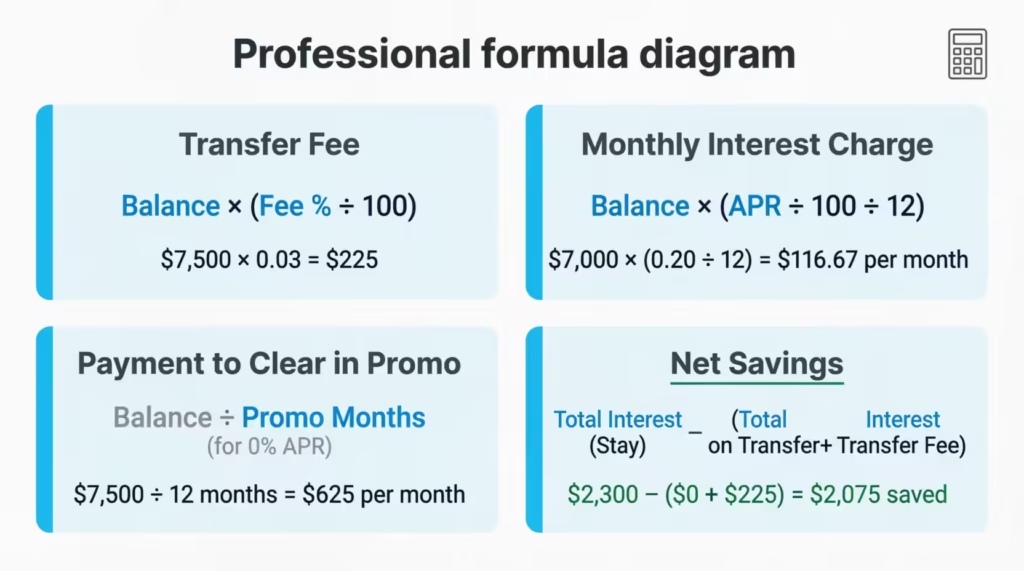
Transfer Fee = Balance × (Fee% ÷ 100)
If you transfer $7,500 at a 3% fee, your transfer fee is $225.
Starting Balance When You Add the Fee
If you choose to roll the transfer fee into the balance rather than pay it separately:
BT Starting Balance = Original Balance + Transfer Fee
So $7,500 + $225 = $7,725 becomes your new starting balance.
Monthly Interest Charge
Monthly Interest = Balance × (APR ÷ 100 ÷ 12)
For a $7,000 balance at 20% APR: Monthly Interest = $7,000 × (0.20 ÷ 12) = $116.67 per month in interest.
Payment to Clear the Balance in the Promo Period
The calculator uses the standard loan payment formula, also known as the PMT formula:
Monthly Payment = (Balance × Monthly Rate) ÷ (1 – (1 + Monthly Rate)^(-Promo Months))
For a 0% promo APR, this simplifies to:
Monthly Payment = Balance ÷ Promo Months
A $7,500 balance spread across 12 months = $625 per month.
Net Savings
Net Savings = Total Interest (Stay) – (Total Interest on Transfer + Transfer Fee)
Example:
- Staying on your current card costs $1,800 in total interest.
- Transferring costs $300 in interest plus $225 in fees.
- Net Savings = $1,800 – ($300 + $225) = $1,275 saved.
Break-Even Month
The break-even month is found by tracking cumulative interest month by month across both scenarios. This is the first month when the interest saved by transferring is more than the transfer fee. The calculator identifies and reports that exact month. If the transfer never covers the fee, the result shows “Never.”
How to Use This Calculator (Step by Step)
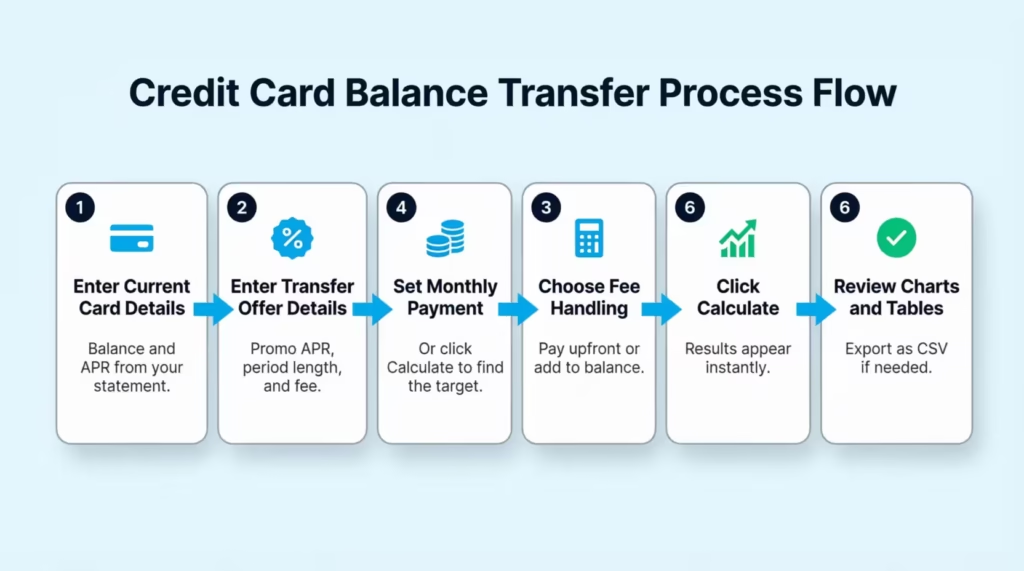
Step 1: Enter Your Current Card Details
Type in your current credit card balance. Then enter your current APR. You can find both on your monthly statement or by logging into your card issuer’s online portal. The smallest payment is set at 2%. This is the usual minimum for most major US credit card issuers.
Step 2: Enter the Balance Transfer Offer Details
Fill in the details below:
- Promotional APR:
- Promo Period Length (in months):
- Balance Transfer Fee Percentage:
- Post-Promo APR:
These figures are in the Schumer Box. This table shows fees and is required by federal law. It must be clear on every credit card application.
Step 3: Set Your Planned Monthly Payment
Enter how much you plan to pay each month after the transfer. Not sure what number to enter? Click the “Calculate payment to clear in promo” button first. This shows the monthly payment you need to pay off your balance before the promo ends.
Step 4: Choose How to Handle the Transfer Fee
You have two options. You can pay the transfer fee separately with your own funds, or you can add it to the transferred balance. Paying upfront lowers your starting balance. It also reduces the risk of leftover debt after the promo ends.
Step 5: Click Calculate
Your results appear in real time. You’ll see your net savings, how many months it takes to pay off the balance, your break-even month, and a clear green, yellow, or red verdict.
Step 6: Review the Charts and Payment Schedules
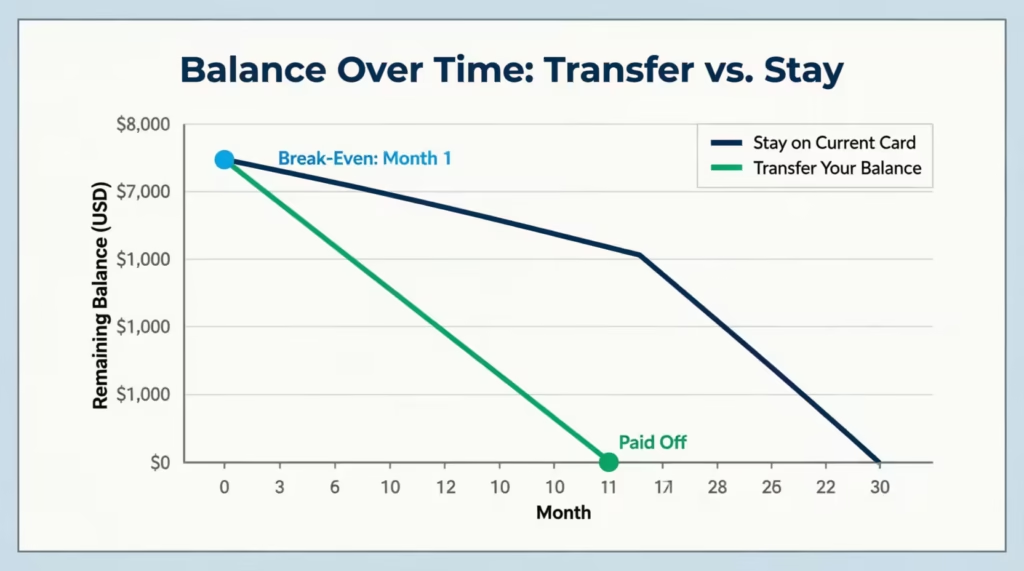
Toggle between the “Balance Over Time” chart and the “Interest Comparison” chart. Both give you a visual side-by-side look at how each scenario plays out. You can also open the full monthly amortization table for each scenario and export either one as a CSV file for your own records.
💡 Pro Tip: Always click “Calculate payment to clear in promo” before entering a custom payment amount. This single number tells you the minimum you must pay each month to avoid all interest. Paying even $10 less than this target per month can leave a remaining balance that starts accruing interest at the post-promo rate the day the promo ends.
How to Read Your Results
Net Savings
This is the most important number in the results. It shows the total cost difference between transferring and staying on your current card. A positive number means the transfer saves you money. A negative number means the transfer costs you more in the long run.
- Net savings above $100 = “Worth It” (green verdict)
- Net savings between $0 and $100 = “Marginal Benefit” (yellow verdict)
- Negative net savings = “Not Worth It” (red verdict)
Monthly to Clear
This is the payment amount needed to pay off your entire balance within the promo window. Think of it as your target number. If you can match or beat this amount every month, you pay zero interest on the transferred balance.
Months to Pay Off
This tells you how long it takes to clear the balance at the monthly payment you entered. If this number is bigger than your promo period, you’ll pay interest after the promo ends. This applies to any balance left when the time is up.
Break-Even Month
This tells you when the transfer starts putting money back in your pocket, after the transfer fee is recovered. If your break-even is Month 4, then starting in Month 5, every dollar you’re not paying in interest is pure savings. A shorter break-even month is always better.
The Payment Schedule Tables
These month-by-month tables show your starting balance, payment made, interest charged, principal applied, and remaining balance for each scenario. Blue-highlighted rows are months still within the promotional period. Both tables are exportable as CSV files, which makes it easy to track your progress in a spreadsheet.
Real-World Example
Let’s say Jessica, a 34-year-old teacher in Columbus, Ohio, has a $7,500 balance on a card charging 21% APR. She’s been paying the 2% minimum, which works out to about $150 per month. At that pace, her balance is barely moving and she’s paying hundreds each year in interest.
Jessica finds a balance transfer offer with 0% APR for 12 months and a 3% transfer fee. She enters her details into the calculator:
| Field | Value |
|---|---|
| Current Balance | $7,500 |
| Current APR | 21% |
| Minimum Payment % | 2% |
| Promo APR | 0% |
| Promo Period | 12 months |
| Balance Transfer Fee | 3% ($225) |
| Post-Promo APR | 21% |
| Monthly Payment | $700 |
| Fee Handling | Pay upfront |
What the calculator shows:
- Transfer Fee: $225
- Total Interest on Transfer (paid off within promo): $0
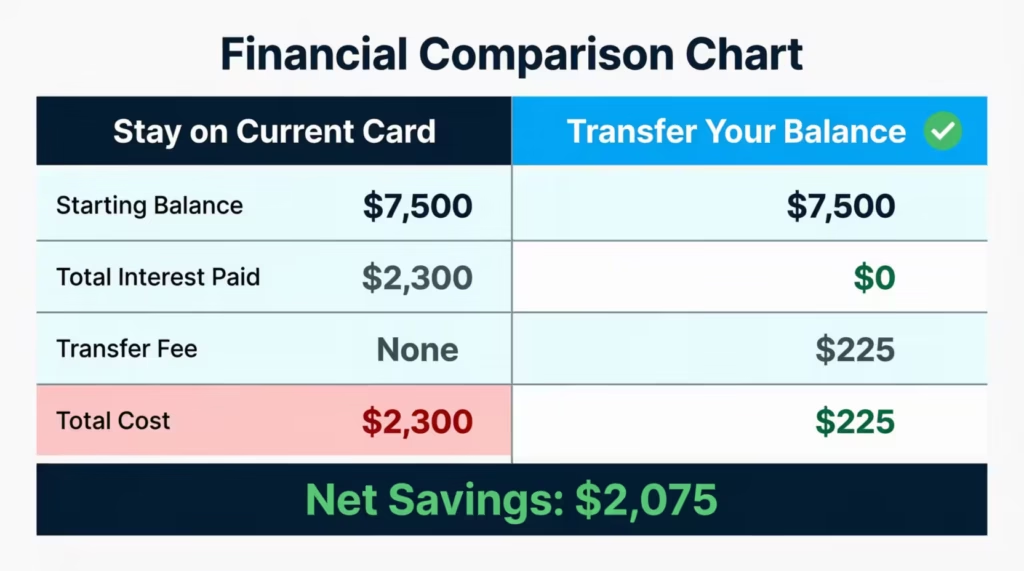
- Total Interest on Stay (least payments at 21% APR): approx. $2,300
- Net Savings: approx. $2,075
- Break-Even Month: Month 1
At $700 per month, Jessica clears the $7,500 balance in just under 11 months, well inside the 12-month promo window. She pays zero interest on the transferred balance and saves over $2,000 compared to staying on her current card and making least payments.
The calculator’s verdict: Worth It.
Expert Tips and Insights
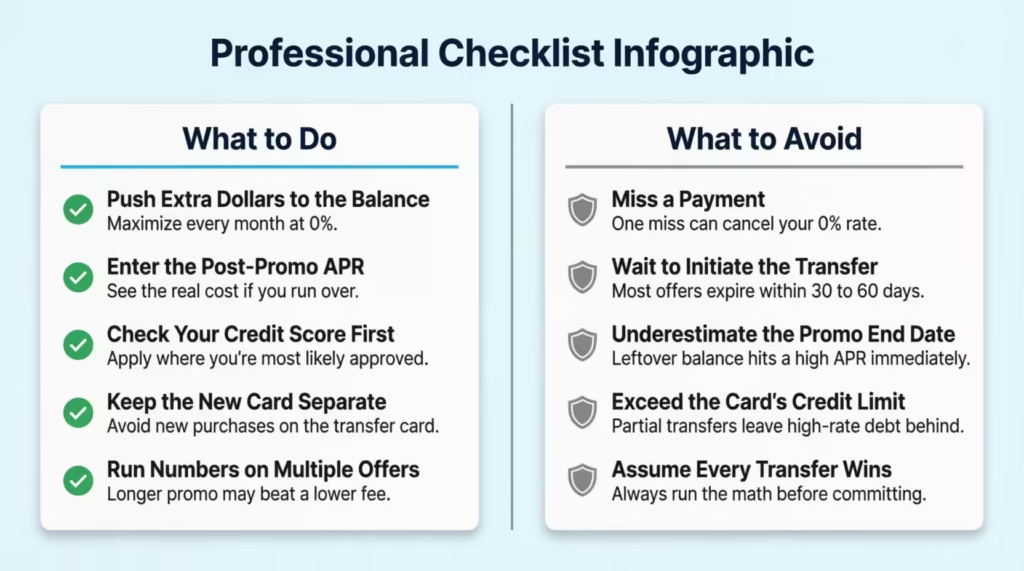
Push every extra dollar toward the balance during the promo window
The promotional period is your biggest opportunity to make real progress on your debt. Paying just the minimum now can leave a big balance. This balance will start accruing interest as soon as the promo ends. Try to pay as much as you realistically can each month while the rate is 0%.
Always enter the post-promo APR before deciding
Many balance transfer cards have post-promo APRs that match or exceed the rate on the card you’re leaving. If you don’t clear the balance in time, your savings can evaporate quickly. Running the numbers with the post-promo APR included gives you the real picture.
Check your credit score before you apply
Most balance transfer cards with long 0% intro periods require good credit. Cards offering 21-month promo windows often prefer scores closer to 750 or higher. Checking your credit score first helps you apply for cards where you’re most likely to get approved at the best terms.
Keep the new card separate from everyday spending
New purchases on a balance transfer card often don’t carry the 0% rate. They may start accruing interest at the standard purchase APR right away. Keep the card dedicated to paying off the transferred balance only, and use a separate card for daily spending.
Run the numbers on multiple offers before choosing one
A card with a 5% transfer fee and a 21-month promo might save you more. This is true compared to a card with a 3% fee and just a 12-month promo. It all depends on your balance and your monthly payments. Use the calculator with each offer individually before making a final decision.
💡 Pro Tip: If you don’t qualify for a balance transfer card, try calling your current card issuer and asking for a lower interest rate. Some issuers might lower your APR by 2% to 5%. This often happens if you have a good payment history. Mentioning that you’re thinking of transferring your balance can help too.
Common Mistakes to Avoid
Missing a payment during the promo period
Many card issuers will cancel your 0% promotional APR after a single missed payment. A late payment can lead to a penalty APR of 29.99% or more immediately. This can erase months of savings in just one billing cycle. Set up autopay for at least the minimum payment to protect your promotional rate from day one.
Waiting too long to complete the transfer
Most balance transfer offers require you to finish the transfer within 30 to 60 days of opening the new account. Miss that window and you lose the promotional rate entirely. Start the transfer process as soon as your application is approved.
Underestimating what happens when the promo ends
Marcus, a 41-year-old marketing manager in Seattle, transferred $9,000 to a 0% card but only paid $300 per month. After 15 months, he still owed about $4,500. When the promo ended, his rate jumped to 24.99%. He ended up paying more interest than he originally saved. Running the numbers beforehand with his actual monthly payment would have shown him the risk clearly.
Transferring more than the new card’s credit limit allows
The card issuer may not approve the full transfer if the amount requested exceeds a set percentage of your assigned credit limit. This can leave a partial balance on your old card, still charging high interest. Always confirm your approved credit limit before initiating the transfer, and plan for a partial transfer if needed.
Assuming every balance transfer is automatically a win
Sometimes the numbers simply don’t work out. A very short promo period, a high transfer fee, or a balance you can’t realistically pay down in time can make a transfer more expensive than staying put. Always run the calculation before you commit.
⚠️ Mistake to Avoid: Don’t skip the break-even analysis before committing. If your break-even is Month 10 and your promo period is only 12 months long, you get just two months of real savings. In that case, a card with a lower fee or a longer promo period may be a smarter choice.
FAQs
What credit score do I need to qualify for a balance transfer card?
Most balance transfer cards with 0% intro APR periods need a good credit score of at least 670. Cards offering the longest promo periods, such as 21 months, often prefer scores of 750 or higher.
How long does a balance transfer take to process?
Most balance transfers are complete within 5 to 14 business days after your new card is approved. Keep making payments on your old card during this time to avoid late fees.
Can I transfer a balance between cards at the same bank?
No. Card issuers do not allow transfers between their own cards. For example, you cannot move a balance from one Chase card to another Chase card. The transfer must go to a card issued by a different financial institution.
Does a balance transfer hurt my credit score?
Opening a new card causes a temporary hard inquiry that may lower your score by a few points. Over time, your score can recover and even improve as you pay down the balance and lower your overall credit utilization ratio.
What happens if I still have a balance when the promo period ends?
The remaining balance starts accruing interest at the post-promo APR, which is often 20% or higher. This interest applies going forward only, not retroactively to the promo period.
Can I keep doing balance transfers to different cards to stay at 0%?
Technically, yes, but each new application creates a hard credit inquiry and opens a new account. Doing this repeatedly can lower your credit score and may signal financial instability to lenders. It is not a sustainable long-term strategy.
Is a 3% balance transfer fee worth paying?
In most cases, yes. A 3% fee on a $5,000 transfer costs $150. If your current card charges 21% APR, you could easily pay over $1,000 in interest over 12 months by staying put. The fee is a small fraction of what you would pay in interest in other situations.
Does the 0% promo APR apply to new purchases, too?
Not always. Many balance transfer cards apply the 0% rate only to the transferred balance, not to new purchases. New spending may start accruing interest at the standard purchase APR right away. Always read the card’s terms before using it for everyday spending.
Bottom Line
Paying down high-interest debt is one of the smartest financial moves you can make. A well-timed balance transfer can cut your interest costs and speed up your payoff timeline significantly.
In this guide, we explained what a balance transfer is. We also showed how the calculator compares two real scenarios. You’ll understand what each result means and learn about mistakes that can turn a good idea into a costly one.
If I had to pick one recommendation, I’d say this: always use the “calculate payment to clear in promo” feature first. That single number tells you exactly what to pay each month to walk away interest-free.
If this guide helped you, please share it with a friend or family member dealing with credit card debt. It might be exactly what they need.