
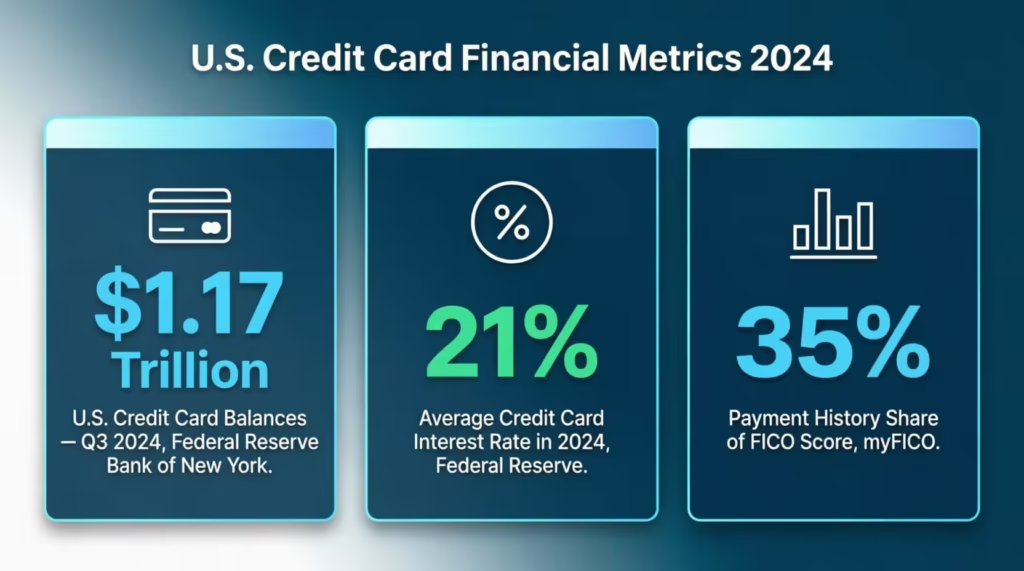
Managing credit card payments is harder than it looks. Miss one due date and you get hit with a late fee, a higher APR, and a lower credit score all at once. The Federal Reserve Bank of New York puts U.S. credit card balances at over $1.17 trillion as of Q3 2024.
Most people still track payments by memory or by opening their bank app only after the bill is already overdue. A reliable credit card payment template is the simplest fix. It gives you one organized place to log every charge, payment, and balance. This way, you won’t miss anything important.
The solution is a structured payment log that shows your full transaction history, running balance, and due dates in one place.
Keep reading. Below, you’ll find free templates in various formats. There’s also a clear, step-by-step guide for filling them out. Plus, you’ll get practical strategies to build a payment plan that keeps you ahead of every due date.
Download Your Free Credit Card Payment Templates
Four ready-to-use formats are available below. Each one includes all the sections you need to track payments, watch interest, and manage your billing cycle with confidence. Pick the format that fits how you work:
Disclaimer: The Templates & Printables on this site are provided for informational and personal tracking purposes only. This is not financial, legal, tax, or credit advice. While reasonable efforts are made to ensure accuracy, Credit Card Wind makes no warranties as to the completeness, reliability, or accuracy of the calculations generated by these Templates & Printables. Users are responsible for independently verifying all data and calculations. Terms, conditions, rates, regulations, and legal requirements vary by institution, jurisdiction, and individual circumstances.
Always refer to your official statements, account agreements, and applicable laws, and consult a qualified professional before making any financial, legal, or other important decisions. By using these Templates & Printables, you acknowledge that Credit Card Wind and its owner shall not be liable for any damages, losses, or financial consequences arising from the use or misuse of these Templates & Printables.
This universal disclaimer applies to all templates and printables provided by Credit Card Wind (https://creditcardwind.com), created by Robert Williams (Owner at Credit Card Wind).
© Credit Card Wind. All rights reserved.
These templates and printables may be downloaded and used for personal, non-commercial purposes only. Redistribution, resale, or modification for commercial use without permission is strictly prohibited.
What Is a Credit Card Payment Template?
A credit card payment template is a pre-built log or spreadsheet that helps you record every transaction, payment, and balance tied to your card accounts. Think of it as a personal record that you’re in charge of, not one hidden in your bank’s system.
Instead of hunting through email receipts or checking an app after the fact, a payment log gives you one clear source of truth. You can spot spending patterns. You know your real balance before the statement closes. And you always have a record to fall back on if a charge ever needs to be disputed.
The Federal Reserve Bank of New York’s Q3 2024 Household Debt and Credit Report confirms that credit card balances in the U.S. surpassed $1.17 trillion. That’s a massive amount of money moving through accounts that most people do not track from month to month.
A solid payment log covers more than just “paid” or “not paid.” It records the payment date, the amount paid, and how much went to interest. It also shows how much the principal and the remaining balance. Some versions also log the payment method and a confirmation number, which is useful if you ever need to dispute a charge with your issuer.
💡Tip: Want to know how many payments it’ll take to clear your balance? The credit card loan repayment calculator lays out the full timeline.
Why Tracking Credit Card Payments Matters More Than You Think
Most people assume their monthly bank statement covers everything. It doesn’t.
Your statement tells you what already happened. A payment tracking log shows you what to expect and whether your payments are lowering your balance or just paying the interest.
Late fees add up faster than expected. Even one missed payment can cost between $25 and $40. Pay late twice in six months and many issuers will raise your APR to a penalty rate that can exceed 29%.
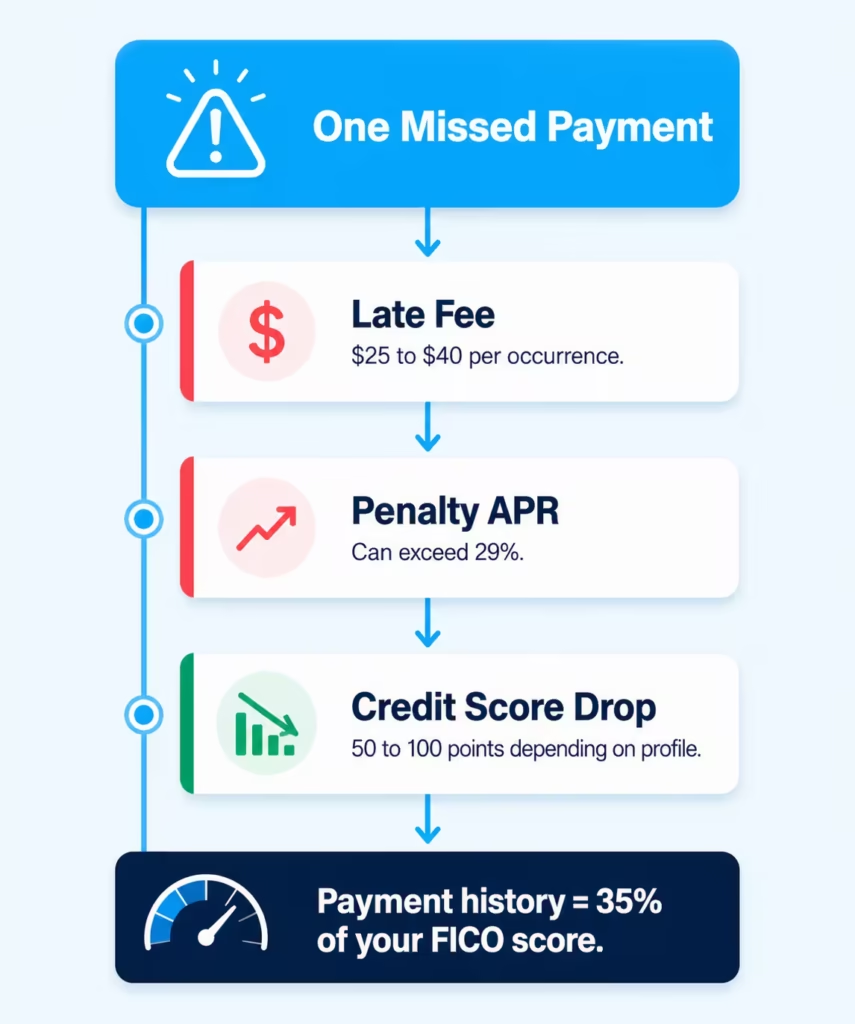
Interest compounds quietly. Federal Reserve consumer credit data shows the average credit card interest rate climbed above 21% in 2024. If you’re carrying a $3,000 balance and only tracking your minimum payment, you could pay $600 or more in interest over a year without noticing.
Payment history drives your credit score. According to myFICO, payment history makes up 35% of your FICO score — the single largest factor. One late payment can drop your score by 50 to 100 points, depending on your credit profile.
Using a bill payment tracking template isn’t just a record-keeping habit. It’s a financial defense strategy that protects your wallet and your score at the same time.
📌 Did You Know: Carrying a balance month to month doesn’t help your credit score. What matters most is your payment history. Paying on time, even if it’s just the minimum, helps your score more than any other way of managing your balance.
What’s Inside Each Template (And How to Use It)
Each format has a distinct layout designed for a specific use case. Walk through each one below to find the right fit.
Credit Card Payment Log (Printable PDF)
This is the most straightforward format. It’s designed for personal payment tracking on a single account, with room to log every transaction during a billing cycle.
Header section: Fill in your name, the last four digits of your card, your bank or issuer name, the interest rate (APR), and the statement period (start and end dates). Also, enter your billing due date and the smallest payment due. Completing this section first anchors every page to the correct account and period.
Transaction table: Each row captures one event. Here’s what goes in each column:
| Column | What to Enter |
|---|---|
| Date | The date the transaction posted to your account |
| Type | Purchase, Payment, Refund, or Fee |
| Description | Merchant name or payment reference |
| Method | How you paid: online, auto-pay, or phone |
| Paid | The dollar amount for that transaction |
| Interest | Interest charged for that period |
| Principal | Amount that actually reduced your balance |
| Balance | Running total after each entry |
| Notes | Disputes, partial payments, or anything worth flagging |
Footer section: At the bottom of each page, enter your total payments, total interest paid, and ending balance. Then check the payment status box: On Time, Late, or Missed. Use the page number field to stay organized across multiple billing cycles.
Credit Card Payment Tracker (Printable PDF)
This format is built for people managing more than one card. It adds two important columns that the Payment Log doesn’t include: Card Name and Conf/Ref #.
Header section: Enter your account holder name, credit card provider, account nickname, billing cycle, payment due date, and minimum due. The account nickname field is especially helpful when you have several cards from the same issuer.
Transaction table: The tracker uses a “Balance After” column instead of a plain “Balance” field. That small change makes it easier to see the impact of each payment right away. The “Conf/Ref #” column is worth taking seriously. Every online or phone payment comes with a confirmation number. Log it here. If a payment ever doesn’t post correctly, that number is what your issuer will need to trace it.
Footer: Tracks total paid, total interest paid, balance remaining, and your next payment date. No more guessing when the next bill is due.
Excel Template (Digital Spreadsheet)
The Excel version mirrors the PDF columns in a digital format. It’s the right choice if you want to calculate running totals automatically or sort transactions by date, type, or category.
Open the file, fill in the header fields at the top, and start logging entries row by row. A basic SUM formula in the Balance column will auto-calculate as you add entries. It works completely offline, so no internet connection is needed.
This payment tracker Excel template is a strong option for anyone who is comfortable with spreadsheets. It provides a free alternative to paid budgeting software for tracking payments effectively.
💡 Pro Tip: In Excel, freeze the top header row so it stays visible as you scroll down through a long list of transactions. Go to View > Freeze Panes > Freeze Top Row. It saves a lot of time when you’re reviewing entries at the end of the month.
Word Template (Editable Document)
The Word template has two distinct sections: a Transaction Log and a Printable Payment Receipt.
The transaction log columns are: Date, Card, Type, Category, Description, Amount, Balance, and Notes. The Category column sets this apart from the PDF formats. You can group your spending by type, like dining, travel, subscriptions, and office supplies. This helps you see where your money goes each month.
The payment receipt section at the bottom is worth keeping for physical records. It includes fields for the transaction date, reference number, merchant name, and total amount paid, plus a signature line. Print one whenever you want a paper record of a specific payment.
How to Fill Out Your Payment Log: Step by Step
Starting a new tracking log takes under five minutes. Follow these steps and you’ll have a fully working system from your very first entry.
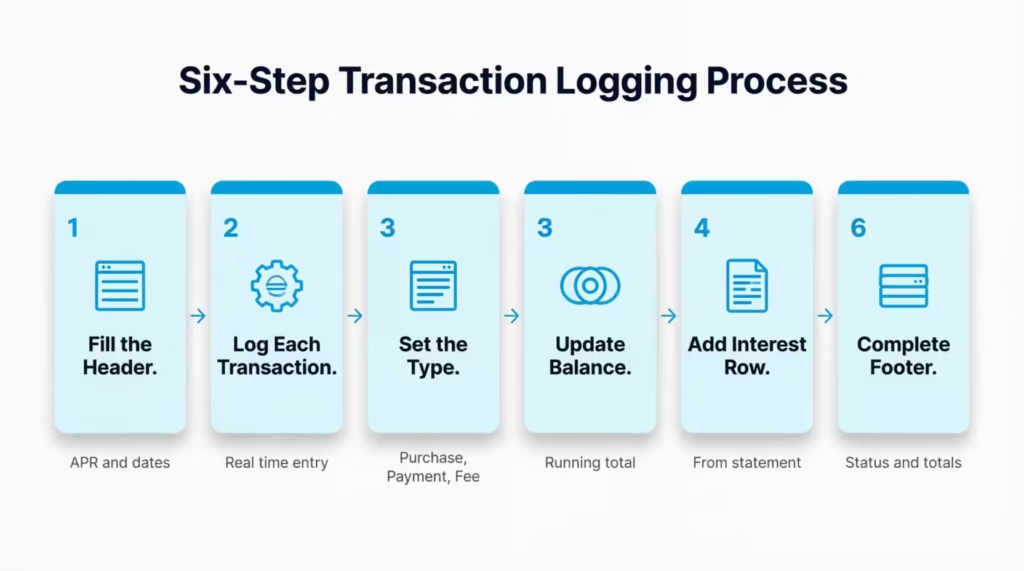
Step 1: Complete the header before adding transactions.
Write your name, the last four digits of your card, your bank name, APR, statement start and end dates, billing due date, and minimum payment due. Don’t skip this step. It ties every entry on the page to the right account.
Step 2: Log each transaction as it happens.
Don’t wait until the end of the month. Each time you make an acquisition or a payment, add a row. It only takes thirty seconds per entry, and real-time logging is much more accurate than trying to remember a whole month later.
Step 3: Use the Type column correctly.
Use only three options: Purchase, Payment, or Fee. “Purchase” for any spending, “Payment” for money you send to the card issuer, and “Fee” for late charges, annual fees, or foreign transaction fees.
Step 4: Update the Balance column after every row.
If your balance was $1,200 before a $300 payment, the new balance is $900. If you then make a $75 purchase, the balance becomes $975. Keep this column current so your running total is always accurate.
Step 5: Log interest charges as their own row.
When your statement arrives, find the interest charge and add it as a separate entry under “Type: Fee.” This is how you see exactly how much of your monthly payment goes toward interest versus reducing your actual balance.
Step 6: Complete the footer at the end of each billing cycle.
Add up total payments, total interest, and record the ending balance. Then check the appropriate status box: On Time, Late, or Missed. This running status history tells you at a glance whether your payment habits are improving over time.
⚠️ Mistake to Avoid: Don’t skip the Interest and Principal columns thinking they’re optional. Without them, you can’t tell whether your payments are reducing your debt or just covering finance charges. Many people pay $200 a month and think they’re making progress, but they often find out that most of it goes to interest.
How to Build a Credit Card Payment Plan With Your Template
A payment log is a true planning tool when you use it to look ahead, rather than just looking back.
Start with your current balance. Pull up your latest statement and enter the outstanding balance as the starting point in your tracker. That number is your baseline.
Set a realistic monthly payment target. The least payment keeps your account current, but it won’t shrink your balance quickly. Paying more than the minimum is the single most effective way to reduce credit card debt. Write your target payment in the Notes column at the top of each page so you stay accountable to it.
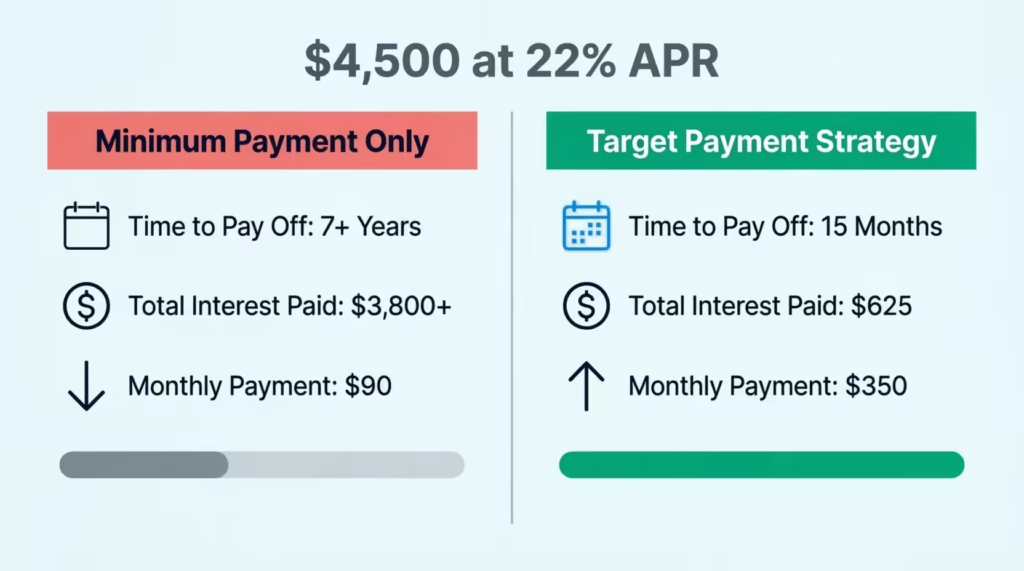
Here’s why that matters in practice. David, a freelance writer, carried a $4,500 balance at 22% APR. He set a monthly target of $350 using his payment tracker. In 15 months, his balance reached zero and he paid roughly $625 in total interest. Had he only paid the $90 minimum, clearing that same balance would have taken over seven years and cost more than $3,800 in interest.
Project your future balances using the tracker. Subtract your planned monthly payment from your current balance for each coming month. Then, write those projected amounts in the Balance column ahead of time. This provides a visual roadmap, giving you a target to aim for, rather than just numbers to track.
Treat the tracker as a living document. Income changes, unexpected expenses happen, new purchases get made. Update your plan when circumstances shift so it stays realistic and useful. A payment history log that reflects real life is far more valuable than a perfect one you stopped using in February.
Tip: → Curious how much interest piles up between payments? See it instantly with the daily credit card interest calculator.
Tracking Credit Card EMI Payments With Your Template
Many card issuers offer installment plans, known as credit card EMI. These plans let you break big purchases into fixed monthly payments. Your payment tracker handles these with one small adjustment.
In the Description column, label each installment clearly. For example: “EMI 4 of 12 – Laptop Purchase – $100.” Log the fixed monthly amount under “Paid,” any finance charge under “Interest,” and update the Principal column to show how much of the original purchase has been paid off.
This approach works especially well in the Excel and Google Sheets versions. You can enter a simple subtraction formula in the Balance column. This will ensure the remaining balance updates automatically after each installment payment is made. For a $1,200 purchase split into 12 payments, the tracker will show you exactly how much is left without any manual math.
If your EMI plan carries zero interest, enter $0 in the Interest column each month. This keeps your records clean and makes it easy to confirm the total paid at the end of the term.
Managing Multiple Cards With One Tracking System
Tracking one card is manageable. Three or four cards without a system is where payments get missed and fees start stacking.
The credit card payment tool handles this best. The “Card Name” column lets you log transactions from different accounts on the same page. For cleaner records, print one log per card and label each with the card nickname.
A few habits that make multi-card tracking easier:
Pick one tracking day each week. Jennifer, a small business owner with four credit cards, blocks 15 minutes every Sunday to log the week’s transactions across all accounts. In six months, she hasn’t missed a single payment.
Use the Account Nickname field. Instead of “Visa ending in 4521,” write something specific like “Travel Rewards” or “Business Expenses.” It’s faster to read when you’re scanning many cards at once.
Record due dates at the top of each card’s tracker. Even if you pay all cards on the same date each month, write the actual due date for each card. Billing cycles don’t always align, and a one-day gap can mean a late fee.
Note auto-pay status in the Method column. If a card is enrolled in auto-pay, write “Auto-Pay” in the Method field for that payment. This clears up any confusion about whether a payment has posted or is pending. It also protects you from making a double payment by accident.
Common Mistakes to Avoid When Tracking Payments
Even with a solid template in hand, certain habits can undermine the whole system. These are the ones that cost people the most:
Logging only payments, not purchases.
Your balance grows every time you swipe. If you only record payments, your running balance will always be off. Add purchases as they happen, not at the end of the month.
Treating interest as invisible.
Interest charges appear on your statement, but many people absorb them without logging them separately. Enter each interest charge as its own row. Over time, watching that number get smaller is one of the most motivating parts of the whole process.
Mixing up statement balance and current balance.
The statement balance is what you owed at the close of your last billing cycle. The current balance includes spending since then. Know which one you’re logging and stay consistent. Switching between the two mid-month creates errors that are hard to trace later.
Leaving the Status box empty.
The “On Time / Late / Missed” status at the bottom of each page is easy to skip. Don’t. That status history lets you see if your habits are getting better or worse. It’s helpful if you need to dispute a late fee with your issuer.
Starting strong but stopping after a month or two.
Michael, a graduate student, launched a payment tracker in January and abandoned it by March. By May, he had missed two payments and paid $70 in late fees. Consistency matters more than perfection here. An incomplete log is still better than no log at all. Even a quick five-minute weekly update is enough to help you stay on track.
Frequently Asked Questions
What is a credit card payment log used for?
A credit card payment log records each payment, transaction, fee, and interest charge tied to a card account. It tracks your running balance and gives you written confirmation that payments were processed on time.
Can I track multiple credit cards on one template?
Yes. The Credit Card Payment Tracker PDF includes a “Card Name” column that lets you log transactions from different accounts on the same page. You can also print one log per card and label each with the card nickname for cleaner organization.
What is the difference between a payment log and a payment tracker?
A payment log focuses on a single account and records individual transactions row by row. A payment tracker is more comprehensive. It usually includes many cards, confirmation numbers, and upcoming details like the next payment date.
What does the “Principal” column mean on the template?
Principal is the part of your payment that reduces your actual balance, not counting interest. If you pay $200 and $48 is interest, then $152 goes toward principal. Tracking this column shows whether your payments are making real progress or mostly covering finance charges.
Should I log the minimum payment or my actual payment?
Always log the actual amount you paid. The small payment due belongs in the header section as a reference point. The transaction table should provide a precise account of the events of each month.
How do I track credit card EMI payments on the template?
Use the Description column to label each installment clearly, for example, “EMI 3 of 12.” Log the fixed payment amount in the Paid column and any interest charge in the Interest column. This lets you see both the progress made and the total cost of the plan.
What should I do if I forget to log a transaction?
Cross-reference your bank or card statement and add the missing entry using the correct posting date. The template is date-ordered, so you can insert older entries without disrupting the rest of the log.
How often should I update my payment tracking spreadsheet?
Updating in real time is ideal, but a weekly 10-minute review works well for most people. Set a recurring weekly reminder, log new transactions, and check your running balance before moving on.
Can the Word or Excel template be used for business credit cards?
Yes. The Word template has a Category column. It’s great for business expenses like travel, marketing, or office supplies. The Excel version supports sorting and filtering by category, which makes it easier to prepare expense reports.
Do I need an internet connection to use these templates?
The PDF, Excel, and Word formats all work offline. Only the Google Sheets version requires an internet connection. This is why they list it as a secondary option for those who prefer cloud-based access.
Bottom Line
Staying on top of credit card payments doesn’t require complicated software or a finance degree. It requires consistency and a clear system. These free templates give you that system, whether you prefer printing a PDF, filling in a spreadsheet, or editing a document in Word.
For most people, the credit card payment tracker or the Excel payment tracking spreadsheet will deliver the best results. Both show your running balance, interest paid, and next due date. This info helps you stop reacting to bills and start planning ahead.
If you found this helpful, share it with someone who’s juggling various cards or working to pay down a balance. A simple tracking habit, started today, can save them real money over the next 12 months.