
Credit Card Loan Repayment Calculator
Estimate your payoff timeline, total interest, and create a repayment plan.
Your Repayment Plan
Based on your inputs, here's your estimated payoff.
Months to Payoff
Payoff Date
Total Interest Paid
Total Amount Paid
Balance Over Time
Amortization Schedule
| Month | Payment | Principal | Interest | Balance |
|---|---|---|---|---|
| Enter your loan details to see the schedule. | ||||
How to Use
- 1 Enter your credit card balance and APR.
- 2 Choose a monthly payment amount or target payoff time using the toggle.
- 3 (Optional) Add extra monthly payments to accelerate your payoff.
- 4 Review your results and download a PDF plan or share your scenario.
Carrying credit card debt feels like running on a treadmill. You pay every month, but the balance barely moves. Federal Reserve data shows the average U.S. credit card interest rate exceeded 20% in late 2024. That kind of rate can turn a manageable balance into years of payments. Using a credit card loan repayment calculator is the first real step toward taking back control.
The fastest path out of credit card debt is a clear, number-based repayment plan built before your next payment.
Keep reading. We’ll cover exactly how this tool works, the math behind it, step-by-step instructions, and expert tips to help you pay off your balance faster and smarter.
Tip: → Now that you know your repayment schedule, track each payment with the credit card payment template.
What Is a Credit Card Loan Repayment Calculator?
A credit card loan repayment calculator is a free online tool. It helps you figure out how long it will take to pay off your credit card balance. It also shows you how much interest you’ll pay along the way.
Think of it as your personal debt roadmap. Instead of guessing, you get exact numbers based on your real balance, your interest rate, and your payment amount.
This type of tool matters more than most people realize. Federal Reserve data confirms the average U.S. credit card interest rate exceeded 20% in late 2024. At that rate, a $5,000 balance with only minimum payments can cost thousands in extra interest and take years to clear.
This tool is especially useful because credit card interest works differently from a traditional loan. With a standard installment loan, you know the exact payoff date from day one. With a credit card, the balance, interest, and minimum payment all interact in a way that’s very hard to track mentally.
The tool on this page takes care of all that math for you. It models your repayment schedule month by month and shows you the complete picture.
How This Calculator Works
This credit card loan repayment tool has two distinct calculation modes. You can switch between them using the toggle inside the tool.
Mode 1: Fixed Monthly Payment
In this mode, you enter a set dollar amount you’ll pay each month. The calculator then figures out:
- How many months will it take to pay off your balance
- Your exact payoff date
- The total interest you’ll pay over time
- The total amount paid (principal + interest)
Mode 2: Target Payoff Time
In this mode, you enter a deadline. For example, you want to be debt-free in 24 months. The calculator then works backward to tell you exactly how much you’ll need to pay each month to hit that goal.
Both modes also support an optional extra monthly payment field. Adding even a small extra amount each month can cut months off your payoff timeline.
Other inputs include:
- Credit Card Balance: The current amount you owe
- APR (Annual Percentage Rate): Your card’s yearly interest rate
- Repayment Start Date: The month you plan to begin (this sets your payoff date)
After you enter your numbers, the calculator displays the results immediately.
- A summary panel with your months to pay off, payoff date, total interest, and total paid
- A line chart that shows your balance dropping over time
- A full amortization table with month-by-month payment details
- A PDF download option to save your repayment plan
The Formula Explained
You don’t need to be a math expert to use this tool. But understanding the core formulas helps you see why your results look the way they do.
Monthly Interest Rate Conversion
Credit card APRs are annual rates. The calculator converts them to a monthly rate first:
Monthly Rate = APR ÷ 12 ÷ 100
For example, a 21% APR becomes: 21 ÷ 12 ÷ 100 = 0.0175 per month (or 1.75%)
Fixed Payment Mode: Amortization Simulation
Each month, the calculator runs through these three steps in order:
- Interest for the month = Current Balance × Monthly Rate
- Principal paid = Monthly Payment – Interest for the Month
- New balance = Previous Balance – Principal Paid
This process repeats for every month until the balance reaches zero. That full breakdown is your amortization schedule.
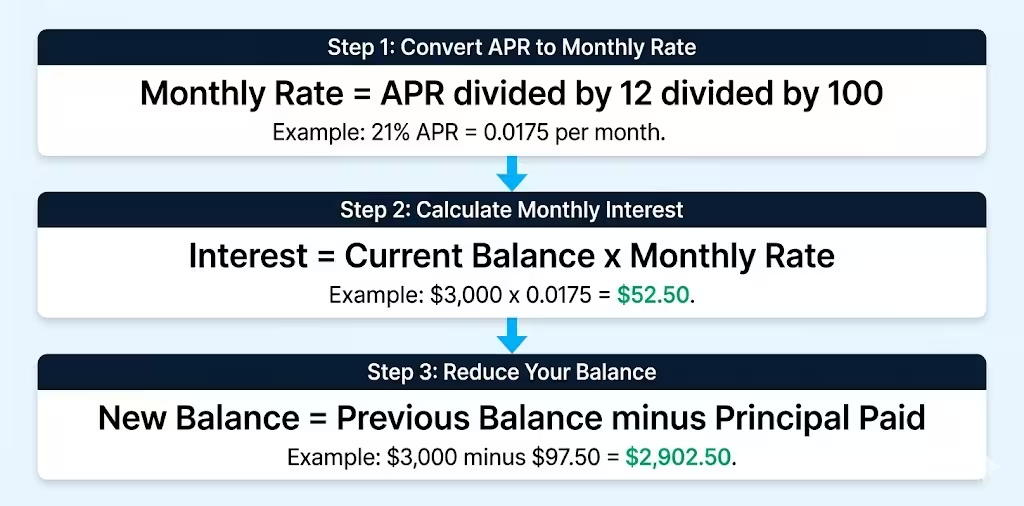
Here’s a simple example. Say you owe $3,000 at a 21% APR and you pay $150 a month:
- Month 1 interest: $3,000 × 0.0175 = $52.50
- Principal paid: $150 – $52.50 = $97.50
- New balance: $3,000 – $97.50 = $2,902.50
The calculator repeats this every single month until you’re at $0.
Target Payoff Time Mode: PMT Formula
When you set a target number of months, the calculator uses the standard PMT (payment) formula to find the required monthly payment:
P = [r × PV] ÷ [1 – (1 + r)^-n]
Where:
- P = Required monthly payment
- r = Monthly interest rate (APR ÷ 12 ÷ 100)
- PV = Present value (your current balance)
- n = Number of months to pay off
For a $3,000 balance at 21% APR paid off in 24 months:
r = 0.0175 P = (0.0175 × 3,000) ÷ [1 – (1.0175)^-24] P = 52.50 ÷ [1 – 0.6588] P = 52.50 ÷ 0.3412 P ≈ $153.88 per month
This is the same PMT formula used in Microsoft Excel and financial planning software.
📌 Did You Know: The Consumer Financial Protection Bureau (CFPB) requires credit card issuers to include a minimum payment warning on statements showing how long it will take to pay off your balance if you only make the smallest payments. Most people find what that number says shocking.
How to Use This Calculator (Step by Step)
Follow these steps to get your repayment results in under two minutes.
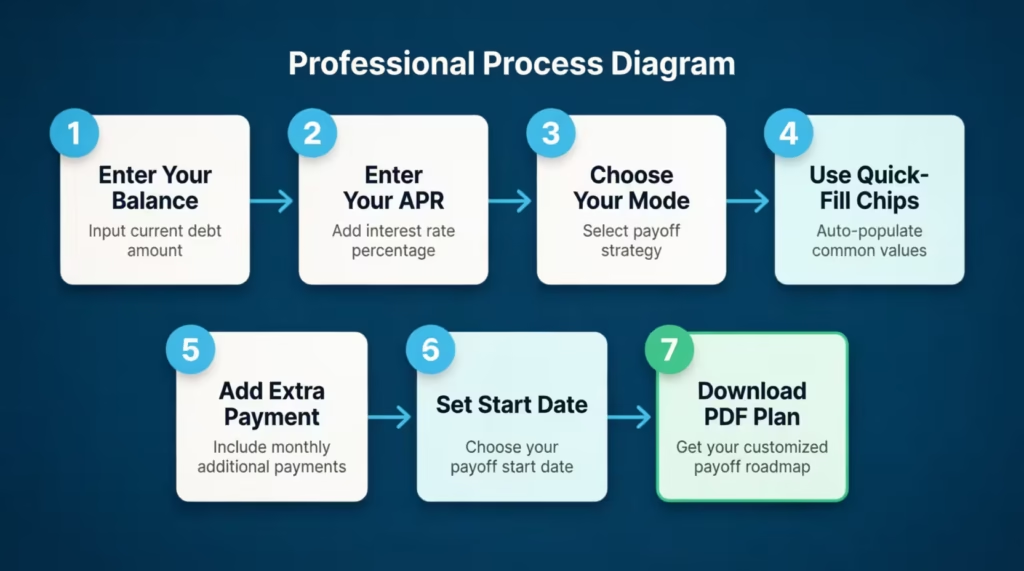
Step 1: Enter your credit card balance
Type in the amount you currently owe. You’ll find this number on your credit card statement or through your card issuer’s app. Use the full balance, not the minimum due.
Step 2: Enter your APR
Your APR is also listed on your monthly statement. It’s usually labeled as “Purchase APR” or “Variable APR.” If your card has a promotional 0% rate, you can enter 0 and still model your payoff timeline.
If the APR you enter is unusually high, the calculator will show a warning in yellow. Don’t ignore it.
Step 3: Choose your calculation mode
Use the toggle to pick your approach:
- Fixed Monthly Payment: Choose this if you already know how much you can pay each month.
- Target Payoff Time: Choose this if you have a deadline in mind, such as paying off your card before a vacation, a wedding, or a job change.
Step 4: Use the quick-fill chips (optional)
Below the input field, you’ll see shortcut buttons: Min (2%), $50, $100, 12 months, and 24 months. These chips allow you to test common scenarios efficiently without typing.
Tap “Min (2%)” to see what happens if you only pay the minimum. The result is often eye-opening.
Step 5: Add an extra monthly payment (optional)
If you can throw an extra $25, $50, or $100 at your balance each month, enter it here. Even a small extra amount can reduce your total interest significantly and shorten your payoff timeline.
Step 6: Set a repayment start date
Pick the month you plan to start. This allows the calculator to show you an exact payoff date rather than just some months.
Step 7: Review your results and download your plan
The results panel updates in real-time as you type. Once you’re happy with a scenario, click the “Download PDF” button to save your full repayment plan, including the amortization table.
💡 Pro Tip: Run the calculation twice. First with your minimum payment, then with a higher fixed amount. Seeing the difference in total interest side by side is one of the most motivating things you can do for your finances.
How to Read Your Results
Once you enter your details, four summary cards appear at the top of the results panel. Here’s what each one means:
Months to Payoff: This is the total number of monthly payments it will take to reach a zero balance. A lower number means you’re paying more aggressively and saving on interest.
Payoff Date: This converts your months to payoff into an actual calendar date. It’s a powerful motivator. Seeing a specific month and year makes the goal feel real and achievable.
Total Interest: This is the total amount you’ll pay in interest on top of your original balance. This number shows the true cost of carrying debt. A higher APR and longer payoff time will inflate this number quickly.
Total Paid: This is your original balance plus all the interest. It represents the full dollar cost of your debt. For example, if you owe $5,000 today and your total paid is $6,400, that extra $1,400 is what your debt actually costs you.
The Balance Chart: The line chart below the summary cards shows your balance dropping over time. A steep downward slope means your payments are eating into the principal fast. A shallow slope means most of your payment is going to interest, not the balance.
The Amortization Table: Below the chart, you’ll see a month-by-month breakdown. Each row shows:
- The month number
- Your total payment for that month
- How much went to principal
- How much went to interest
- Your remaining balance
In the first few months, you’ll notice that most of your payment goes to interest. As the balance shrinks, more of each payment goes to principal. This is how all amortizing debt works.
Real-World Example
Let’s walk through a realistic scenario.
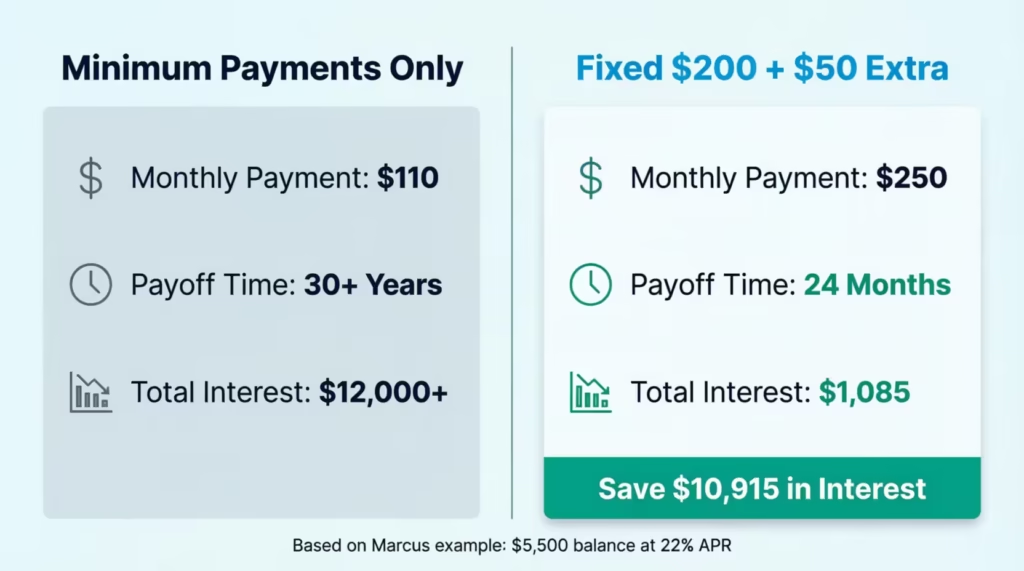
The situation: Marcus, a project manager at a mid-sized marketing firm in Chicago, has a $5,500 credit card balance at a 22% APR. His card issuer calculates his minimum payment at 2% of the balance, which starts at $110.
Scenario A: Minimum Payments Only
Marcus enters his balance, APR, and selects the “Min (2%)” chip. The results show it would take over 30 years to pay off the balance, and he’d pay more than $12,000 in total interest. More than double what he originally borrowed.
Scenario B: Fixed Monthly Payment of $200
Marcus switches to $200 per month. Now the results show:
- Payoff time: 32 months
- Total interest: $1,487
- Total paid: $6,987
Scenario C: $200 per month with a $50 extra payment
Marcus adds $50 to the extra payment field. The results shift:
- Payoff time: 24 months
- Total interest: $1,085
- Total paid: $6,585
By adding just $50 more per month, Marcus saves $402 in interest and pays off his debt 8 months earlier. He downloads the PDF and sets up his plan that same evening.
This is exactly why running many scenarios before committing to a payment strategy is so valuable.
Expert Tips and Insights
Here are some strategies to get the most out of your repayment plan.
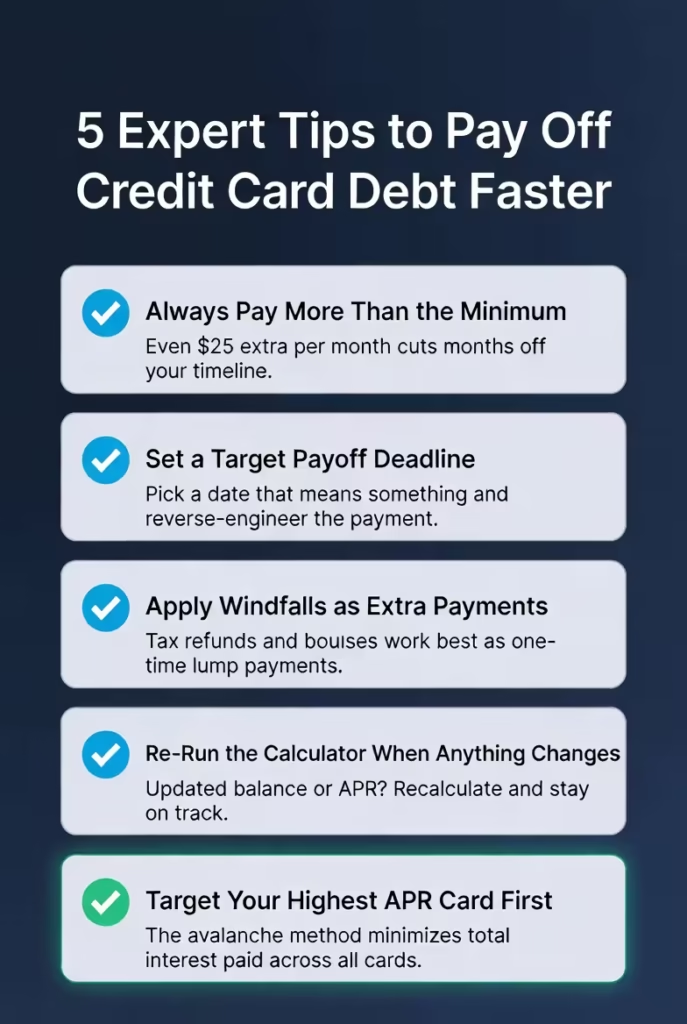
1. Always pay more than the minimum
Minimum payments are designed to keep balances alive longer. Experian data shows the average U.S. credit card balance reached $6,730 in Q3 2024. At a 21% APR, paying only the least on that balance would take decades and cost thousands in unnecessary interest.
2. Use the “Target Payoff Time” mode to set a deadline
Deadlines work. Pick a date that means something to you, like the end of the year, a birthday, or before a major life event. Then let the calculator tell you exactly what monthly payment gets you there.
3. Apply any windfalls as extra payments
Tax refunds, work bonuses, and birthday money are perfect for one-time extra payments. Even a single extra payment of $300 or $400 can meaningfully reduce your total interest and shorten your payoff timeline.
4. Re-run the calculation when your balance changes
Your results are only as accurate as your inputs. If your APR changes or you make a large extra payment, re-run the calculation with the new balance. Staying current keeps your plan on track.
5. Target the highest APR card first
If you have various credit cards, use this tool for each one separately. Then focus your extra payments on the card with the highest interest rate first. This is known as the avalanche method, and it minimizes the total interest paid across all cards.
💡 Pro Tip: The Federal Reserve Bank of New York reports that total U.S. credit card balances hit $1.28 trillion in Q4 2024. Most of that debt is sitting in accounts earning interest every single day. Every dollar you pay above the minimum is working directly against that clock.
Common Mistakes to Avoid
Knowing how to use the tool is important. Knowing what not to do is just as valuable.
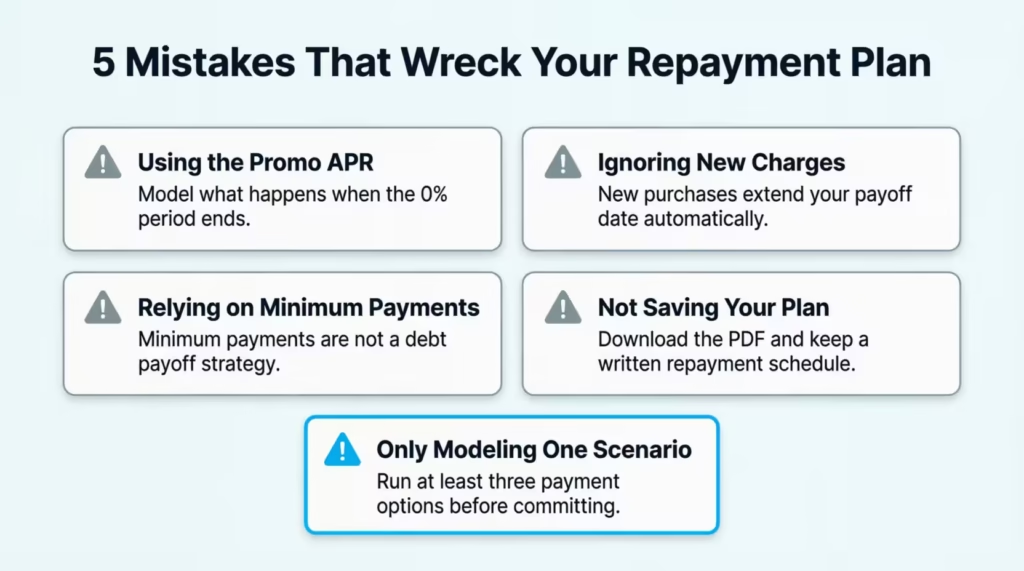
Mistake 1: Using your promotional APR instead of your standard APR
Many credit cards offer a 0% intro APR for 12 to 21 months. If you model your payoff plan using the 0% rate, your results will look much better than they really are. Once the intro period ends, your rate jumps, often to 24% or higher. Always model both scenarios: the promo rate ending on schedule and the full APR applying to any remaining balance.
⚠️ Mistake to Avoid: Never build a repayment plan around a promotional 0% APR without also modeling what happens when it expires. Many cardholders are caught off guard when their rate resets and their balance is still large.
Mistake 2: Forgetting about new charges
This calculator models a fixed starting balance with no new purchases. If you continue using the card while paying it down, your actual payoff date will be longer. For the most accurate results, consider pausing new purchases on the card while you execute your payoff plan.
Mistake 3: Using the minimum payment as a long-term strategy
A minimum payment keeps you in good standing with your card issuer. But it’s not a debt payoff strategy. As noted by the Consumer Financial Protection Bureau, even card issuers are legally required to show you how long the smallest payments take. It’s a built-in warning. Take it seriously.
Mistake 4: Not saving your plan
Once you’ve run a scenario you’re happy with, download the PDF. It gives you a full monthly schedule you can refer to. Print it, save it, or share it with a financial advisor. Having a written plan significantly increases the likelihood of sticking to it.
Mistake 5: Only modeling one scenario
Don’t settle for the first number you see. Try at least three scenarios: your minimum payment, a comfortable fixed payment, and a stretch payment with a firm deadline. Comparing these side by side gives you a realistic picture of your options.
Frequently Asked Questions (FAQs)
What is the lowest payment percentage used in this calculator?
The calculator uses 2% of the current balance as the minimum payment. This is a common standard used by many major U.S. credit card issuers, though your actual minimum may differ.
Can I use this tool for a 0% APR card?
Yes. Enter 0 in the APR field. The calculator divides your balance equally across your target months, without adding any interest. It shows you the exact monthly payment needed to clear the balance before the promotional period ends.
What happens if my monthly payment is too low to cover the interest?
The calculator will show an error message and tell you the minimum payment needed to cover the interest charge. Any payment at or below the monthly interest amount means your balance will never go down.
Does this calculator account for new purchases I make on the card?
No. This tool models a fixed starting balance with no new charges added. For best results, stop adding new purchases to the card while you follow the repayment plan.
What is an amortization schedule?
It is a month-by-month table showing each payment broken into principal and interest, plus your remaining balance after each payment. It lets you see exactly how your debt shrinks over time.
How accurate is the payoff date shown in the results?
The date is an estimate based on consistent monthly payments starting on the date you enter. If your actual payment dates vary or your APR changes, the real payoff date may shift slightly.
Can I use this calculator for personal loans or auto loans too?
The math behind it works for any fixed-rate installment loan. However, the tool is specifically designed with credit card debt in mind. For complex loan types with fees or variable rates, a dedicated loan calculator may give more precise results.
What does the balance chart show me?
The line chart plots your remaining balance at the end of each month. A steep downward curve means your payments are working hard. A flat or slow-declining line is a signal that most of your payment is going to interest rather than reducing the actual balance.
Is downloading the PDF free?
Yes, 100%. The PDF export is free. It creates a printable version of your repayment plan. This includes the summary results and your amortization schedule.
What is the difference between total interest and total paid?
Total interest is the extra amount charged by your card issuer on top of your original balance. Total paid is your original balance plus all the interest combined. Subtracting your original balance from the total paid gives you the exact cost of carrying that debt.
Bottom Line
We covered a lot of ground here. Understanding how credit card interest compounds monthly is key. You can also use the PMT formula. Additionally, modeling real scenarios helps with various payment amounts and timelines.
The key takeaway is simple: the sooner you build a concrete repayment plan, the less you pay in interest and the faster you reach financial freedom.
The Mode 2 (Target Payoff Time) is the best choice for most people. Setting a firm deadline and using the calculator to determine exact payments eliminates guesswork. It turns a vague goal into a specific number you can act on today.
If this guide helped you understand your debt better, please share it on social media with a friend or family member who is trying to reduce their credit card balances.