
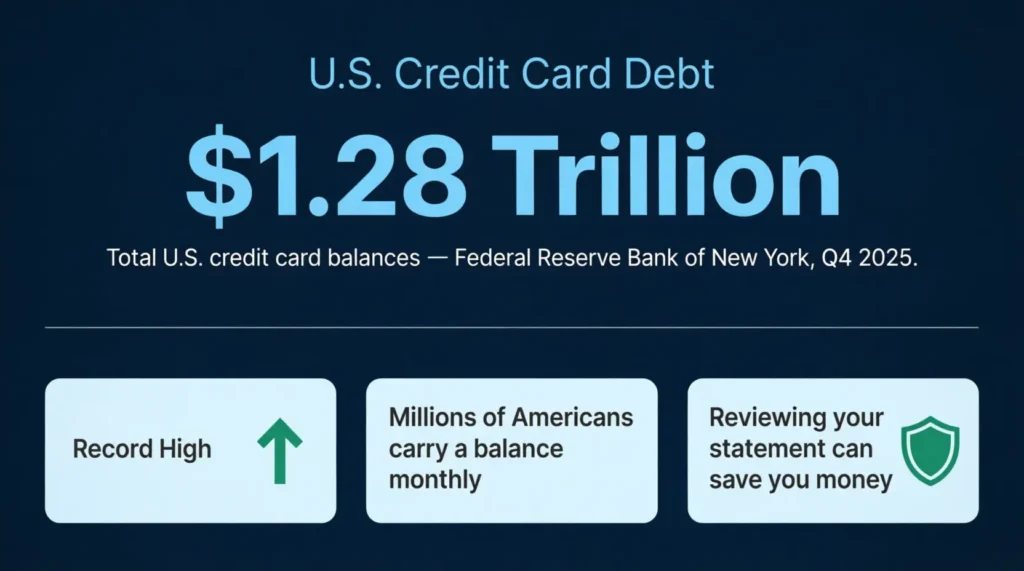
Keeping track of every charge, fee, and payment on your credit cards can feel like a never-ending chore. With Americans now holding a record $1.28 trillion in credit card debt, as reported by the Federal Reserve Bank of New York, staying organized with your monthly credit card statement is more important than ever.
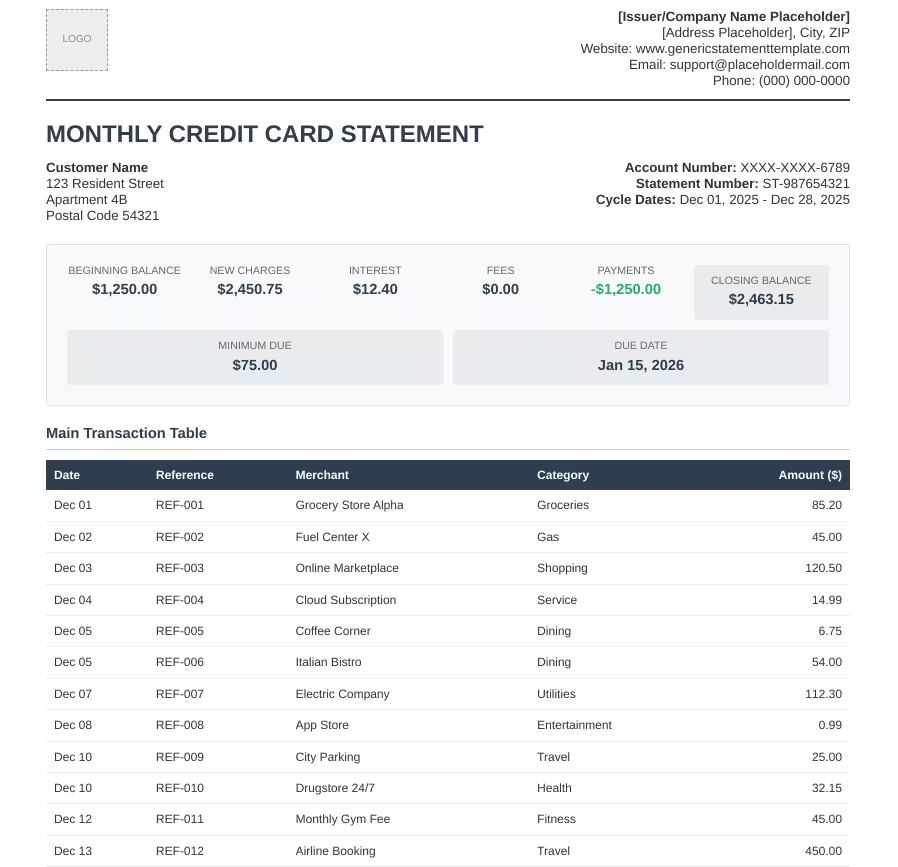
A ready-made template lets you record and review all your card activity in one clean document each month.
Below, you’ll find free downloadable templates in various formats, plus a complete guide on filling them out, avoiding mistakes, and keeping your finances in order.
Download Your Free Monthly Credit Card Statement Templates
3 ready-to-use templates are available to make your life easier. Each one contains all the sections you need: from account summary to transaction details, fees, and payment instructions.
Pick the format and paper size that works best for you:
Disclaimer: The Templates & Printables on this site are provided for informational and personal tracking purposes only. This is not financial, legal, tax, or credit advice. While reasonable efforts are made to ensure accuracy, Credit Card Wind makes no warranties as to the completeness, reliability, or accuracy of the calculations generated by these Templates & Printables. Users are responsible for independently verifying all data and calculations. Terms, conditions, rates, regulations, and legal requirements vary by institution, jurisdiction, and individual circumstances.
Always refer to your official statements, account agreements, and applicable laws, and consult a qualified professional before making any financial, legal, or other important decisions. By using these Templates & Printables, you acknowledge that Credit Card Wind and its owner shall not be liable for any damages, losses, or financial consequences arising from the use or misuse of these Templates & Printables.
This universal disclaimer applies to all templates and printables provided by Credit Card Wind (https://creditcardwind.com), created by Robert Williams (Owner at Credit Card Wind).
© Credit Card Wind. All rights reserved.
These templates and printables may be downloaded and used for personal, non-commercial purposes only. Redistribution, resale, or modification for commercial use without permission is strictly prohibited.
What Is a Monthly Credit Card Statement?
A monthly credit card statement is an official summary of everything that happened on your card account during a specific billing period. It shows every purchase, payment, fee, and interest charge from that month in one place.
Think of it as a snapshot of your card activity. It tells you what you spent, what you owe, when your payment is due, and how much interest you’re being charged. Most card issuers send statements once a month, right after your billing cycle closes.
The Federal Reserve Bank of New York’s Q4 2025 Household Debt and Credit Report puts total U.S. credit card balances at a record $1.28 trillion. That figure shows one thing: millions of Americans carry balances each month. Knowing what’s on your statement can save you money and protect your credit.
Your statement typically includes:
- The dates that cover the billing cycle
- Your opening and closing balance
- Every transaction made during that period
- Any fees charged, such as late fees or annual fees
- The interest rate (APR) applied and how much interest was charged
- Your credit limit and how much of it you’ve used
- The minimum payment due and the full payment due date
Reviewing your statement each month is one of the simplest financial habits you can build. It takes less than ten minutes, but it can catch errors, flag fraud, and help you stay within your budget.
Tip: → Want to verify this month’s interest charge? Run it through the daily credit card interest calculator.
Why You Need a Credit Card Statement Template
A printed bank statement is useful, but it doesn’t always give you a full picture. A dedicated billing summary template gives you control. You decide what gets tracked, how it’s organized, and how it compares across months.
1. Stay Organized
Without a system, charges can slip through the cracks. A structured monthly tracker puts everything in one place: transactions, fees, due dates, and balances. You don’t have to dig through emails or log into multiple portals to find what you need.
2. Track Your Budget
When you can see every charge listed out, you get a real picture of your spending. You’ll see patterns in your spending on dining, subscriptions, or shopping. These can be hard to spot if you just look at the total balance.
3. Catch Errors Fast
Billing errors happen more often than people realize. In 2024, cardholders disputed $9.8 billion in credit card charges, resulting in $5.9 billion in chargebacks, according to the CFPB’s Consumer Credit Card Market Report. A template helps you spot unauthorized charges or duplicate entries before they become bigger problems.
4. Prepare for Tax Time
Some credit card purchases can be tax-deductible. This is especially true for freelancers, self-employed people, and small business owners. Having a well-organized monthly record means you’re not scrambling to find receipts in April.
5. Build Better Money Habits
There’s something powerful about seeing your finances on paper. When you track your spending manually, even once a month, you become more aware of where your money goes. That awareness leads to better decisions.
6. Keep Records Safe
Online portals aren’t forever. Card issuers sometimes limit how far back your statement history goes. A saved, completed template gives you a personal archive you can access anytime, even years later.
What’s Inside the Structure?
The templates available for download include every section you’d find on a real card issuer’s statement. Each section serves a specific purpose.
Issuer and Statement Information
This section sits at the top of the statement. It includes the financial institution’s name, logo, contact details, and website. It also shows the statement period (the billing cycle dates) and the statement issue date (when the statement was generated). This is the starting point for understanding exactly which month the statement covers.
Customer Information
The customer section holds your name, billing address, account number, card type (Visa, Mastercard, etc.), and a unique statement reference ID. This information connects the statement to you. It’s important for record-keeping and can help if you need to reference it during a dispute.
Account Summary
This is the heart of the statement. The account summary gives you a quick view of your financial position at a glance:
- Previous Balance: What you owed at the end of last month
- Payments: How much you paid toward your balance
- Purchases: Total new charges during the billing period
- Fees: Any charges added, such as late fees or annual fees
- Interest: The interest charged on any carried balance
- New Balance: The total amount now owed
- Minimum Due: The smallest amount you must pay to avoid a late fee
- Due Date: The deadline for your payment
Transaction Details
This is your spending record. The transaction section lists every charge made during the billing cycle, including the date, merchant name, category, and amount. Reviewing this list line by line is the best way to catch errors, spot duplicate charges, or flag anything suspicious.
Fees and Interest Overview
This section breaks down exactly what fees were charged and why. It includes your APR , the monthly interest based on that rate, and any fees, like late fees for missed payments. Understanding this section can motivate you to pay your balance in full and avoid unnecessary costs.
Credit Limit Overview
The credit limit section shows four key numbers:
- Credit Limit: The maximum you’re allowed to charge
- Available Credit: How much borrowing room you have left
- Used Credit: How much of your limit is currently in use
- Usage Percentage: Your credit utilization rate for this card
Keeping an eye on your usage percentage is important for your credit health. Most financial experts recommend staying below 30% of your available limit.
Payment Instructions
This section tells you how to pay: whether online, by bank transfer, or in person at a branch. It also notes whether you’re enrolled in autopay. If you’re not already using autopay, this is a good reminder to consider it so you never miss a due date.
How to Use the Monthly Credit Card Statement Template
Getting started with the template is simple. Follow these steps each month and you’ll have a clear, accurate record of your card activity.
Step 1: Choose Your Format
Choose the version that suits you best:
- US Letter PDF for standard American printing
- A4 PDF for international-sized paper
- Word document to type directly into the template on your computer
All three contain the same sections and fields.
Step 2: Fill in Your Personal Details
Start by completing the Customer Information section. Enter your name, billing address, account number, and card type. If you’re using the template for personal records (not as an official issuer document), just fill in your own details as the cardholder.
Step 3: Enter Your Statement Dates
Fill in the statement period: the start and end dates of your billing cycle: and the statement issue date. Check your actual card statement or your online account portal to get the exact dates.
Step 4: Complete the Account Summary
Transfer the following numbers from your official card statement into the template:
- Previous balance
- Payments made during the period
- Total purchases
- Any fees charged
- Interest charged
- Your new balance
- Minimum payment due
- Payment due date
This gives you a clean, at-a-glance summary of your financial position for the month.
Step 5: List All Your Transactions
Go through your actual card statement and enter each transaction into the Transaction Details section. Include the date, description, merchant name, category (such as groceries, travel, or dining), and amount.
This step takes the most time, but it’s also the most valuable. Listing transactions manually forces you to look at each one, making it much easier to catch charges that don’t look right.
Step 6: Add Up Fees and Interest
Enter your APR and the monthly interest charge in the Fees and Interest Overview section. Add any late fees or other charges as separate line items. Seeing these numbers filled in is a powerful reminder of how much carrying a balance can cost you.
💡 Pro Tip: If you’re being charged interest, calculate how much of your monthly payment actually goes toward the principal versus interest. For example, on a $3,000 balance at 20% APR, roughly $50 of your first month’s interest alone goes to the lender: not toward reducing your debt. Seeing that number in writing often motivates faster payoff.
Step 7: Check Your Credit Limit Info
Fill in your credit limit, available credit, and used credit, and calculate your usage percentage. The formula is simple: divide your used credit by your credit limit, then multiply by 100.
For example: $1,200 used ÷ $4,000 limit = 30% utilization.
Aim to keep this number below 30% for the best impact on your credit score.
Step 8: Review Everything Twice
Before saving or printing your completed template, go back through each section. Check that the numbers match your official statement. Check for anything unusual: a charge you don’t recognize, an unexpected fee, or an interest rate that seems too high.
Step 9: Save and Store Your Statements
Once complete, save your filled-in template as a PDF with a clear file name, such as “CreditCard_Statement_March2026.” Store it in a clearly labeled folder on your computer or cloud storage. Most experts suggest keeping personal financial statements for at least 12 months. For tax-related purchases, keep them longer.
Step 10: Repeat Each Month
Set a recurring reminder: on the 1st or 2nd of each month works well: to fill in your template as soon as your billing cycle closes. The whole process takes about 15 to 20 minutes once you’re familiar with the format. Over time, you’ll build a complete year-round record of your card activity.
Tip: → Curious how your daily rate translates into the monthly interest figure? The DPR calculator shows the math.
Tips for Managing Your Credit Card Statements
Filling in your template is just the start. These practices will help you get the most out of reviewing your card activity every month.
Set a Reminder for Your Due Date
Late payments are one of the most damaging things you can do to your credit score. Set a phone alert or calendar reminder at least five days before your due date. That gives you enough time to arrange a payment even if something unexpected comes up.
Pay More Than the Minimum
The minimum payment keeps you out of trouble in the short term, but it costs you far more over time. If you only pay the minimum on a $2,500 balance at 20% APR, it could take several years to pay off and cost hundreds in interest. Pay as much as you can above the smallest amount each month.
Review Every Transaction
Don’t just check the total balance: go line by line. Even small unauthorized charges can add up, and catching them early makes disputes easier to resolve. Merchants sometimes make billing mistakes, and fraudulent charges are more common than most people expect.
Use Categories to Track Spending
The transaction section of the template includes a category column. Use it. Tagging each purchase as groceries, dining, travel, entertainment, or utilities lets you see exactly where your money goes. Many people are surprised when they see how much they spend in a single category over a full month.
Keep Statements for At Least a Year
A good rule of thumb is to keep your completed monthly records for at least 12 months. If any of your purchases are tax-deductible, keep those statements for at least three to seven years in case of an audit. The IRS recommends keeping records that support income or deductions for at least three years.
Check Your Credit Limit and Usage Regularly
Your credit utilization ratio, the percentage of your available credit that you’re using, is one of the most important factors in your credit score. Using your monthly tracker helps you decide when to pay down your balance or ask for a credit limit increase.
Watch for Interest Rate Changes
Card issuers can change your APR with 45 days’ notice under the Credit CARD Act of 2009. If your interest rate changes, it will appear on your statement. Track your APR each month in your template. You’ll see changes quickly. Then, you can choose to pay down your balance faster or contact your issuer.
Sign Up for Alerts
Most card issuers let you set up real-time text or email alerts for purchases, payment due dates, and balance thresholds. Turn them on. They don’t replace your monthly review, but they give you an early warning if something unusual happens between statements.
Common Mistakes to Avoid
Even people who are financially careful can fall into these traps. Knowing about them in advance is the first step to avoiding them.
Ignoring Small Charges
A $2.99 charge might seem harmless. But small charges are exactly where billing errors and unauthorized subscriptions hide. Over a full year, several overlooked small charges can add up to hundreds of dollars. Every transaction on your statement deserves a second look.
Forgetting About Recurring Charges
Streaming services, subscription boxes, and app memberships charge your card each month. These costs can be easy to overlook. Your monthly template is a great place to flag recurring charges so you can evaluate whether you still use and value each one.
Not Checking the Statement Issue Date
Your statement’s issue date matters. It marks the end of your billing cycle and triggers the start of your grace period. If you miss this date, you might also miss the start of the countdown to your due date. Always note the statement issue date when you fill in your template.
Paying Late
A late payment triggers a fee: often $30 or more, and it can hurt your credit score. If you miss a payment by 30 days or more, the issuer can report it to credit bureaus. This can stay on your credit report for up to seven years. Set that reminder before your due date every single month.
Maxing Out Your Card
Charging close to your credit limit might feel fine in the moment, but it spikes your utilization ratio. A high utilization ratio can significantly lower your credit score even if you’ve never missed a payment. Try to keep your balance well below your limit at all times.
⚠️ Mistake to Avoid: Don’t wait until your due date to check your balance. Your card issuer typically reports your balance to the credit bureaus around your statement closing date, not your due date. If your balance is high on closing day, your credit score can take a hit even if you pay the full balance right after.
Not Disputing Errors
Many people see a charge they don’t recognize and assume it was probably a legitimate acquisition they forgot about. Don’t assume: investigate. If, after checking your records, you still can’t identify a charge, contact the merchant or your card issuer. You can dispute billing errors under the Fair Credit Billing Act. Most issuers make this process easy.
How Credit Card Statements Affect Your Credit Score
Your monthly card statement plays a bigger role in your credit score than most people realize. Here’s how the data from your statement connects to the five factors that make up your FICO score.
Payment History
Payment history is the single most important factor in your credit score. Experian notes that it accounts for approximately 35% of your FICO Score. Every on-time payment you make is a positive mark. Every late or missed payment is a negative one. Your statement clearly indicates your due date, leaving no room for excuses for missing it.
Credit Utilization
Amounts owed: specifically, your credit utilization ratio makes up about 30% of your FICO score. Your statement tells you exactly how much of your credit limit you’ve used. Keep that number below 30% to protect your score. For the best results, aim for below 10%.
Length of Credit History
Keeping older credit card accounts open helps your credit history. This makes up about 15% of your FICO score. Your statement history builds a track record over time. The longer you’ve had an account in good standing, the better.
New Credit
Opening many new credit accounts within a brief timeframe can lead to a temporary decrease in your score. Each application triggers a hard inquiry, which accounts for a small part of your score, about 10%. Tracking your statements consistently helps you avoid overspending on newer cards and keeps your overall debt manageable.
Credit Mix
Lenders like to see that you can manage different types of credit responsibly. Credit cards count as revolving credit, and having a mix of credit types makes up about 10% of your FICO score. Keeping your credit card accounts in good standing helps you. Your monthly records play a key role in this.
📌 Did You Know: Your card issuer typically reports your balance to the credit bureaus around your statement closing date, not your payment due date. This means even if you pay your full balance before the due date, a high balance on the closing date can temporarily lower your credit score. Pay down your balance before the closing date, not just the due date. This helps keep your reported utilization low.
Understanding Your Statement Period vs. Due Date
These four terms appear on every credit card statement. Mixing them up is one of the most common sources of confusion for cardholders.
Statement Period
The statement period (also called the billing cycle) is the window of time covered by a single statement. It typically runs for about 28 to 31 days. Any purchases, payments, or fees that occur during this window appear on that month’s statement.
Statement Issue Date
The statement issue date is the day your statement is generated and sent to you. This is also the closing date of your billing cycle. Purchases made after this date will appear on your next statement, not the current one.
Due Date
The due date is the deadline for your payment. Under the Credit CARD Act of 2009, card issuers must send your statement at least 21 days before your payment is due. This gives you time to review your charges and arrange your payment without penalty.
Grace Period
The grace period is the stretch of time between your statement closing date and your payment due date. During this window, no new interest is charged on purchases, as long as you pay your full balance by the due date. As the Consumer Financial Protection Bureau explains, card companies must give you at least 21 days between sending your statement and the payment due date if they offer a grace period. If you carry a balance from month to month, you lose your grace period and interest starts accruing immediately on new purchases.
What to Do If You Spot an Error on Your Statement
Errors on credit card statements happen. The important thing is to act quickly. Under the Fair Credit Billing Act, you have 60 days from the statement date to dispute a billing error.
Step 1: Gather Your Records
Pull up your receipts, transaction confirmations, or emails that relate to the charge in question. Write down the date of the transaction, the merchant name, and the exact amount on your statement.
Step 2: Contact the Merchant First
If the error seems like a merchant mistake, like a duplicate charge or wrong amount, contact the merchant first. Then, call your card issuer if needed. Many billing errors are resolved quickly at this level, without needing to file a formal dispute.
Step 3: Call Your Card Issuer
If the merchant can’t fix the problem or if the charge seems fake, call the customer service number on the back of your card. Report the error and ask them to open a dispute. Most issuers will issue a provisional credit while they investigate.
Step 4: Follow Up in Writing
After calling, send a written notice to your card issuer’s billing inquiries address. Keep a copy for your records. Include your name, account number, the date and amount of the disputed charge, and a brief explanation of why you’re disputing it. Written disputes create a paper trail and strengthen your legal protections under the Fair Credit Billing Act.
Step 5: Wait for the Investigation
Card issuers must acknowledge your dispute within 30 days. They need to resolve it within two billing cycles, which is no more than 90 days. You don’t have to pay the disputed amount during the investigation. Also, the issuer can’t charge interest or penalties on that part of your balance.
Step 6: Keep Records
Keep a folder, physical or digital, with copies of every communication related to your dispute. Note the date and time of any calls and the name of the representative you spoke with. This documentation protects you if the dispute is not resolved in your favor and you need to escalate.
How to Organize Multiple Credit Card Statements
Managing more than one card? Your organization’s system matters even more. Here’s how to stay on top of many accounts without letting anything slip through the cracks.
Create a Master Folder
Set up a dedicated folder on your computer, in the cloud, or in a physical filing system, just for credit card statements. Label it clearly and keep all your downloaded or completed statement templates inside. This makes it easy to find any record quickly when you need it.
Use Consistent File Names
Name each file using the same format every time. A clear naming convention like “CardName_Statement_YYYY-MM” makes it easy to sort, search, and retrieve files. For example: Chase_Statement_2026-03.pdf or Amex_Statement_2026-03.pdf.
Track All Cards in One Spreadsheet
Besides individual monthly templates, consider maintaining a simple master spreadsheet.
- List each card in one column.
- Track the due date.
- Note the minimum payment.
- Record the full balance.
- Calculate the utilization percentage for each card.
This gives you a single view of your full credit picture at any given time.
Set Reminders for Each Due Date
Different cards have different due dates. Note each one in your phone calendar or a task manager app. Set a reminder at least five days in advance. Missing just one due date, even by a single day, can trigger a late fee and potentially impact your credit score.
Pay Them All in One Session
If possible, schedule all your credit card payments on the same day each month. Pick a date that falls a few days before your earliest due date. This reduces the mental load of tracking multiple deadlines and makes your monthly payment routine more efficient.
💡 Pro Tip: If you manage three or more cards, consider color-coding each one in your master folder and spreadsheet. Assign each card a color: blue for your travel card, green for your cash-back card, red for your store card. Color-coding takes two minutes to set up and makes it much easier to scan your records at a glance.
Frequently Asked Questions
How often does a credit card statement get issued?
Credit card statements are issued once per billing cycle, which is typically every 28 to 31 days. Most issuers send your statement within a day or two of your billing cycle closing date.
What is the difference between a statement balance and a current balance?
Your statement balance is the total amount owed as of your last billing cycle’s closing date. Your current balance reflects real-time activity, including charges made after that closing date. Paying your statement balance in full each month avoids interest charges.
How long should you keep your credit card statements?
Most financial experts recommend keeping credit card statements for at least 12 months. If any purchases are tax-deductible, keep those records for three to seven years in case of a tax audit.
Can you dispute a charge that has already been posted to your statement?
Yes. Under the Fair Credit Billing Act, you have 60 days from the statement date to formally dispute a billing error. Contact your card issuer as soon as possible after identifying the charge.
What happens to your grace period if you carry a balance?
If you carry a balance from one month to the next, you lose your grace period. Interest starts accruing on new purchases from the transaction date, not from the due date. Paying your full statement balance each month is the only way to keep your grace period active.
Does your credit card statement date affect your credit score?
Yes. Your card issuer typically reports your balance to the credit bureaus around your statement closing date. If your balance is high, then your utilization ratio will also be high. This can lower your credit score, even if you pay it off right after.
What is the smallest payment on a credit card statement?
The minimum payment is the least amount you need to pay by the due date. This keeps your account in good standing and helps you avoid a late fee. It’s typically a small percentage of your balance or a flat dollar amount, whichever is greater. Paying only the minimum results in ongoing interest charges on the remaining balance.
Can you get a credit card statement if you made no purchases that month?
Most card issuers send a monthly statement, even if you made no purchases. This happens as long as your account has an open balance or activity like fees or interest charges. If your account had no activity and a zero balance, some issuers may skip the statement for that cycle.
Bottom Line
You can keep track of your credit card activity without complicating things. A well-organized monthly billing tracker helps you catch errors, monitor your spending, and protect your credit score: all in one place.
The templates available on this page give you a ready-made format to get started immediately. Whether you prefer filling in a PDF on paper or editing a Word document on your computer, there’s a version here that fits your routine.
The best way to handle this is simple. First, download your favorite template. Next, fill it in on the same day each month. Finally, keep it with your old records for easy access. That single habit, repeated consistently, builds financial clarity over time.
If this guide helped you get your credit card records under control, share it with someone who might need it too. Whether it’s a friend juggling several cards, a family member who’s new to credit, or a colleague trying to get their budget in order, a clear monthly system can make a real difference.