
Most people check their credit score once in a while, but never actually track it over time. Experian’s 2023 State of Credit report found the average American FICO score sits at 715. But knowing a single number isn’t enough. A credit score tracker template gives you the system to see what’s moving your number and why.
The fastest path to a better score is straightforward: measure it regularly, record the reason behind every change, and compare your results month to month.
Here are free templates in five formats. You’ll also get a full guide for each field and tips on habits that boost your score. Let’s get started.
Download Your Free Credit Score Tracker Templates
Five ready-to-use formats are available to fit your workflow and paper size. Each one includes all the fields you need to start tracking right away.
Pick the format that works best for you:
Disclaimer: The Templates & Printables on this site are provided for informational and personal tracking purposes only. This is not financial, legal, tax, or credit advice. While reasonable efforts are made to ensure accuracy, Credit Card Wind makes no warranties as to the completeness, reliability, or accuracy of the calculations generated by these Templates & Printables. Users are responsible for independently verifying all data and calculations. Terms, conditions, rates, regulations, and legal requirements vary by institution, jurisdiction, and individual circumstances.
Always refer to your official statements, account agreements, and applicable laws, and consult a qualified professional before making any financial, legal, or other important decisions. By using these Templates & Printables, you acknowledge that Credit Card Wind and its owner shall not be liable for any damages, losses, or financial consequences arising from the use or misuse of these Templates & Printables.
This universal disclaimer applies to all templates and printables provided by Credit Card Wind (https://creditcardwind.com), created by Robert Williams (Owner at Credit Card Wind).
© Credit Card Wind. All rights reserved.
These templates and printables may be downloaded and used for personal, non-commercial purposes only. Redistribution, resale, or modification for commercial use without permission is strictly prohibited.
What Is a Credit Score Tracker Template?
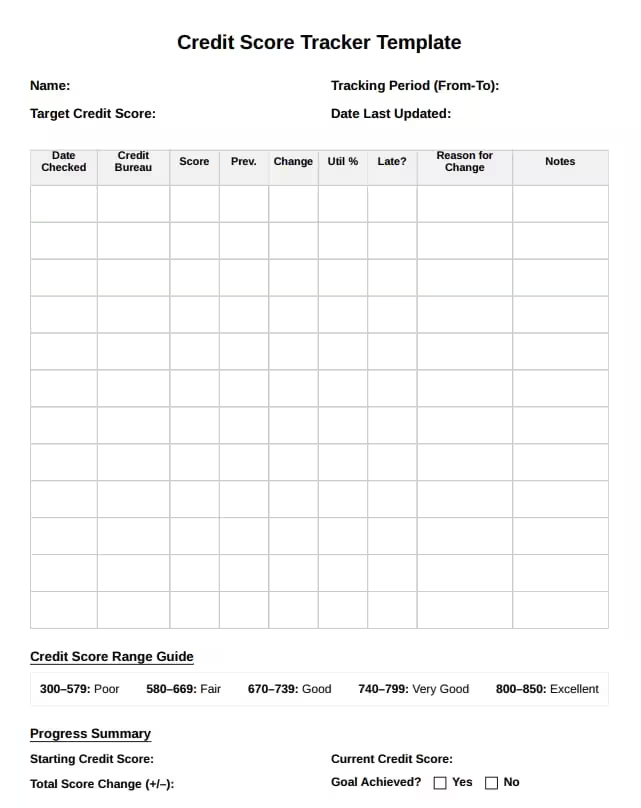
A credit score tracker template is a structured log you fill in every time you check your credit score. It records your score, which bureau reported it, your credit utilization, any late payments, and short notes on what changed.
Think of it like a health log for your finances. Instead of stepping on a scale once a year and wondering what happened, you track every data point consistently. Over time, you start to see real patterns.
That context matters more than most people realize. Experian’s 2023 State of Credit report puts the average American FICO score at 715. That’s a useful benchmark. But “average” isn’t the goal for most people. A credit monitoring log helps you push past that benchmark with clear, documented proof of every step forward.
Who benefits most from one?
- Anyone who has recently applied for a loan, mortgage, or credit card
- People recovering from a late payment or a high debt balance
- Anyone working toward a specific score goal, like 750 or 800
- First-time credit builders who want to see their progress clearly
📌 Did You Know: Your score can vary between Experian, Equifax, and TransUnion. This is completely normal. Not all creditors report to all three bureaus at the same time. Tracking all three gives you the most complete picture of your credit health.
Why Tracking Your Credit Score Actually Matters
Most people only pull their score when they’re about to apply for something big. By that point, they’ve already missed weeks of useful data.
Consistent monitoring does three things at once. It helps you catch problems early. It shows you which actions are actually working. And it keeps you accountable to your own credit goals.
Take Marcus, a 29-year-old software developer from Austin. He watched his score jump 47 points over four months after starting a monthly log. The key wasn’t doing anything dramatically different. He noticed his credit utilization spiked every February. So, he adjusted his payoff timing before the statement closed.
The Consumer Financial Protection Bureau also points out that errors on credit reports are more common than most people expect. Regularly checking scores helps you quickly notice any sudden drops. This way, you can dispute issues before they lead to bigger problems.
Tip: → Working toward a homebuying goal? See how your improving score affects what you can afford with the mortgage affordability calculator.
Understanding the Credit Score Range Guide
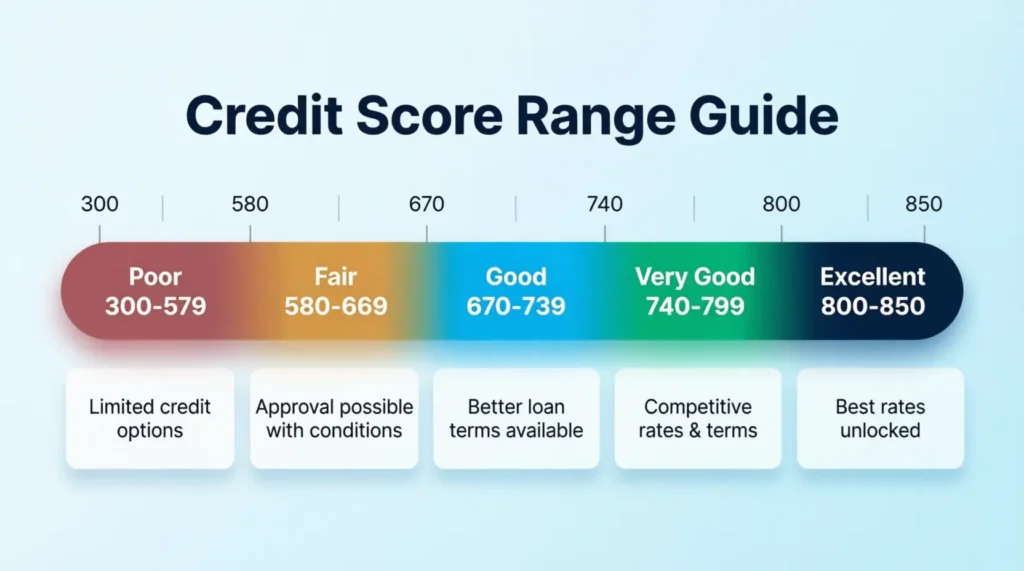
Every version of the tracker includes a Credit Score Range Guide. This guide helps you understand exactly where you stand today and how far you need to go to reach your goal.
| Score Range | Rating |
|---|---|
| 300–579 | Poor |
| 580–669 | Fair |
| 670–739 | Good |
| 740–799 | Very Good |
| 800–850 | Excellent |
This range is based on the standard FICO scoring model, which is the most widely used credit scoring system in the United States.
What do these ranges mean in practice?
A score in the “Poor” or “Fair” range often leads to higher interest rates or outright loan denials. Moving into the “Good” range (670+) opens up significantly better borrowing terms. Reaching “Very Good” (740+) typically unlocks the best rates from most lenders.
The Target Credit Score field at the top of the tracker is where you set your personal goal. The range guide keeps that target in context every time you log a new entry.
💡 Pro Tip: Set your target score 20 to 30 points above the minimum required for your financial goal. If a mortgage lender requires 620, aim for 650. That buffer protects you if your score dips slightly during the application window.
How to Use the Credit Score Tracker: Step by Step
Each template shares a core structure, but the Excel version adds automatic calculations and a Dashboard sheet. This walkthrough covers the shared sections first, then the Excel-specific features.
Step 1: Fill in Your Header Information
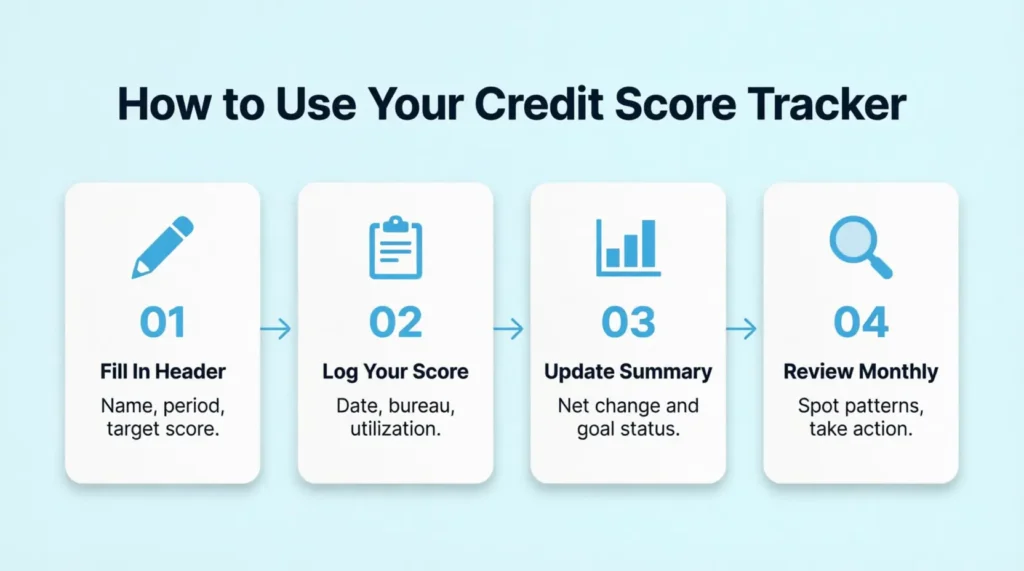
At the top of the tracker, write your name. Then, add the tracking period (like January 2025 to December 2025). Next, enter your target credit score and the date you last updated the file.
Step 2: Log Your First Score Entry
Add the following details each time you check your score:
- Date Checked – The exact date you pulled your score
- Credit Bureau – Which bureau reported it (Equifax, Experian, or TransUnion)
- Reported Score – The score number as shown
- Previous Score – Your score from the last log entry
- Change – The difference between the two numbers (positive or negative)
- Credit Limit / Balance – Your total available credit and current balance
- Utilization % – Divide your balance by your total credit limit (the Word template includes a helper hint for this: Balance ÷ Limit)
- On-Time Payments (Last 12 Months) – Number of on-time payments in the past year
- Inquiries – Any hard inquiries from new credit applications
- Derogatory Items – Collections, charge-offs, or negative marks
- Late? – Mark yes or no for any late payments in the period (PDF version)
- Reason for Change – A short note on what likely caused the score movement
- Notes / Action Items – Any context worth remembering for next time
Step 3: Update the Progress Summary
After a few entries, fill in the Summary section. Record your starting score, your current score, the net change, and whether you’ve reached your goal.
Step 4: Review Your Patterns Monthly
Every month, scan back through your entries. Notice which actions led to score increases. Pay attention to what caused drops. The patterns become obvious once you have two or three months of data.
⚠️ Mistake to Avoid: Don’t log your score and close the tracker. The “Reason for Change” and “Notes” columns are the most valuable fields in the entire template. Without them, you lose the insight that makes tracking worth the effort.
What the Excel Template Automatically Calculates
The Excel version is the most powerful of the five formats. It has two sheets: Score Log and Dashboard.
Score Log Sheet
This is where you enter your data. Once you enter your reported score, previous score, total credit limit, and current balance, the spreadsheet automatically calculates the results for you:
- Change in points (current minus previous score)
- Change percentage (how much the score moved relative to the prior entry)
- Credit utilization percentage (balance divided by total credit limit)
The Score Log also tracks new accounts opened, accounts closed, hard inquiries, soft inquiries, and derogatory items. These fields help you directly connect score movements to specific credit events.
Dashboard Sheet
The Dashboard pulls from your Score Log and displays key metrics with no manual math required:
- Latest score
- Highest score across all entries
- Lowest score across all entries
- Average score for the tracking period
- Latest utilization percentage
- Total hard inquiries logged
- Most recent score change (points gained or lost)
Just update the Score Log, and the Dashboard refreshes itself. This makes the Excel version especially useful for anyone tracking their score over six months or more.
How Often Should You Check Your Credit Score?
Most financial professionals recommend checking your credit score at least once a month. That frequency is enough to catch meaningful changes without overanalyzing small week-to-week fluctuations.
For most people, picking a consistent date works best. The first of the month is popular because it’s easy to remember. Others tie their check to their credit card statement date.
Under federal law, you’re entitled to a free credit report from each of the three bureaus every year through AnnualCreditReport.com. That’s your official report, which is different from your live score. Many banks, credit unions, and credit card issuers now provide free score monitoring. This perk makes it easy and free to track your score each month.
The Date Checked column in the tracker exists precisely for this habit. Once you build the routine of checking on the same date each month, logging your entry takes under two minutes.
Tip: → Tracking your score for a future car purchase? The car loan calculator by credit score shows the payoff.
What Causes Your Credit Score to Change?
This section connects directly to the “Reason for Change” column. To write useful notes, you need to understand what actually drives your score.
MyFICO’s credit score education resource breaks the FICO model into five weighted factors:
| Factor | Weight |
|---|---|
| Payment history | 35% |
| Amounts owed (utilization) | 30% |
| Length of credit history | 15% |
| Credit mix | 10% |
| New credit (hard inquiries) | 10% |
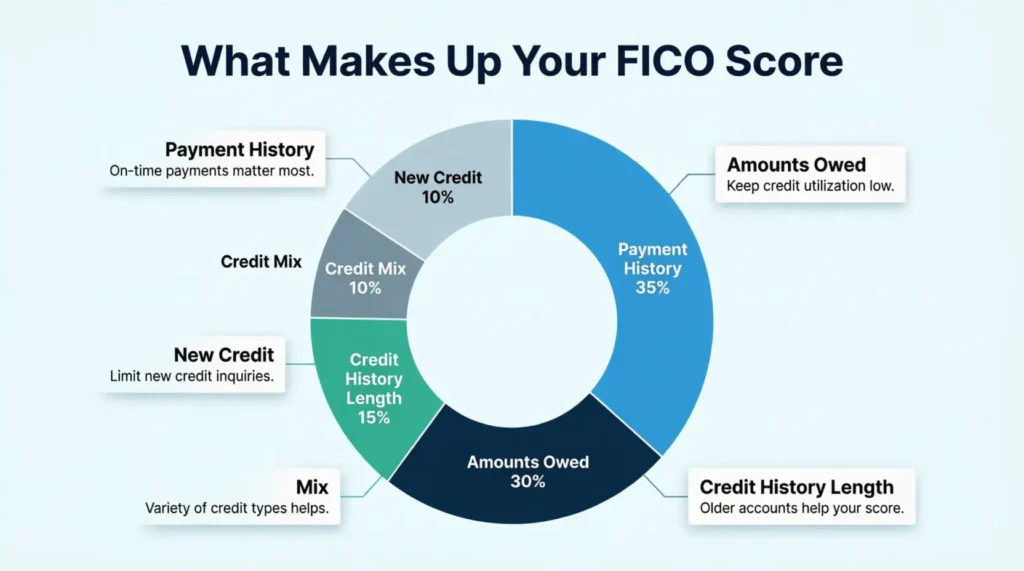
Payment history (35%): One missed payment can drop a score significantly. Consistent on-time payments are the single most powerful credit-building action available.
Amounts owed (30%): This primarily means your credit utilization rate. Keeping it below 30% is the widely cited benchmark. Staying below 10% is even more effective for scores above 750.
Length of credit history (15%): Closing old accounts can shorten your average account age and hurt this factor. Think carefully before canceling a card you’ve held for several years.
New credit (10%): Each hard inquiry from a new application can cause a small, temporary dip. Multiple applications in a short window compound that effect.
Credit mix (10%): A mix of revolving accounts (credit cards) and installment loans (auto, mortgage, personal) can help your score. That said, opening new accounts purely for variety rarely makes sense.
When you log a score change, reference this list. If your score dropped 9 points and you just applied for a new card, that’s your answer. Log “hard inquiry, new card application” in the Reason column. Three months later, that note will tell you exactly what happened and when the effect wore off.
How to Set a Realistic Target Credit Score
The Target Credit Score field at the top of the tracker is more than a motivational number. It’s a planning tool tied to a real financial outcome.
The right target depends on what you’re working toward:
- Renting an apartment: Most landlords look for 620 or higher
- Personal loan at a competitive rate: Aim for 670 or above
- Car loan at the best available rate: 720 or higher puts you in a strong position
- Conventional mortgage: Most lenders prefer 620+, but 740+ typically unlocks the best rates
- Premium travel or rewards credit cards: Generally require 700 to 750+
Set a goal tied to a specific financial milestone you’re planning for. Then work backward. If you need 720 for a car loan in eight months and you’re currently at 670, that’s 50 points over eight months. With consistent on-time payments and reduced utilization, that’s an achievable target.
Update your goal as you hit milestones. A score tracker without a destination is just a number log.
How Credit Scores Relate to Credit Cards
Credit ratings determine which credit cards a person can obtain. Cards with great rewards, travel perks, and 0% intro APR offers typically require a score of at least 670. Top-tier cards with large sign-up bonuses often require a score of 740 or higher.
Conversely, how credit cards are used affects the credit score in the following ways:
- Payment history — Paying the card bill on time every month builds a strong history. Missing payments destroys it.
- Credit utilization — Keeping card balances low improves the score. Maxing out cards lowers it.
- Credit age — Keeping old cards open lengthens credit history. Closing them shortens it.
- New credit — Applying for too many cards in a short time hurts the score. Spacing out applications helps.
By tracking a credit score, the connection between credit card habits and credit numbers becomes visible. This makes it easier to qualify for better cards in the future.
When to Check Your Credit Report vs. Your Credit Score
Credit reports and credit scores are not the same thing. This distinction confuses many consumers.
Credit Report: This is a detailed list of credit accounts, payment history, inquiries, and public records. It functions like a complete history of credit activity. One free report from each bureau per year is available at AnnualCreditReport.com. Checking the full report at least once per year to look for errors is recommended.
Credit Score: This is a single number based on the information in the credit report. It can be checked more frequently. Many services offer it for free. Checking monthly using a credit card app is common.
Both are important. The credit report shows what factors are affecting the score. The credit score shows how lenders view the borrower.
Additional context: Identity theft is another reason to stay alert. The FTC received over 1.1 million identity theft reports in 2024. Among these, credit card fraud was the most reported type of theft. Catching a fraudulent account on a credit report early can save months of stress and financial damage.
Common Mistakes People Make When Tracking Their Score
Even with a solid system in place, a few habits can quietly slow your progress.
Tracking inconsistently.
Skipping months creates gaps in your data. When your score moves later, you won’t know why. Set a recurring calendar reminder on the same date each month.
Only monitoring one bureau.
Experian, TransUnion, and Equifax can show different scores because creditors don’t always report to all three. If a lender pulls a bureau you haven’t been watching, the result may surprise you.
Ignoring the utilization column.
Many people focus on their score alone. But utilization is the second-largest scoring factor and changes every billing cycle. Logging it alongside your score adds context that a score number alone never provides.
Confusing soft and hard inquiries.
Checking your own score is a soft inquiry. It does not affect your credit. Only applications for new credit generate hard inquiries. Knowing the difference prevents unnecessary concern every time you check.
Using the tracker as a report card instead of a planning tool.
A lower score isn’t a judgment. It’s information. The most useful response to a drop is to identify the cause, log it, and decide the next action step.
Tips to Improve Your Score While You Track It
Tracking a credit score is useful, but improving it is even better. Below are the most effective actions that work consistently.
Pay Every Bill on Time
This is the single most important action to take. Set up automatic payments if necessary. Even one late payment can remain on a credit report for seven years.
Keep Utilization Low
Keeping utilization below 30% is a standard guideline. However, to significantly boost a score, aim for under 10%. This can be done by paying the balance down before the statement closes.
Pro tip: Most credit cards report the balance to the bureaus on the statement closing date. Paying most of the balance a few days before that date results in lower reported utilization, even if the card is used again later.
Do Not Close Old Accounts
Length of credit history matters. If an old card is not used much, keep it open. Use it once every few months to keep it active. Closing an old card can shorten the average account age and hurt the credit score.
Limit New Applications
Each hard inquiry can drop a credit score by a few points. If planning to apply for a mortgage or car loan soon, avoid opening new credit cards for at least six months before applying.
Fix Errors Fast
Check credit reports at least once per year.
The Consumer Financial Protection Bureau (CFPB) suggests checking reports for:
- Accounts that aren’t yours
- Late payments that were paid on time
- Old debts that should have disappeared
Disputes can be filed with each bureau online. It usually takes 30 days to get results.
Become an Authorized User
If a family member has excellent credit, ask to be added as an authorized user on one of their cards. Their good payment history can boost the authorized user’s score. Ensure that the primary cardholder pays on time and keeps low balances.
Mix Your Credit Types
Having different types of credit can help a credit score. This might include a credit card, a car loan, and a student loan. However, do not take on debt solely to diversify credit types. Only take on debt that can be handled comfortably.
Frequently Asked Questions
Does checking my own credit score lower it?
No. Viewing your own credit score is a soft inquiry and has no impact on your score at all. Only applications for new credit, which trigger hard inquiries, can cause a temporary dip.
Which credit bureau should I track?
Track all three when you can. Equifax, Experian, and TransUnion can show different scores because not all creditors report to every bureau. The tracker includes a Credit Bureau column so you can log each one separately.
How long does it take to see a credit score improvement?
Small gains from reducing credit utilization can show up within 30 to 60 days. It usually takes 3 to 6 months to see big improvements from fixing errors or building a steady payment history.
What is a good credit utilization rate to log in my tracker?
Keep your utilization below 30% for a positive score impact. If you’re actively trying to raise your score, staying below 10% tends to produce the strongest results.
Can I track all three bureau scores in one template?
Yes. Each entry in the tracking table includes a Credit Bureau column. Just log Equifax, Experian, and TransUnion as separate rows and note which bureau each entry belongs to.
How do I fill in the Reason for Change column?
Write the most likely cause of your score movement in a few words. Examples include “paid down balance,” “new hard inquiry,” “late payment posted,” or “credit limit increased.” This turns your log into a useful reference you can look back on months later.
What should I do if my credit score drops for no clear reason?
Get your full credit report at AnnualCreditReport.com. Look for errors, strange accounts, or new collections. An unexplained drop is often the first sign of a reporting error or unauthorized activity.
Is it safe to store my credit data in an Excel file?
The Excel template does not connect to any outside accounts or services. It’s a standalone file you fill in manually, so it’s as secure as any other document saved on your own device.
Should I track my VantageScore or my FICO score?
For loan and mortgage planning, it’s practical to track your FICO score. This is important because the vast majority of top lenders use FICO models when making credit decisions. Many credit card issuers provide a free FICO score as a standard cardholder benefit.
How many months of data do I need before I can see real patterns?
Most people start noticing meaningful patterns after 3 to 4 months of consistent logging. Six months of data provides a strong baseline. It helps you understand what specifically drives your score up or down.
Bottom Line
Building a better credit score starts with one consistent habit: tracking your progress over time. The templates in this guide give you the structure to log every change, understand what caused it, and stay focused on a specific goal.
For most people, the Excel version delivers the best results because it eliminates manual calculations, auto-populates the Dashboard, and makes long-term patterns easy to see. If you prefer pen and paper or a quick printout, the PDF and Word formats cover everything you need in a clean, easy-to-fill layout.
Based on the scoring factors above, the best approach is to check your score once a month. Keep your utilization low and maintain a clean payment history. This will help you achieve a better score. Those two factors alone account for 65% of your FICO score.
If you know someone working on building or repairing their credit, share this page with them. A score tracker with a clear goal is an easy way to stay on track. You don’t need to pay for a credit monitoring service.