
Do you know your exact credit utilization rate right now? Most people don’t. That blind spot can quietly drag your credit score down every month. According to FICO, amounts owed on revolving accounts make up 30% of your credit score, making it one of the biggest factors lenders check. A credit card utilization template helps you see that number across every card you own, all in one place.
A utilization tracker puts your balances, limits, and percentages into one clear snapshot so you can act before your score takes a hit.
Below, you’ll find free templates in multiple formats, plus a step-by-step guide on how to fill them out and use the data to protect your credit.
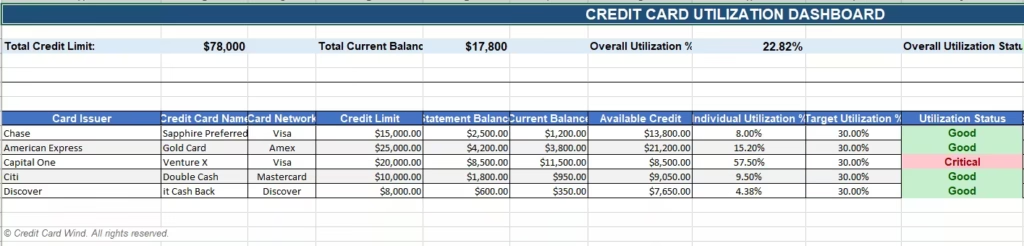
Download Your Free Credit Card Utilization Tracker Templates
Four ready-to-use templates are available to make your life easier. Each one includes every field you need to track all your cards in one place.
Pick the format and paper size that works best for you:
Prefer tracking everything online? A version is also available at no cost. It functions like an Excel file, but operates completely within your browser.
Disclaimer: The Templates & Printables on this site are provided for informational and personal tracking purposes only. This is not financial, legal, tax, or credit advice. While reasonable efforts are made to ensure accuracy, Credit Card Wind makes no warranties as to the completeness, reliability, or accuracy of the calculations generated by these Templates & Printables. Users are responsible for independently verifying all data and calculations. Terms, conditions, rates, regulations, and legal requirements vary by institution, jurisdiction, and individual circumstances.
Always refer to your official statements, account agreements, and applicable laws, and consult a qualified professional before making any financial, legal, or other important decisions. By using these Templates & Printables, you acknowledge that Credit Card Wind and its owner shall not be liable for any damages, losses, or financial consequences arising from the use or misuse of these Templates & Printables.
This universal disclaimer applies to all templates and printables provided by Credit Card Wind (https://creditcardwind.com), created by Robert Williams (Owner at Credit Card Wind).
© Credit Card Wind. All rights reserved.
These templates and printables may be downloaded and used for personal, non-commercial purposes only. Redistribution, resale, or modification for commercial use without permission is strictly prohibited.
What Is a Credit Card Utilization Template?
A credit card utilization template is a tracking tool that helps you record your credit limit and current balance for each card you own. It calculates what percentage of your available credit you’re using, both on each individual card and across all your cards combined.
That percentage is called your credit utilization ratio. You get it by dividing your current balance by your credit limit, then multiplying by 100. If your card has a $2,000 limit and a $600 balance, your utilization rate is 30%.
Why does this number matter so much? FICO’s breakdown of credit score factors confirms that the “Amounts Owed” category makes up 30% of your FICO score. Credit utilization is the dominant factor within that category. Lenders use it to measure how dependent you appear to be on borrowed money.
Without a tracker, it’s easy to lose track of where each card stands. A utilization log solves that problem. It gives you a real-time view of your credit health. This lets you make smarter decisions before your next billing cycle closes.
Who benefits most from keeping one? Anyone managing two or more credit cards, working on improving their score, or planning to apply for a mortgage, car loan, or business credit in the next few months.
📌 Did You Know: Credit scoring models measure your utilization both overall and on each individual card. Even if your total rate looks healthy, one maxed-out card can still pull your score down on its own.
What Counts as a Good Credit Utilization Rate?
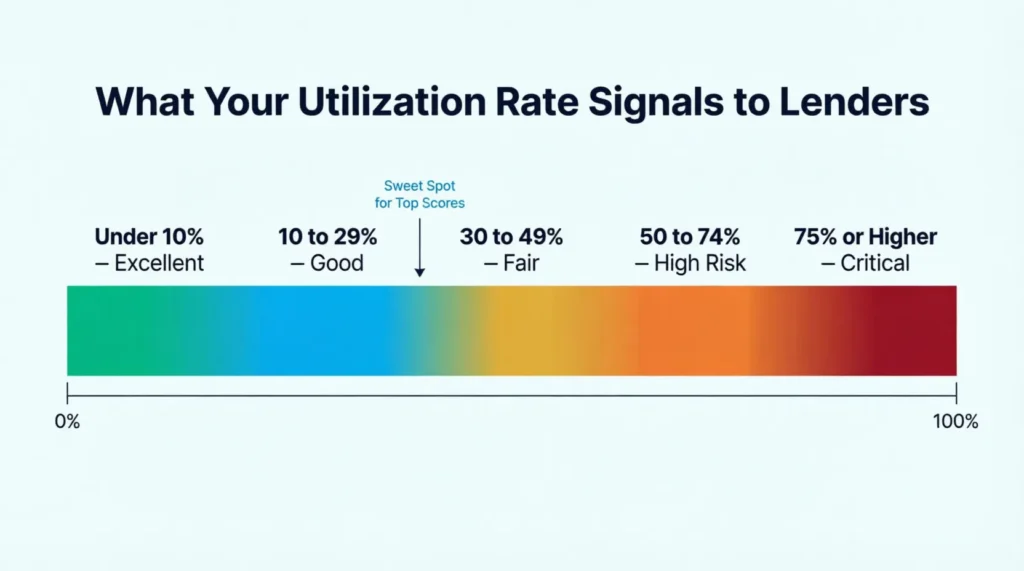
The 30% rule is the most widely cited benchmark. Keeping your utilization below 30% on each card and in total is considered responsible credit management by most lenders.
But if you’re aiming for an excellent score, lower is better. Experian’s analysis of high-scoring borrowers shows that people with credit scores above 750 typically keep their utilization in the single digits. The sweet spot for top-tier scores is under 10%.
What about 0%? It’s not always ideal. Carrying a tiny balance, even just $5 to $10, shows your card is active. A card that reports $0 every month for several cycles can appear dormant, which doesn’t help your score. The goal is low, not zero.
The table below shows how different utilization rates signal credit risk to lenders:
Tip: → Want to see how your limit factors into your utilization ratio? The credit card limit calculator connects the dots.
How to Calculate Your Credit Card Utilization Ratio
The math is straightforward. There are two calculations worth knowing: per-card and overall.
Per-card utilization: (Balance on One Card ÷ Credit Limit on That Card) × 100 = Utilization %
Overall utilization: (Total Balances on All Cards ÷ Total Credit Limits on All Cards) × 100 = Overall Utilization %
Both numbers matter. Scoring models look at both, so neither can be ignored.
Take Marcus, a high school teacher in Chicago with three credit cards. His Discover card has a $4,000 limit and a $1,600 balance (40% utilization). His Bank of America card has a $6,000 limit and a $900 balance (15%). His Citi card has a $2,000 limit and $180 on it (9%).
His per-card rates are 40%, 15%, and 9%. His overall utilization is $2,680 ÷ $12,000 = 22%. That overall rate looks acceptable. But the 40% on his Discover card is a red flag on its own, even though the total picture seems fine.
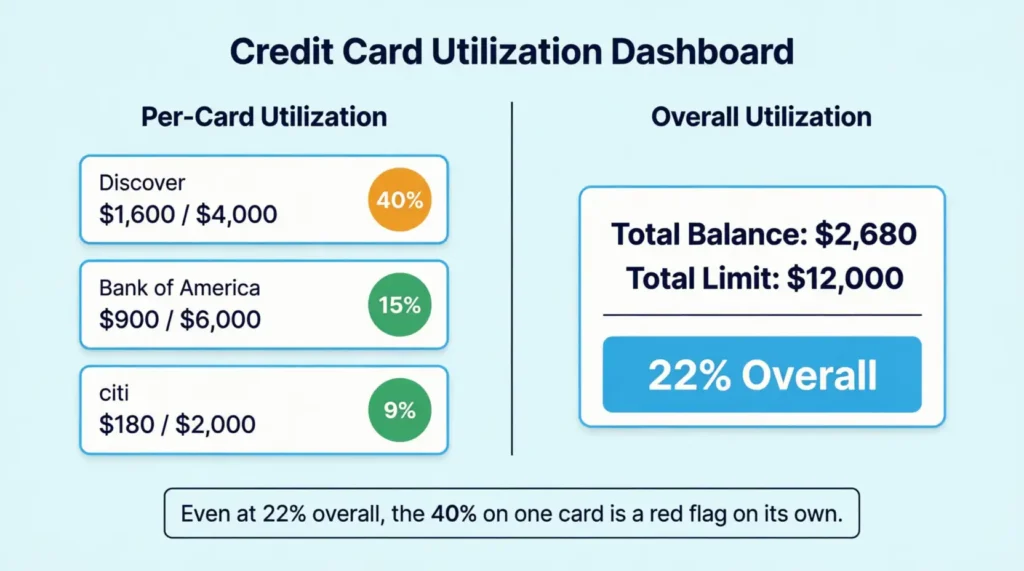
Without a per-card breakdown, Marcus might never catch it. That’s exactly what a tracker reveals at a glance.
When Does Credit Utilization Get Reported to the Credit Bureaus?
Most people assume their credit card payment due date is the same as the reporting date. It isn’t. Mixing them up is a common reason why someone pays on time but still shows a high utilization rate on their credit report.
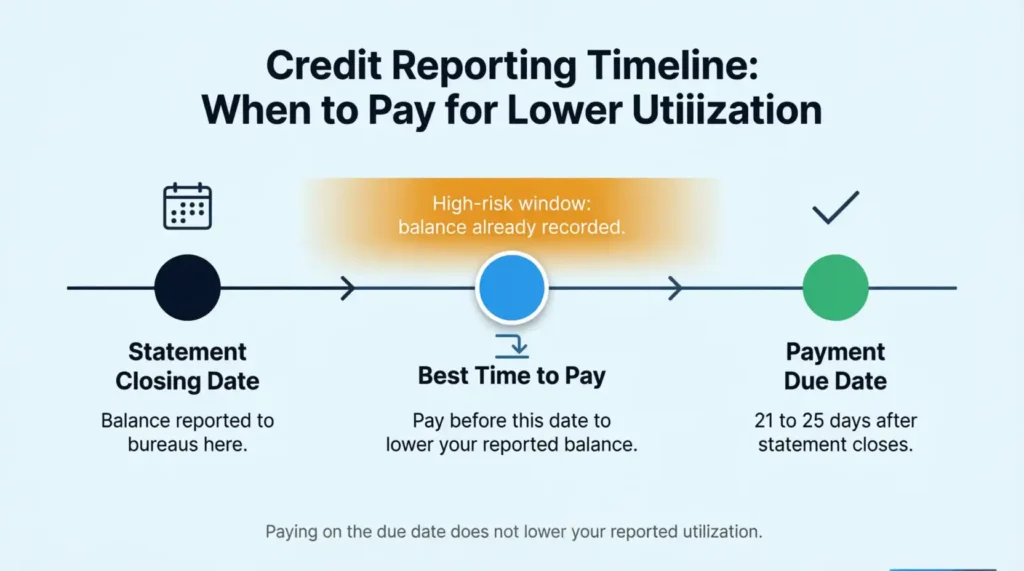
Your card issuer reports your balance to Equifax, Experian, and TransUnion at the end of your billing cycle. That’s the statement closing date, and it’s the snapshot the bureaus record. Whatever your balance is on that specific date is what appears on your credit report for that month.
Your payment due date typically falls 21 to 25 days after the statement closes. So if you carry a high balance all the way to the due date and then pay it off, the bureaus have already recorded that high balance.
This is why the tracker advises capturing your numbers right after each statement closes. That date reflects exactly what’s sitting on your credit report at that moment.
To lower your reported utilization, make a payment before your statement closing date. This is more effective than waiting until your due date. Even a partial payment before the statement closes can move the needle in the right direction.
How to Use the Credit Card Utilization Tracker Template
Filling out the tracker takes under 10 minutes. Follow these steps to get the most out of whichever format you choose.
Step 1: Enter Your Header Information
At the top of the tracker, fill in your name and the billing period, month, or year. This keeps your records clean and organized if you save copies each month. The Word version shows your total credit limit and balance at the top. This gives you a quick summary before you scroll down to the rows.
Step 2: List Each Card
In the main table, add each card to its own row. The PDF and Excel versions use a single “Card Name” column. The Word version goes a step further with two separate columns: “Card Issuer” (like Chase or Capital One) and “Card Name” (like Freedom Unlimited or Quicksilver). Filling in both makes each card easy to identify at a glance.
Step 3: Enter Your Credit Limit and Current Balance
Log into each card’s online account or pull up your most recent statement. Enter the credit limit and current balance for each card. Use the most recent figures available for the most accurate picture.
Step 4: Calculate and Enter the Utilization %
Divide each card’s balance by its credit limit, then multiply by 100. Enter that figure in the Utilization % column. If you’re using the Excel template, this field calculates automatically the moment you enter a balance and limit. No manual math needed.
Step 5: Fill In the Status Column
The Status column is your personal flag system for each card. The next section explains exactly what to write there and how to use it to prioritize action.
Step 6: Complete the Monthly Summary
At the bottom of the tracker, fill in your totals: Total Credit Limit, Total Balance, and Overall Utilization %. These three numbers give you the big picture in seconds. The Word version also includes a “High Utilization Alerts” field in the monthly summary, which is a useful spot to call out any card sitting above 30% so it doesn’t get overlooked.
Step 7: Use the Notes and Action Plan Section
Every format includes a Notes or Action Plan section at the bottom. Use it to jot down payment plans, reminders to request a limit increase, or notes about specific cards. It turns the tracker from a static snapshot into a working plan.
💡 Pro Tip: Update your tracker on the same day each month, ideally right after your statement closing date. That’s when balances get reported to the credit bureaus, making it the most accurate moment to capture your utilization for the record.
What to Enter in the Status Column
The Status column is one of the most useful fields in the tracker. But it delivers value only when you use it on a regular basis.
Think of it as a personal traffic light system for each card. A simple, consistent labeling system lets you scan the whole tracker in seconds and know which cards need attention right now.
A four-label system works well for most people:
- Good – Utilization is under 10%. No action needed.
- Watch – Utilization is between 10% and 29%. Keep monitoring this card.
- High – Utilization is between 30% and 49%. Plan a payment to bring it down.
- Critical – Utilization is 50% or above. Make this card your top priority.
These labels eliminate the need to redo the math every time you open the tracker. Just look at the status, and the next step is obvious.
Tip: → Tracking utilization on a business card? The business credit card limit calculator helps you understand that limit.
How to Lower Your Credit Utilization Rate
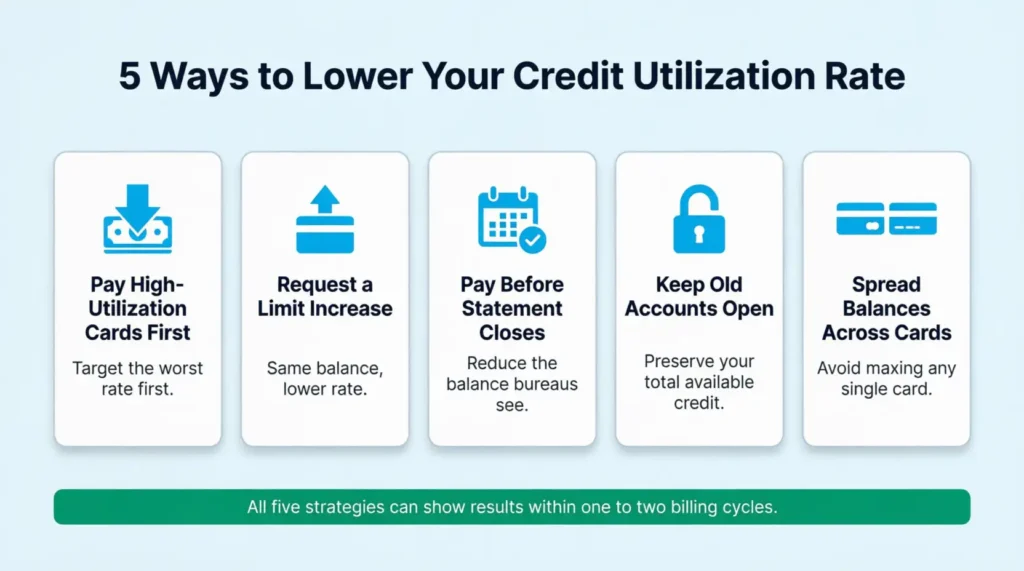
Once the tracker shows your status, targeted action can really help in one or two billing cycles.
Pay Down the Highest-Utilization Card First
The tracker makes this easy to spot. Focus any extra payments on the card with the worst rate before spreading attention elsewhere. Dropping one card from 70% to below 30% can produce a measurable score increase on its own.
Request a Credit Limit Increase
A higher limit lowers your utilization rate without requiring you to pay a single extra dollar. If your balance stays the same but your limit goes up, the math shifts in your favor. Many issuers allow online requests that take just a few minutes to submit.
Make a Payment Before Your Statement Closes
Most cardholders pay once a month, after the statement arrives. But as covered earlier, balances are reported when the statement closes, not on the due date. Making a payment before that closing date reduces the balance that gets sent to the bureaus.
Laura, an administrative assistant in Atlanta, had her primary card reporting a 68% utilization rate every month. She started making a small extra payment 10 days before her statement closed. In just two billing cycles, the balance fell below 28%. Her score then rose by 19 points, even though her total debt stayed the same.
Keep Old Accounts Open
Closing a paid-off card removes its credit limit from your total available credit. That shrinks the denominator in your utilization formula. Your overall rate can jump even if your balances haven’t changed by a cent.
⚠️ Mistake to Avoid: Never close a credit card simply because you paid it off. That unused limit still works in your favor by lowering your overall utilization rate. Keep the card open and use it for a small purchase every few months to maintain activity.
Spread Balances Across Multiple Cards
Running one card up to 80% while the others stay empty hurts your per-card utilization, even if the total looks reasonable. Distributing spending more evenly across cards keeps any single card from becoming a problem.
How Often Should You Update Your Utilization Tracker?
Once a month is the baseline. Most billing cycles run about 30 days, so monthly updates give you a consistent record of your credit health over time.
But timing within the month matters just as much as frequency. Update your tracker right after each statement closes, not after you make your payment. That closing-date balance is what the bureaus see. Capturing it at that moment gives you the most accurate reflection of your current credit report.
If you’re planning to apply for a mortgage, car loan, or any other major credit product, update the tracker 60 to 90 days in advance. That window lets you make changes and see them in your score before the lender checks your report.
If you’re carrying high balances on multiple cards, check your accounts every two weeks. This can help you catch problems before they impact your credit bureaus. The tracker is an efficient tool that allows a bi-weekly review to be completed in just a few minutes.
Credit Utilization Mistakes That Can Cost You Points
Even people who understand the basics still fall into these traps. Run through this list against your current tracking habits to make sure no points are slipping away.
Tracking Only the Total, Not Per Card
Focusing solely on overall utilization is one of the most common oversights. As Marcus’s example showed, a single card sitting at 40% can hurt your score even when the overall picture looks healthy. Always track both.
Waiting Until the Due Date to Pay
Paying on the due date keeps you safe from late fees, but it doesn’t help your reported utilization. The balance was already captured when the statement closed, days earlier. Paying down high-balance cards before the statement date is what actually moves the needle.
Ignoring Cards With Small Limits
A card with a $500 limit is easy to max out by accident. A single $420 purchase puts it at 84% utilization. Small-limit cards need just as much attention as large ones, sometimes more.
Only Pulling Out the Tracker When Something Goes Wrong
If the tracker only comes out after a score drop or a loan denial, you’re reacting instead of managing. Monthly updates let you spot trends and address problems before they compound.
📌 Did You Know: Some card issuers report balances mid-cycle rather than at the statement close date. It’s worth contacting your specific issuer to confirm exactly when your balance gets sent to the bureaus, so you know the best timing for payments.
Frequently Asked Questions
Does checking my credit utilization hurt my score?
No. Reviewing your own utilization or credit report is a soft inquiry and has no impact on your score. Only hard inquiries from lenders cause any scoring change.
Should I track utilization on cards I never use?
Yes. Even unused cards contribute their credit limit to your total available credit, which helps your overall rate. Leaving them out of your tracker gives you an incomplete picture.
What is the difference between credit utilization and a credit limit?
Your credit limit is the maximum amount your card lets you spend. Your credit utilization rate is the percentage of that limit you’re currently using. A $5,000 limit with a $1,500 balance equals 30% utilization.
Can I have 0% utilization and still build a good credit score?
A 0% rate across all cards can signal inactivity to scoring models, which is not ideal. Keeping a small balance on one or two cards and paying it off monthly shows responsible use. It won’t hurt your rate.
Does credit utilization reset every month?
Yes. Your issuer reports your current balance each billing cycle. Once the new statement period begins, your utilization reflects your current balances, not what was there last month.
What happens if my utilization temporarily spikes above 30%?
A short-term spike may lead to a temporary score dip. But it usually recovers when the balance is paid down and a new statement is issued. The real damage comes from staying above 30% across multiple consecutive cycles.
Do all credit card types affect utilization the same way?
Standard revolving credit cards factor directly into your utilization rate. Charge cards, which require full monthly repayment, are often excluded from utilization calculations. Installment loans, such as car loans or mortgages, are not included in credit utilization at all.
Is per-card utilization or overall utilization more important for my score?
Both matter. Credit scoring models evaluate each. Aim to keep your individual card rates and overall rate below 30%. For the best results, target under 10%. This approach ensures you cover all the bases.
Bottom Line
Keeping your credit utilization in check is one of the most direct ways to protect your credit score month after month. This tracker puts every card’s balance, limit, and rate in one place so nothing slips through. From calculating per-card rates to flagging high-risk accounts with the Status column, each section serves a purpose.
The best approach is to update your statement monthly on the closing date. First, target any card with a balance above 30%. Also, keep older accounts open to preserve your total available credit. Based on everything covered here, even small, consistent changes to how you track your cards can lead to real score improvements within a few billing cycles.
If you know someone managing multiple credit cards, share this guide with them. The right info at the right time can significantly influence their next credit decision.