
Keeping up with payment due dates across multiple cards is surprisingly easy to get wrong. Miss one and you could face late fees, lose your grace period, and damage your credit score. With Americans now carrying over $1.277 trillion in credit card debt, per Federal Reserve Bank of New York Q4 2025 data, having a credit card billing cycle calendar printable is a smart habit, not just a nice-to-have.
A billing cycle calendar keeps your key dates in one place.
This page shows you how to use it, what each date means, and how to stay on top of every payment.
Download Your Free Credit Card Billing Cycle Calendar
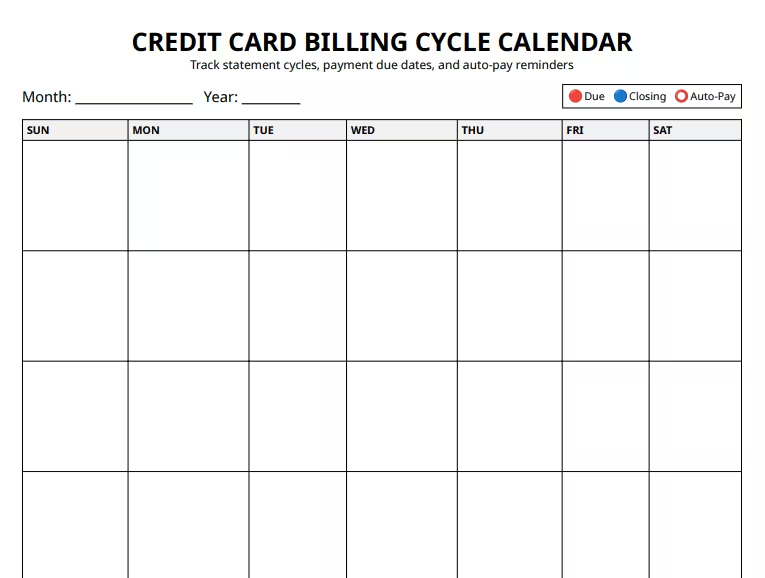
Three ready-to-use formats are available below. Each one includes a full monthly calendar grid, a billing cycle table, a payment checklist, and an issuer reference section.
Pick the format and paper size that works best for you:
Disclaimer: The Templates & Printables on this site are provided for informational and personal tracking purposes only. This is not financial, legal, tax, or credit advice. While reasonable efforts are made to ensure accuracy, Credit Card Wind makes no warranties as to the completeness, reliability, or accuracy of the calculations generated by these Templates & Printables. Users are responsible for independently verifying all data and calculations. Terms, conditions, rates, regulations, and legal requirements vary by institution, jurisdiction, and individual circumstances.
Always refer to your official statements, account agreements, and applicable laws, and consult a qualified professional before making any financial, legal, or other important decisions. By using these Templates & Printables, you acknowledge that Credit Card Wind and its owner shall not be liable for any damages, losses, or financial consequences arising from the use or misuse of these Templates & Printables.
This universal disclaimer applies to all templates and printables provided by Credit Card Wind (https://creditcardwind.com), created by Robert Williams (Owner at Credit Card Wind).
© Credit Card Wind. All rights reserved.
These templates and printables may be downloaded and used for personal, non-commercial purposes only. Redistribution, resale, or modification for commercial use without permission is strictly prohibited.
What Is a Credit Card Billing Cycle?
A credit card billing cycle is the time period between two consecutive statement closing dates. For most credit cards, this period runs between 28 and 31 days.
At the end of each cycle, your card issuer creates a billing statement. That statement shows your total balance, your minimum payment due, and the exact date by which your payment must arrive.
Here’s the part that trips most people up: the closing date and the due date are two very different things.
- The closing date is when your billing cycle ends and your statement is generated.
- The due date is the payment deadline, which typically falls 21 to 25 days after the closing date.
That gap between the two is called the grace period. If you pay your full balance within the grace period, most card issuers won’t charge you any interest on purchases.
As total U.S. credit card debt reached a record $1.277 trillion in Q4 2025, according to the Federal Reserve Bank of New York, keeping track of cycle dates has become more critical than ever. Millions of American cardholders carry balances, and every missed date makes repayment harder and more expensive.
📌 Did You Know: Your issuer reports your balance to the credit bureaus right after the statement closing date, not after the payment due date. That means the balance shown on your statement can affect your credit utilization ratio before you even have a chance to pay it. Paying down your card a few days before the closing date can help lower what gets reported.
How the Billing Cycle Actually Works
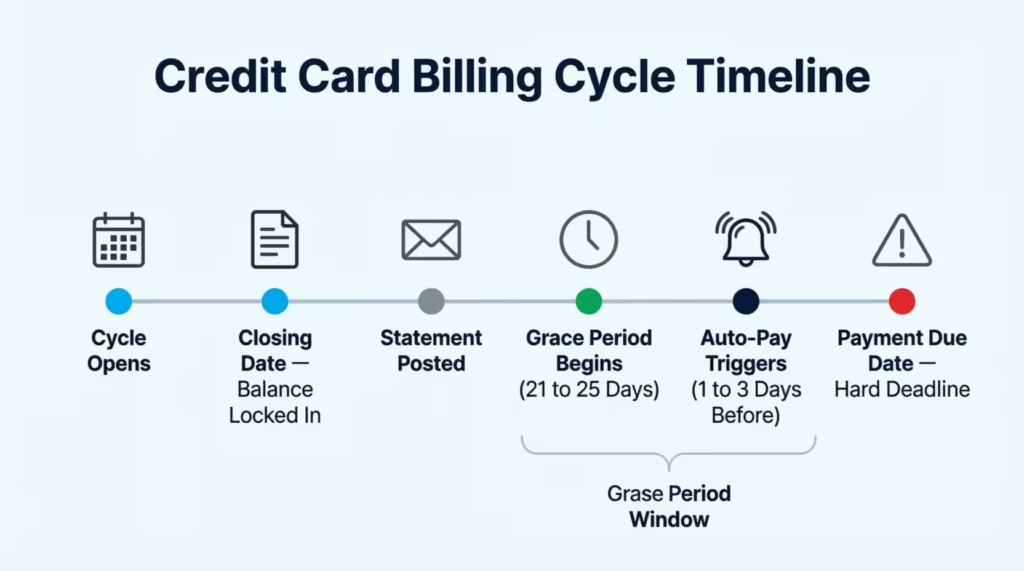
Think of your billing cycle like a monthly clock that resets. Here’s how the key dates connect, in order:
1. Billing Cycle Opens
Your new cycle starts the day after the previous closing date. Every purchase and transaction from this point builds toward your current cycle’s balance.
2. Statement Closing Date
This is when the billing cycle ends. Your issuer calculates your total balance, creates your statement, and reports your balance to Equifax, Experian, and TransUnion.
3. Statement Posted or Mailed
Within a few days of the closing date, your billing statement becomes available. It lists your balance, minimum payment, due date, and any fees charged during the cycle.
4. Grace Period Begins
The grace period is your window to pay without being charged interest on purchases. It starts on the closing date and runs 21 to 25 days. Under the CARD Act of 2009 (Credit Card Accountability Responsibility and Disclosure Act), issuers must give cardholders at least 21 days between the statement mailing date and the payment due date.
5. Payment Due Date
This is the hard deadline. Pay at least the minimum by this date or you’ll face a late fee. If the payment goes unpaid for 30 or more days past this date, it can be reported to the credit bureaus.
6. Autopay Trigger Date
If you’ve set up automatic payments, your bank typically processes the transfer one to three business days before the due date. It’s easy to forget about this date, but it matters just as much as the due date itself.
Tip: → Curious what rate your card actually charges per day? The daily periodic rate calculator breaks down your APR into a daily number.
What’s Inside This Credit Card Billing Cycle Calendar Printable
This tracker is built as a two-page layout that holds everything you need in one clean document. Here’s what each page contains:
Page 1: Monthly Calendar Grid
The grid spans a full month using Sunday-to-Saturday columns. Three color-coded markers help you track the most important dates at a glance:
- Red dot (Due): Your payment due date
- Blue dot (Close/Closing): Your statement closing date
- Circle (Auto-Pay): The date your automatic payment is scheduled
Write the month and year at the top. Then, mark each card’s key dates on the grid with the right marker.
Page 2: Billing and Planning Worksheet
This page is divided into four sections:
- Section 1: Billing Cycle Table – One row per card. Fill in the card name, statement closing date, payment due date, grace period length, and autopay status. This becomes your permanent, all-in-one reference for every card you own.
- Section 2: Payment Checklist Before each payment, check these five boxes:
- Statement reviewed
- Payment amount confirmed
- Payment scheduled
- Autopay verified
- Available balance checked
- Section 3: Issuer and Account Reference
- Each card’s issuer name
- Nickname
- Customer support number
- Website or app login
- Section 4: Notes This is a space for important details, such as:
- Introductory APR expiration dates
- Rewards redemption deadlines
- Upcoming large purchases
- Balance transfer cutoff dates
How to Fill Out Your Billing Cycle Calendar: Step by Step
Filling out this calendar takes less than 15 minutes the first time. After that, it’s a quick monthly refresh.
Step 1: Gather Your Most Recent Statements
Pull up the latest statement for each active card you own. You need two things from each one: the statement closing date and the payment due date.
Step 2: Write the Month and Year at the Top
Fill in the current month and year in the header fields at the top of the Page 1 calendar grid.
Step 3: Mark Your Closing Dates
Find each card’s closing date and mark it on the grid with a blue dot. If you have three cards with different closing dates, you’ll place three separate blue dots on different days.
Step 4: Mark Your Payment Due Dates
Mark each card’s due date with a red dot. These typically fall 21 to 25 days after the closing date, depending on your card’s terms.
Step 5: Mark Your Autopay Processing Dates
If autopay is active, note the date your bank will process the transfer. This is usually one to three days before the due date. Mark it with the circle symbol. Many cardholders overlook this date. However, it decides if funds must be ready before the due date.
Step 6: Complete the Billing Cycle Table on Page 2
Fill in one row per card in Section 1. Write the card name, closing date, due date, grace period length, and whether autopay is active. This table is your go-to reference. You can check it anytime without sifting through old statements.
Step 7: Run Through the Checklist Every Month
At the end of each billing cycle, go through the five items in Section 2. It takes two minutes or less and makes sure nothing slips through the cracks.
💡 Pro Tip: If you manage two or more credit cards, use a different pen color for each card on the calendar grid. For example, black for your Chase card and blue for your Capital One card. At a glance, you’ll know which date belongs to which card, without needing to re-read every entry.
Key Dates Every Cardholder Should Know
Three dates drive every billing cycle. Knowing the difference between them is the foundation of solid credit card management.
The Statement Closing Date
This is when the billing period ends and your balance gets locked in for that month. It’s also the date your issuer uses to calculate your credit utilization ratio before reporting it to the bureaus. If you want to report a lower balance, pay down your card a few days before this date, not just before the due date. The two dates are weeks apart, and that timing gap matters for your credit profile.
The Payment Due Date
This is your payment deadline. The Consumer Financial Protection Bureau notes that a payment is generally considered late if received after 5 p.m. on the due date, based on the time zone listed on your billing statement. Pay at least the minimum by this date to avoid a late fee. Pay the full statement balance to avoid interest charges.
The Autopay Processing Date
If you rely on autopay, your bank needs one to three business days to transfer the funds. A due date on the 20th may mean your autopay triggers on the 17th or 18th. Mark this on the calendar grid so you can confirm the right amount is in your account ahead of time.
Tip: → Want to see how much a missed due date could cost you? Run the numbers with the daily credit card interest calculator.
How a Missed Payment Hurts Your Credit Score
Payment history is the single largest factor in your FICO score. myFICO data shows that it accounts for 35% of your total score. The due date on your billing calendar is one of the most important financial dates each month.
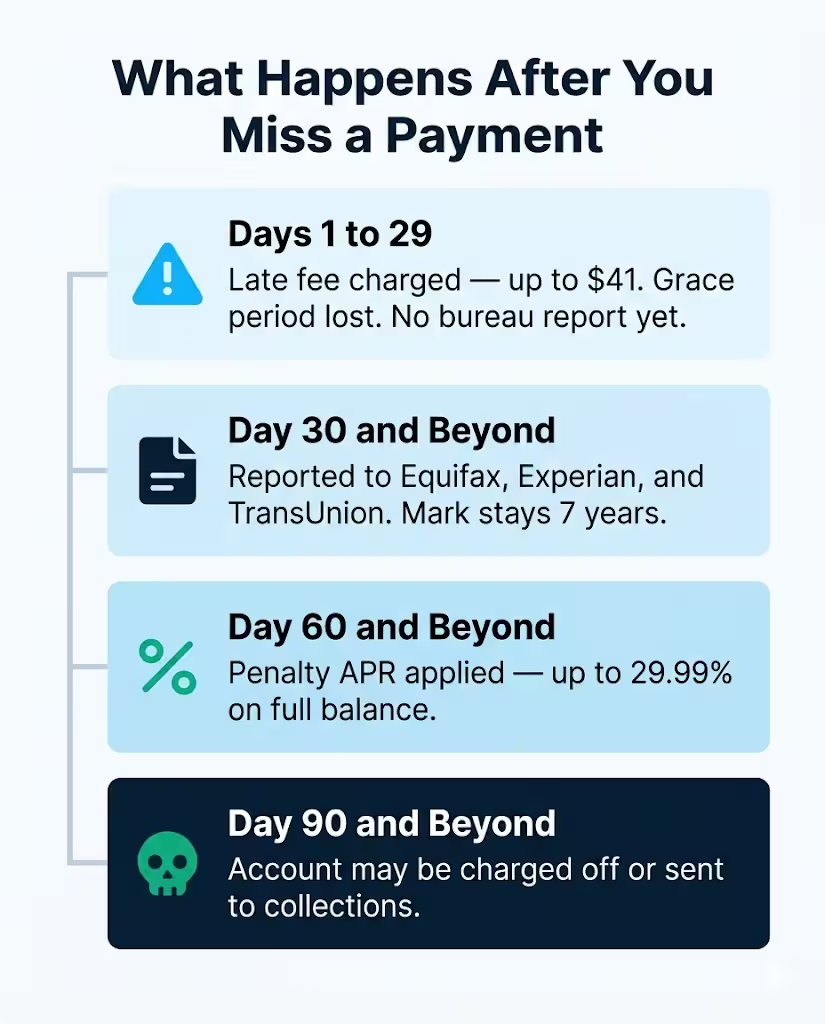
Here’s what happens at each stage after a missed payment:
Days 1 to 29 After the Due Date
Your issuer charges a late fee right away, up to $41 for repeat occurrences within six billing cycles. No credit bureau report yet. But you may lose your grace period, meaning interest starts accruing on your full balance immediately.
Day 30 and Beyond
The missed payment gets reported to Equifax, Experian, and TransUnion. From this point, the mark can remain on your credit report for seven years. A single late payment, even just 30 days, can greatly lower your score. This impact depends on how good your credit history was before.
Day 60 and Beyond
Your issuer may apply a penalty APR. This can run as high as 29.99%, and it applies to your existing balance and any future purchases. Most issuers want six on-time payments in a row. Then, they may think about removing the penalty rate.
Day 90 and Beyond
The company may send the account to collections or charge it off. A charge-off is one of the most damaging entries a credit report can carry.
Research from the Federal Reserve Bank of St. Louis shows that the share of cardholders 30 or more days past due on credit card debt has been trending upward since mid-2021, making consistent cycle tracking more important than ever.
A monthly billing calendar helps you see exactly when each due date falls, so you can act well before any of these consequences become a problem.
Common Mistakes People Make with Billing Cycle Tracking
Even cardholders with good intentions fall into these tracking traps. Here’s what to watch out for:
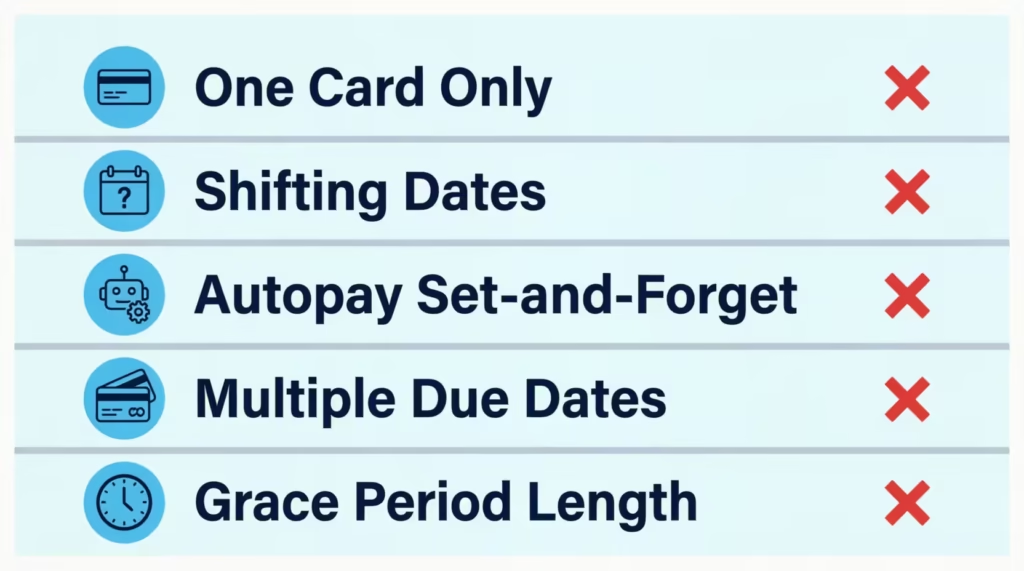
Tracking Only One Card
If you own multiple credit cards, tracking just one creates blind spots. Jennifer, a marketing manager in Chicago with four credit cards, used a statement planner only for her primary cash-back card. She rarely touched a store card she’d opened for a sign-up bonus and forgot to track it. One missed payment dropped her credit score by 63 points and triggered a late fee. The fix is simple: track every active card, even the ones you rarely use.
Forgetting That Closing Dates Can Shift
Some issuers adjust closing dates by a day or two when they fall on weekends or bank holidays. A closing date that lands on a Sunday may shift to Monday. Always check your most recent statement rather than assuming the date is the same as last month.
Setting Autopay and Walking Away
Autopay is a useful safety net, but it doesn’t replace active monitoring. It fails if your bank account is short on funds or if your card is replaced and payment details change. Run through the Section 2 checklist every month, even with autopay turned on.
Assuming All Cards Have the Same Due Date
Unless you’ve specifically requested a due date change from each issuer, your cards very likely have staggered due dates throughout the month. The billing cycle table in Section 1 was designed for this situation. Filling in one row per card gives you a side-by-side view of all your cycle dates in seconds.
Ignoring the Grace Period Length
Not all grace periods last 25 days. Some cards offer only 21 days, the legal minimum under the CARD Act. A shorter grace period means less time to pay before interest builds. Check each card’s terms and note the exact grace period in the billing cycle table.
⚠️ Mistake to Avoid: Don’t confuse the statement closing date with the payment due date. Some cardholders set up manual payments to process on the closing date, thinking that covers the bill for that cycle. It doesn’t. The due date is the actual payment deadline, and it comes weeks later.
Tips to Stay on Top of Every Credit Card Payment
Using the calendar is the foundation. These habits will reinforce the system and keep your payment record clean.
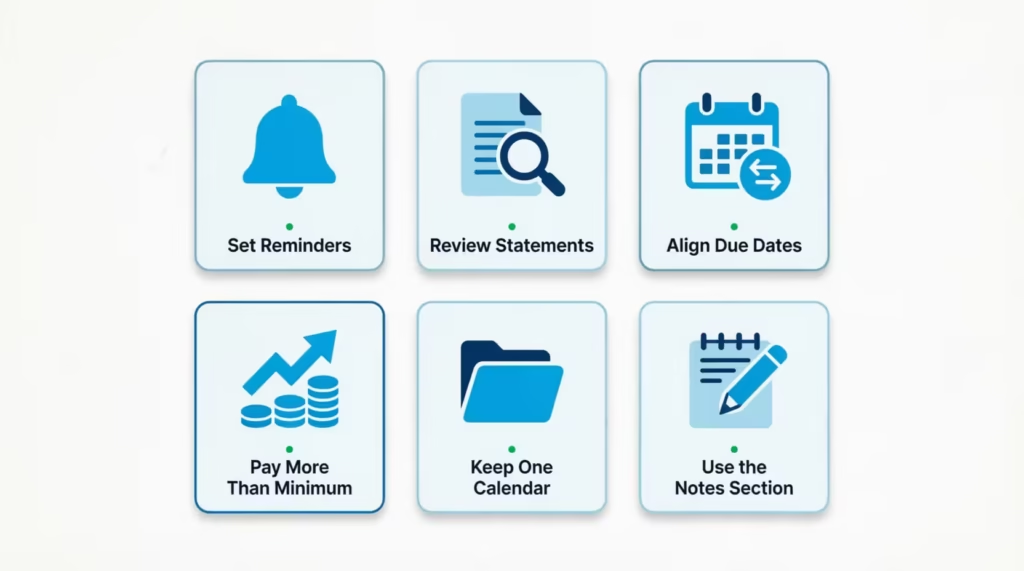
Set a Reminder Three Days Before Each Due Date
A physical calendar is useful, but a digital reminder adds a backup layer. Set a phone alert three days before each due date. This lets you check the payment, move funds if needed, and reach out to your issuer if something seems off before the deadline.
Review Your Statement the Week It Closes
Don’t wait until the due date to open your statement. Review it the same week your billing cycle closes. Check for unauthorized charges, billing errors, or unexpected fees. Catching these early gives you time to dispute them before payment is required.
Consider Requesting Due Date Alignment
Most major issuers allow you to request a due date change by calling customer service or logging in to your online account. If staggered due dates make tracking tough, reach out to each issuer. Ask to change the date to a consistent window. The billing cycle length stays the same, but the tracking gets simpler.
Pay More Than the Minimum When You Can
The minimum payment is designed to keep your account in good standing, not to help you get out of debt. Paying even $25 to $50 more than the minimum each month reduces your balance faster and cuts the total interest you pay over time. Those extra dollars add up quickly when the alternative is letting interest compound at a high APR.
Keep One Completed Calendar as a Reference
After each month ends, don’t discard the calendar immediately. Keep it for one full billing cycle. This way, you can check dates if there’s a problem on your next statement. You can also confirm when a payment was scheduled.
Use the Notes Section Before It Feels Necessary
The Notes area on Page 2 is most useful when you fill it in proactively. Track when your introductory APR ends, when you can redeem rewards, or any big purchases that might change your balance before the next closing date. These are time-sensitive details that belong on paper, not just in memory.
Frequently Asked Questions
What is a billing cycle on a credit card?
A billing cycle is the period between two consecutive statement closing dates, usually 28 to 31 days. At the end of each cycle, your issuer generates a statement showing your balance, minimum payment, and payment due date.
Is the statement closing date the same as the payment due date?
No. The closing date is when your billing period ends and your balance is calculated. The due date comes 21 to 25 days later and is the deadline for making at least the minimum payment.
What happens if I miss my credit card payment by just one day?
Your card issuer can charge a late fee immediately, even for one day. However, the payment is not reported to the credit bureaus as late unless it remains unpaid for 30 or more days past the due date.
Can I change my credit card payment due date?
Yes. Most major issuers allow you to request a due date change through customer service or your online account. Changes typically take one to two billing cycles to take effect.
How long is a standard credit card grace period?
Most grace periods run between 21 and 25 days. The CARD Act of 2009 requires issuers to provide at least 21 days between the statement mailing date and the payment due date. Check your cardholder agreement for your specific card’s terms.
Does paying before the statement closing date help my credit score?
Yes. Paying before your closing date lowers the balance sent to credit bureaus. This can reduce your credit utilization ratio and help improve your score. Paying by the due date is what keeps your payment history clean.
What is a penalty APR and when does it apply?
A penalty APR is a higher interest rate your issuer can charge after a payment is 60 or more days past due. It can reach 29.99%, and most issuers require six consecutive on-time payments before removing it from your account.
Can I use this calendar for more than one credit card?
Yes. The billing cycle table in Section 1 has rows for multiple cards. On the Page 1 grid, use a different marker color for each card so you can identify every card’s closing date, due date, and autopay date at a glance.
Conclusion
Tracking your billing cycle doesn’t have to be complicated. Knowing when your statement closes, when your payment is due, and when autopay triggers puts you in control of your credit. Check your statements quickly and go through the checklist each month. These habits keep your score and wallet safe.
For most cardholders, the most effective approach is straightforward: fill in your dates, set reminders, and check off the list every month.
If you know someone juggling multiple credit cards and struggling with due dates, share this page with them. This kind of system could save them from a late fee they never saw coming.