We’ve all been there. You froze your Equifax credit file a few years ago, life moved on, and now a lender, landlord, or auto dealer is asking for a credit pull that keeps getting rejected. The stress builds fast when you can’t remember your login, your PIN, or even which bureau is blocking the check. Learning how to unfreeze your credit on Equifax shouldn’t add to that pressure.
The fastest way to lift an Equifax freeze is to log in to myEquifax and click “Manage Freeze” under the Identity section, no PIN required.
Below, you’ll find every method that works today, plus the tri-bureau steps, timing rules, and troubleshooting fixes most guides skip.
Key Takeaways
This guide explains how to unfreeze your credit on Equifax using online, phone, and mail methods, including exact steps, identity verification options, processing times, and troubleshooting fixes for common errors.
Core Facts:
- Equifax no longer requires a 10-digit PIN to unfreeze credit; identity is instead verified through account login, a text-based one-time code, or knowledge-based questions.
- The online method works through myEquifax: log in, go to My Products, select Security Freeze, then Manage Freeze, and choose a temporary lift or permanent removal.
- The dedicated phone line for security freeze requests is (888) 298-0045, available 24/7; the general Equifax consumer line is 888-378-4329.
- Mail requests require a completed Security Freeze Request Form, a government-issued photo ID, and proof of address, sent to Equifax Information Services LLC in Atlanta, GA.
- A temporary lift restores the freeze automatically at midnight on the chosen end date, while a permanent removal requires a new freeze request to reinstate protection.
- Unfreezing Equifax alone may not be enough since Experian and TransUnion maintain separate freezes, and mortgage applications typically pull from all three bureaus at once.
Best for:
- Readers who need to unfreeze their Equifax credit report for a pending loan, lease, or credit application.
- Anyone unsure whether they need a PIN, or who has lost an old PIN letter from a prior freeze.
- Readers troubleshooting a failed login, failed identity verification, or unclear status after a temporary lift.
How to Unfreeze Your Equifax Credit Report Online
The online path through myEquifax is the fastest and most reliable route. It runs on secure identity checks, so you don’t need to dig up an old PIN or wait on a paper form.
Start by going to the Equifax Consumer Services Center and signing in. Once you’re inside your dashboard, click on My Products, then choose Security Freeze. From there, select Manage Freeze under the Identity section. You’ll see two clear choices: a temporary lift for a set date range, or a permanent removal.
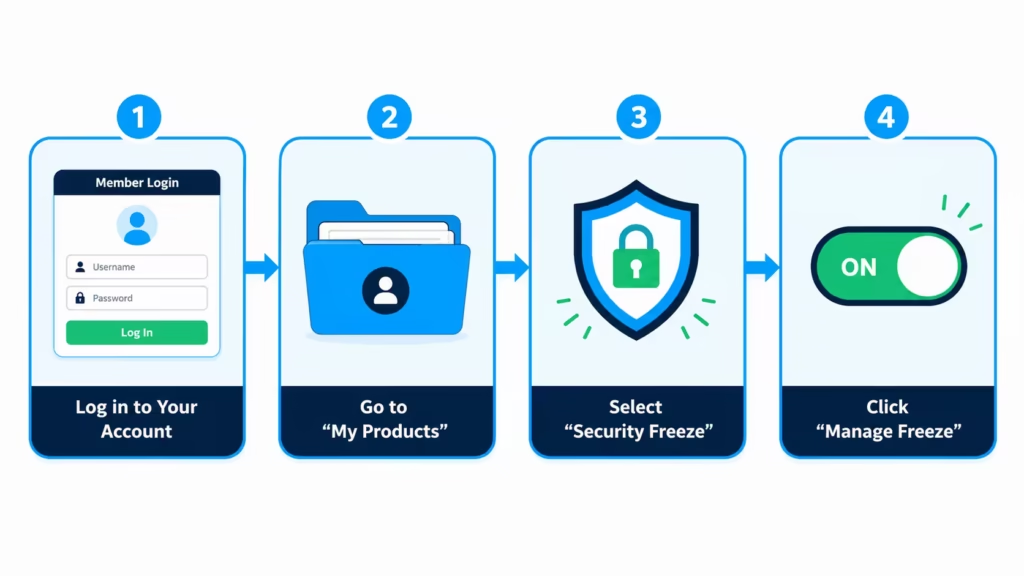
Pick the option that matches your situation, confirm the dates if you’re choosing a temporary lift, and submit. The screen updates in real time, usually within a minute. The Federal Trade Commission allows credit bureaus up to one hour to process online requests, but most go through much faster.
💡 Pro Tip: If your lender only needs one pull on a known date, schedule a temporary thaw that starts one day before the pull and ends two days after. That way you’re covered if the hard inquiry runs late, and the freeze snaps back on automatically.
Setting Up a myEquifax Account If You Don’t Have One
No account yet? Setup takes about five minutes. Head to the myEquifax registration page and enter your full legal name, date of birth, Social Security number, and current address.
Equifax then asks a few identity verification questions pulled from your credit file. These often cover old addresses, past auto loans, or mortgage amounts. Answer them from memory, not from documents that may have typos. If you fumble two or more questions, the system may lock you out for 24 hours.
Once verified, you’ll create a username, a strong password, and a security question. Save these somewhere safe. Your freeze status shows on the dashboard the moment you log in.
Do You Need a PIN to Unfreeze Equifax?
No. Equifax no longer requires a 10-digit PIN for self-service unfreezing. This is one of the biggest updates that trips up returning users who last managed their freeze years ago.
The old PIN system was replaced when Equifax rolled out myEquifax. Now, identity is verified through account login, a one-time PIN sent by text, or knowledge-based questions about your credit history. If you still have an old PIN letter lying around, you can shred it. It won’t be needed for online or phone requests.
How to Unfreeze Your Equifax Credit Report by Phone
Phone is the best backup when the website won’t cooperate, or you’d rather talk to a person. Call the Equifax automated freeze line at 888-298-0045. This is the dedicated security freeze number, and it runs 24/7. The general Equifax consumer line at 888-378-4329 also handles freeze requests.
Have these details ready before you dial:
- Full legal name, date of birth, and Social Security number
- Current address and any address from the last two years
- A working mobile phone that can receive text messages
You’ll be given two ways to verify your identity. The faster option is a one-time PIN sent by text to the number Equifax has on file. If your phone number is outdated, the system falls back to knowledge-based questions about old loans, credit limits, or previous addresses.
Once verified, tell the agent whether you want a temporary lift with a specific end date, or a permanent removal. Phone requests also fall under the FTC’s one-hour processing rule for online and phone lifts.
⚠️ Mistake to Avoid: Never call from a phone number that isn’t listed on your credit file. If verification fails and you can’t answer the knowledge questions, Equifax might ask you to switch to the mail process. This will add days to your timeline.
How to Unfreeze Your Equifax Credit Report by Mail
Mail is the slowest route, but it’s the safety net when online and phone verification both fail. It’s also the correct path if you’re managing a freeze for a minor, an incapacitated adult, or someone who has passed away.
Download the official Security Freeze Request Form from the Equifax site. Fill it out completely, check the box for either a temporary lift or a permanent removal, and gather the following:
- A copy of a government-issued photo ID, such as a driver’s license or passport
- Proof of your current address, like a utility bill, bank statement, or lease agreement dated within the last 90 days
- Your full Social Security number (some situations allow the last four digits, but the full number processes faster)
Mail everything to:
Equifax Information Services LLC P.O. Box 105788 Atlanta, GA 30348-5788
By law, Equifax must process a valid mail request within three business days of receiving it, though total time depends on postal delivery. Use certified mail with tracking if the deadline for your credit pull is close. You’ll get a written confirmation once the freeze is lifted.
Temporary vs. Permanent Freeze Removal, How to Choose
The right choice depends on why you froze your credit in the first place.
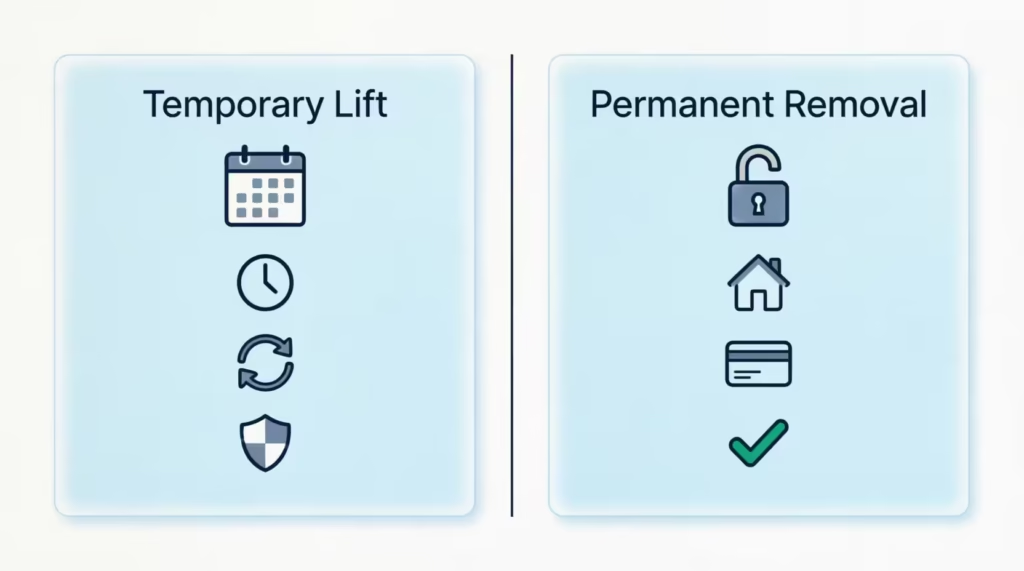
Pick a temporary lift if you froze your report because of a past data breach, identity theft, or general precaution. You get a set date range where creditors can access your file, and the freeze restores itself automatically. This keeps your long-term protection intact while letting a single application go through.
Choose permanent removal if you plan to apply for several credit options soon. This includes shopping for a mortgage, refinancing, or opening a new card all at once. Removing the freeze fully saves you from constantly scheduling thaws. You can always refreeze later for free.
A quick way to decide: if you’re worried your Social Security number is already floating around, stay temporary. If your reason for the freeze has passed and you want less friction, go permanent.
How to Refreeze After a Temporary Lift Ends
A temporary lift with an end date restores the freeze on its own. You don’t need to do anything on the closing date. The freeze snaps back at midnight.
Still, verify it worked. Log in to myEquifax the day after your lift ends and check the dashboard. If the status shows anything other than “Frozen,” go to Manage Freeze and reapply it. Reapplying is free and takes under a minute. If you want a permanent removal, you must request a new freeze online, by phone, or through mail.
Cost and Processing Time for Unfreezing Equifax
Unfreezing your Equifax credit report is completely free. Under the 2018 Economic Growth, Regulatory Relief, and Consumer Protection Act, all three national credit bureaus must offer freezes and unfreezes at no charge. The Federal Trade Commission confirmed this rule applies to placing, lifting, and permanently removing a freeze.
Processing time depends on the method:
| Method | Typical Processing Time | Legal Maximum |
|---|---|---|
| Online (myEquifax) | Real time, often under a minute | 1 hour |
| Phone (automated or agent) | Real time to 1 hour | 1 hour |
| 3 business days after receipt | 3 business days |
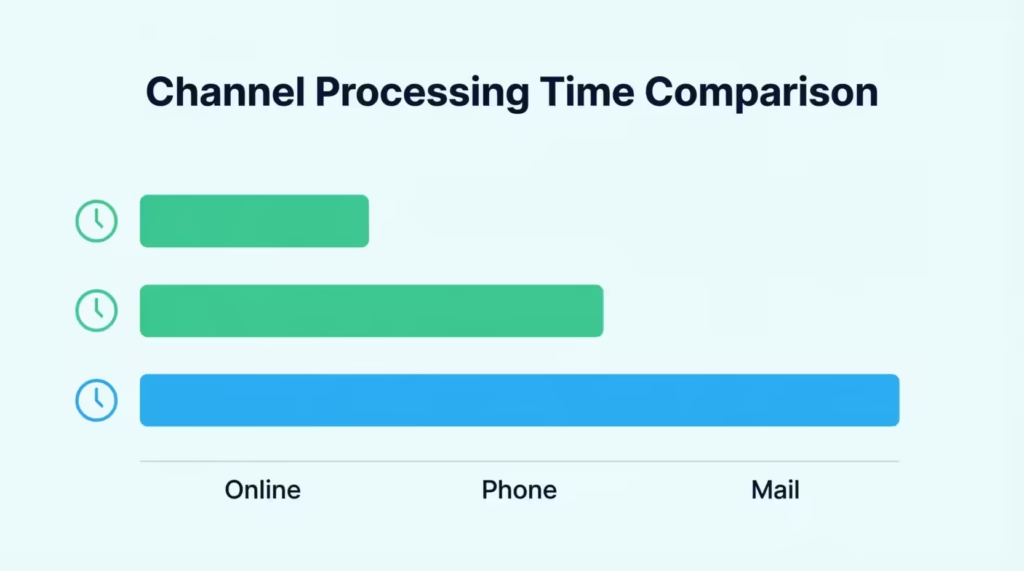
If a creditor needs a same-day credit pull, always choose online first. Phone is the strong backup. Mail should be a last resort tied to a real reason, not convenience.
📌 Did You Know: Before the 2018 federal law, some states let credit bureaus charge $5 to $10 each time you froze or unfroze your file. That fee is now permanently banned across all 50 states.
Equifax Freeze vs. Equifax Lock, Which One Do You Have?
This is where a lot of readers get stuck. A security freeze is the free, federally protected tool. A credit lock is a separate feature, sometimes bundled inside a paid identity protection subscription.

Both block new creditors from pulling your report, but the legal backing is different. A freeze is written into federal law and comes with stronger consumer protections. A lock is a contract between you and the credit bureau, so the terms depend on the fine print.
To check which one you have, log in to myEquifax. Look at your dashboard. If you see the words Security Freeze, you have the free federal version. If you see Lock & Alert or a similar branded product, you’re on the lock product. Equifax offers a free Lock & Alert service too, but paid tiers may include monitoring and monthly fees.
Managing them is different. A freeze is handled through Manage Freeze. A lock is toggled on and off inside the lock product’s own dashboard, often with a single tap. Check if your lender is asking about a “freeze” or a lock. If you only have a lock, unlocking it might not clear the block. So, make sure to verify which one is active first.
Do You Need to Unfreeze Experian and TransUnion Too?
Yes, in most cases. Lifting only the Equifax freeze won’t help if the lender pulls from a different bureau. Each freeze is separate, so you may need to unfreeze all three depending on the type of credit check.
- Mortgage applications almost always use a tri-merge report that pulls from Experian, TransUnion, and Equifax at once. Unfreeze all three.
- Auto loans vary by lender. Some pull one bureau, others pull two. Ask which one the dealer uses, or unfreeze all three to be safe.
- Credit cards usually pull one bureau, often based on your state. Unfreezing all three removes the guesswork.
- Apartment rentals and background checks often use only one bureau or a specialized report, so ask the landlord first.
Here’s how to reach the other two bureaus:
- Experian: Experian Freeze Center or 888-397-3742
- TransUnion: TransUnion Service Center or 800-916-8800
Both offer online, phone, and mail options with the same free, real-time online processing rules that Equifax follows.
How to Confirm Your Equifax Freeze Was Actually Lifted
Never assume the request went through. Confirmation takes 30 seconds and can save you a failed application.
Log in to myEquifax and look at the freeze status banner on your dashboard. If your request went through, the status will read Temporarily Lifted with the specific date range, or Removed if you chose permanent removal. If you used the phone method, you’ll usually get a confirmation email or text within an hour. Mail requests come with a written confirmation letter.
For extra peace of mind, ask your lender to run a soft check before the hard credit pull. A soft check will succeed if the freeze is truly lifted and won’t hurt your score. If the soft check fails, log back in immediately and check the status. A common reason for failure is choosing a lift window that starts in the future, so the freeze is still active on the day the lender tries to pull.
Troubleshooting Common Equifax Unfreeze Problems
Not every unfreeze goes smoothly the first time. Here are the three most common problems and how to fix each one fast.
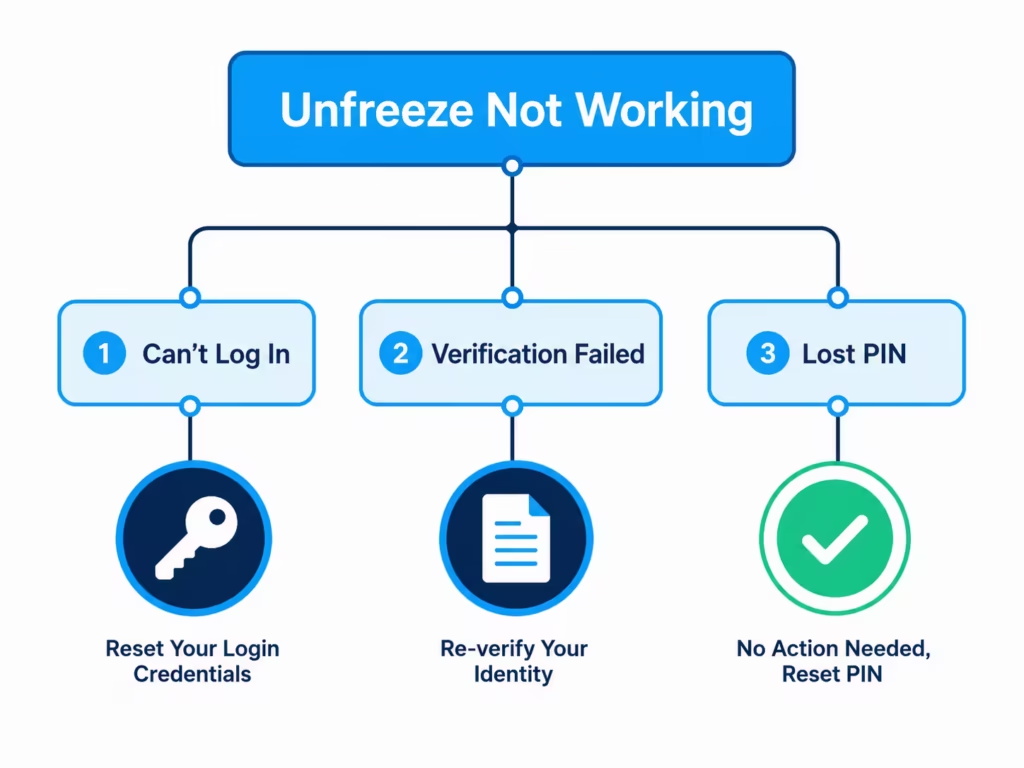
I Can’t Log Into myEquifax
Start with a password reset. Click Forgot Password on the login screen and enter the email tied to your account. Equifax sends a reset link within a few minutes. If the email never arrives, check your spam folder, then confirm you’re using the right email address.
Still locked out? Call 888-298-0045, verify your identity by phone, and ask the agent to reset your account access or process the unfreeze directly over the call. Michael, a project manager applying for a mortgage in Ohio, lost access when his old work email was shut down. A single 12-minute phone call cleared both the account recovery and the freeze lift.
My Identity Verification Failed
The most common reason is an address mismatch. Equifax pulls addresses from your credit file, and if you’ve moved recently, the system may still expect the old one. Try entering the address that was on your most recent credit card statement or car loan, not just your current mailing address.
Other quick fixes: use your full legal name exactly as it appears on your Social Security card, and answer the knowledge-based questions from memory rather than guessing. If you fail three times, the system will lock you out for 24 hours. When that happens, switch to the phone method or, as a last resort, mail your request with a photo ID and proof of address.
I Lost My PIN and Can’t Find It
Good news: you don’t need it. Equifax no longer requires the old 10-digit PIN for self-service unfreezing. If you’re staring at an old PIN letter or freeze confirmation, you can safely set it aside.
Log in to myEquifax, verify your identity through the standard process, and manage the freeze from your dashboard. The same goes for phone requests. Here, the agent verifies you using a text message code or questions about your credit file.
Frequently Asked Questions (FAQs)
How do I unfreeze my Equifax credit report online?
Log in to myEquifax, click My Products, then Security Freeze, then Manage Freeze. Choose a temporary lift or permanent removal and submit, and the change usually processes in under a minute.
Do I need a PIN to unfreeze Equifax?
No. Equifax replaced the old 10-digit PIN system with account login, text-based one-time codes, or knowledge-based identity questions.
How long does it take to unfreeze Equifax?
Online and phone requests typically process in real time to under an hour, since federal law caps processing at one hour. Mail requests take three business days after Equifax receives them.
Is there a fee to unfreeze Equifax?
No. Federal law requires all three credit bureaus to offer freezes and unfreezes for free, and this covers placing, lifting, and permanently removing a freeze.
Do I need to unfreeze Experian and TransUnion too?
Yes, in most cases, since each bureau’s freeze is separate. Mortgage applications almost always pull all three, so unfreezing only Equifax won’t help if the lender checks a different bureau.
What number do I call to unfreeze my credit with Equifax?
Call the dedicated security freeze line at (888) 298-0045, which runs 24/7. The general Equifax consumer line at 888-378-4329 also handles freeze requests.
How do I unfreeze my Experian credit report?
Contact the Experian Freeze Center online or call 888-397-3742. Experian follows the same free, real-time online processing rules as Equifax.
How do I unfreeze my credit with TransUnion?
Contact the TransUnion Service Center online or call 800-916-8800. Like Equifax, requests are processed for free with real-time online options.
Can you permanently unfreeze your credit?
Yes. Choosing permanent removal lifts the freeze indefinitely, which is useful if you’re shopping for a mortgage or opening several credit accounts at once. You can refreeze later at no cost.
What’s the difference between a credit freeze and a credit lock?
A security freeze is free and protected by federal law, while a credit lock is a separate feature often bundled into a paid identity protection subscription with terms set by contract.
The Bottom Line
Lifting an Equifax freeze doesn’t have to derail your credit application. The online myEquifax route takes less than an hour for most requests. If you need help, call (888) 298-0045 as a backup. You can also use the mail option if identity verification fails.
To follow the FTC’s one-hour rule and Equifax’s advice, start by unfreezing online. Then, check the status before your lender does the pull. Remember to check whether Experian and TransUnion need lifting too, especially for a mortgage.
If a friend or family member is stuck on a stalled loan or apartment application, share this guide with them; it could save days of stress.