
Credit Card Interest Rate Comparison Calculator
Compare up to four credit cards to find the best payoff strategy and save on interest.
Payment Warning
Visual Comparison
Total Interest Paid
Balance Over Time
Share Your Results
Have questions or feedback? Contact Us
Juggling various credit cards gets stressful when you don’t know which one is costing you the most. The Consumer Financial Protection Bureau (CFPB) found that Americans paid $160 billion in credit card interest in 2024 alone. A credit card interest rate comparison calculator shows you where your money goes. It helps you track your spending before another dollar vanishes.
The fastest way to reduce what you owe is to compare each card’s APR and fees, then direct extra payments toward the most expensive card first.
This guide explains how the calculator works, what each result means, and expert tips to cut your interest costs.
Tip: → Comparing more than just rates? The credit card comparison worksheet template covers fees, rewards, and terms too.
What Is a Credit Card Interest Rate Comparison?
A credit card interest rate comparison is the process of looking at two or more cards side by side. It looks at APRs, fees, and payoff costs so you can identify which card is the most expensive to carry a balance on.
The CFPB’s 2025 Consumer Credit Card Market Report confirms that in 2024, consumers were assessed $160 billion in interest charges, up from $105 billion in 2022. Rising APRs, more cardholders, and an 18% increase in average monthly balances per cardholder pushed that number higher.
That’s a striking jump. And it becomes even more personal when you consider that Federal Reserve SHED data from 2024 shows 46% of credit card owners carried a balance at least once in the prior 12 months. If you’re in that group, your APR is costing you real money every single month.
📌 Did You Know: Federal Reserve FRED data shows the average APR for all credit card accounts hit 20.97% in Q4 2025. For accounts that were actually accruing interest, that average climbed to 22.30%. Even a 3% to 5% difference in APR between two cards can cost you hundreds of dollars a year.
Types of Credit Card APRs
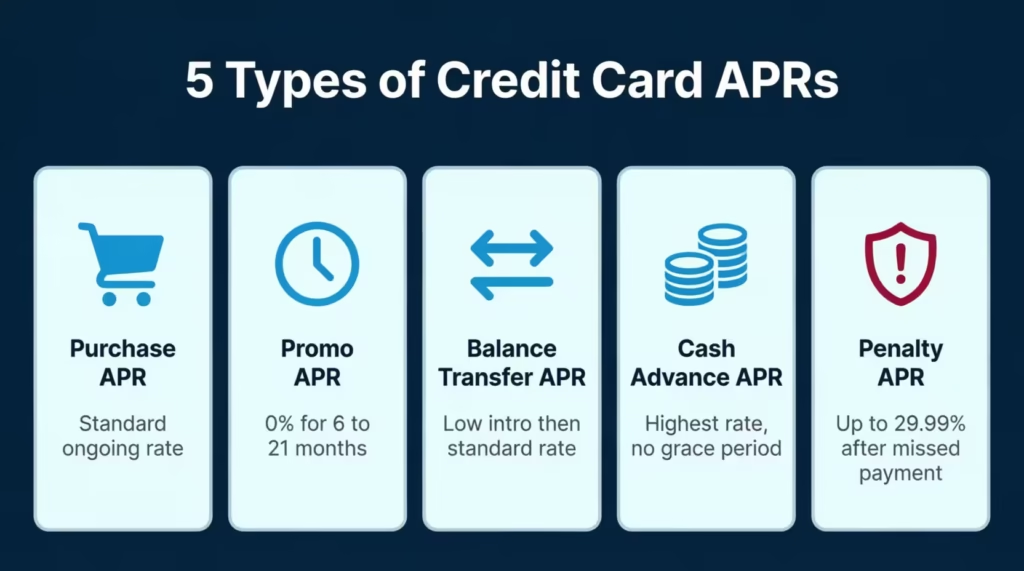
Not all credit card rates are the same type. Understanding each one helps you enter the right numbers into the calculator:
Purchase APR is the standard rate charged when you carry a purchase balance from one month to the next. This is the most common rate you’ll deal with day to day.
Introductory (Promo) APR is a temporary, reduced rate offered to new cardholders or for balance transfers. It’s usually 0% and has a duration of 6 to 21 months. After that, the regular purchase APR kicks in.
Balance Transfer APR is the rate applied to balances moved from another card. It usually starts low during a promo period, then reverts to the standard rate.
Cash Advance APR is typically the highest rate on any card. It starts accruing interest immediately, with no grace period.
Penalty APR is triggered by missed payments. It can reach 29.99% or higher and can apply to your entire existing balance, not just new charges.
Even a single misclassified rate can skew your comparison results. So knowing which APR applies to your situation is an important starting point.
How Credit Card Interest Rate Comparison Calculator Works
This tool runs a month-by-month simulation for each card you enter. It doesn’t just apply a single formula once and give you a rough estimate. It tracks your balance every month. It applies interest and manages promotional rates. It adds annual fees on time and subtracts your chosen payment.
Then it does this for every card you’ve entered and ranks them from cheapest to most expensive.
Global Settings
These settings apply across all cards you’re comparing:
- Number of Cards: Choose 2, 3, or 4 cards to compare at once.
- Currency: Select USD ($), GBP (£), or EUR (€).
- Comparison Horizon: Choose how long the simulation runs. Options range from 3 months to “Until Payoff.” The “Until Payoff” setting simulates until all cards hit a zero balance. This provides the best view for debt planning.
Per-Card Inputs
For each card, you’ll enter the following:
- Card Nickname: A label like “Chase Visa” or “Store Card” for easy result reading.
- Current Balance: What you currently owe on that card.
- Purchase APR: The regular ongoing rate that applies to your balance.
- Promotional APR and Promo Months: If your card currently has a special intro rate, enter both the rate and how many months remain.
- Balance Transfer Fee: The percentage fee and smallest dollar amount charged on transfers.
- Annual Fee: The yearly fee this card charges, plus the month it gets billed.
- Payment Strategy: Choose how you plan to pay each month (explained in the formula section below).
When you click “Calculate Comparison,” the calculator runs all simulations at once. It finds the card with the lowest total interest paid. That card is the Best Option.
The Formula Explained
The math behind this tool is built on a real financial formula used by lenders. Here’s how it works, step by step.
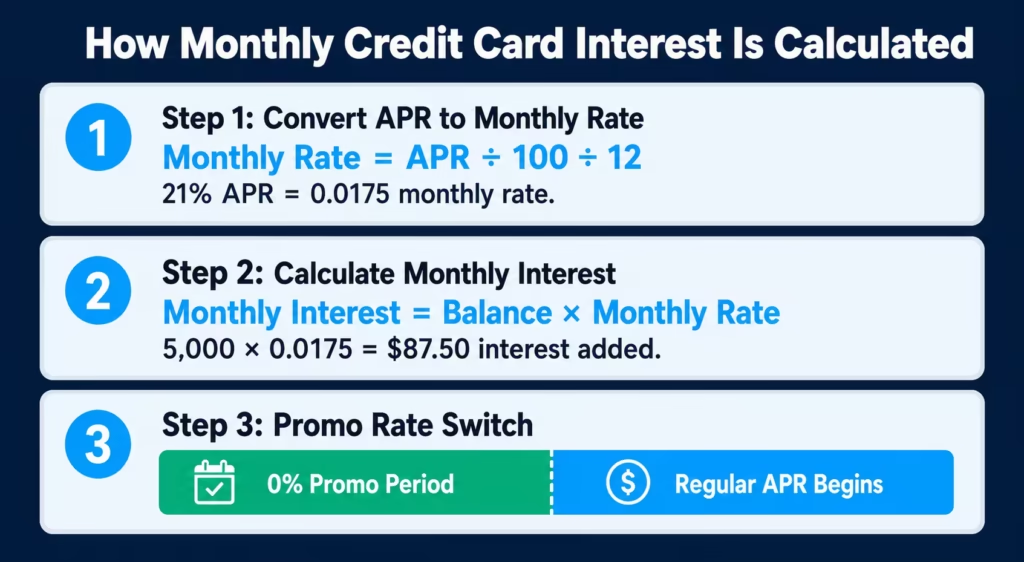
Step 1: Convert the Annual Rate to a Monthly Rate
Credit cards charge interest monthly. So the calculator first converts your annual APR:
Monthly Rate = APR ÷ 100 ÷ 12
For example, a 21% APR becomes a monthly rate of 0.0175, or 1.75%.
Step 2: Calculate Monthly Interest
Next, the calculator applies that monthly rate to your current balance:
Monthly Interest = Current Balance × Monthly Rate
Using the same example: a $5,000 balance at 21% APR results in $87.50 in interest added in the very first month. That interest is added to your balance before your payment is subtracted.
Step 3: Handle Promotional Rates
If you enter a promo APR and a number of promo months, the calculator uses the promo rate during those months. Once the promo period ends, it automatically switches to the regular purchase APR. This matters more than most people realize, because the payment gap between a 0% promo rate and a 24% regular rate can be significant.
Step 4: Add Annual Fees
Annual fees are added to your balance in the specific month you choose. Adding a $95 annual fee to your balance in month 1 is different from adding it in month 12. The calculator handles this with precision, ensuring that your total cost figure is accurate.
Step 5: Apply Your Payment Strategy
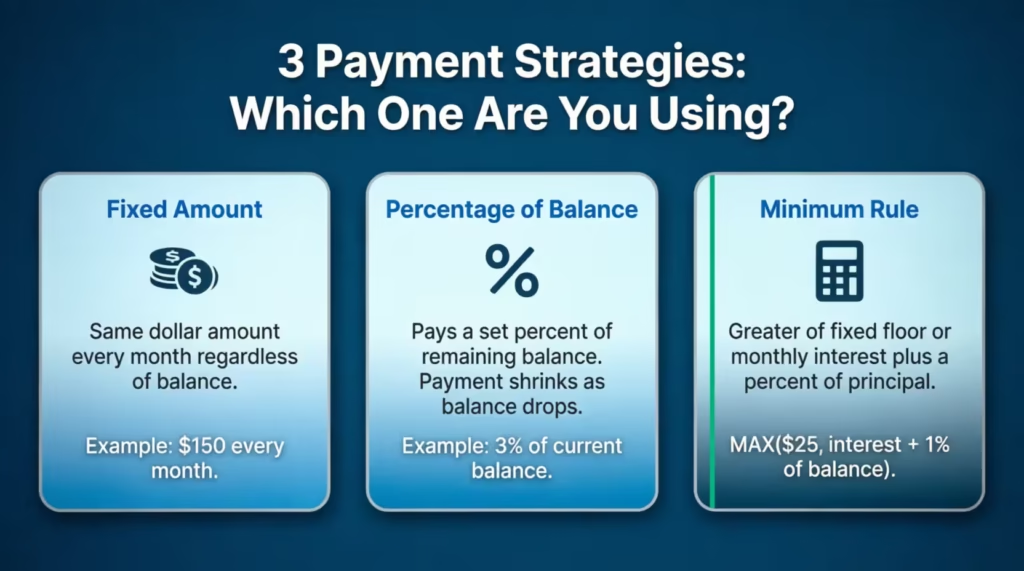
The calculator supports three payment options for each card:
| Strategy | How It Works |
|---|---|
| Fixed Amount | You pay the same dollar amount every month, no matter what the balance is. |
| Percentage of Balance | You pay a set percentage of your current balance each month. As the balance drops, so does your payment amount. |
| Minimum Rule | Your payment equals the greater of a fixed floor (such as $25) or monthly interest plus a percentage of your principal. |
The Minimum Rule formula works like this:
Payment = MAX(Fixed Minimum, Monthly Interest + (Balance Before Interest × Minimum Percentage))
This mirrors how major credit card issuers actually calculate minimum payments. It means the least payment is always at least enough to cover some principal, not just interest.
Step 6: Detect Negative Amortization
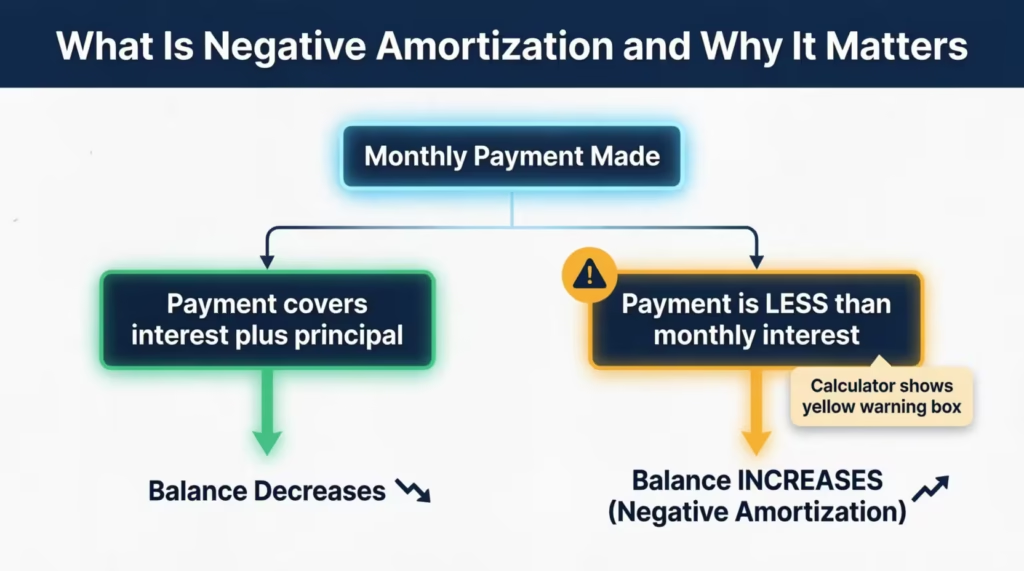
Every month, the calculator checks whether your payment covers the interest charged that month. If your payment is smaller than the monthly interest, your balance will grow instead of shrink. This is called negative amortization, and it’s a dangerous trap.
When this happens, the calculator shows a yellow warning box. It suggests the minimum payment needed to prevent your balance from rising. The recommended floor is roughly:
Recommended Payment = Monthly Interest + (Current Balance × 1%)
Final Output: Total Cost
For each card, the calculator adds everything together:
Total Cost = Original Balance + Total Interest Paid + Total Fees Paid
This is the most honest comparison number. It tells you the true price of carrying a balance on each card from start to finish.
How to Use This Calculator (Step by Step)
Follow these steps to get your comparison results:
Step 1: Choose your global settings.
At the top of the calculator, select how many cards you want to compare. Pick your currency and set your comparison horizon. If your goal is to pay off debt completely, choose “Until Payoff” for the most accurate planning results.
Step 2: Name each card.
Give each card a nickname. Use something specific like “Citi Double Cash” or “Amazon Store Card.” Clear labels make the results much easier to read, especially when comparing three or four cards.
Step 3: Enter each card’s details.
For each card, fill in your current balance, the regular purchase APR, and any promo APR with its remaining months. Then add your annual fee and the month it gets charged. If you’re not sure about your APR, check your monthly statement or log into your card’s online account.
Step 4: Choose a payment strategy for each card.
Pick how you plan to pay each month. “Fixed Amount” works well if you already know what you can afford. Try “Minimum Rule” if you want to see what happens when you only pay the minimum. The results are often eye-opening and can motivate you to pay more.
Step 5: Click “Calculate Comparison.” The button simulates all your cards at once. Results appear below the input section, sorted from the lowest to the highest total interest paid.
Step 6: Review, compare, and save.
Read through each card’s detailed breakdown. Look at the bar chart to compare total interest visually, and use the line chart to see how each card’s balance drops over time. When you’re ready, click “Download Results as PDF” to save a copy for your records.
💡 Pro Tip: Run the calculator twice for each card. First, use your current monthly payment. Then bump it up by $50 and run it again. The difference in total interest paid and payoff time can be huge. Seeing that number clearly can encourage a larger payment.
How to Read Your Results
Once the calculator runs, here’s what each piece of output means:
Summary Banner (Green Box)
This appears at the top of the results section. It names the winning card, which is the one with the lowest total interest paid across your comparison horizon. It also shows the dollar amount you save compared to the next-best card.
For example: “Best Option: Cash Back Card — You save $412 vs. Store Card.”
Per-Card Breakdown
Each card gets its own results panel. Here’s what each metric tells you:
Total Interest Paid is the full amount of interest charged across the entire comparison period for that card. This is the number to pay the most attention to when choosing your payoff priority.
Total Fees Paid shows all annual fees added during the simulation. A card with a $95 annual fee charged three times during a 36-month payoff adds $285 in real cost that doesn’t appear in the APR at all.
Total Cost is the big-picture number: your original balance plus all interest plus all fees. This is the true cost of carrying that card to payoff.
Months to Payoff tells you how long until that card reaches a zero balance at your chosen payment level. A card that takes 12 more months to pay off than another card is 12 more months of interest and financial pressure.
Ending Balance (if you chose a fixed time horizon) shows what balance remains at the end of that period. This is useful for short-term cash flow planning, such as deciding how much to divide each month.
The card with the lowest total interest is highlighted in green and labeled “Best Option.”
Visual Charts
Two charts give you an instant visual picture of your comparison:
Bar Chart (Total Interest Paid): Each bar represents one card. The taller the bar, the more interest you’ll pay. A quick glance tells you which card is the biggest drain.
Balance Over Time Line Chart: This shows each card’s balance month by month. A steeper downward slope means faster payoff. If a line curves slowly or flattens, that card may have a low payment relative to its interest charges.
Negative Amortization Warning (Yellow Box)
If the warning box appears, treat it as a serious matter. It means your payment on at least one card is not covering the monthly interest. The tool will name the specific card and suggest a payment amount high enough to start making real progress.
Real-World Example
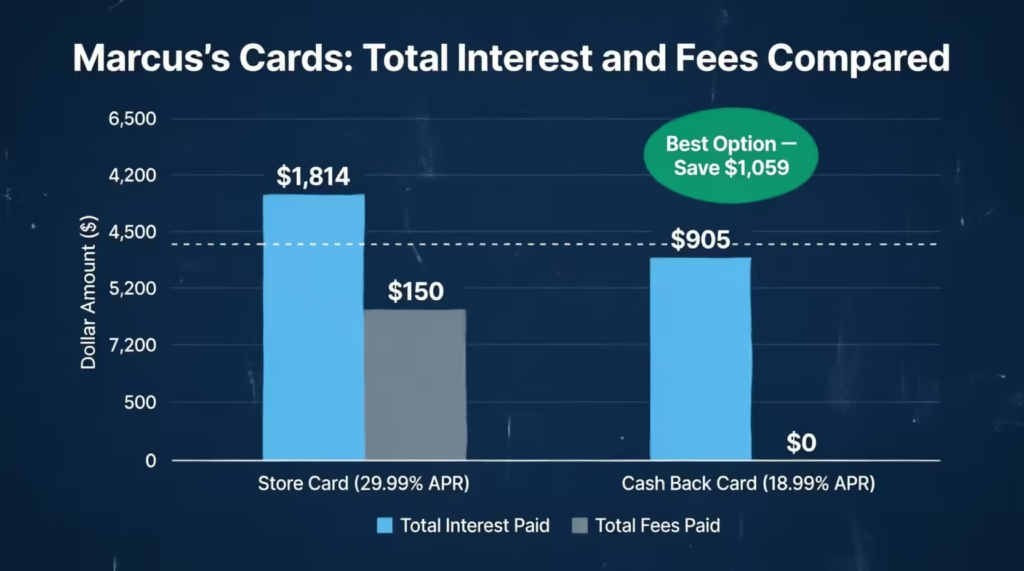
Meet Marcus, a 34-year-old teacher from Austin, Texas. He has two credit cards. Both cards have a $4,000 balance and require a $150 monthly payment.
Card A (Store Card): $4,000 balance, 29.99% APR, $50 annual fee, $150/month fixed payment
Card B (Cash Back Card): $4,000 balance, 18.99% APR, no annual fee, $150/month fixed payment
He enters both cards into the calculator with the “Until Payoff” horizon and clicks “Calculate Comparison.”
Results:
| Card A (Store Card) | Card B (Cash Back Card) | |
|---|---|---|
| Total Interest Paid | $1,814 | $905 |
| Total Fees Paid | $150 | $0 |
| Total Cost | $5,964 | $4,905 |
| Months to Payoff | 36 | 31 |
Card B is cheaper by $1,059 in total cost, even though both cards start with the same balance and receive the same monthly payment. The APR difference (29.99% vs. 18.99%) and the annual fee on the Card A account for the entire gap.
The bar chart makes this obvious at a glance: Card A’s bar is nearly double the height of Card B’s.
Marcus decides to put every extra dollar toward Card A. He increases his Card A payment to $225/month and drops Card B to $75/month. He runs the calculator again. The total cost gap narrows significantly, and the payoff timelines become much closer together. He can now see the exact dollar value of shifting $75 per month from one card to the other.
Expert Tips and Insights
1. Use “Until Payoff” for Debt Planning
Short horizons (3, 6, or 12 months) help budget month to month. But if your goal is to get completely out of debt, use “Until Payoff” as your comparison horizon. It gives you the full picture of what each card will actually cost from today until the balance reaches zero.
2. Test the Impact of Promo Rate Expiration
If you have a balance at a 0% introductory APR, enter the remaining promo months. Then, see what happens when the promo period ends. Many people are caught off guard by how fast interest charges spike once the regular rate kicks in. Seeing that moment in the simulation often motivates a faster payoff plan during the promo window.
3. Apply the Debt Avalanche Method
The debt avalanche strategy involves paying the minimum on all cards except the one with the highest total cost. Then, you focus all extra money on that card. This calculator finds the avalanche target card. It does this by sorting cards from the lowest to highest total interest paid. The card at the bottom of that list is your priority.
4. Don’t Overlook the Annual Fee Month Setting
The calculator lets you specify which month the annual fee gets charged. This is more important than it sounds. A $95 annual fee added in month 2 of a 24-month comparison is counted twice. Added in month 13, it’s counted once. Always enter the correct month to get a fair total cost figure.
⚠️ Mistake to Avoid: Don’t assume the card with the lowest APR is always the cheapest option. A card with a $95 annual fee and a 17% APR can end up costing more than a card with a 19% APR and no annual fee. This is especially true for smaller balances and shorter payoff periods. Always compare total cost, not just the APR percentage.
5. Ask Your Card Issuer for a Lower Rate
A June 2025 LendingTree survey found that 83% of cardholders who asked their issuer to lower their APR were successful. Before making your next payment, call the number on the back of your card and ask for a rate reduction. Even a 2% to 3% drop makes a meaningful difference over a payoff period of 12 to 36 months. Use this calculator to quantify exactly how much that rate drop is worth.
Common Mistakes to Avoid
Mistake #1: Only Making Minimum Payments
Minimum payments are designed to keep you in debt longer, not to help you get out of it quickly. With a $5,000 balance at 21% APR, paying only the minimum each month means you’ll take years to pay it off. Plus, you’ll end up paying thousands more in interest. Select the “Minimum Rule” option in the calculator to see this in action, and then try increasing your payment to see how fast the numbers improve.
Mistake #2: Ignoring the Promo Expiration Date
A 0% promotional APR feels great until it ends. If you don’t pay off the transferred balance before the promo ends, you’ll start owing interest at the full purchase APR. This can be 24% or even higher. Enter the correct number of promo months in the calculator so you can see exactly what happens when the clock runs out.
Mistake #3: Leaving the Annual Fee Out of Your Comparison
Annual fees add a real cost that your APR doesn’t capture. A card charging $95 per year is meaningfully more expensive than its interest rate suggests. The calculator adds the annual fee to your balance in the correct month, making sure it appears in your total cost figure. Never compare cards without accounting for this.
Mistake #4: Comparing APRs Without Matching Payment Strategies
Two people with the same APR can end up paying very different amounts in interest if their payment strategies differ. A fixed $300/month payment pays off a balance much faster than 2% of the balance per month. Always run the comparison with the specific payment strategy you actually plan to use. Otherwise, the results don’t reflect reality.
Mistake #5: Dismissing the Negative Amortization Warning
If the calculator shows a yellow warning box for any card, that’s not a suggestion to pay a little more. It means your balance is growing, not shrinking, every single month. A balance that keeps rising eventually becomes very difficult to manage. Take the recommended payment seriously and adjust your strategy immediately.
FAQs
What does APR mean on a credit card?
APR stands for Annual Percentage Rate. It’s the yearly interest rate charged on any balance you carry from one month to the next. A higher APR means more interest added to your balance each billing cycle.
How is credit card interest calculated each month?
Your monthly interest charge equals your current balance multiplied by your APR divided by 12. For example, a $3,000 balance at 21% APR results in $52.50 in interest added in that month alone.
What is considered a good credit card APR in 2026?
The Federal Reserve reported an average APR of 20.97% for all credit card accounts in Q4 2025. Any rate below 18% is competitive for most borrowers, while rates below 15% are generally considered excellent.
What is a promotional APR, and how does it affect my payoff?
A promo APR is a temporary, reduced rate (often 0%) available for a set number of months. During that period, all your payments go toward reducing principal. After it expires, the regular purchase APR kicks in. Interest charges then start to add up quickly on any remaining balance.
What does negative amortization mean for a credit card?
Negative amortization means your monthly payment is smaller than the interest charged that billing cycle. Your balance goes up instead of down. It’s a warning sign that your payment needs to increase before the debt becomes harder to manage.
Can each card in the calculator have a different payment strategy?
Yes. Each card has its own payment strategy setting. You can set Card A to a fixed payment amount and Card B to the minimum rule at the same time. The calculator processes each card in its month-by-month simulation, treating each as an individual case.
How does the debt avalanche method work with this tool?
The debt avalanche method means you pay the minimum on all cards. Then, put any extra money toward the card with the highest APR. This calculator ranks cards by total interest paid, from lowest to highest. It helps you find the best card to target using the avalanche approach.
What is the difference between total interest paid and total cost?
Total interest paid is just the interest part. Total cost adds the original balance, all interest, plus any fees. Always use total cost when comparing cards, because annual fees can shift the ranking significantly.
Does a balance transfer fee change which card is the cheapest?
Yes. Balance transfer fees are an initial cost. They can reduce the interest savings you get from a lower APR. The calculator includes balance transfer fee fields so you can factor this into your total cost comparison.
How accurate are the calculator’s results for real debt planning?
The results are estimates based on the information you enter. Real balances can change due to new purchases, rate adjustments, or varying payments. Use the results as a strategic planning guide instead of a guaranteed payoff schedule. Revisit the calculator when your situation changes.
Bottom Line
Understanding which card is actually costing you the most is one of the most valuable financial moves you can make. We explained how APRs work and how the monthly simulation runs. Each result was clarified. We also talked about strategies, like the debt avalanche method and planning for promotional rates.
The negative amortization warning is the tool’s most important feature. It serves as a reality check that making monthly payments does not always reduce your balance.
If this guide helped you, share it with a friend or family member working through their own credit card debt. A small shift in strategy can add up to serious savings over time.