
Juggling three or four credit cards? You’re not alone. Experian reports that the average American uses 3.7 active credit cards. That’s a lot of card numbers, due dates, and credit limits to keep track of. A credit card information template helps you record every card detail in one neat place.
It’s a simple form where you log your card numbers, payment dates, credit limits, and issuer contacts.
Below, you’ll find free templates in six formats, plus a step-by-step guide on how to fill them out and keep your data safe. Let’s get started.
Download Your Free Credit Card Information Templates
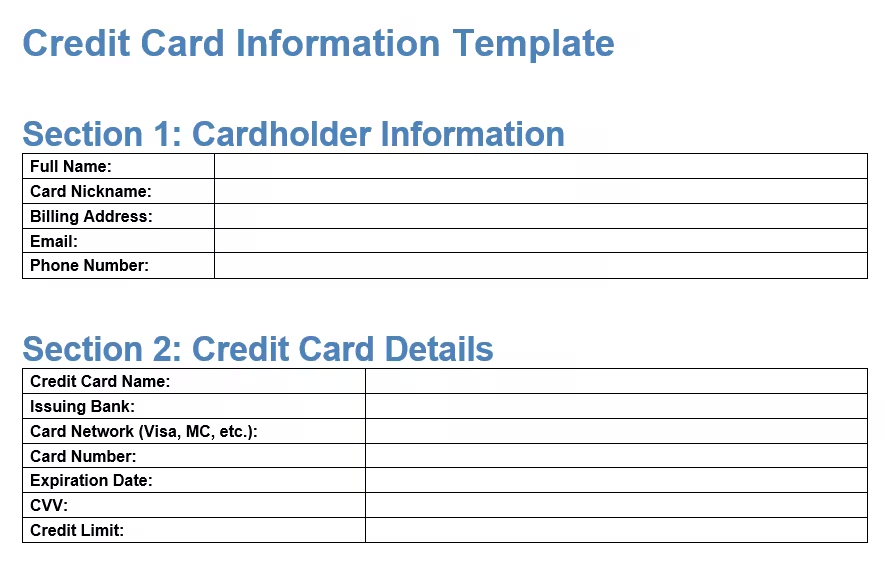
Six ready-to-use templates are available to make your life easier. Each one has all the sections you need to record your card details, payment dates, and security notes.
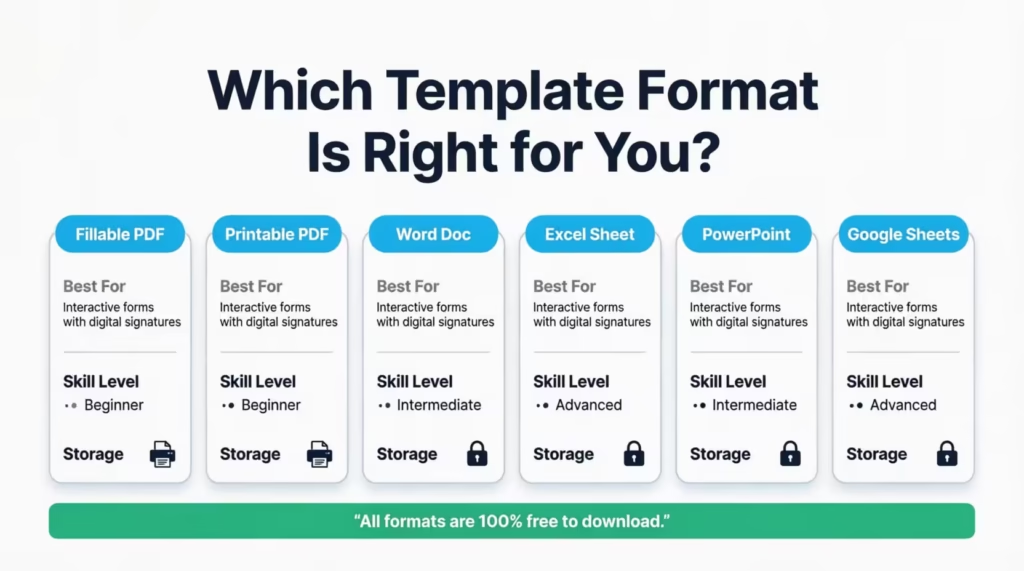
Pick the format and paper size that works best for you:
Disclaimer: The Templates & Printables on this site are provided for informational and personal tracking purposes only. This is not financial, legal, tax, or credit advice. While reasonable efforts are made to ensure accuracy, Credit Card Wind makes no warranties as to the completeness, reliability, or accuracy of the calculations generated by these Templates & Printables. Users are responsible for independently verifying all data and calculations. Terms, conditions, rates, regulations, and legal requirements vary by institution, jurisdiction, and individual circumstances.
Always refer to your official statements, account agreements, and applicable laws, and consult a qualified professional before making any financial, legal, or other important decisions. By using these Templates & Printables, you acknowledge that Credit Card Wind and its owner shall not be liable for any damages, losses, or financial consequences arising from the use or misuse of these Templates & Printables.
This universal disclaimer applies to all templates and printables provided by Credit Card Wind (https://creditcardwind.com), created by Robert Williams (Owner at Credit Card Wind).
© Credit Card Wind. All rights reserved.
These templates and printables may be downloaded and used for personal, non-commercial purposes only. Redistribution, resale, or modification for commercial use without permission is strictly prohibited.
What Is a Credit Card Information Template?
A credit card info sheet is a structured form that holds all the key details about your credit cards in one spot. Think of it as a personal reference page for every card in your wallet.
Experian data shows that the average American carries 3.7 active cards. With that many cards, it’s easy to forget a payment date or mix up a customer service number. A card details form solves that problem.
Each template includes four main sections:
- Cardholder Information – Your name, billing address, email, and phone number
- Credit Card Details – Card name, issuing bank, card network, card number, expiration date, CVV, and credit limit
- Account and Payment Info – Statement closing date, payment due date, minimum payment, customer service phone, and issuer website
- Security and Notes – A security reminder, space for notes, and a “last updated” date field
The goal is simple. When you need a card detail fast, you open one form instead of digging through a pile of statements or logging into five different banking apps.
💡 Pro Tip: Print one template per card. That way, each card gets its own dedicated page, and you won’t accidentally mix up details between accounts.
How to Use the Credit Card Information Template
This section walks you through each section of the template, field by field. Grab one of the downloaded templates and follow along.
Step 1: Enter Your Cardholder Information
Start at the top. Fill in these five fields:
- Full Name – Write your legal name exactly as it appears on the card. This matters if you ever need to dispute a charge or verify your identity.
- Card Nickname – Give each card a short name you’ll remember. For example, “Chase Freedom” or “Amex Blue.” This is helpful when you have several cards and need to tell them apart quickly.
- Billing Address – Enter the address linked to the card. This is the address your issuer has on file. It must match what’s in their system, or online purchases may get declined.
- Email Address – Add the email tied to your card account. This is where your issuer sends statements, alerts, and fraud notifications.
- Phone Number – Write down the phone number on your account. The issuer may call this number to verify transactions.
Step 2: Record Your Credit Card Details
This section captures the core data printed on your card:
- Credit Card Name – The official product name, like “Capital One Quicksilver” or “Citi Double Cash.”
- Issuing Bank – The bank or company that issued the card. For example, Chase, Bank of America, or American Express.
- Card Network – Is it Visa, Mastercard, American Express, or Discover? Write it here.
- Card Number – The full 15- or 16-digit number on the front of your card. The template splits this into four boxes for easy reading.
- Expiration Date – The month and year your card expires. Format it as MM/YY.
- CVV – The 3-digit security code on the back of your card (or 4 digits on the front for Amex cards).
- Credit Limit – The largest amount your issuer allows you to charge. Knowing this helps you track your credit utilization.
Tip: → Logging your card details? The credit card expiration date calculator helps you stay ahead of renewals.
Step 3: Fill In Account and Payment Info
This section keeps your billing cycle details organized:
- Statement Closing Date – The date your issuer closes your billing cycle each month. Charges after this date roll into the next statement.
- Payment Due Date – The deadline to pay at least the minimum amount. Missing this date can trigger late fees and hurt your credit score.
- Minimum Payment – The smallest amount you can pay to keep the account in good standing. This changes each month, so update it at the beginning of each month.
- Customer Service Phone Number – The number on the back of your card. Write it here so you can find it fast if your card is lost or stolen.
- Issuer Website – The URL where you log in to manage your account, check your balance, and view statements.
Step 4: Add Security Notes and the Last Updated Date
The final section is all about safety and reminders:
- Security Warning – The template includes a built-in reminder: “Do not share your credit card information with anyone. This template is for personal use only.” Leave this in place as a constant prompt.
- Notes and Remarks – Use this space for anything extra. For example, you might note that a card earns 3% cash back on dining. Or that you set up autopay for the small amount on the 15th. Some people also note the annual fee due date here.
- Last Updated Date – Write today’s date every time you update the form. This tells you at a glance if the info is current or needs a refresh.
Fill out one template for each card you own. Store them together in a single folder, binder, or secure digital file.
How Often Should You Review Your Template?
Do not fill it out once and forget about it. Regular check-ins are necessary.
Monthly Review
Every month, update the following:
- Current balances
- Recent payments made
- Any new charges over a certain amount
- Changes to due dates
This takes approximately 10 minutes but keeps all information accurate.
Quarterly Deep Check
Every three months, perform a deeper review:
- Confirm all account details are still correct
- Check if credit limits have changed
- Review reward balances
- Look for cards that have not been used in a while
- Consider closing cards with high fees and low value
Annual Full Audit
Once a year, review everything:
- Compare the form to actual statements to catch any errors
- Update customer service numbers
- Review security measures
- Check if needs have changed (different cards may be needed now)
- Calculate the total annual fees being paid
- Assess whether the rewards strategy is still working
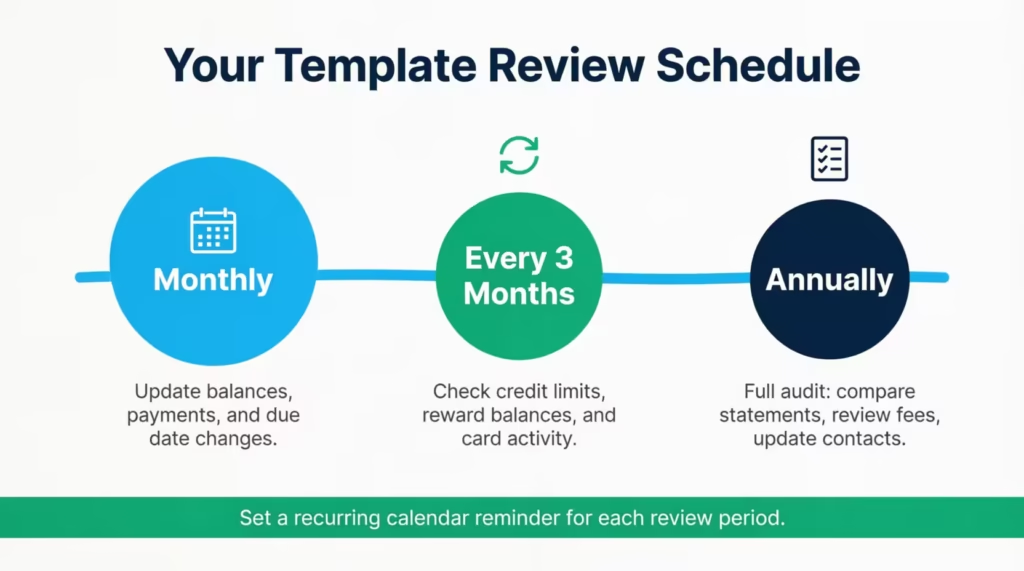
Action Step
Set a recurring calendar reminder for each of these review periods.
How This Template Helps Your Credit Score
Managing cards better leads to a higher credit score. The tracking form helps in the following ways.
On-Time Payments
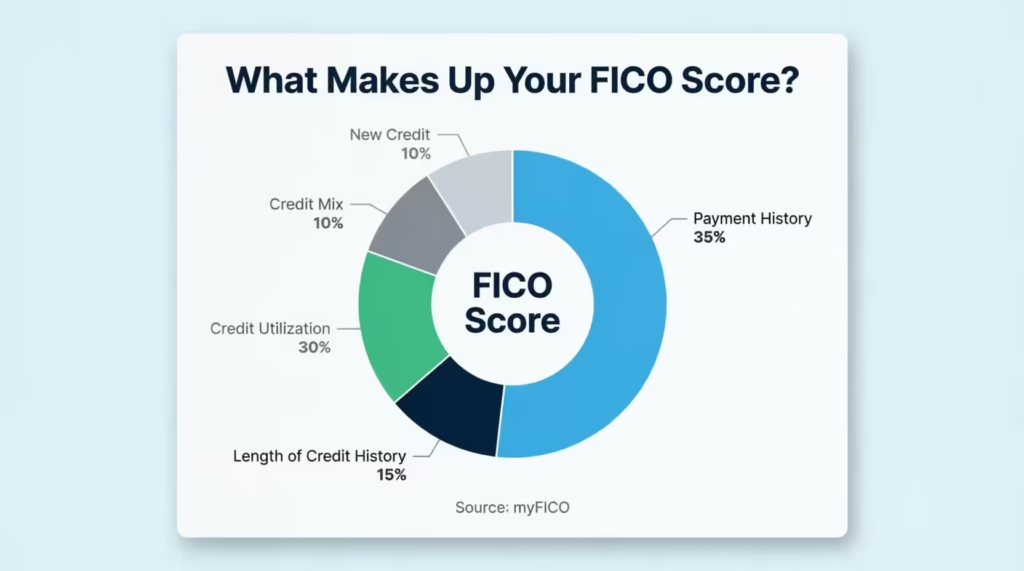
Payment history is the single largest factor in a FICO score. According to myFICO, the consumer division of Fair Isaac Corporation, it accounts for 35% of how scores are calculated — more than any other factor. When all due dates are tracked in one place, it’s less likely a payment will be missed.
Setting phone reminders 3 days before each due date works well. Many people haven’t missed a payment in years using this method.
Credit Utilization
This factor represents 30% of a credit score. It is the ratio of balance to credit limit. The Consumer Financial Protection Bureau advises keeping credit use at no more than 30 percent of the total credit limit to maintain a healthy score.
The tracking tool presents both numbers with clarity. For example:
- Card A: $500 balance / $2,000 limit = 25% utilization
- Card B: $1,800 balance / $2,000 limit = 90% utilization
When a card exceeds 30% utilization, it is time to pay down the balance quickly.
Length of Credit History
This factor represents 15% of a credit score. Keeping old cards open (even if they are not used heavily) helps average account age.
The form reminds users which cards they have held the longest. These should not be closed unless a strong reason exists.
Credit Mix
Having different types of credit (credit cards, loans, mortgages) helps a credit score. The tracking tool shows what cards an individual has. If all cards are from one bank, consider diversifying.
What Credit Card Details Should You Keep on File?
Not sure what’s worth recording? Here’s a quick look at the most useful card details to track, and why each one matters.
Personal and Contact Info
Your full name, billing address, and phone number link back to your identity. If your card is stolen, the issuer will verify these details. Having them written down speeds up the process.
Card Number, Network, and Issuing Bank
The card number is the most obvious detail to log. But don’t stop there. Write down the card network (Visa, Mastercard, etc.) and the issuing bank too. Why? Because if you need to report fraud, the bank’s fraud department needs to know which product you’re calling about.
Billing Cycle and Payment Dates
The statement closing date and payment due date control your billing cycle. Tracking them helps you:
- Avoid late payments (and the fees that come with them)
- Time large purchases so they hit the right statement
- Keep your credit utilization low by paying before the closing date
Credit Limit and Minimum Payment
Your credit limit tells you how much room you have left. The smallest payment tells you the smallest amount due each month. Together, these two numbers help you plan your monthly budget and protect your credit score.
Customer Service and Issuer Website
If your card is lost, stolen, or shows a strange charge, you need the customer service number fast. Don’t waste time searching for it online. Log it in your template so it’s always one glance away.
Why Every Cardholder Needs a Card Details Organizer
Still wondering if this is worth the effort? Here are five strong reasons to start tracking your card data today.
1. Fast Access in an Emergency
A lost wallet is stressful enough. With a card reference sheet, you can call each issuer within minutes to freeze your accounts. Without one, you’re scrambling to find numbers while the clock ticks.
2. Spot Fraud Faster
FTC data reveals that consumers reported losing more than $12.5 billion to fraud in 2024, a 25% jump from the year before. Credit card fraud remains the most common type of identity theft, with over 449,000 cases reported to the FTC that same year.
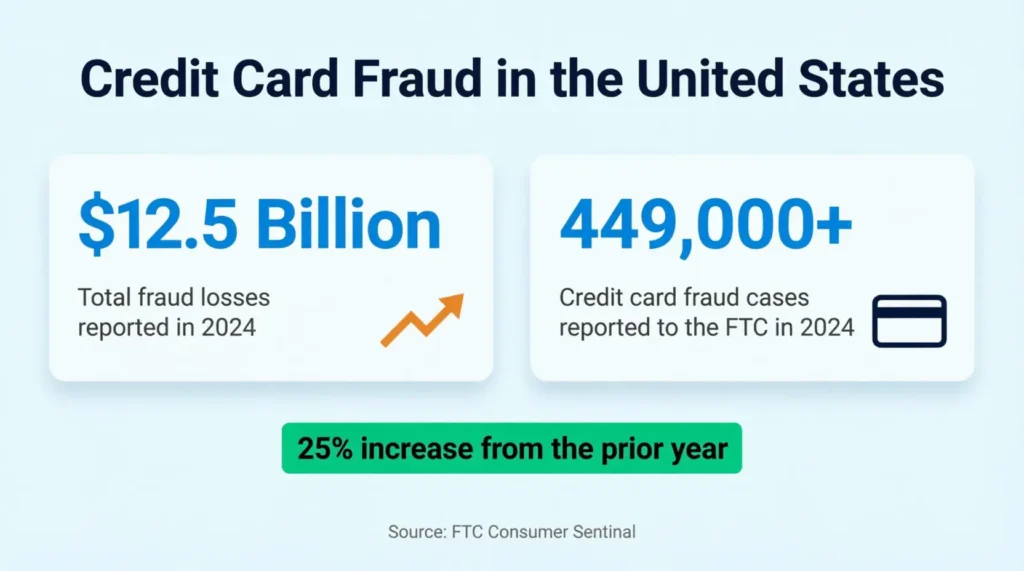
When all your card details sit in one place, it’s easier to cross-check statements and catch charges that don’t belong.
3. Never Miss a Payment
Late payments can drop a credit score by 100 points or more. A card details tracker with payment due dates acts like a backup alarm. Even if you use autopay, having a written record helps you double-check that every bill is covered.
4. Manage Multiple Cards with Ease
Jennifer, a marketing manager in Austin, carried five credit cards for different rewards categories. She missed a $39 annual fee on a card she rarely used because she forgot it existed. A simple card info log would have flagged that charge before it slipped through.
5. Simplify Tax Time and Expense Tracking
Some cards are used only for business expenses or specific categories like travel. A record form helps sort which card handled which acquisition. That’s one less headache during tax season.
📌 Did You Know: Credit card fraud is the single most reported category of identity theft in the United States, according to FTC Consumer Sentinel data. Keeping organized records can help you detect unauthorized activity early.
How to Keep Your Credit Card Records Safe
Recording your card details is only smart if you protect the records themselves. Here are clear steps to lock down your data.
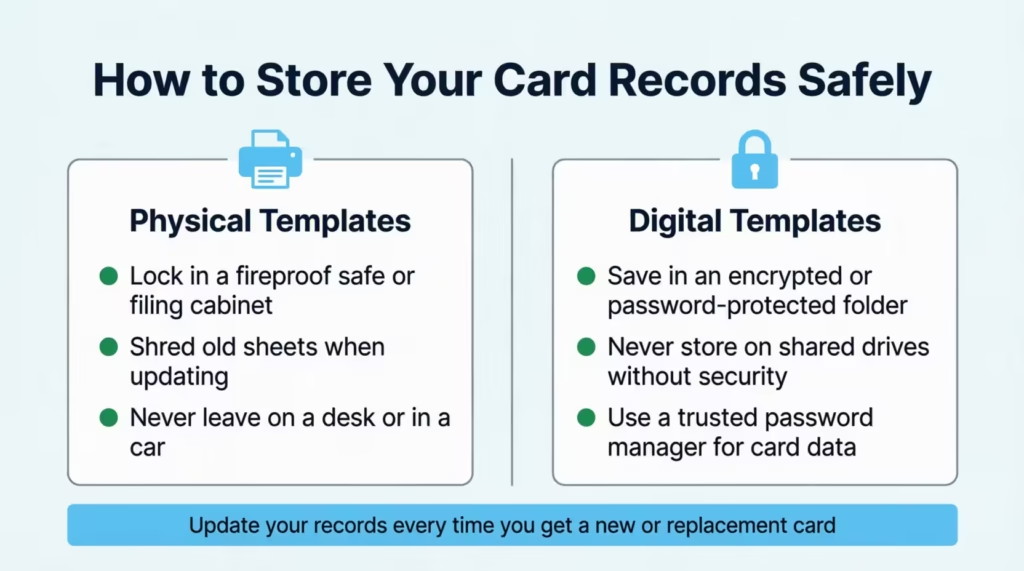
For Physical (Printed) Templates:
- Store printed sheets in a locked drawer, filing cabinet, or fireproof safe
- Never leave filled-out templates on a desk, in a car, or in an unlocked bag
- Shred old templates when you update them. Don’t just toss them in the trash
For Digital Templates (Word, Excel, PDF):
- Save the file in an encrypted folder or a password-protected ZIP file
- Use a strong, unique password that mixes uppercase letters, lowercase letters, numbers, and symbols
- Don’t store the file on a shared computer or a public cloud folder without encryption
- The PCI Security Standards Council recommends that sensitive cardholder data always be stored with strong encryption, and this principle applies to personal records, too
General Safety Tips:
- Never email a filled-out card info sheet to yourself or anyone else. Email is not encrypted by default.
- Don’t take a photo of the completed template and leave it in your camera roll. Anyone who picks up your phone could see it.
- Consider using a reputable password manager to store digital copies. Tools like 1Password, Bitwarden, or Dashlane offer encrypted vaults built for sensitive data.
- Update your records every time you get a new card, a replacement card, or a changed credit limit.
⚠️ Mistake to Avoid: Storing a completed card details sheet in a regular Google Drive or Dropbox folder without a password gives anyone with access to your account a full view of your card numbers, CVVs, and billing info.
Digital vs. Paper: Which Template Format Should You Choose?
Both options have pros and cons. Which format is best for each situation is explained below.
Excel Spreadsheet Template
Best for: People who manage many cards and like to analyze their data
Pros:
- Easy to update and edit
- Can add formulas to track spending
- Sortable by due date, balance, or credit limit
- Can add extra columns for custom tracking
- Backup copies are simple to create
Cons:
- Requires password protection and encryption
- Risk if the computer gets hacked or stolen
- Requires basic Excel skills
Recommended if: The user is comfortable with computers and wants flexibility.
Word Document Template
Best for: People who want a simple digital format
Pros:
- Easy to fill out and read
- Works on almost any computer or phone
- Simple to password-protect
- Clear formatting
Cons:
- Not as flexible as Excel
- Cannot easily sort or calculate
- Takes more work to reorganize
Recommended if: Someone has just 2-3 cards and wants a straightforward option.
Fillable PDF Template
Best for: People who want a digital file that feels like a paper form
Pros:
- Type directly into the form
- Looks professional and organized
- Can save various versions
- Works on phones, tablets, and computers
- Easy to print if needed
Cons:
- Less flexible than Word or Excel
- Some PDF readers do not save fillable data well
Recommended if: Someone likes the structure of a paper form but wants to type instead of handwrite.
Printable PDF Template
Best for: People who prefer writing by hand or do not trust digital storage
Pros:
- No hacking risk
- Easy to lock in a safe
- Works even when power or the internet is unavailable
- Simple for anyone to use
- No technical skills needed
Cons:
- Harder to update (requires rewriting or reprinting)
- Can get lost or damaged
- Takes up physical space
- Risk if another person finds it
Recommended if: Someone is not comfortable storing sensitive details digitally or wants a backup copy.
Common Mistakes to Avoid When Recording Card Information
Even with a great template in hand, small errors can cause big problems. Watch out for these common slip-ups.
1. Copying the Card Number Wrong
One mistyped digit makes the entire number useless. Always double-check each group of four digits against the physical card or your issuer’s app. Read the number out loud as you type or write it. That simple step catches most errors.
2. Forgetting to Update After a Card Renewal
When your card expires and the issuer sends a new one, the card number often stays the same. But the expiration date and CVV change. If you don’t update the template, you’ll have outdated security codes that won’t work for online purchases.
3. Logging the CVV in a Visible Spot
The CVV is the most sensitive number on your card. Don’t write it on a sticky note or save it in a plain text file on your desktop. It belongs inside your secure, encrypted card record, and nowhere else.
4. Skipping the “Last Updated” Date
David, an IT consultant in Chicago, kept a card info spreadsheet for two years without updating it. When his wallet was stolen, half the phone numbers and expiration dates were wrong. A quick “last updated” check every three months would have kept everything current.
5. Storing All Cards on One Unprotected Sheet
If one unprotected sheet is lost or hacked, every card is exposed at once. Either encrypt the document, split sensitive details across separate files, or use a password manager instead.
6. Including Extra Sensitive Data That Doesn’t Belong
A card info sheet should not include your Social Security number, banking PINs, or online banking passwords. Keep those details in a separate, secure location. Mixing them in creates a single point of failure for your entire financial identity.
💡 Pro Tip: Set a calendar reminder for every 90 days to review and update your card info sheets. Three months is long enough for details to change, but short enough to catch problems early.
Frequently Asked Questions
Is it safe to write down credit card information on paper?
Yes, as long as the paper is stored in a locked and secure place like a safe or locked cabinet. Never leave it out in the open or in an unlocked drawer.
What credit card information should I keep on file?
Keep the card number, expiration date, CVV, credit limit, payment due date, issuer phone number, and your billing address. These cover the most common situations where you’ll need card details fast.
Can someone use my credit card with just the card number?
In most cases, online purchases also require the expiration date and CVV. But a stolen card number still poses a risk, so store it securely and track your statements for unauthorized charges.
How often should I update my credit card info sheet?
Review it every 90 days or whenever you receive a new card, a replacement card, or a credit limit change. Always update the “Last Updated” date field so you know the records are current.
Should I store my credit card details on my phone?
Only if the file is inside an encrypted app or a password manager. Storing card numbers in your phone’s notes or camera roll is risky. If someone gets access to your phone, they can easily see them.
Do I need a separate template for each credit card?
Yes. Using one template per card keeps details clean and easy to read. It also limits the damage if one sheet is lost or exposed, since only one card’s information is at risk.
What is the CVV, and why is it on the template?
The CVV (Card Verification Value) is the 3- or 4-digit code on your card used to verify online and phone purchases. It’s included on the template, so you have it on hand without needing the physical card.
How do I protect a digital credit card information file?
Save it in an encrypted folder or a password-protected ZIP file. Avoid storing it on shared drives or in cloud folders without extra security. A password manager with an encrypted vault is the safest option.
Bottom Line
Keeping your card details organized doesn’t take much time, but it saves a lot of stress. You now have six free templates to choose from. There’s a step-by-step guide to help you fill them out. Additionally, you’ll find clear tips to ensure your records remain safe.
Based on the rising rates of card fraud and the average American holding nearly four cards, the most effective approach is to fill out one template per card and store them in a secure, encrypted location. Review the records every 90 days to catch outdated details.
If you know someone juggling many credit cards without a system, share this page. A simple card details tracker could save them from a missed payment or a slow fraud response.