
Collecting card payments without the right tools creates real problems. Missed fields and incomplete billing details cause failed transactions.
Credit cards now account for 35% of all US consumer payments, based on the Federal Reserve’s 2025 Diary of Consumer Payment Choice. For businesses collecting payments manually, a solid credit card checkout form template keeps every transaction organized and prevents costly errors.
A ready-made billing and payment form puts all required fields in one printable layout, so nothing gets missed.
Below, you’ll find three free templates to download, a step-by-step how-to guide, and practical tips to keep your customers’ card data safe.
Download Your Free Credit Card Checkout Form Templates
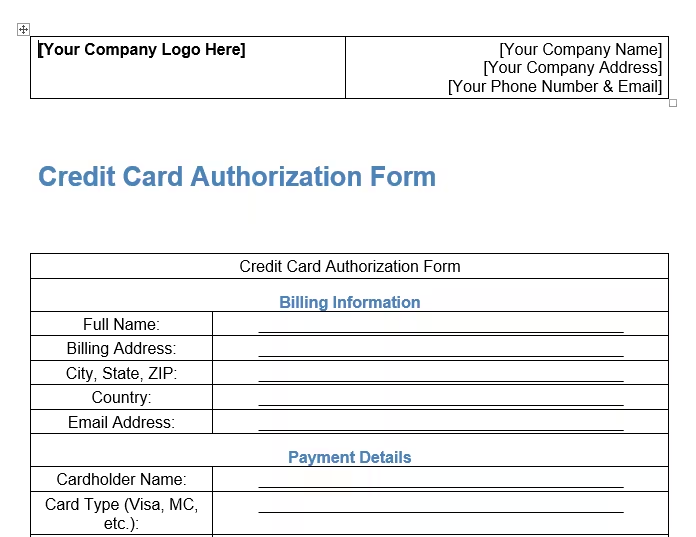
Three ready-to-use templates are available to make your life easier. Each one contains all the sections you need to collect payment information correctly.
Pick the format and paper size that works best for you:
- Download US Letter PDF Template: Perfect for standard 8.5″ x 11″ printing in the US
- Download A4 PDF Template: Ideal for international use or A4-sized paper
- Download A4 Word Template: Edit directly in Microsoft Word (A4 size)
Disclaimer: The Templates & Printables on this site are provided for informational and personal tracking purposes only. This is not financial, legal, tax, or credit advice. While reasonable efforts are made to ensure accuracy, Credit Card Wind makes no warranties as to the completeness, reliability, or accuracy of the calculations generated by these Templates & Printables. Users are responsible for independently verifying all data and calculations. Terms, conditions, rates, regulations, and legal requirements vary by institution, jurisdiction, and individual circumstances.
Always refer to your official statements, account agreements, and applicable laws, and consult a qualified professional before making any financial, legal, or other important decisions. By using these Templates & Printables, you acknowledge that Credit Card Wind and its owner shall not be liable for any damages, losses, or financial consequences arising from the use or misuse of these Templates & Printables.
This universal disclaimer applies to all templates and printables provided by Credit Card Wind (https://creditcardwind.com), created by Robert Williams (Owner at Credit Card Wind).
© Credit Card Wind. All rights reserved.
These templates and printables may be downloaded and used for personal, non-commercial purposes only. Redistribution, resale, or modification for commercial use without permission is strictly prohibited.
What Is a Credit Card Checkout Form?
A credit card checkout form is a physical document that businesses use to collect payment details from customers at the time of purchase. Think of it as a printed version of an online checkout page.
Instead of typing card details into a website, the customer writes them on a structured paper form. The business uses those details to process the transaction. This happens through a payment processor or a virtual terminal.
These forms have been a reliable part of business operations for decades. They’re especially useful when digital tools aren’t available or simply aren’t practical. Trade fairs, pop-up markets, phone-based orders, and remote service locations all benefit from having a dependable paper option ready.
Data from the Federal Reserve’s 2025 Diary of Consumer Payment Choice shows credit cards accounted for 35% of all US consumer payments in 2024, up from 32% the year before. As card payments keep growing, having a reliable way to capture payment data offline matters more than ever for small businesses.
A well-structured form also creates a paper trail. When a customer disputes a charge, the completed form shows what was approved. That kind of record can protect your business during a chargeback review or billing dispute.
Tip: → Planning to add a card surcharge at checkout? The credit card surcharge calculator makes sure you charge the correct amount.
What Should a Credit Card Checkout Form Include?
Not all payment forms are built the same. A professional card payment order form needs four key sections. If any are missing, you risk collecting incomplete data, hitting processing errors, or losing a sale entirely.
Here’s what every form should cover:
1. Order Summary
The order summary sits at the top of the form. It’s a simple table with four columns: item description, quantity, unit price, and the total per line item.
Below the table, the form calculates the subtotal, sales tax, shipping cost, and total. This section keeps the transaction transparent. Both the customer and the business can see exactly what’s being charged before any card details are written down.
Having a clear order summary also reduces chargebacks. If a customer questions a charge weeks later, a signed form with itemized details provides strong proof for the transaction.
2. Billing Information
The billing information section captures the address linked to the customer’s credit card. It includes:
- Full name
- Street address
- Apartment, suite, or unit number (optional)
- City and state or province
- ZIP or postal code
- Country
This section is critical. Card processors use billing addresses to run an Address Verification Service (AVS) check. If the address the customer provides doesn’t match what the bank has on file, the transaction can be declined.
Getting this right the first time saves time and avoids awkward follow-up calls. Always remind the customer to use the billing address tied to the card, not their current mailing address.
3. Contact Information
The contact information section gathers the customer’s email address. It also allows for an optional phone number. This section is especially valuable for service-based businesses and phone-order operations.
If a card declines or a question comes up after the transaction, you can reach the customer right away. Without contact details, a single processing issue can mean a lost sale and a frustrated customer with no way to resolve it.
4. Secure Payment Information
This is the most sensitive section of the form. It collects the card details needed to process the payment:
- Cardholder name (exactly as it appears on the card)
- Card number (15 or 16 digits, depending on the card type)
- Expiration date in MM/YY format
- CVV or CVC security code
⚠️ Mistake to Avoid: Never keep a customer’s CVV or CVC code on file after the transaction is complete. Card network rules and PCI DSS standards strictly prohibit storing this code, even on paper. Once the payment is processed, redact or shred this field immediately. Keeping it creates legal liability and puts your business at serious risk of penalties.
The templates in this guide include a lock icon next to this section. It’s a clear reminder for staff and customers that this data is confidential. It must be handled carefully.
When Do You Actually Need a Paper Payment Form?
Paper payment forms aren’t outdated. For many businesses, they’re still the most practical solution in specific situations.
Here are the most common use cases:
Pop-up shops and outdoor markets: Internet access isn’t always reliable at craft fairs, farmers’ markets, or street festivals. A printed card payment request form is a simple, zero-tech backup when a card reader won’t connect.
Phone and mail orders (MOTO transactions): Businesses that take orders over the phone or by mail use a process called Mail Order/Telephone Order, or MOTO. Staff fill out paper forms to capture customer details. Then, they manually process the transaction using a virtual terminal.
Service providers: Photographers, event planners, contractors, consultants, and tutors often collect payment at the point of service delivery. A signed card authorization form provides a clear, dated record of what was approved.
POS system downtime: Technology fails at the worst times. When a payment terminal goes offline, a paper form keeps business moving without turning customers away.
Subscription and recurring billing sign-ups: Some businesses use paper forms to collect written authorization for recurring billing. It’s common for gym memberships, service retainers, and monthly subscription plans. Here, customers agree in writing to future charges.
📌 Did You Know: MOTO transactions are classified as “card-not-present” payments. These carry a slightly higher fraud risk than in-person chip or tap transactions. A thorough, signed paper form documents the customer’s authorization and provides a paper trail if a dispute comes up later.
How to Fill Out the Credit Card Checkout Form Step by Step
Using the templates requires only a few minutes. Follow these steps:
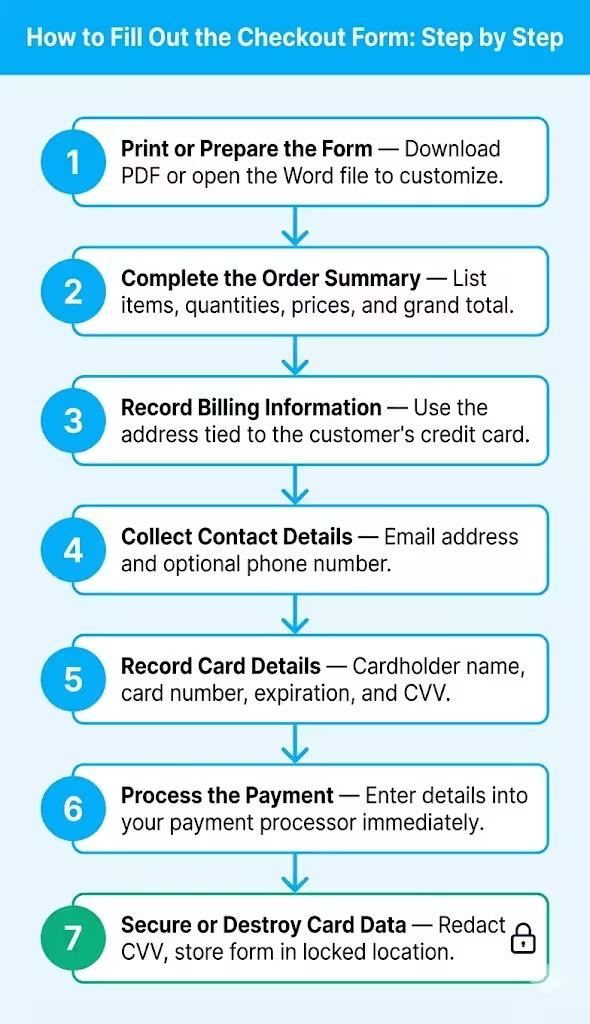
Step 1: Print or prepare the form
Download your preferred format. Print the PDF version on standard US Letter or A4 paper. If you want to customize the form, open the Word version first. Add your business name or logo, adjust any fields you need, and then print.
Step 2: Complete the order summary
Write down each item the customer is purchasing. Fill in the quantity and unit price for each line. Calculate the subtotal at the bottom of the table. Add any applicable sales tax and shipping costs. Write the grand total in the final field.
Step 3: Record the billing information
Ask the customer for the billing address linked to their credit card. Write each line clearly and legibly. Sloppy or rushed handwriting in this section is one of the most common causes of AVS mismatches and declined payments. Take an extra 30 seconds here to get it right.
Step 4: Collect contact details
Write the customer’s email address in the contact information section. Ask for a phone number too. Having both gives you two ways to follow up if anything goes wrong during processing.
Step 5: Record the card details
Have the customer fill in this section directly whenever possible. If you’re taking the order over the phone, record each detail as the customer reads it to you:
- Write the cardholder’s name exactly as it appears on the card
- Record the full card number without spaces or dashes
- Write the expiration date in MM/YY format
- Note the CVV or CVC code carefully
Step 6: Process the payment
Enter the card details into your payment processor or virtual terminal right away. Don’t leave completed forms sitting out on a counter or desk between steps. The longer sensitive data remains exposed, the higher the risk becomes.
Step 7: Secure or destroy the card data
Once the transaction is approved, store the completed form in a locked location. Cross out or cut out the CVV section immediately. Provide the customer with a printed or emailed receipt.
💡 Pro Tip: Always make a photocopy of the completed form before filing it. Keep the original in a locked drawer and the copy in a separate secure location. This two-copy approach protects you if a form is lost, damaged, or needed for a chargeback dispute down the road.
Paper Payment Forms vs. Digital Solutions: Which Works Better?
This is a fair question. Digital payment tools like Square, Stripe, and PayPal are fast and convenient for most businesses. But they’re not always the right fit.
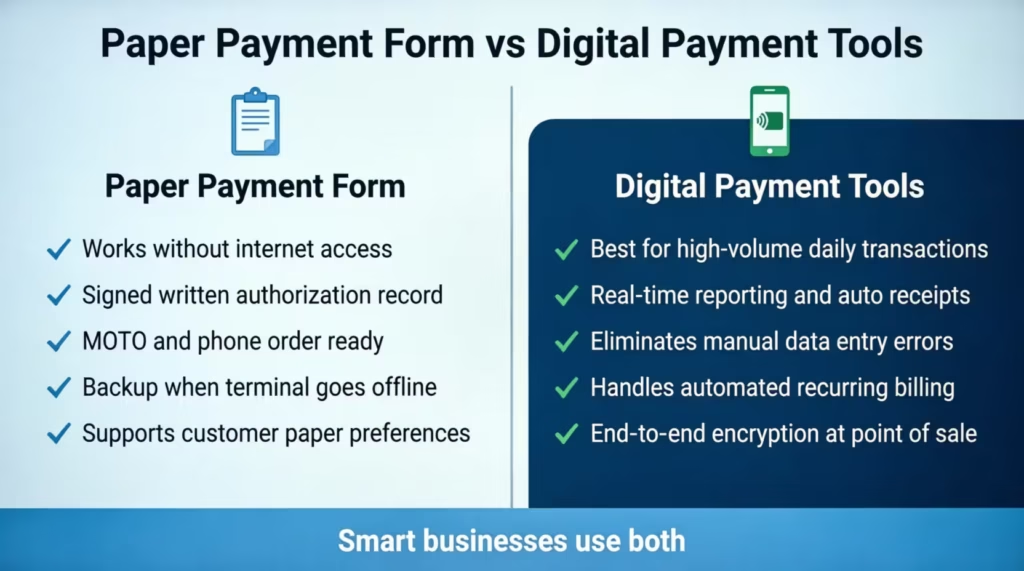
Here’s a clear breakdown:
When a paper card payment form works best:
- Your location has limited or no reliable internet access
- You need a signed, written record of cardholder authorization
- You take phone or mail orders (MOTO transactions)
- Your customers prefer or require a paper-based process
- Your card reader goes offline, and you need a backup right now
When digital tools work better:
- You process a high volume of transactions every day
- You need real-time transaction reporting, automatic receipts, and logs
- You want to eliminate manual data entry and reduce human error
- You handle recurring billing and need automated processing
- You want end-to-end encryption handled automatically at the point of sale
For many small businesses, the smartest approach is to use both. Digital payment tools handle everyday transactions in a timely manner. A printed form serves as a reliable safety net when tech fails or the situation calls for a paper process.
Having a ready-made card payment order form on hand isn’t a sign of being behind the times. It’s a sign of being prepared for situations that digital tools can’t always handle.
How to Protect Cardholder Data When Using Paper Forms
Handling physical card data comes with real responsibility. The Payment Card Industry Data Security Standard, known as PCI DSS and managed by the PCI Security Standards Council, sets the rules for how businesses must handle, store, and dispose of cardholder information. These rules apply to paper records just as much as digital ones.
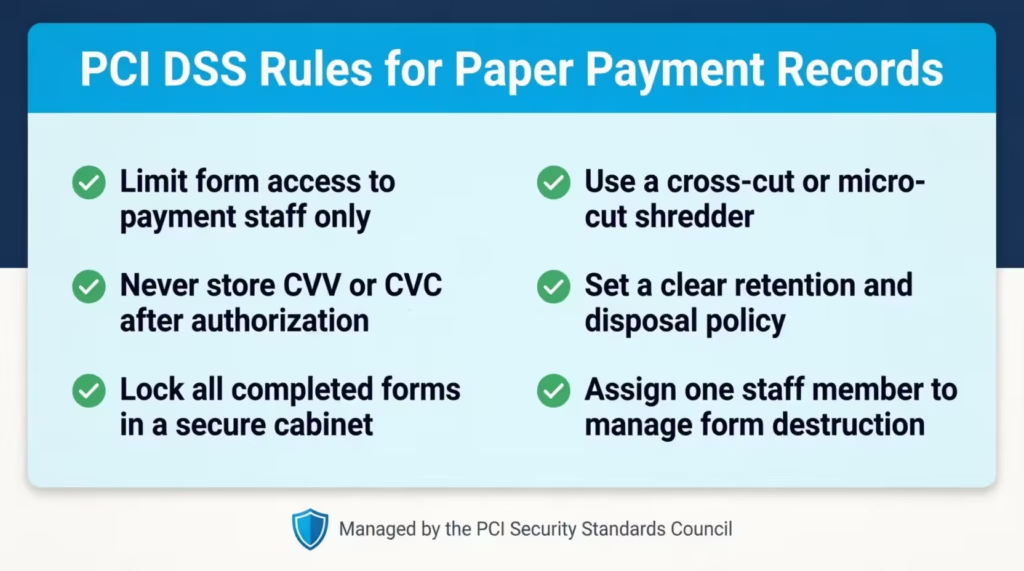
Here are the key steps every business should follow:
Limit who has access to completed forms
Only staff members who need to process payments should ever handle a completed payment form. Keep forms off shared desks, counters, and communal spaces. The fewer people who see card data, the lower the exposure risk.
Never store CVV or CVC codes after authorization
This rule cannot be overstated. Visa, Mastercard, Discover, and American Express do not allow businesses to keep security codes after a transaction is approved. Once the payment goes through, that field must be removed or destroyed right away.
Lock up all paper records
Any forms that must be kept for transaction records should go into a locked cabinet or drawer. Open filing trays, shared desks, and unlocked storage bins are not safe for forms with payment data.
Use the right shredder
A standard strip-cut shredder is not secure enough for sensitive financial documents. Use a cross-cut or micro-cut shredder instead. These cut paper into small, confetti-like pieces that are far harder to reassemble than the long strips produced by a basic shredder.
Set a clear retention and disposal policy
Most financial and business advisors suggest keeping sales records for three to seven years. This helps with bookkeeping and tax needs. The card data portion, however, should be removed or destroyed as soon as the payment is processed. Keep the order summary and transaction confirmation. Remove the card number, CVV, and expiration date entirely.
The FTC’s Protecting Personal Information: A Guide for Business advises businesses to collect only the information they genuinely need and to dispose of it securely when the business need is over. That principle applies directly to paper payment forms.
💡 Pro Tip: Assign one dedicated team member to manage and destroy paper payment forms. A clear chain of custody means no document is left unprotected at any step. Every form is tracked from when it’s completed to when it’s shredded.
Frequently Asked Questions
What is a credit card checkout form used for?
Businesses use it to collect payment details from customers when a digital terminal isn’t available. It logs the order summary, billing address, contact details, and card info for manual transactions.
Is it legal to collect credit card information on a paper form?
Yes, collecting card data on paper is legal. Businesses that manage card data must follow PCI DSS guidelines. These rules ensure secure handling, limit access, and require proper disposal of cardholder information after processing.
Can I customize the Word version of the template?
Yes. The editable Word file lets you add your business name, logo, or extra fields before printing. The two PDF versions are fixed-format and ready to print exactly as they are.
What is the difference between the US Letter and A4 template versions?
US Letter paper is 8.5 by 11 inches and is the standard size in the United States. A4 paper is 8.27 by 11.69 inches and is the standard in most other countries. Both versions have identical fields and sections.
Should I keep the completed form after processing the payment?
You can keep the order summary and transaction record for your records. However, remove or destroy the card number, CVV, and expiration date right after processing. Retaining card security codes violates card network rules and PCI DSS standards.
What do CVV and CVC mean on the form?
CVV stands for Card Verification Value, and CVC stands for Card Verification Code. Both refer to the 3-digit security code printed on the back of Visa, Mastercard, and Discover cards. American Express uses a 4-digit code printed on the front of the card. It confirms that the card is physically present at the time of the transaction.
What is a MOTO transaction?
MOTO stands for Mail Order and Telephone Order. It describes transactions where the cardholder is not physically present at the point of sale. These are common in phone-based and mail-based businesses. A paper payment form helps staff capture the customer’s approval when the card can’t be swiped or tapped.
Can this form be used to set up recurring or subscription billing?
The form is built for single, one-time transactions. For recurring billing, customers usually must sign a separate authorization. This document should state the billing frequency, the amount charged, and the payment method kept on file.
Bottom Line
A structured card payment form speeds up billing detail collection. It also cuts down processing errors and protects your customers’ sensitive information. Whether you run a pop-up shop, take phone orders, or just want a reliable backup for when your terminal goes down, having a pre-made form on hand means you’re always prepared.
This page offers three free templates. They include all four key sections: order summary, billing information, contact details, and secure card data. For any business that handles card payments, whether offline or on paper, a well-designed credit card checkout form template is one of the simplest tools you can add to your process today.
If you know a small business owner who takes card payments manually, share this page. It might help them avoid a costly mistake.