
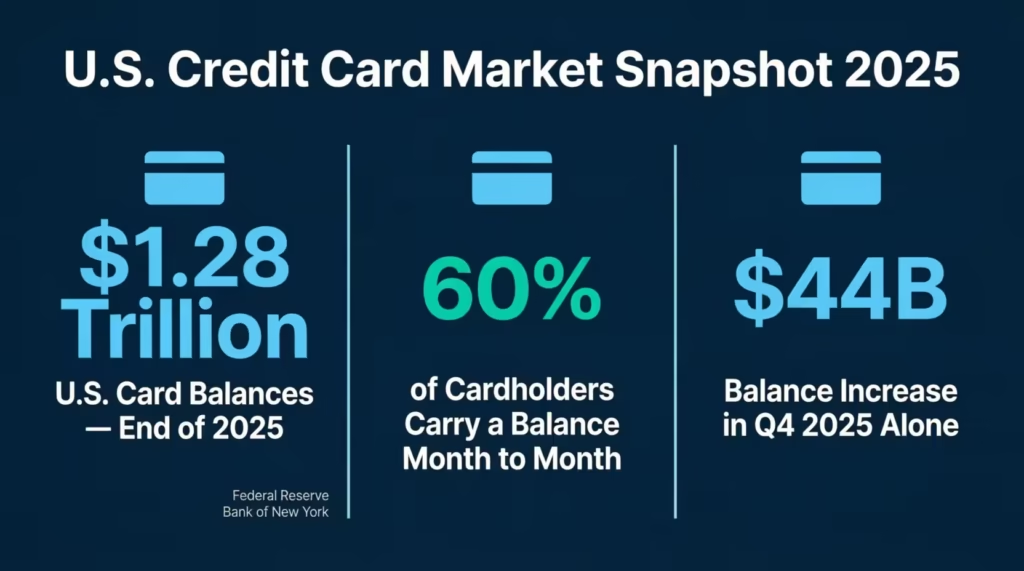
Keeping up with credit card spending can feel like chasing a moving target. The Federal Reserve Bank of New York reports that U.S. card balances hit a record $1.28 trillion at the end of 2025. Without a plan, credit card budget templates make it too easy to lose track and overspend.
A simple card budget planner can fix that. It gives you one clear view of every charge, category, and due date.
Below, you’ll find free templates in four formats, plus a step-by-step guide to put them to work right away.
Download Your Free Credit Card Budget Tracker Templates
4 ready-to-use templates are here to make your life easier. Each one has all the sections you need to plan, track, and review your monthly card spending.
Pick the format and paper size that works best for you:
Disclaimer: The Templates & Printables on this site are provided for informational and personal tracking purposes only. This is not financial, legal, tax, or credit advice. While reasonable efforts are made to ensure accuracy, Credit Card Wind makes no warranties as to the completeness, reliability, or accuracy of the calculations generated by these Templates & Printables. Users are responsible for independently verifying all data and calculations. Terms, conditions, rates, regulations, and legal requirements vary by institution, jurisdiction, and individual circumstances.
Always refer to your official statements, account agreements, and applicable laws, and consult a qualified professional before making any financial, legal, or other important decisions. By using these Templates & Printables, you acknowledge that Credit Card Wind and its owner shall not be liable for any damages, losses, or financial consequences arising from the use or misuse of these Templates & Printables.
This universal disclaimer applies to all templates and printables provided by Credit Card Wind (https://creditcardwind.com), created by Robert Williams (Owner at Credit Card Wind).
© Credit Card Wind. All rights reserved.
These templates and printables may be downloaded and used for personal, non-commercial purposes only. Redistribution, resale, or modification for commercial use without permission is strictly prohibited.
What Is a Credit Card Budget Tracker Template?
A credit card budget template is a ready-made worksheet. It helps cardholders plan their spending, log each purchase, and compare actual charges against a specific limit. This way, users can track their expenses effectively. Think of it as a spending roadmap for every billing cycle.
The Federal Reserve Bank of New York’s Household Debt and Credit Report shows that card balances climbed $44 billion in Q4 2025 alone, reaching $1.28 trillion. Roughly 60% of cardholders carry a balance from month to month. A structured expense tracker bridges the gap between “I think I’m fine” and knowing exactly where every dollar goes.
A typical card budget planner includes three core parts:
- Budget Allocation Summary – Lists each spending category (groceries, utilities, dining, subscriptions) with columns for budgeted, planned, and actual amounts
- Transaction Log – Records every individual charge with the date, merchant, category, amount, and cleared or pending status
- Variance Column – Shows whether you came in under or over budget for each category at a glance
💡 Pro Tip: Treat the “Planned” column as your spending ceiling, not your spending goal. Setting a limit lower than your total budget leaves room for surprise charges without blowing past your overall cap.
The goal isn’t to restrict every acquisition. It’s to make spending visible so each swipe stays intentional.
How to Use These Budget Planner Templates
Each template follows the same layout. The steps below walk through the sections in order, from setup to month-end review.
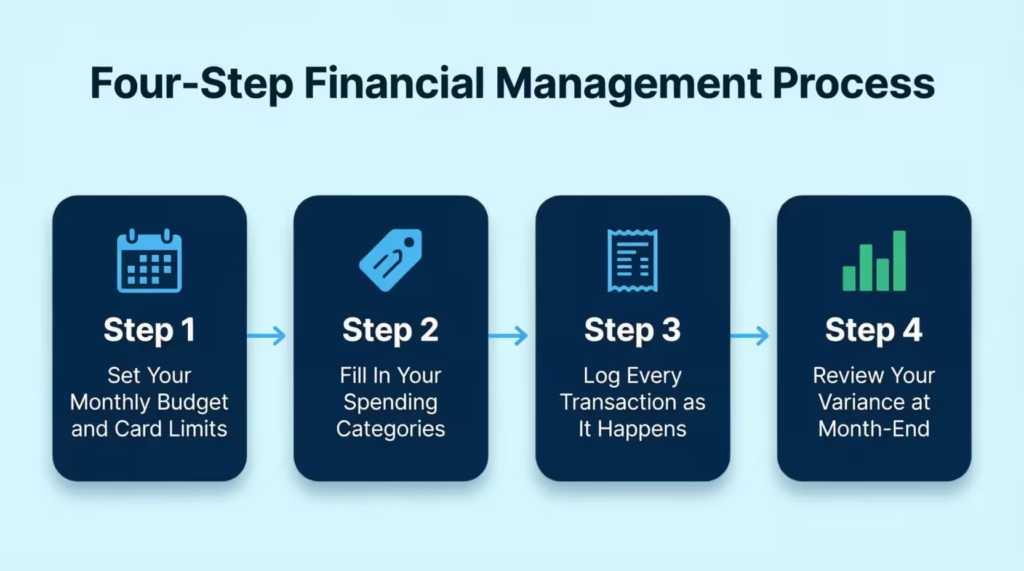
Step 1: Set Your Monthly Budget and Card Spending Limits
Open the template and fill in the header fields first.
- Month – Enter the current month and year (e.g., “April 2026”).
- Total Budget – Write your total take-home income or the amount you plan to spend this month.
- Total Planned Card Charges – Enter the dollar amount you expect to put on your card. This number should always be less than or equal to your total budget.
- Notes – Add a short reminder, like “Pay full balance by the 15th” or “No dining out this week.”
Starting with these four fields sets a clear ceiling before any money moves.
Step 2: Fill In Your Budget Categories
Move down to the Budget Allocation Summary table. The template includes five starter categories:
| Category | What to Enter |
|---|---|
| Groceries | Weekly food and household supplies |
| Utilities | Electric, water, internet, phone |
| Entertainment | Streaming, movies, hobbies |
| Dining Out | Restaurants, coffee shops, takeout |
| Subscription Services | Apps, memberships, recurring charges |
For each row, fill in three numbers:
- Budget – The most you want to spend in that category this month.
- Planned – The amount you realistically expect to charge.
- Actual – Leave this blank for now. You’ll fill it in at month-end.
Add or remove rows to match your real spending habits. Some users add “Gas/Travel,” “Medical,” or “Gifts.”
Step 3: Log Each Transaction as It Happens
The Transaction Log is the heart of the planner. Every time a charge hits your card, record it here.
Fill in five columns per row:
- Date – The purchase date (e.g., 01/02).
- Merchant/Description – The store or vendor name.
- Category – Match it to one of the categories from Step 2.
- Amount – The exact dollar amount charged.
- Status – Mark it “Cleared” once it posts, or “Pending” if it hasn’t been processed yet.
Logging charges daily, or every two to three days, keeps the data fresh. Waiting until the end of the month often leads to missed entries and guesswork.
⚠️ Mistake to Avoid: Don’t skip small charges like a $4.50 coffee or a $2.99 app purchase. Those “tiny” charges add up fast. A mid-sized consulting firm discovered that employees missed out on $127 each month in small card transactions. This happened because no one logged the transactions.
Step 4: Check Your Variance at Month-End
At the close of the month, total up the actual charges for each category and enter them in the Actual column. The Variance column then tells the story:
- Positive variance (e.g., +$5.00) means you spent less than planned. That money can roll into savings or next month’s budget.
- Negative variance (e.g., -$20.00) means you overspent. Look at the transaction log to find out which purchases pushed you over.
Review the bottom-line total, too. Compare your Total Planned Card Charges to your actual total. If there’s a pattern of overspending in the same category for two or three months in a row, adjust the budget or cut back.
Why Tracking Card Spending With a Budget Planner Matters
Swiping a credit card doesn’t feel like spending real money. That disconnect is one reason debt keeps climbing. NerdWallet’s 2025 Household Credit Card Debt Study found that 49% of Americans now say carrying card debt is “normal.” The average household with revolving balances owes $11,149.
A monthly spending tracker works against that drift in several ways:
- Catches overspending early. Seeing a -$20 variance in week two gives time to pull back before the billing cycle closes.
- Keeps credit utilization low. Utilization, the share of available credit being used, makes up about 30% of a FICO score. Tracking charges helps keep that ratio under the 30% threshold most experts suggest.
- Prevents missed payments. When every charge is logged, the total owed at statement time holds no surprises. That makes it easier to pay the full balance on time.
- Builds smarter habits. Reviewing categories each month shows spending patterns that bank apps often hide in long lists of transactions.
David, a marketing manager at a small e-commerce company, started using a card budget worksheet in January 2026. After three months, he noticed that his “Dining Out” category was consistently $80 over plan. He switched two weekly restaurant meals to home-cooked dinners and saved $960 over the next six months.
Small shifts like that only happen when the data is visible.
💡Tip: Wondering how much your card fees are eating into your budget? Run the numbers with the credit card fee calculator.
Which Template Format Works Best for You?
Four formats are available. Each one fits a different workflow.
| Format | Best For | Editing | Printing |
|---|---|---|---|
| Pen-and-paper users who prefer a printed credit card budget planner printout | Not editable (fill by hand) | Excellent | |
| Excel (.xlsx) | Number-crunchers who want built-in formulas and auto-calculations | Full editing in Excel | Good |
| Word (.docx) | Users who want to add notes, resize tables, or change the layout in Word | Full editing in Word | Good |
| Google Sheets | Anyone who needs cloud access, real-time syncing, or wants to share the file | Full editing in browser | Print from browser |
Quick decision guide:
- Want to print and pin it to your fridge? Grab the PDF.
- Need the spreadsheet to do the math for you? Go with Excel.
- Prefer editing text and tables freely? Pick a word.
- Work from multiple devices or share with a spouse? Use Google Sheets.
📌 Did You Know: The CFPB’s 2025 Consumer Credit Card Market Report found that purchase volume on consumer cards reached $3.6 trillion in 2024. With that much money flowing through cards, having a structured tracker in any format beats guessing.
How to Budget Credit Card Spending With the 50/30/20 Rule
The 50/30/20 rule is one of the simplest ways to divide income into clear spending buckets. It works especially well when paired with a card expense planner.
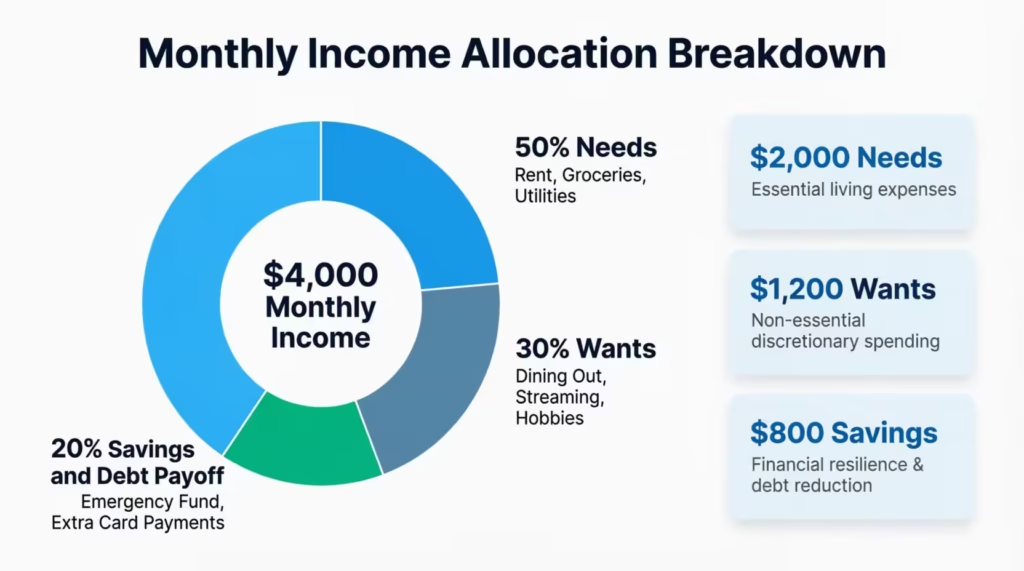
The breakdown:
- 50% for Needs – Rent, mortgage, groceries, utilities, insurance, minimum debt payments
- 30% for Wants – Dining out, entertainment, subscriptions, hobbies, non-essential shopping
- 20% for Savings and Debt Payoff – Emergency fund, retirement contributions, extra card payments
Applying it to your template:
- Calculate your monthly take-home pay. For example, $4,000.
- Multiply: $4,000 x 0.50 = $2,000 for needs, $4,000 x 0.30 = $1,200 for wants, $4,000 x 0.20 = $800 for savings and debt payoff.
- In the template’s Budget Allocation Summary, assign each category to one of the three buckets.
- Set the “Budget” column for each category so the bucket totals don’t exceed their limits.
For instance, if groceries ($400), utilities ($200), and insurance ($150) are all “Needs,” their combined total should stay within the $2,000 ceiling.
This method prevents the common trap of charging too many “wants” on a card and scrambling to cover “needs” later in the month.
💡Tip: Curious how much cash back you’re actually earning each month? Check it with the credit card cash back calculator.
5 Common Credit Card Budgeting Mistakes (and How to Fix Them)
Even with a solid template, certain habits can undermine a budget. These five show up most often.
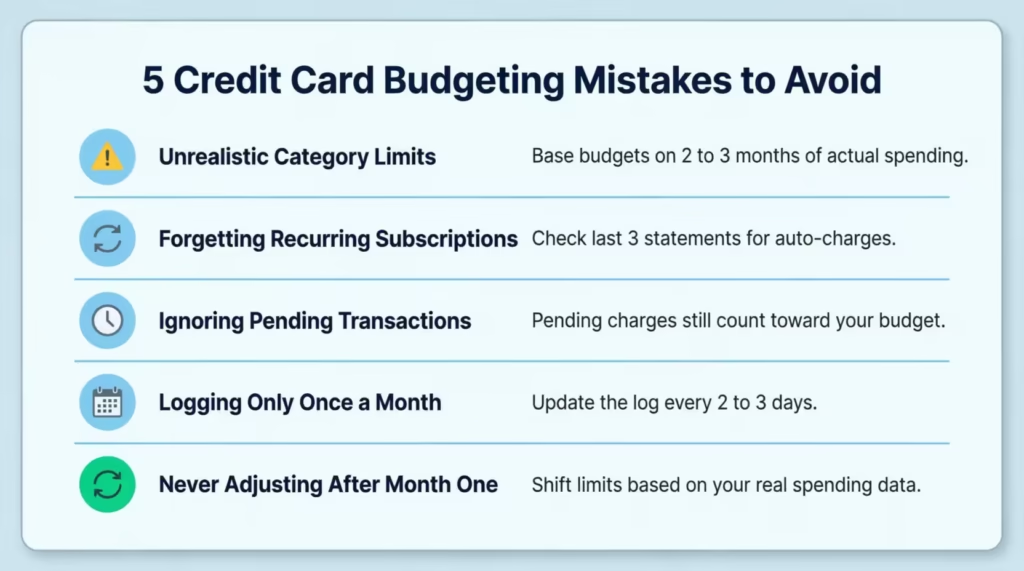
1. Setting Unrealistic Category Limits
Budgeting $50 for groceries when the real cost is $350 sets the plan up for failure. Base each category on two to three months of actual spending history, not wishful thinking.
2. Forgetting Recurring Subscriptions
Streaming services, cloud storage, gym memberships, and app renewals hit the card automatically. List every recurring charge in the template before the month starts. Check the last three statements to catch ones that slip through.
3. Ignoring the “Pending” Column
A charge marked “Pending” still counts toward the budget. Jennifer, an HR coordinator at a staffing agency, once overspent by $215 because she only tracked cleared transactions and forgot about three pending hotel charges from a work trip.
4. Updating the Log Only Once a Month
Batch-logging at month-end turns the template into a record, not a tool. Checking and logging every two to three days keeps the budget active and useful.
5. Not Adjusting After the First Month
The first month of tracking reveals how spending actually flows. Use that data to recalibrate. If “Entertainment” is always $40 over and “Dining Out” is always $30 under, shift those limits. A budget should bend to reality, not break against it.
⚠️ Mistake to Avoid: Don’t copy someone else’s budget categories without customizing. A household with three kids has very different spending patterns than a single professional. Tailor every category to your actual life.
Smart Tips to Stay on Track With Your Monthly Card Budget
Sticking with a budget planner gets easier once a few habits lock into place.
- Set phone alerts for big charges. Most card issuers let users set real-time alerts for any transaction over a chosen dollar amount. A $50 threshold flag can catch impulse buys the same day they happen.
- Review mid-month, not just end-of-month. A quick 10-minute check around the 15th shows whether spending is on pace. Adjustments made halfway through the month are far more useful than regrets on the 30th.
- Use one card per budget plan. Tracking five cards on one template creates confusion. Assign one card for the most budgeted spending and keep the template focused. Experian data from 2025 puts the average card balance at $6,735. Consolidating charges onto one card makes that number easier to manage.
- Match the log to your statement. At the end of each billing cycle, compare the transaction log side by side with the card statement. Flag any charges that don’t match. This catches errors, duplicate charges, and even fraud.
- Keep old templates. Save each month’s completed planner. After three to six months, a clear spending trend appears. That trend data is gold for setting more accurate budgets going forward.
💡 Pro Tip: Pair the budget template with autopay for at least the minimum payment. This protects the credit score even during months when tracking slips. But always aim to pay the full statement balance to avoid interest charges.
Frequently Asked Questions
Can a budget template help improve a credit score?
Yes. Tracking card spending helps keep credit utilization low and ensures on-time payments. Both factors make up a large share of most credit scoring models.
How often should the transaction log be updated?
Every two to three days works best. Logging daily is ideal, but even a mid-week check prevents missed entries and keeps the budget accurate.
Is it better to budget with a credit card or a debit card?
Credit cards offer fraud protection and rewards, but need more discipline. A budget template adds that discipline by making every charge visible before the statement arrives.
What spending categories should a card budget include?
Start with groceries, utilities, dining out, entertainment, and subscriptions. Then add categories that match your real habits, like gas, medical, or gifts.
Should credit card payments be listed as a budget category?
No. Individual charges go into spending categories. The card payment itself is the total of those charges, not a separate expense line. This avoids double-counting.
Can two people share one budget template?
Yes. The Google Sheets version allows real-time editing by many users. Couples or business partners can log charges to the same file from different devices.
What is a good credit card spending limit to set in the template?
A common guideline is to keep total card charges below 30% of the available credit limit. This protects credit utilization while leaving room for emergencies.
Do these templates work for multiple credit cards?
Each template tracks one card per sheet. For many cards, make a copy of the template for each card and review them side by side at the month-end.
Bottom Line
A card budget planner turns invisible spending into clear, trackable numbers. The templates above cover every format, whether you prefer printing a PDF, editing in Excel, or syncing through Google Sheets. Setting a monthly cap, logging charges, and reviewing the variance each month builds habits that shrink debt and protect credit scores.
Based on the data throughout this article, the most effective approach is to start with one template this month, track every charge for 30 days, and adjust category limits based on real results.
If you know someone juggling several credit cards without a spending plan, share this page. These free templates could save them from surprise bills and growing balances.