
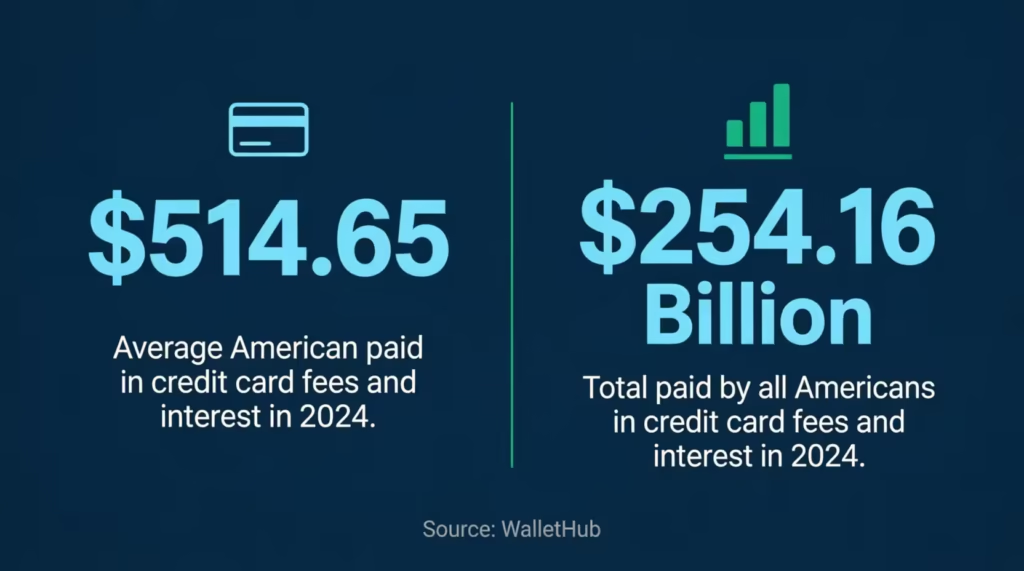
Do you know exactly how much your credit cards cost you last year? Most people don’t. The average American paid $514.65 in credit card interest and fees in 2024, according to WalletHub. If you carry multiple cards, it is easy to lose track of annual renewals, late charges, and foreign transaction costs without a reliable credit card fees tracker template.
A simple fee log gives you a clear record of every charge so you can dispute errors, evaluate your cards, and negotiate refunds with confidence.
In this guide, you will find free, ready-to-use templates plus a complete walkthrough on how to use them to track every fee and keep more of your money.
Download Your Free Credit Card Fees Tracker Templates
These templates are designed to be simple and effective. You don’t need to be a spreadsheet expert to use them. Choose the format that fits your style and start taking control of your credit card costs today.
Disclaimer: The Templates & Printables on this site are provided for informational and personal tracking purposes only. This is not financial, legal, tax, or credit advice. While reasonable efforts are made to ensure accuracy, Credit Card Wind makes no warranties as to the completeness, reliability, or accuracy of the calculations generated by these Templates & Printables. Users are responsible for independently verifying all data and calculations. Terms, conditions, rates, regulations, and legal requirements vary by institution, jurisdiction, and individual circumstances.
Always refer to your official statements, account agreements, and applicable laws, and consult a qualified professional before making any financial, legal, or other important decisions. By using these Templates & Printables, you acknowledge that Credit Card Wind and its owner shall not be liable for any damages, losses, or financial consequences arising from the use or misuse of these Templates & Printables.
This universal disclaimer applies to all templates and printables provided by Credit Card Wind (https://creditcardwind.com), created by Robert Williams (Owner at Credit Card Wind).
© Credit Card Wind. All rights reserved.
These templates and printables may be downloaded and used for personal, non-commercial purposes only. Redistribution, resale, or modification for commercial use without permission is strictly prohibited.
What Is a Credit Card Fees Tracker?
A credit card fees tracker is a simple tool used to record and monitor the various costs associated with your credit card accounts. It serves as a dedicated log where you note every charge that isn’t a purchase you made. Think of it as a specialized checkbook register, but only for the money the bank takes from you.
Many cardholders ignore these small charges, assuming they are just the cost of doing business. However, these small amounts add up quickly. In fact, Americans paid a combined $254.16 billion in credit card interest and fees in 2024 per WalletHub’s analysis. That is a massive amount of wealth transferring from consumers to banks.
By using a fee tracking log, you create a paper trail. This trail is essential when you want to dispute a charge or ask for a waiver. It turns vague feelings about “paying too much” into hard data you can use to negotiate.
Tip: → Not sure if a fee you’re logging is accurate? Cross-check it with the credit card fee calculator.
Why Tracking Your Credit Card Fees Actually Matters
You might wonder if writing down a $25 fee is worth your time. It absolutely is. Banks count on you not noticing these charges. When you track them, you change the power dynamic.
First, tracking helps you catch mistakes. Banks do make errors. A promotional waiver might not be applied correctly, or a refund you were promised might never show up. Without a record, you won’t know you were overcharged.
Second, it helps you evaluate your cards. That premium travel card with the $550 annual fee might seem worth it, but is it really? A credit card expense tracker lets you see the total cost of owning a card. If you paid $600 in fees but only redeemed $300 in rewards, you know it’s time to cancel or downgrade.
Finally, tracking builds your case for waivers. When you call customer service, being able to say, “I’ve been a loyal customer for five years, and this is my first late fee,” is powerful. But you need to know your history to make that claim with confidence.
A Real-World Example
Consider Jennifer, a project manager in Chicago who carries four credit cards. She never tracked her fees closely and assumed everything looked fine. When she finally sat down and reviewed 12 months of statements, she found $312 in fees she hadn’t noticed. This included a $95 annual fee that renewed on a card she barely used, two late fees totaling $82, and a $135 cash advance fee she thought was just a regular charge.
She called her issuers with her fee login in hand. Two of the three issuers agreed to refund $127. They noted her good payment history and that she had never made this request before. That one hour of work put real money back in her pocket. Without her fee log, she would never have had the confidence or the data to make that call.
Types of Credit Card Fees You Should Be Tracking
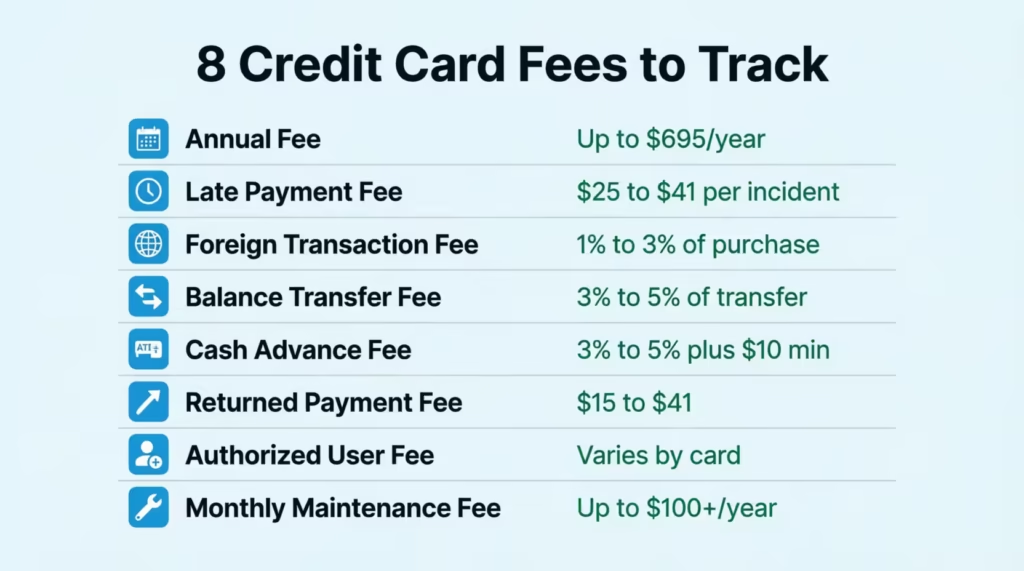
Credit card issuers have many names for fees, and they can appear on your statement in confusing ways. Here are the main types you should record in your fee monitoring spreadsheet.
Annual Fees
This is the price you pay just to hold the card. According to Experian, annual fees can range from $0 to over $695 for premium luxury cards. Often, this fee posts once a year and is easy to miss if you aren’t looking for it.
💡 Pro Tip: Set a calendar reminder 30 days before your annual fee renews. That gives you time to call your issuer and ask for a waiver or retention offer before the charge posts to your account.
Late Payment Fees
If you miss your due date by even one day, you will likely see this charge. Federal regulations cap these fees, but they are still costly. They typically range from $25 to $41 per incident. Beyond the cost, a late payment can hurt your credit score if it’s more than 30 days overdue.
📌 Did You Know Many cardholders don’t realize that a late fee can also trigger a penalty APR on their account. That means your interest rate could jump significantly after just one missed payment.
Foreign Transaction Fees
When you buy something outside the U.S. or from a non-U.S. website, your bank may charge a conversion fee. This is usually around 1% to 3% of the purchase price. On a $2,000 vacation, that adds up to $60 extra just for using your card.
Balance Transfer Fees
Moving debt from one card to another to get a lower rate often comes with a cost. This fee is standardly 3% to 5% of the amount you transfer. If you move $5,000, you could pay $150 to $250 immediately.
Cash Advance Fees
Using your credit card at an ATM is expensive. You will typically pay a fee of 3% to 5% (often with a $10 minimum), plus you start paying interest immediately. There is usually no grace period for cash advances.
Other Fees Worth Watching
- Returned Payment Fee: Charged if your check bounces or your auto-pay fails due to insufficient funds. These typically run $15 to $41.
- Over-Limit Fee: Charged only if you have opted in to allow transactions beyond your credit limit. The Credit CARD Act of 2009 requires you to opt in before this fee can be applied.
- Authorized User Fee: Some premium cards charge an extra fee to add a spouse or family member. Standard cards rarely charge this fee.
- Card Replacement Fee: Some issuers charge $5 to $15 to send a replacement card. However, many waive this fee if you ask, especially for a first request.
- Monthly Maintenance Fee: Common on subprime or secured cards designed for people building credit. These can add up to $100 or more per year and are worth noting in your fee log.
Tracking all of these in one place gives you a complete picture of what each card truly costs you. The goal of your card charges log is not just to record numbers. It is to create the kind of financial clarity that motivates better decisions.
How to Use the Credit Card Fees Tracker Template
The templates provided above are designed to be intuitive. You don’t need complex software to make this work. Here is a simple step-by-step guide to using your card fee log template effectively.
Step 1: Fill in the Card Header
Start by identifying the card you are tracking. At the top of the sheet, fill in the Card Name (e.g., “Gold Rewards Card”), the Issuer (e.g., Chase, Amex), and the Card Type (Personal or Business). Enter the Tracking Year so you can keep your records organized by date. Don’t forget to note the Currency if you have cards from different countries.
Step 2: Log Each Fee in the Detailed Fee Log
This is the core of your tracker. Whenever you see a fee on your statement, open your log and record it right away. Here is what each column means:
- Date: The date the fee was charged to your account.
- Statement Period: Which monthly bill this fee appeared on (e.g., “Jan 2025”).
- Fee Category: Use the types we discussed above, such as Annual, Late, or Foreign Transaction.
- Fee Description: A short note about what the fee was for, in your own words.
- Reference / Statement ID: The transaction ID or reference number shown on your statement. This is useful when you call to dispute a charge, as the agent can pull it up quickly.
- Fee Charged: The exact amount taken from your account.
- Fee Refunded: If you successfully get a waiver, enter the refund amount here.
- Net Fee: Subtract the refund from the charge to see your actual out-of-pocket cost.
- Due Date: When any payment tied to this fee is due.
- Notes: Use this column for anything relevant, like the name of the agent you spoke to or the date you submitted a dispute.
Step 3: Update Monthly Totals
At the end of each month, sum up your costs in the Monthly Totals section. You will record the Total Fees Charged and Total Refunds. This gives you a quick “Net Fees” snapshot. Seeing that you paid $45 in fees in one month can be a great wake-up call to change your habits.
Step 4: Review the Annual Credit Card Fee Snapshot
This section gives you the big picture. Sum up your monthly totals to find your Total Fees Paid for the year. Subtract your Total Fees Refunded to get your Net Annual Fee Cost. There is also a spot to mark your Annual Fee Status. Note whether it was Paid, Waived, or Partially Waived. This field alone can show you, at a glance, which of your annual fees you were able to negotiate down.
Step 5: Use Notes & Actions
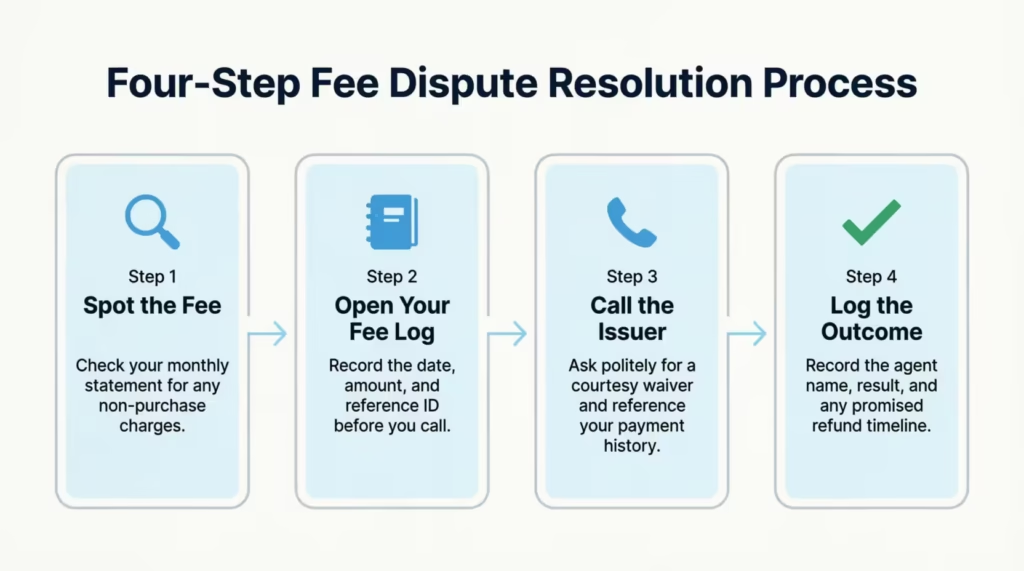
Use the open text area at the bottom for reminders. Did you call customer service? Write down the date, the agent’s name, and what they said. If they promised a refund in two billing cycles, make a note here so you remember to check for it.
⚠️ Mistake to Avoid: Don’t wait until your year-end statement to review fees. By then, the window to dispute or request a waiver has likely already closed for most of those charges.
How to Reduce or Avoid Credit Card Fees
Once you start tracking, your next goal is to drive those numbers down to zero. Most credit card fees are avoidable if you know the rules.
The most effective strategy is to use automation. Bankrate’s guide on avoiding common credit card fees highlights setting up automatic payments for at least the minimum due as one of the simplest and most impactful steps. This one habit eliminates late fees entirely. Pair that with text or email alerts set to fire three days before your bill is due, and you create a reliable safety net.
For foreign transaction fees, the fix is simple. Get the right card. Many travel cards and even some standard cash-back cards now charge $0 for international purchases. If you travel even once a year and use the wrong card, you could lose 3% of every purchase you make abroad. Over a $3,000 vacation, that’s $90 gone for no reason.
To avoid balance transfer and cash advance fees, read the fine print before you move money around. These transactions almost always come with a cost. If you need cash, use a debit card. If you need to transfer a balance, look for a card with a promotional “no balance transfer fee” window. These offers appear periodically, especially for new cardholders.
Small Habits That Make a Big Difference
- Set up autopay for at least the minimum payment on every card.
- Put your annual fee date in your calendar so you can call before the charge hits.
- Check your statements monthly rather than waiting for something to feel off.
- Never use your credit card at an ATM unless it is a genuine emergency.
- Review card benefits annually to make sure you are getting more value than you are paying in fees.
How to Request a Credit Card Fee Waiver or Refund
You have more power than you think. Banks spend hundreds of dollars to acquire a new customer, so they often prefer to waive a $35 fee rather than lose you. But you have to ask.
When you see a fee you want removed, call the number on the back of your card. Be polite but firm. A simple script works well: “I noticed a late fee on my statement. I’ve been a customer for three years and have always paid on time. I’d like to request that this fee be waived as a courtesy.”
According to Chase, many issuers review waiver requests based on your history with the bank. If you are a loyal customer who rarely makes mistakes, your odds of success are high.
💡 Pro Tip: Always call your card issuer rather than using the chat feature when requesting a fee waiver. Phone agents usually have more power to approve goodwill adjustments than online chat reps.
For annual fees, the conversation is different. Call and say, “I’m thinking about closing this card because the annual fee is too high for the value I’m getting.” This often triggers a retention offer. The issuer may waive the fee. They might also give you bonus points to cover the cost. Alternatively, they could recommend switching to a no-fee version of the card.
What to Track Before You Call
Before picking up the phone, open your fee tracking log and write down the following:
- The date and amount of the fee you are disputing
- How long have you been a customer with that issuer
- Your on-time payment record (how many months since your last late payment, if any)
- The Reference or Statement ID from your log, which is the identifier shown on your statement
Having this information ready shows the agent that you are organized and serious. It also shortens the call significantly. Most issuers train their retention teams to favor customers with clear, specific requests. They prefer these over vague complaints.
David, a financial consultant in Atlanta, uses this approach every time his annual fees renew. In the past four years, he has had three of the four annual fees either waived or covered by statement credits. He estimates he has saved around $620 in fees by simply making a polite, informed call once a year.
Credit Card Fee Tracker Template vs. Budgeting Apps
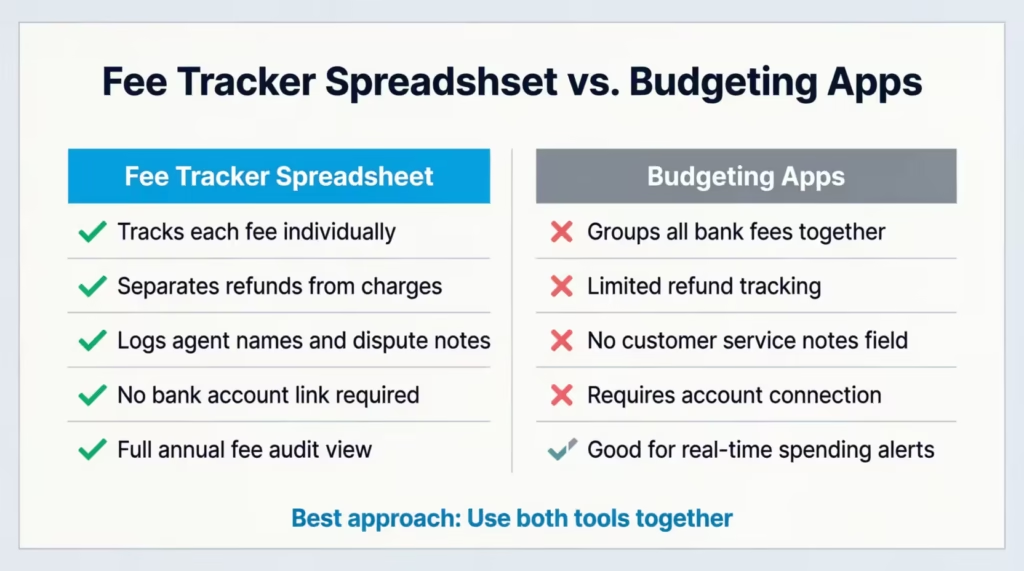
You might wonder why you should use a spreadsheet when there are so many apps out there. Apps like Credit Karma, YNAB, and PocketGuard are great for budgeting. However, they often miss the details needed for managing fees.
Most apps lump all “Bank Fees” into one category. They don’t typically let you separate a late fee from an annual fee or track refunds clearly. They also don’t give you a dedicated space to record your conversations with customer service agents.
A manual fee management worksheet forces you to look at each charge individually. The act of entering the number creates a stronger psychological connection to the money you are losing. It makes you more likely to take action.
There is also a privacy advantage. With a spreadsheet, you aren’t linking your bank account to a third-party app. Your data stays on your device or in your own Google Drive. For many people, that peace of mind is worth a lot.
When an App Makes Sense
To be fair, a budgeting app works well for real-time spending alerts and automatic transaction categorization. The smart approach is to use both tools together. Let the app track your daily spending. Then, use your annual fee tracker spreadsheet for a monthly fee audit. This combination gives you the convenience of automation and the precision of manual review.
Tips to Reduce and Avoid Credit Card Fees
Tracking fees is useful, but preventing them in the first place is even better. Consider the following tips.
Set Up Auto-Pay
Never miss a payment. Set up automatic payments for at least the minimum amount due. This prevents late fees.
Use Calendar Reminders
Enter payment due dates into a phone calendar with a reminder a few days before. This allows time to ensure funds are available.
Choose the Right Card
If you travel, select a card with no foreign transaction fees. If you sometimes carry a balance, look for cards with lower or no late fees.
Read the Fine Print
Before signing up for a new card, check the fee schedule. Understanding the terms in advance prevents surprises.
Pay in Full Each Month
This does not eliminate all fees, but it avoids interest charges. When interest is not a concern, missed payments become less likely.
Keep Your Balance Low
Staying well under the credit limit prevents over-limit fees.
Call and Negotiate
If a fee is charged, call customer service. Be polite but firm. Ask to have it waived, especially if it is the first occurrence. This approach works for many cardholders.
Review Statements Carefully
Do not merely glance at the total due. Examine every charge and fee. Catching errors early saves money.
Common Mistakes People Make When Tracking Fees
Many individuals set up fee tracking systems but fall into common pitfalls. Avoid the following errors.
Not Tracking Small Fees
Even $5 or $10 fees matter. They add up over time. Track all fees, regardless of size.
Forgetting to Update Regularly
A tracker only works if it is used consistently. Set a monthly reminder to avoid falling behind.
Tracking Only One Card
If you have multiple credit cards, track fees for all of them. You may be surprised which one costs the most.
Not Taking Action
Tracking without changing behavior is ineffective. Use the collected data to make better financial decisions.
Losing Your Tracker
Keep the tracker in a safe, easy-to-find place. If digital, back it up. If paper, do not let it become buried under other documents.
Frequently Asked Questions
What is a credit card fees tracker template?
It is a document or spreadsheet designed specifically to log and categorize fees charged by your credit card issuer. It helps you keep track of costs like annual fees, late charges, and interest. This is separate from your regular purchases.
What types of fees should I track with a credit card fee log?
You should track every non-purchase charge, including annual fees, late payment fees, foreign transaction fees, and balance transfer fees. It is also helpful to track cash advance fees and any interest charges if you carry a balance.
How often should I update my credit card fee tracking log?
The best practice is to update it once a month when your statement arrives. This ensures you catch errors or fees quickly enough to dispute them before the next billing cycle begins.
Can I track fees for multiple credit cards in one template?
Yes, the Excel and Google Sheets versions can easily handle multiple tabs for different cards. For the printable PDF versions, it’s better to print one sheet for each credit card. This helps keep your records organized.
What is the difference between a fee charged and a fee refunded in the tracker?
“Fee charged” is the amount the bank took from your account, while “fee refunded” is money they gave back after you requested a waiver. Tracking both lets you see your “net cost” and measure how successful your waiver requests are.
How do I know if a credit card fee can be waived?
Most fees are waivable at the bank’s discretion, especially if it is your first offense or you are a long-term customer. There is no official list, so the only way to know for sure is to call customer service and ask politely.
Is an Excel or Google Sheets credit card fee tracker better?
Excel is better if you prefer offline privacy and advanced formatting features. Google Sheets is best for accessing your tracker on your phone or different computers. You won’t need to transfer files.
Does tracking credit card fees actually help save money?
Yes, because seeing the total cost often motivates people to change behavior, like setting up autopay to stop late fees. It also provides the specific data you need to successfully negotiate fee waivers with your bank.
Conclusion
Credit card fees are a silent drain on your finances, but they don’t have to be. By using a simple tracker, you move from passively accepting these charges to actively managing them. You can catch errors, spot bad habits, and build the evidence you need to negotiate refunds.
Based on the complexity of credit card terms today, the most effective approach for most people is to combine this manual log with automated bank alerts. This gives you the safety net of automation with the detailed oversight of a manual log.
Start today. Download the credit card fees tracker template you like best. Then, log your last three months of statements. You might be surprised at what you find.
If you know someone who juggles multiple credit cards and isn’t tracking their fees, share this with them. It could save them hundreds of dollars a year.