
Keeping track of company card charges can feel like a second job. When receipts go missing and expense reports pile up, small errors turn into big problems fast.
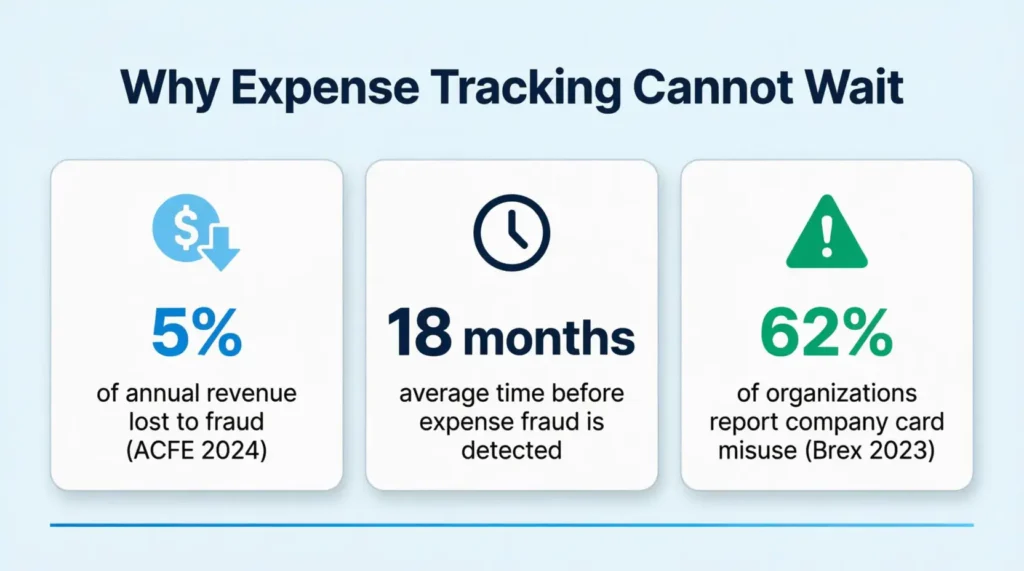
According to the ACFE’s 2024 Report to the Nations, organizations lose about 5% of their annual revenue to fraud. An employee credit card usage log is the fix. It’s a simple document that records every business charge, receipt, and approval in one place.
Below, you’ll find free templates, a step-by-step guide, and best practices to keep every dollar accounted for.
Download Your Free Employee Credit Card Usage Log Templates
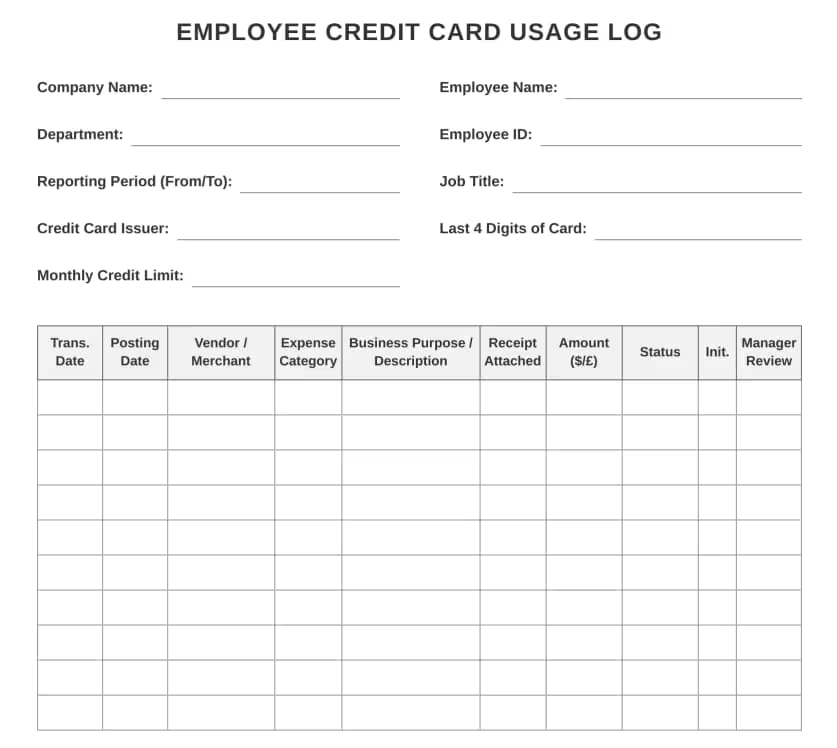
3 ready-to-use templates are available to make tracking simple. Each one has all the sections needed to record company card charges properly.
Pick the format and paper size that works best:
Disclaimer: The Templates & Printables on this site are provided for informational and personal tracking purposes only. This is not financial, legal, tax, or credit advice. While reasonable efforts are made to ensure accuracy, Credit Card Wind makes no warranties as to the completeness, reliability, or accuracy of the calculations generated by these Templates & Printables. Users are responsible for independently verifying all data and calculations. Terms, conditions, rates, regulations, and legal requirements vary by institution, jurisdiction, and individual circumstances.
Always refer to your official statements, account agreements, and applicable laws, and consult a qualified professional before making any financial, legal, or other important decisions. By using these Templates & Printables, you acknowledge that Credit Card Wind and its owner shall not be liable for any damages, losses, or financial consequences arising from the use or misuse of these Templates & Printables.
This universal disclaimer applies to all templates and printables provided by Credit Card Wind (https://creditcardwind.com), created by Robert Williams (Owner at Credit Card Wind).
© Credit Card Wind. All rights reserved.
These templates and printables may be downloaded and used for personal, non-commercial purposes only. Redistribution, resale, or modification for commercial use without permission is strictly prohibited.
What Is an Employee Credit Card Usage Log?
An employee credit card usage log is a structured document that tracks every purchase made with a company-issued card. It records the date, vendor, amount, business purpose, and receipt status for each transaction.
Think of it as a detailed diary for business spending. Every time a charge hits the corporate card, it gets logged with all the key details.
The ACFE’s Occupational Fraud 2024 report estimates that organizations lose 5% of their annual revenue to fraud. A large chunk of that comes from expense-related schemes. A well-maintained spending record helps catch problems early and keeps the company’s finances clean.
This type of log goes by several names. Some companies call it a corporate card expense tracker, a business credit card log, or a company card spending record. No matter the name, the goal is the same: full visibility into how business funds get spent.
Unlike a basic spreadsheet, a proper usage log includes authorization fields, receipt tracking, and a financial summary. This structure makes it useful for employees, managers, and the finance team alike.
Tip: → Make sure the spending limit you’re tracking against makes sense with the business credit card limit calculator.
Why Every Business Needs a Credit Card Expense Tracker
Prevents Lost Receipts and Missing Records
Receipts have a way of disappearing. They fade in wallets, get tossed with junk mail, or sit forgotten in email inboxes. A tracking log solves this by creating a real-time record of the moment a purchase happens.
When each charge gets logged on the same day, there’s no guessing later. The vendor name, amount, and business purpose are all captured while the details are still fresh.
Jennifer, a project coordinator at a mid-sized marketing firm, used to lose two or three receipts every month. After her team started using a structured expense log, that number dropped to zero within 60 days.
Makes Tax Season and Audits Much Easier
Tax time doesn’t have to mean scrambling through shoeboxes of receipts. A complete spending log gives the finance team a clean, organized trail of every business charge.
This matters because the IRS requires businesses to keep records that clearly show income and expenses. A detailed log with dates, amounts, vendors, and business purposes meets that standard.
During an audit, having organized records saves time and reduces stress. The finance team can pull up any month’s charges in minutes instead of hours.
Helps Control Company Spending
Without a tracking system, it’s easy for spending to creep above budget. Small charges add up fast when nobody monitors them.
A corporate expense log makes every charge visible. Managers can spot patterns, like rising office supply costs or unusual vendor charges, before they snowball.
💡 Pro Tip: Set a weekly calendar reminder to review the log. Catching a billing error or duplicate charge within a few days is much easier than finding it three months later during reconciliation.
Ensures Policy Compliance
Most companies have a written credit card policy. But rules only work when there’s a system to enforce them.
A usage log creates accountability. Each entry shows what was bought, why, and whether it falls within approved spending categories. When employees know every charge gets reviewed, they’re more likely to stick to the rules.
Research from Ramp shows that employees with spending controls on their corporate cards are 10% more likely to stay compliant with company policy. A tracking log adds another layer of oversight on top of those controls.
Reduces Fraud and Costly Errors
Expense fraud doesn’t always look like a giant embezzlement scheme. It often appears as small personal charges mixed with business expenses. You might see inflated meal receipts or duplicate submissions too.
Data from the ACFE’s 2024 Report to the Nations reveals that expense reimbursement fraud lasts an average of 18 months before detection. That’s a year and a half of unchecked losses.
A consistent logging process makes it much harder to hide fraudulent charges. Documenting each transaction with a receipt and a supervisor’s initials greatly reduces the chance of misuse.
Key Sections of the Employee Credit Card Usage Log
The template has four main sections. Each one serves a specific purpose. Together, they create a complete record that employees, managers, and accountants can all rely on.
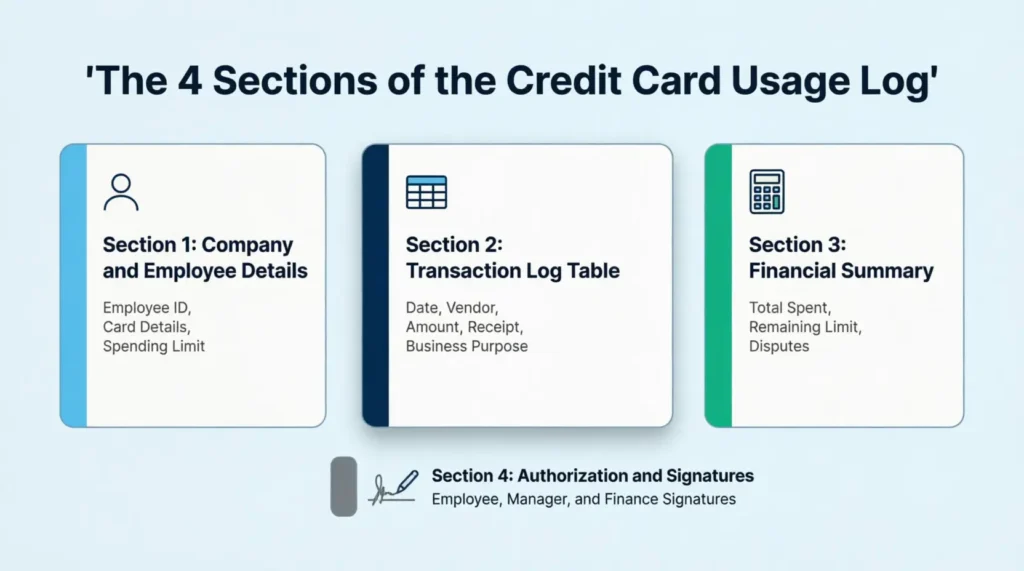
1. Company and Employee Details
This top section captures the basics:
- Company Name and Department
- Reporting Period (start and end dates)
- Employee Full Name and Employee ID
- Job Title
- Credit Card Issuer and Last 4 Digits of Card
- Approved Monthly Limit
These fields link every transaction to a specific person, card, and time frame. If a question comes up later, this section tells the finance team exactly who was responsible for the charges.
The “Approved Monthly Limit” field is especially useful. It creates a clear benchmark to measure total spending against throughout the month.
2. Transaction Log Table
This is the core of the document. It’s a 10-column table that captures every detail of each purchase:
| Column | What to Record |
|---|---|
| Date | The actual purchase date |
| Posting Date | When the charge appeared on the statement |
| Vendor / Merchant | Store or company name |
| Category | Expense type (travel, supplies, meals, etc.) |
| Business Purpose / Description | Why the purchase was made |
| Receipt (Y/N) | Whether a receipt is attached |
| Amount | Dollar amount of the charge |
| Status | Approved, pending, or disputed |
| Initials | Employee’s initials confirming the entry |
| Review | Supervisor’s review mark |
The “Business Purpose / Description” column is the most important one. Vague entries like “supplies” don’t help anyone. A strong entry like “Printer toner for Q2 client proposals, marketing dept” gives the finance team exactly what they need.
3. Financial Summary
At the bottom of the transaction section, four summary fields pull everything together:
- Total Number of Transactions — How many charges were made
- Total Amount Spent — The sum of all charges for the period
- Remaining Credit Limit — How much spending room is left
- Disputed Amount — Any charges under dispute
This summary gives a quick snapshot without needing to add up every row manually. Managers can glance at it and know whether spending is on track or over budget.
⚠️ Mistake to Avoid: Don’t leave the “Disputed Amount” field blank when there are no disputes. Write “$0.00” instead. A blank field could look like it was skipped or forgotten during a review.
4. Authorization and Signatures
The final section requires three signatures:
- Employee Signature + Date — Confirms that all entries are accurate
- Manager / Supervisor Signature + Date — Confirms the charges are approved
- Finance Department Approval + Date — Final review before filing
This three-tier sign-off creates a clear chain of accountability. If a charge gets questioned later, the signatures show exactly who reviewed and approved it.
How to Use the Employee Credit Card Usage Log (Step-by-Step Guide)
Follow these six steps to fill out the template correctly. Each step builds on the last, so start from the top and work down.
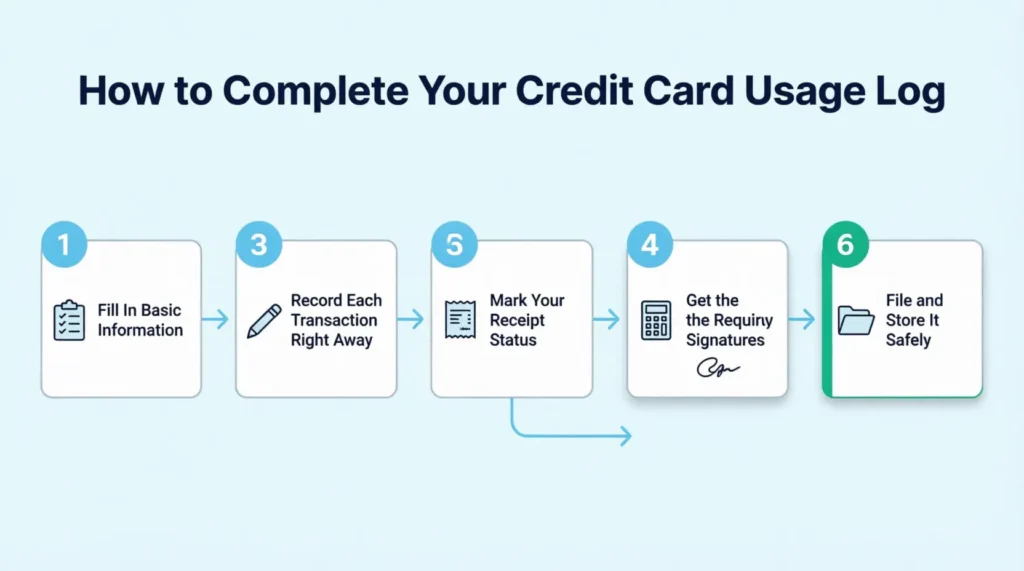
Step 1: Fill In the Basic Information
Start with the Company and Employee Details section at the top of the form.
- Write the company name and department
- Enter the reporting period (for example, “From: March 1, 2026 To: March 31, 2026”)
- Add the employee’s full name, ID number, and job title
- Record the credit card issuer (Visa, Mastercard, Amex, etc.) and the last four digits of the card number
- Write the approved monthly spending limit
Complete this section on the first day of each reporting period. That way, the log is ready to use before any charges come in.
Step 2: Record Each Transaction Right Away
Every time a charge hits the company card, open the log and fill in a new row.
Write the purchase date, the vendor name, and the amount. Then fill in the category and a specific business purpose.
Don’t wait until the end of the week. The longer the gap between the purchase and the log entry, the more likely important details get forgotten.
David, a sales rep at a logistics company, tried batching his entries every Friday. After three weeks, he couldn’t remember the business purpose for six different charges. His manager flagged them all for review. Daily logging would have taken 30 seconds per entry and saved hours of back-and-forth.
Step 3: Mark Your Receipt Status
For each row, check the “Receipt (Y/N)” column.
- Write Y if a receipt is saved (paper or digital)
- Write N if the receipt is missing
Then, attach the actual receipt to the log. Staple paper receipts to the back, or save digital copies in a matching folder on the company drive.
📌 Did You Know The IRS doesn’t require receipts for business expenses under $75. But most company policies are stricter than the IRS minimum. Always check the internal policy before assuming a receipt isn’t needed.
Step 4: Calculate the Monthly Summary
At the end of the reporting period, complete the Financial Summary section.
- Count the total number of transactions and write it in the first field
- Add up every charge to get the Total Amount Spent
- Subtract the total from the Approved Monthly Limit to find the Remaining Credit Limit
- Note any charges under dispute in the Disputed Amount field (write “$0.00” if none)
Double-check the math. A small addition error can cause headaches during reconciliation.
Step 5: Get the Required Signatures
Once the log is complete, sign and date the Employee Signature line. Then hand it to the direct supervisor for review.
The manager checks the entries, confirms the business purposes look valid, and signs the Manager/Supervisor line.
Finally, the finance department reviews the full log and provides the third signature.
Keep a copy of the signed log before submitting it. A quick photo or scan works fine.
Step 6: File and Store It Safely
After all three signatures are collected, file the completed log in a secure location.
Paper copies should go in a locked filing cabinet, organized by month and employee name. Digital copies should be saved in a protected folder with restricted access.
The IRS generally recommends keeping business expense records for at least three years from the filing date. Employment tax records should be kept for four years. Store the logs accordingly.
Common Expense Categories for Business Credit Cards
The “Category” column in the transaction log needs consistent labels. Using the same categories across the team makes reporting and budgeting much easier.
Here’s a reference table of common business expense categories:
| Category | Examples |
|---|---|
| Travel | Flights, hotels, rental cars, rideshare, parking |
| Meals and Entertainment | Client lunches, team dinners, conference meals |
| Office Supplies | Paper, pens, toner, desk accessories |
| Software and Subscriptions | SaaS tools, cloud storage, project management apps |
| Professional Development | Courses, certifications, conference tickets, books |
| Client Gifts | Holiday gifts, thank-you items (check policy limits) |
| Shipping and Postage | FedEx, UPS, USPS, courier services |
| Equipment and Hardware | Laptops, monitors, keyboards, headsets |
| Marketing and Advertising | Ad spend, print materials, event sponsorships |
| Miscellaneous | Anything that doesn’t fit the categories above |
Every company has different needs. Adjust these categories to match the company’s chart of accounts. The key is consistency: everyone on the team should use the same labels.
Best Practices for Keeping an Accurate Spending Log
Log Transactions the Same Day
Waiting even two or three days can cloud the details. Record each charge on the same day it happens. This takes less than a minute per entry and saves major headaches later.
Be Very Specific in Descriptions
Vague entries create problems. “Office stuff” tells the finance team nothing.
Vague Descriptions: “Supplies”
Good Specific Descriptions: “20 boxes of copy paper for Q2 client packets, operations dept.”
The more specific the description, the faster the approval process.
Keep Receipts Organized
Create a simple system: a labeled envelope for paper receipts, or a dedicated folder on the company drive for digital ones. Match each receipt to a row in the log by date and amount.
Review the Log Weekly
Don’t wait until the end of the month to review. Set aside 10 minutes each Friday to scan the entries. Look for missing receipts, blank fields, or charges that need clarification.
Stay Within Approved Limits
The “Approved Monthly Limit” field at the top of the log sets the boundary. Track the running total throughout the month. If spending approaches the limit, flag it with the manager before the next purchase.
Separate Personal and Business Charges
A 2023 survey cited by Brex found that 62% of corporate cardholders knew company cards were being misused for non-business purchases within their organization.
If a personal charge accidentally hits the company card, note it immediately in the log. Most companies have a process for reimbursement, but hiding it or ignoring it can lead to disciplinary action.
Paper Logs vs. Digital Spreadsheets vs. Expense Apps
Not sure which format is the best fit? Here’s a quick breakdown of the three main options.
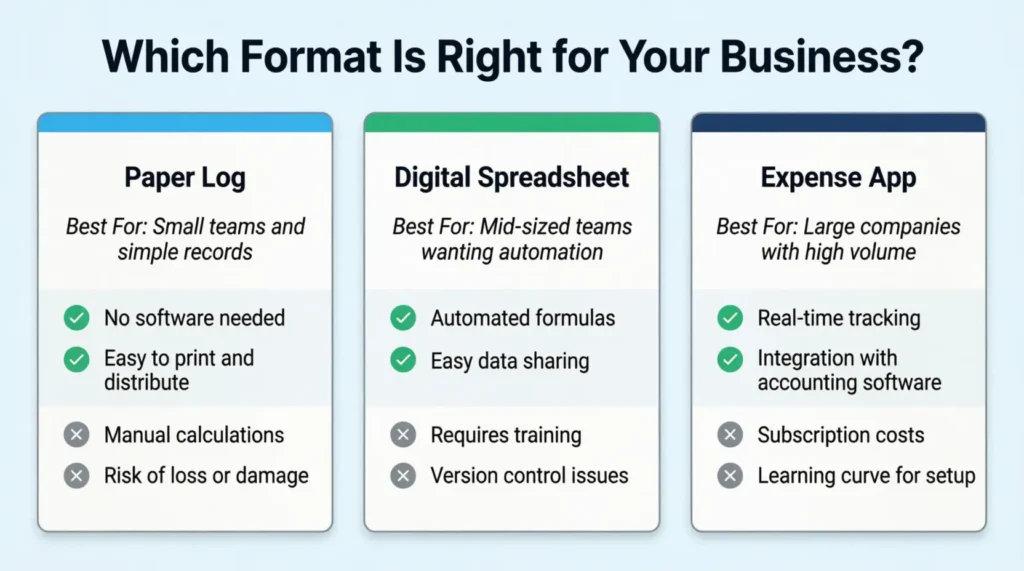
Paper Logs (Like the Templates Above)
Best for: Small teams, companies without expense software, and businesses that need a simple printed record.
Pros
- No software needed
- Easy to print and distribute
- Works for employees who aren’t tech-savvy
- Creates a physical paper trail
Cons
- Manual calculations
- Harder to search or sort
- Risk of physical damage or loss
Digital Spreadsheets
Best for: Mid-sized teams that want basic automation without buying software.
Pros
- Auto-calculations with formulas
- Easy to sort, filter, and search
- Cloud storage for backup
- Shareable across the team
Cons
- Requires basic spreadsheet skills
- No built-in approval workflows
- Data entry is still manual
Expense Management Apps
Best for: Larger companies with high transaction volumes and complex approval chains.
Pros
- Automated receipt scanning
- Real-time spending alerts
- Built-in approval workflows
- Integration with accounting software
Cons
- Monthly subscription costs
- Learning curve for the team
- May be overkill for small businesses
The bottom line: For most small to mid-sized businesses, a paper log or digital spreadsheet is more than enough. The templates provided here give a solid starting point. As the team and transaction volume grow, upgrading to a dedicated app makes sense.
Common Mistakes That Lead to Expense Tracking Problems
Waiting Too Long to Record Charges
This is the number-one issue. When entries pile up for a week or more, details get fuzzy. Was that $47.82 charge for printer ink or shipping labels? Daily logging prevents this entirely.
Writing Vague Descriptions
“Meals” or “Travel” tells the reviewer nothing useful. Always include who, what, and why. A good description answers the question: “How does this charge help the business?”
Losing Receipts
A missing receipt can delay the entire approval process. Snap a photo of every receipt on the spot. Store it in a cloud folder labeled by month. That way, even if the paper copy disappears, the digital backup is safe.
💡 Pro Tip: Use the phone’s camera to snap a photo of every receipt right at the register. Create a dedicated album called “Business Receipts,” so they’re easy to find later.
Mixing Personal and Business Charges
Even one personal charge on a company card can raise red flags. It creates extra paperwork, delays approvals, and can trigger a policy review. Keep personal cards and company cards in separate slots in the wallet to avoid accidental swipes.
Skipping Signatures and Reviews
The signature section isn’t just a formality. It’s the final quality check. Skipping it means nobody officially verified the charges. If a dispute comes up later, there’s no documented approval. Always complete all three signature lines before filing.
Tips for Managers Reviewing Employee Expense Logs
Reviewing logs takes attention to detail. These tips help managers catch errors and keep the team on track.
- Check for completeness. Every row should have all 10 columns filled in. Blank fields are a red flag.
- Verify the business purpose. Each charge should clearly tie back to the company’s business. If a description is vague, send it back for clarification before signing.
- Compare against the credit card statement. The log and the statement should match. Look for charges on the statement that don’t appear in the log.
- Look for patterns. Repeated charges to the same vendor, round amounts, or charges just below the approval limit can indicate issues.
- Be consistent. Review every log within the same time frame, typically within five business days of submission.
- Document the review. Use the “Review” column in the transaction table to mark each line. If an entry needs follow-up, note it in the margins.
- Provide feedback. If an employee consistently forgets receipts or writes vague descriptions, address it directly. A quick five-minute conversation is more effective than rejecting the log repeatedly.
Legal and Compliance Considerations
IRS Recordkeeping Rules
The IRS requires businesses to keep records that support the income and deductions reported on tax returns. For business expenses, you need to record the amount, date, location, and purpose of each charge.
The general rule is to keep these records for at least three years from the date the tax return was filed. Employment tax records should be kept for at least four years.
A properly filled-out credit card spending log meets these documentation standards when paired with matching receipts.
Company Policy Compliance
Many organizations have a corporate card policy. This policy explains approved spending categories, limits, and what documentation is needed. The usage log reinforces these rules by creating a clear paper trail.
Employees should receive a copy of the policy when they get their card. The log serves as a working tool that puts the policy into daily practice.
Fraud Prevention
Internal controls are the first line of defense against expense fraud. The three-signature authorization process in this template ensures separation of duties. This method is one of the best anti-fraud controls available.
When the buyer, reviewer, and approver are all different people, it gets much harder for fraud. This setup helps catch fake charges better.
How Long to Keep Completed Logs
Follow this general retention schedule:
- Standard business expenses: At least 3 years
- Employment tax records: At least 4 years
- If income was underreported by more than 25%: 6 years
- Fraud or failure to file: No time limit
When in doubt, keep the records longer. Storage is cheap compared to the cost of missing documents during an audit.
How to Customize This Template for Your Business
The templates work well right out of the box. But every company has its own needs. Here are a few ways to adapt them.
- Add extra columns. If the team needs to track project codes, cost centers, or client names, add those columns to the transaction table. The Word template makes this easy to edit.
- Adjust the categories. Replace the generic categories with ones that match the company’s chart of accounts. This speeds up the accounting process at month-end.
- Change the reporting period. The default is monthly, but some companies prefer bi-weekly or weekly logs. Adjust the “Reporting Period” field to match the internal schedule.
- Include budget tracking. Add a row in the Financial Summary. This row should show the department’s monthly budget and the total spent. This gives a side-by-side comparison at a glance.
- Add project-specific fields. For teams that bill clients or track project costs, add a “Project Name” or “Client Code” column. This links each charge to a specific job or account.
- Adjust for currency. International teams can change the dollar signs and formatting to match local currency. The A4 template is already sized for international paper standards.
Frequently Asked Questions (FAQs)
What’s the difference between a credit card usage log and an expense report?
A usage log tracks every transaction on a specific company card in real time. An expense report is a summary submitted after the fact, often covering multiple payment methods for reimbursement.
How often should employees submit their credit card logs?
Most companies require a monthly submission, typically within five business days after the reporting period ends. Some businesses with high transaction volumes use bi-weekly submissions instead.
Can an employee use a company credit card for personal purchases in an emergency?
Most corporate card policies prohibit personal use entirely. If it happens by accident, the employee should report it immediately and reimburse the company. Repeated personal charges can lead to card revocation or disciplinary action.
Do I need to keep paper receipts if I have digital copies?
No. The IRS allows digital copies of receipts. This includes photos and scanned images. They must be clear and show key details like the date, vendor, amount, and items bought.
What should I do if I lose a receipt for a business charge?
Contact the vendor and request a duplicate receipt. If that’s not possible, write a detailed memo that includes the date, vendor, amount, and business purpose. Attach it to the log as a substitute.
Who is responsible if a fraudulent charge appears on an employee’s company card?
The employee should report the charge to the finance department and the card issuer immediately. In most cases, the company and the card issuer handle the dispute. The employee is typically not held personally liable for unauthorized charges reported promptly.
Does the log need to include charges that are later refunded?
Yes. Record the original charge when it happens. Then log the refund as a separate entry with a negative amount or a note in the Status column. This keeps the paper trail complete.
Can managers review employee logs without the employee present?
Yes. Reviewing expense logs is a standard part of financial oversight. Managers and finance teams can check submitted logs anytime. This is part of the company’s internal controls.
Bottom Line
Tracking company card charges doesn’t have to be complicated. A structured spending log brings order to what can quickly become a messy process. It protects employees, managers, and the business from lost receipts, billing errors, and compliance issues.
The templates provided here cover all four essential sections: employee details, transaction tracking, financial summaries, and authorization signatures. Based on the evidence throughout this article, the most effective approach is to combine a printed or editable log with a daily recording habit. That simple combination catches problems early and keeps the finance team happy.
For most small to mid-sized teams, these free employee credit card usage log templates are a strong starting point. Download the format that fits, fill it in consistently, and review it weekly.
Share this guide with your team if it helps them stay organized with company card charges. A colleague juggling multiple business expenses will appreciate having a clear system in place.