
Credit Card Fee Calculator
Estimate processing fees for single transactions or batches.
Show Advanced Options (Monthly, Chargebacks, etc.)
Effective Rate
0.00%
Total Fees
$0.00
Net Revenue
$0.00
Total Volume
$0.00
Avg Fee Per Transaction
$0.00
Processing Fees
$0.00
Chargeback & Other Fees
$0.00
Fee Breakdown
Chart showing the proportion of net revenue versus total fees.
Link copied to clipboard!
How to Use This Calculator
- Select "Single" or "Batch" mode for your calculation.
- Enter your transaction amount and, if in batch mode, the number of transactions.
- Choose a provider preset or select "Custom Rate" to enter your own fees.
- Use the "Advanced Options" for costs like monthly fees or chargebacks.
- Your results will update automatically.
Disclaimer:
This calculator is for informational purposes only. The results are estimates based on the information you provide and may not be accurate or applicable to your specific financial situation. The information provided does not constitute financial, legal or tax advice. We do not guarantee the accuracy of the calculations or the applicability of any information. Always consult a qualified financial professional for advice specific to your personal circumstances. Credit card terms, conditions, rates and offers are subject to change by the issuing bank at any time. We are not responsible for any actions or decisions taken based on the information provided by this tool.
Every time a customer swipes a card, a slice of revenue disappears. Most business owners don’t realize how much until it’s too late. The Federal Reserve’s November 2024 Payments Study recorded $9.76 trillion in general-purpose card payment value across the United States in 2022.
A percentage of every single sale went straight to processing fees. A credit card fee calculator is the fastest way to stop guessing and see exactly where that money goes.
The simplest fix is to calculate your true processing cost before you lose more money.
Keep reading for step-by-step guidance, real examples, and practical tips. You’ll learn how to take control of your payment processing costs.
Tip: → Log what you find here in the credit card fees tracker templates to keep an eye on costs over time.
What Is a Credit Card Processing Fee?
A credit card processing fee is the cost a business pays every time a customer pays by credit card. It’s not one simple charge. It’s a layered combination of several fees that bundle together into a single deduction from your revenue.
The Federal Reserve Payments Study (November 2024) confirmed that general-purpose card payments reached $9.76 trillion in value in 2022 alone, growing 10.5% from the prior year. Processing costs for that volume add up to hundreds of billions of dollars in merchant fees each year. These fees come right out of your pocket with every sale.
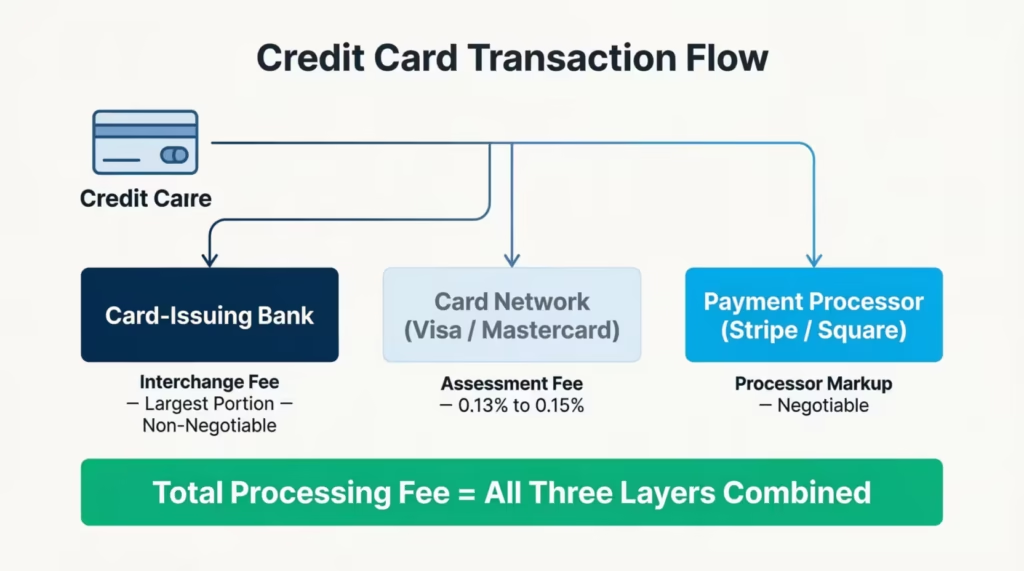
Three main parties collect a share of every card transaction:
The card-issuing bank collects the interchange fee. This is the largest piece of the total. It goes to the bank that issued the customer’s card, such as Chase, Capital One, or Bank of America. You can’t negotiate or avoid it.
The card network (Visa, Mastercard, American Express, or Discover) charges a network assessment fee. This is typically 0.13% to 0.15% of each transaction. Small per sale, but it adds up across thousands of transactions.
The payment processor (Square, Stripe, PayPal, or your bank’s merchant service) adds its own markup on top. This is the company that actually moves the money from the customer’s bank to yours. Their markup is the part you can sometimes negotiate.
Together, these three layers form the total cost most merchants call a “processing fee” or “merchant service fee.”
Here’s a breakdown of the main fee types you’ll encounter:
- Interchange fee: Paid to the card-issuing bank. Non-negotiable. Set by Visa and Mastercard based on card type and industry. According to Visa’s official interchange reimbursement fees page, rates range from well under 1% for regulated debit cards to over 2.7% for premium rewards credit cards.
- Assessment fee: Paid to the card network. Small but unavoidable on every transaction.
- Processor markup: Varies by provider and pricing model. This is the part you have the most leverage over.
- Flat transaction fee: A fixed dollar amount charged per transaction, like $0.30 per swipe. This flat amount hits harder on small sales than on large ones.
- Monthly or gateway fee: Some processors charge a monthly fee for access to their platform or payment gateway services.
- Chargeback fee: A penalty charged to the merchant when a customer successfully disputes a charge. Typically, between $15 and $100 per dispute.
📌 Did You Know: Premium rewards cards, like travel and cashback credit cards, carry higher interchange fees for merchants. Your actual processing cost depends partly on the card your customer pulls from their wallet. You have no control over that choice.
How This Calculator Works
This tool takes your specific inputs and computes your real payment processing costs in real time. You don’t need an accounting background. You don’t need to dig through a processor’s pricing page. Just enter your numbers and the calculator does all the math for you.
Here’s what the tool can do:
Single Transaction Mode
Enter one transaction amount and select your payment provider. The calculator instantly shows your total fee, net revenue, and effective rate for that individual sale. This mode is perfect for checking the cost of a specific order. It also helps you see how different card types change your results.
Batch Mode
Toggle to Batch Mode and enter both the transaction amount and the number of transactions. This mode is built for business planning. Use it to project your weekly or monthly processing costs across a realistic volume of sales. It’s the best way to see your total annual fee exposure.
Provider Presets
The calculator comes with built-in rate presets for the most popular U.S. payment processors:
| Provider | Percentage Fee | Flat Fee Per Transaction |
|---|---|---|
| Square | 2.9% | $0.30 |
| Stripe | 2.9% | $0.30 |
| PayPal | 3.49% | $0.49 |
| American Express | 2.5% (estimated) | $0.00 |
| Custom | You enter | You enter |
Note: The American Express rate is a simplified estimate. Actual Amex merchant rates vary based on business type and processing volume. Always confirm your rate directly with Amex.
Quick Industry Presets
Four one-click preset buttons auto-fill typical settings for common business types:
- E-commerce: Stripe at 2.9% + $0.30, with a 0.1% chargeback rate and $15 per chargeback
- Retail POS: Square at 2.9% + $0.30, with a 0.05% chargeback rate and $20 per chargeback
- Restaurant: Square at 2.9% + $0.30, with a $10 monthly fee, 0.08% chargeback rate, and $20 per chargeback
- Nonprofit: PayPal at 3.49% + $0.49, with a 0.02% chargeback rate and $10 per chargeback
These presets save time and give you a realistic starting point for planning costs by industry type.
Advanced Options
Expand the “Show Advanced Options” section to unlock three extra fields:
- Monthly Fixed Fees: These are any regular costs from your processor. This includes platform fees, gateway fees, or software subscriptions.
- Chargeback Rate (%): The percentage of your transactions that typically result in disputes
- Per-Chargeback Fee ($): The penalty amount your processor charges each time a dispute is filed
The calculator also saves your inputs automatically using local storage. Your settings stay in place if you return later. You can create a permalink to save or share your scenario. This makes it easy to send to a bookkeeper, business partner, or financial advisor.
The Formula Explained
Here is the exact math the calculator uses. Every output on the screen comes from these steps. No hidden logic, no surprises.
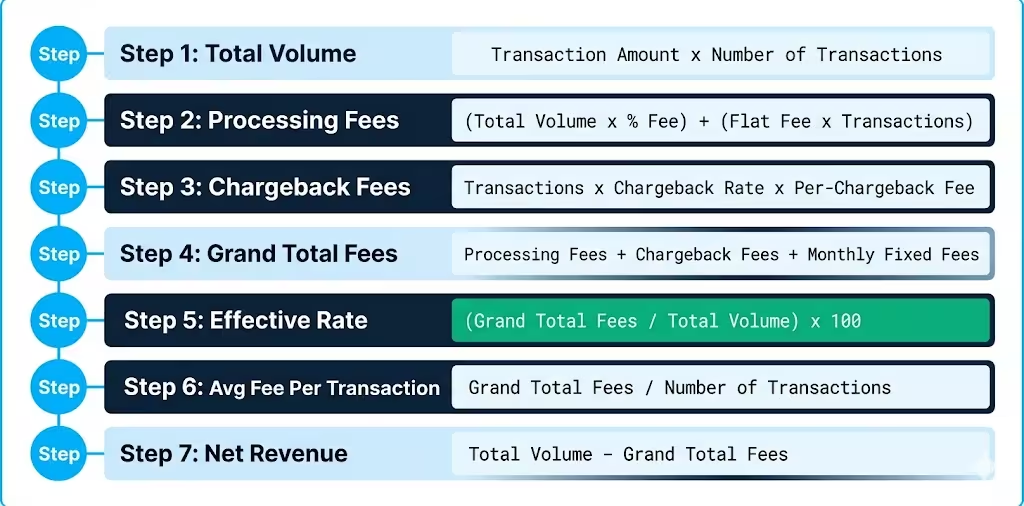
Step 1: Total Volume
Total Volume = Transaction Amount × Number of Transactions
This is your gross card payment revenue before any fees are applied.
Step 2: Total Processing Fees
Total Processing Fees = (Total Volume × Percentage Fee) + (Flat Fee × Number of Transactions)
The percentage fee applies to the entire dollar volume. The flat fee, like $0.30, applies separately to each individual transaction no matter the sale size.
Step 3: Chargeback Fees
Total Chargeback Fees = Number of Transactions × Chargeback Rate × Per-Chargeback Fee Amount
Example: 200 transactions × 0.1% chargeback rate × $15 per chargeback = $3.00
Step 4: Grand Total Fees
Grand Total Fees = Processing Fees + Chargeback Fees + Monthly Fixed Fees
This is the complete cost of accepting credit cards for the period you entered.
Step 5: Effective Rate
Effective Rate = (Grand Total Fees ÷ Total Volume) × 100
This is the single most important output. It tells you what percentage of your total revenue goes to fees across all cost types combined.
Step 6: Average Fee Per Transaction
Average Fee Per Transaction = Grand Total Fees ÷ Number of Transactions
This number helps you decide on minimum purchase amounts, surcharge policies, and processor comparisons.
Step 7: Net Revenue
Net Revenue = Total Volume – Grand Total Fees
This is the actual dollar amount that lands in your bank account after all fees are deducted. It’s your real earnings from card transactions, not your gross sales figure.
💡 Pro Tip: The effective rate is far more useful than the advertised rate. A processor advertising “2.9%” can have an effective rate of 3.4% or higher once flat fees and monthly costs are factored in. Always judge processors by effective rate, not by the headline number.
How to Use This Calculator (Step by Step)
Follow these steps to get accurate, actionable results in under two minutes.
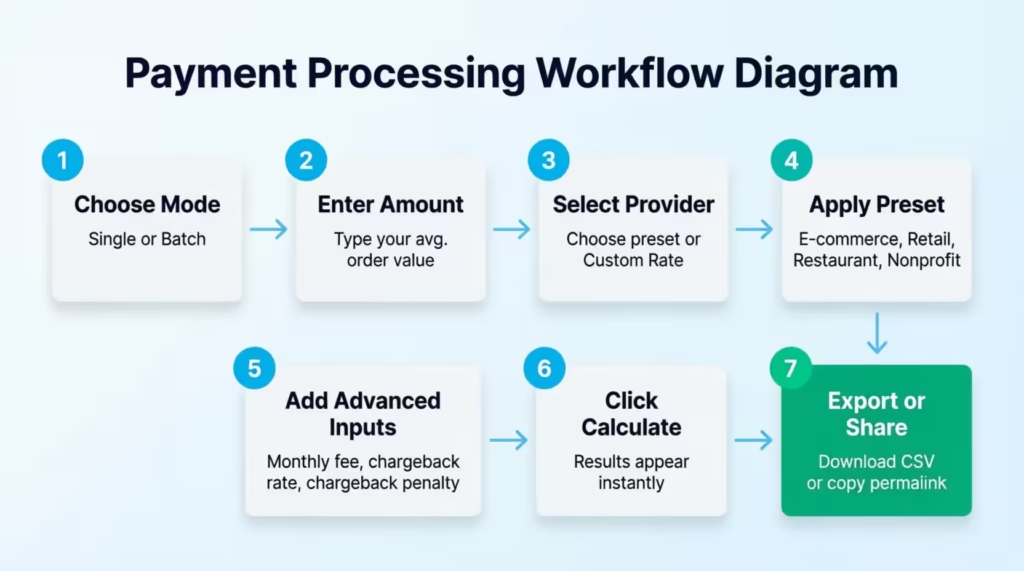
Step 1: Choose Your Transaction Mode
Look for the toggle switch at the top of the input panel. It reads “Single” on the left and “Batch” on the right.
- Choose Single to calculate the fee on one specific transaction.
- Choose Batch to project costs across many transactions. This is the best mode for monthly budgeting and planning.
Step 2: Enter the Transaction Amount
Type in the dollar value of a typical transaction. For example, $95.00. Use your real average order value for the most accurate result.
If you’re in Batch Mode, a second field will appear. Enter the number of transactions you want to calculate. For example, 200 transactions per month.
Step 3: Select Your Payment Provider
Click the dropdown menu and choose your current processor. Square, Stripe, PayPal, and American Express are pre-loaded with their standard published rates. Selecting one of these will auto-fill the rate fields.
If your processor isn’t listed, or if you’ve negotiated a custom rate, choose Custom Rate. Two fields will appear: enter your own percentage fee and flat fee per transaction.
Step 4: Use a Quick Preset (Optional)
Click one of the four preset buttons to instantly load industry-typical settings:
- E-commerce: for online stores and digital product sellers
- Retail POS: for brick-and-mortar stores with card readers
- Restaurant: for dining businesses with monthly platform fees included
- Nonprofit: for charitable organizations, often eligible for discounted rates
These are useful starting points. You can always adjust any value after applying a preset.
Step 5: Add Advanced Inputs (Optional)
Click “Show Advanced Options” to reveal three more input fields. These are optional but can significantly affect your results:
- Type in your Monthly Fixed Fee if your processor charges a recurring subscription or gateway access fee.
- Enter your Chargeback Rate (%): the percentage of your orders that typically result in disputes. Industry averages range from 0.02% to 0.1%.
- Enter your Per-Chargeback Fee ($): the dollar penalty your processor charges each time a dispute is filed against you.
Step 6: Click Calculate
Press the blue Calculate button. All results appear in the panel to the right immediately after processing. The tool updates in real time whenever you change any input field.
Tip: → See how this fee fits into your overall spending with the credit card budget tracker template.
Step 7: Export or Share Your Results
Once your results are ready, choose what to do next:
- Click Download CSV to export all your input data and results into a spreadsheet. This is useful for comparing many processor options side by side.
- Click Copy Permalink to generate a unique shareable link that stores your exact inputs. Share it with your accountant, business partner, or financial advisor. There’s no need to retype anything.
- Use the Share icons to post your results directly to Facebook, X (Twitter), WhatsApp, or Reddit.
How to Read Your Results
The results panel shows seven key numbers. Here’s what each one means and why it matters for your business decisions.
Effective Rate
This is your true cost percentage. It reflects every fee type combined: the percentage, the flat fee, the monthly costs, and chargebacks. A low effective rate means your processor setup is genuinely efficient. A high effective rate signals hidden costs worth investigating. This is the number to use when comparing two processors head-to-head.
Total Fees
This is the total dollar amount you’ll pay in processing costs for the scenario you entered. It combines the percentage-based fee, flat transaction fees, chargeback costs, and monthly fees into one simple total.
Net Revenue
This is what you actually keep after all fees are deducted from your total sales volume. Think of it as the most honest measure of your real earnings from card payments. If this number surprises you, the fee breakdown section will tell you exactly why.
Total Volume
This is your gross card payment revenue before any deductions. It’s the starting point before fees chip away at your earnings.
Average Fee Per Transaction
This is your typical cost per individual sale. Knowing this number helps you decide whether to set a minimum card purchase amount. It helps you see if a flat-rate or subscription pricing model fits your transaction volume better.
Processing Fees
This line shows only the percentage-plus-flat-fee part of your costs. It’s separated from chargeback fees and monthly fees so you can see each cost layer independently. Use this to isolate the base processing cost from everything else.
Chargeback and Other Fees
This line captures the combined total of your chargeback penalty costs and your monthly platform fee. Even a chargeback rate of just 0.1% can cost hundreds of dollars per month for a business doing 500 or more transactions. This field makes that cost visible.
The Doughnut Chart
The visual chart at the bottom of the results panel divides your total transaction volume into two segments:
- Green section: Net Revenue, which is what actually goes into your account
- Red section: Total Fees, which is what goes to processors, networks, and banks
Seeing the red section expand as you change inputs is a powerful way to grasp how fee structure choices impact your real profits. Try toggling between providers or changing your average order value and watch the chart respond.
Tip: → Comparing cards by their fees? The credit card comparison worksheet template puts it side by side.
Real-World Example
Let’s walk through a real scenario to put all of these numbers into practice.
Maria, Owner of a Small Online Boutique in Austin, Texas
Maria runs a women’s clothing boutique online. She processes about 150 orders per month at an average order value of $75. She uses Stripe at the standard online rate of 2.9% + $0.30 per transaction. She doesn’t pay a monthly fee, and her chargeback rate is roughly 0.1%.
She opens the credit card fee estimator. She selects the E-commerce preset, which loads Stripe’s rates. Then, she enters $75 as the transaction amount. Next, she toggles to Batch Mode. Finally, she types in 150 transactions.
Here’s what the calculator shows her:
| Metric | Value |
|---|---|
| Transaction Amount | $75.00 |
| Number of Transactions | 150 |
| Total Volume | $11,250.00 |
| Percentage Processing Fee (2.9%) | $326.25 |
| Flat Fee Total ($0.30 x 150) | $45.00 |
| Chargeback Fees (0.1% x $15) | $0.23 |
| Grand Total Fees | $371.48 |
| Effective Rate | 3.30% |
| Net Revenue | $10,878.52 |
Maria notices her effective rate is 3.30%, not the 2.9% she assumed. The difference comes entirely from the flat $0.30 fee applied to each $75 order. That flat fee alone adds 0.40% to her effective rate.
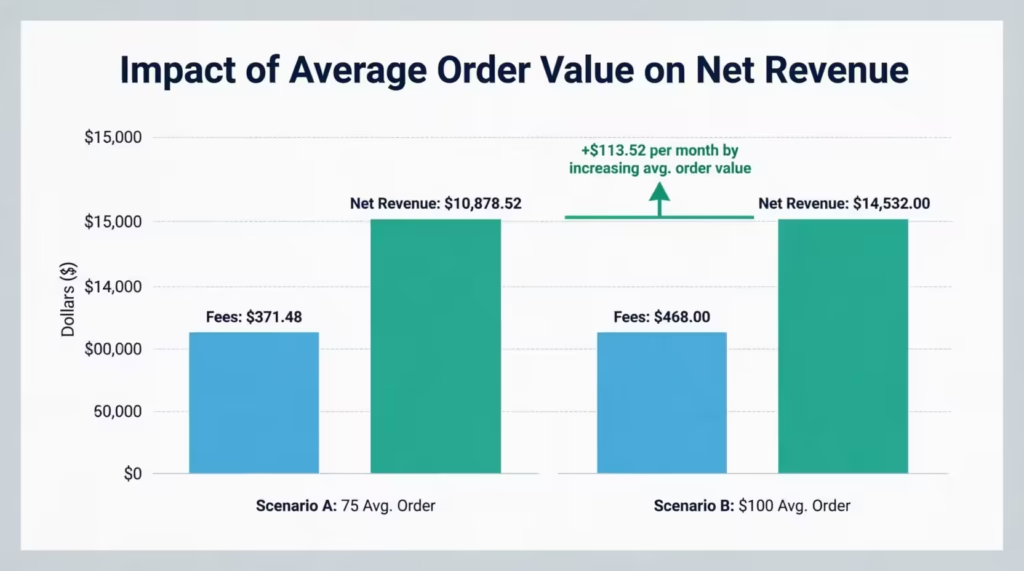
She runs a second scenario. What if she nudged her average order value to $100 by bundling products or setting a $100 free-shipping threshold?
At $100 per order across the same 150 transactions, her total volume rises to $15,000. Her effective rate drops to about 3.20%. That 0.10% improvement translates to an extra $113.52 in net revenue per month, or $1,362.24 per year. No new customers needed.
⚠️ Mistake to Avoid: Don’t evaluate a payment processor based on the percentage rate alone. Maria’s example shows exactly why the effective rate tells the whole story. Two merchants with the same provider and rate can have different effective rates. This difference depends on their average order value.
Expert Tips and Insights
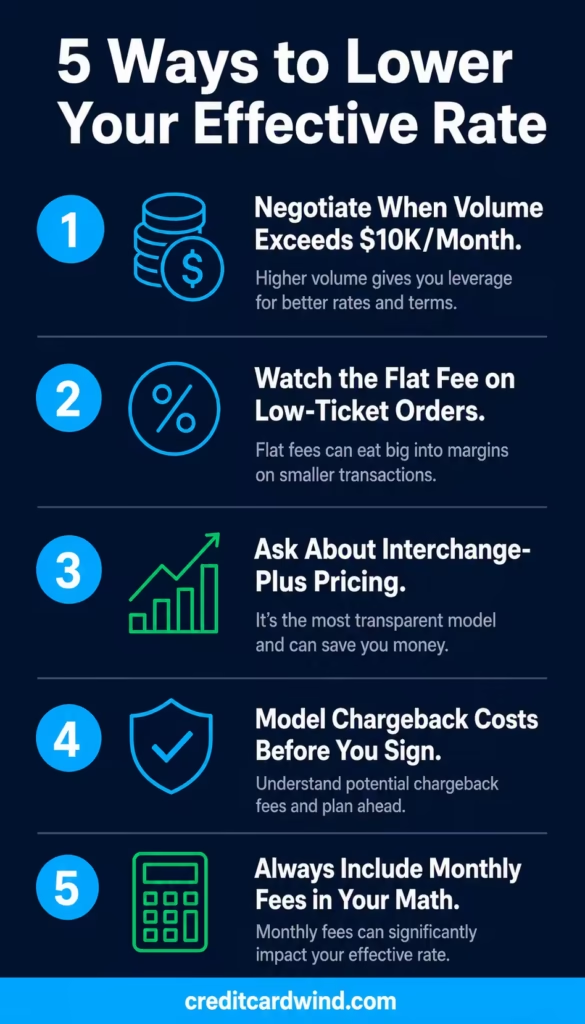
1. Negotiate Your Rate When Your Volume Justifies It
Many small business owners don’t know this: payment processors negotiate rates with merchants who handle over $10,000 each month. At lower volumes, processors place merchants on standard flat-rate pricing automatically. As your monthly volume increases, talking directly with your account representative can help you get lower rates.
Kevin, a gym equipment retailer in Denver, was processing $47,000 per month on Stripe’s standard plan at 2.9% + $0.30. He contacted Stripe’s sales team and negotiated his percentage down to 2.5%. That conversation saved him $2,256 per year. Nothing else changed about his business.
2. Watch the Flat Fee Impact on Low-Ticket Sales
The flat fee per transaction does its most damage on small purchases. At $0.30 per transaction, a $5 item carries an effective flat-fee cost of 6% before adding any percentage fee. A $50 item carries a flat-fee cost of only 0.6%.
If your average order value is low, consider these options:
- Look for processors with lower flat fees.
- Consider subscription pricing. You pay a monthly fee instead of fees for each transaction.
3. Explore Interchange-Plus Pricing for High Volume
Most small businesses are auto-enrolled in flat-rate pricing, like 2.9% + $0.30. This is simple and predictable, but it means you pay the same rate regardless of what card type your customer uses. Interchange-plus pricing charges you the real interchange cost plus a set markup percentage. For merchants processing high volumes, this structure is often meaningfully cheaper.
The scale of this cost is staggering. The Merchants Payments Coalition’s September 2025 report found that U.S. merchants paid over $236 billion in total card swipe fees in 2024, with Visa and Mastercard credit card fees averaging 2.91% of every transaction.
Businesses using interchange-plus pricing often save significantly compared to flat-rate models. They pay the actual wholesale interchange rate plus a small fixed processor markup. This is better than a bundled rate that hides costs.
4. Model Chargeback Costs Before They Surprise You
A chargeback costs more than the penalty fee. When a customer wins a dispute, you lose the original sale amount. You also have to pay the chargeback fee. Additionally, you spend time gathering evidence and responding to the dispute. In high-risk categories like online retail or subscriptions, chargeback rates can climb above 0.5%. At $25 per dispute and 500 transactions monthly, chargeback fees exceed $600 each year. This doesn’t include the lost revenue from disputed sales. Use the advanced options to model this before signing any new processing agreement.
5. Always Include Monthly Fees in Your Effective Rate
Some processors show low per-transaction rates. However, they charge $20 to $50 monthly for gateway access, software, or reporting features. A $30 monthly fee spread across 100 monthly transactions adds $0.30 per sale to your average cost. That can meaningfully change the effective rate comparison between two processors. Always add every recurring fee to your calculation.
Common Mistakes to Avoid
1. Comparing Processors by Advertised Rate Only
The advertised rate is just the percentage part of what you pay. Two processors may have the same advertised rates, but their effective rates can vary widely. This difference depends on their flat fees, monthly subscriptions, and chargeback policies. Always compare using your real transaction volume and average order value.
2. Ignoring the Flat Fee on Small Orders
A $0.30 flat fee on a $3 purchase represents 10% of the sale before any percentage is added. Coffee shops, food trucks, and vending businesses are particularly vulnerable to this. If your average ticket is below $15, the flat fee deserves as much attention as the percentage rate.
3. Forgetting to Model Chargeback Exposure
Chargebacks are not a rare edge case. Some retail e-commerce categories see dispute rates above 1%. A business with 300 transactions each month and a $25 chargeback fee pays $9 monthly. This is based on a 0.1% dispute rate, even at the lower industry average. Multiply that over a year, add the lost sale value for each dispute, and the true annual cost of chargebacks becomes clear. Use the advanced options field to include this in your projections.
4. Treating All Business Types the Same
A restaurant’s payment processing needs differ from an e-commerce store’s. In-person, card-present transactions (where the card is tapped or swiped) usually cost less than card-not-present online transactions. That’s because fraud risk is lower when a card is present. The industry presets in the calculator reflect these differences. Use them to compare real costs across business types rather than assuming one setup fits all.
5. Signing a Processing Contract Without Running the Full Numbers
Jennifer, a bakery owner in Phoenix, Arizona, signed a two-year processing contract. She based her decision on just the headline percentage rate. When she used a fee calculator for her monthly transactions, she found her contract’s effective rate was 3.7%. A competitor, however, offered her a lower rate of 2.9% for the same transaction profile. That difference costs her $3,180 more per year. Always calculate the full effective rate for your specific numbers before committing to any agreement.
6. Underestimating American Express Rates
American Express has historically charged merchants higher rates than Visa and Mastercard. The calculator includes an Amex preset at an estimated 2.5% flat rate. If many of your customers use Amex and your other costs are high, the rate difference can add up to a big annual expense. Track your card-type mix and account for it in your planning.
Frequently Asked Questions (FAQs)
What is a typical credit card processing fee for a small business?
Most small businesses in the U.S. pay between 1.5% and 3.5% per transaction when all fee types are included. Online transactions often cost more than in-person swipes. This is because card-not-present payments have a higher fraud risk. Issuers and processors include this risk in their rates.
What is the difference between the advertised rate and the effective rate?
The advertised rate is the percentage fee only. The effective rate is the sum of all fees—percentage, flat, monthly, and chargeback fees. Then, divide that total by your overall volume. Finally, express it as a percentage. The effective rate reflects what you actually pay and is the only number that lets you compare processors fairly.
Does a processing fee apply to every credit card transaction?
Yes. Every credit card payment carries a processing fee. The exact amount varies based on the card type. It also depends on whether you swipe the card in person or enter it online. Plus, your processor’s pricing model plays a role.
Can businesses pass credit card fees on to customers?
In most U.S. states, merchants are allowed to add a surcharge to credit card transactions. Visa and Mastercard both permit surcharges up to 3% on credit card purchases. Surcharges on debit card transactions are not permitted under federal law. A small number of states still restrict surcharging for credit cards, so check your state’s rules before adding one.
What is a chargeback fee, and why does it hurt so much?
A chargeback fee is the penalty a processor charges when a customer disputes a transaction and wins. Most processors charge between $15 and $100 per chargeback. Chargebacks are costly for merchants. They not only lose the fee but also the original sale amount. This makes chargebacks one of the most expensive issues a business can encounter.
Is Square or Stripe cheaper for small businesses?
Both Square and Stripe charge 2.9% plus $0.30 for standard online transactions, so their base rates are identical. The main differences are monthly fees, hardware needs, chargeback rules, and extra features. Use the calculator to compare them side by side with your actual transaction data for a true cost comparison.
What is an interchange fee, and can merchants negotiate it?
An interchange fee is the part of the processing fee that goes to the bank that issued the customer’s credit card. Visa and Mastercard set it, and merchants cannot negotiate it directly. However, switching to interchange-plus pricing helps merchants see the full cost. They can then negotiate just the processor’s markup on that amount.
Does the type of card a customer uses change what the merchant pays?
Yes. Premium rewards cards, such as travel or cashback cards, have higher interchange fees. This is compared to basic debit or standard credit cards. A merchant’s processing cost can change with each transaction. This depends on the card the customer selects, even if the sale amount is the same.
Bottom Line
Processing fees don’t have to be a mystery. This guide explains what makes up a merchant processing fee. It walks through how the calculator’s formulas work and how to read each result clearly. It also points out the most common and costly mistakes business owners make when evaluating payment processors.
The effective rate, the flat fee’s impact on small orders, and chargeback exposure are the three areas that catch most merchants off guard.
Start with Batch Mode and run your monthly transaction numbers through this credit card fee calculator before signing a processing agreement. That one step, which takes less than two minutes, could save you hundreds or even thousands of dollars a year.
If this guide helped you, share it with a business-owner friend who’s still guessing at what processing fees are really costing them.