
Missing a welcome bonus deadline is one of the costliest mistakes in the rewards game. Experian’s 2023 State of Credit report shows Americans hold an average of nearly four credit cards each.
Each card has its own spending goal and time limit. A credit card welcome bonus tracker keeps every deadline, every dollar spent, and every bonus status in one clear place.
The fix is simple: log each card’s bonus details, minimum spend, and deadline into one organized system so nothing slips through.
Below, you’ll find free downloadable templates in various formats. There’s a step-by-step guide to help you fill them out. You’ll also get practical tips to ensure every bonus posts on time.
Download Your Free Credit Card Welcome Bonus Tracker Templates
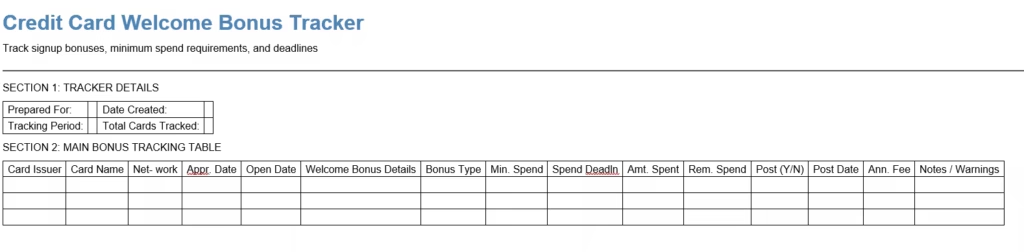
Four ready-to-use templates are available so you can pick the format that fits your style. Each one includes every section you need to track signup bonuses, spending milestones, and posting deadlines.
Choose the format that works best for you:
Disclaimer: The Templates & Printables on this site are provided for informational and personal tracking purposes only. This is not financial, legal, tax, or credit advice. While reasonable efforts are made to ensure accuracy, Credit Card Wind makes no warranties as to the completeness, reliability, or accuracy of the calculations generated by these Templates & Printables. Users are responsible for independently verifying all data and calculations. Terms, conditions, rates, regulations, and legal requirements vary by institution, jurisdiction, and individual circumstances.
Always refer to your official statements, account agreements, and applicable laws, and consult a qualified professional before making any financial, legal, or other important decisions. By using these Templates & Printables, you acknowledge that Credit Card Wind and its owner shall not be liable for any damages, losses, or financial consequences arising from the use or misuse of these Templates & Printables.
This universal disclaimer applies to all templates and printables provided by Credit Card Wind (https://creditcardwind.com), created by Robert Williams (Owner at Credit Card Wind).
© Credit Card Wind. All rights reserved.
These templates and printables may be downloaded and used for personal, non-commercial purposes only. Redistribution, resale, or modification for commercial use without permission is strictly prohibited.
What Is a Credit Card Welcome Bonus Tracker?
A credit card welcome bonus is the reward a card issuer offers when you open a new account and charge a set amount within a specific time window. These offers go by several names: signup bonuses, new cardmember offers, or intro bonus offers. Whatever they’re called, the goal is the same. Spend a required amount by a set deadline, and the issuer gives you a large chunk of points, miles, or cash back.
A signup bonus tracking tool is a structured document or spreadsheet that records every open bonus in one place. It shows:
- How much you’ve spent toward each spending requirement
- How many days remain before each deadline
- Whether the bonus has been posted to your account yet
Think of it as a control panel for all your active welcome offers. Without it, you’re logging into multiple portals, doing mental math on deadlines, and hoping you don’t miss a cutoff.
Experian’s 2023 State of Credit report puts the average American at nearly four credit cards. With each card carrying its own terms, deadlines, and spending requirements, a tracker stops being optional pretty quickly.
Who benefits most from using one?
- First-time rewards cardholders who want to get the most out of their first bonus
- Frequent travelers managing two or three cards at the same time
- Points enthusiasts who apply for multiple cards throughout the year
- Anyone who has lost a bonus before because they forgot the spending deadline
Why Missing a Welcome Bonus Costs More Than You Think
Welcome bonuses aren’t small rewards. On today’s top travel and cash-back cards, a signup bonus is often worth $300 to $500 or more. Premium travel cards often provide bonuses worth over $1,000. This includes point transfers and travel credits.
Missing that bonus doesn’t just mean losing a reward. On a card with an annual fee, it means the fee no longer pays for itself. You paid to hold the card and got nothing back for it.
The most common reasons people lose their bonuses:
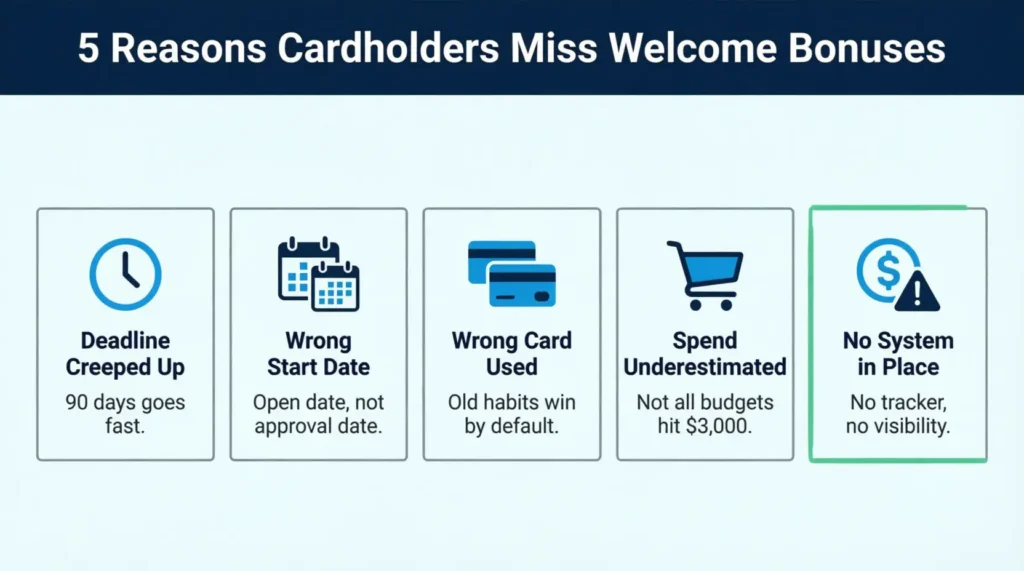
- The deadline crept up unnoticed. The spending window is usually 90 days from account opening. That feels like a long time until it isn’t. Life gets busy, and suddenly the cutoff is two weeks away.
- They confused the approval date with the account open date. The countdown starts when your account opens, not when you applied or got the card. These dates can differ by a week or more.
- They kept swiping the wrong card. Old habits are hard to break. Many people default to their everyday card out of habit, leaving the new card sitting in a wallet doing nothing.
- They assumed regular spending would cover it. For households spending $4,000 or more monthly, this might be true. For others, $3,000 in 90 days takes real planning.
Take David, a freelance designer who opened a travel card offering 80,000 miles with a $4,000 minimum spend in three months. He used it for some gas fill-ups and restaurant meals. But he kept choosing his older cash-back card for everything else.
By day 80, he had spent only $1,600. He scrambled to prepay his phone bill, internet service, and a software subscription in the final ten days. He made it, but only barely. A weekly tracker check would have caught the gap on day 20.
⚠️ Mistake to Avoid: Don’t assume regular spending will cover the minimum on its own. Check your tracker at least once a week so you can course-correct early, not in a last-minute scramble.
What Every Field in Your Tracker Means
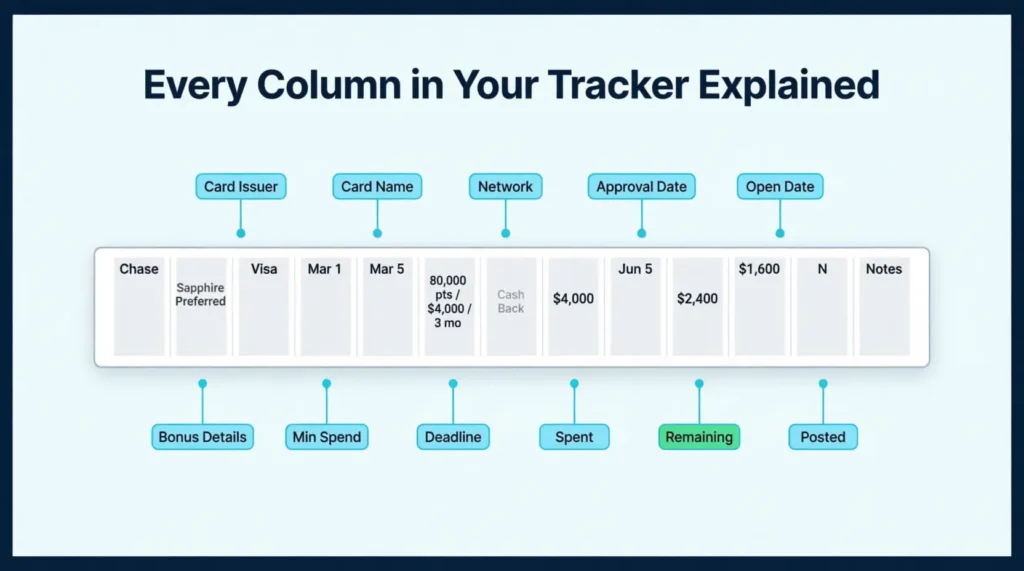
The templates on this page are built around the fields that matter most. Knowing what to enter in each column sets the tracker up to work properly from day one.
Card Issuer
The bank or institution behind the card. Common issuers include Chase, American Express, Capital One, Citi, and Discover. Logging the issuer also reminds you of application restrictions. Chase’s 5/24 rule, for example, limits new card approvals based on how many cards you’ve opened in the past 24 months.
Card Name
The specific product name. Two cards from the same issuer can carry very different bonuses, rewards structures, and fees. “Chase Sapphire Preferred” and “Chase Sapphire Reserve” are separate products with separate offers.
Network
Whether the card runs on Visa, Mastercard, American Express, or Discover. This matters for international travel since acceptance varies by country.
Approval Date and Account Open Date
These aren’t always the same day. The spending window usually starts from the account open date, sometimes called the card issue date. Always check with your issuer about when the clock starts. This is important, especially if your card took a while to arrive in the mail.
Welcome Bonus Details and Bonus Type
Write the full offer in plain terms: “80,000 miles after $4,000 spend in 3 months.” The bonus type matters because one mile and one point can be worth very different amounts depending on how you redeem them.
Minimum Spend and Spend Deadline
These two fields are the heart of the tracker. The smallest spend is the total dollar amount you need to charge to the card. The spend deadline is the exact calendar date you must hit that amount by. Always log the specific date, not “90 days.” Calendar math is easy to miscount when you’re busy.
Amount Spent and Remaining Spend
Log your running total after each update. The remaining spend column tells you the gap you still need to close. The fillable PDF and Excel versions calculate the remaining amount automatically based on what you enter.
Bonus Posted (Y/N) and Post Date
Once the bonus appears in your account, mark this column “Y” and fill in the date. If nothing appears within two full billing cycles of hitting your spending target, that’s the signal to contact the issuer.
Annual Fee
Log this so you can revisit the card’s value before the second-year fee hits. If the ongoing cost no longer makes sense, you’ll want to downgrade or cancel before that charge posts again.
Notes and Reminders
This is the most underused column in most trackers. Use it to flag details like: “Balance transfers excluded from spend,” “Activate offer by [date],” or “Annual fee posts in 30 days.” These small details affect whether your spending counts and when key decisions need to be made.
💡 Pro Tip: Many issuers send a confirmation email or app notification once you’ve met the spending requirement. Screenshot it and log the date in your tracker. That record is useful evidence if the bonus is delayed and you need to follow up with customer service.
How to Use the Credit Card Welcome Bonus Tracker (Step by Step)
Setting up the tracker takes about ten minutes the first time. After that, a short weekly update is all it takes to stay on top of every open bonus.
Step 1: Download your preferred format
Use the Word file if you want to edit the layout or add custom columns. Choose the fillable PDF for a clean digital form you can complete on screen. Pick the printable PDF if you prefer working with paper. The Excel or Google Sheets version offers great flexibility. You can sort, filter, and make automatic calculations easily.
Step 2: Complete Section 1 (Tracker Details)
Start by entering your name, the date the tracker was created, and the tracking period you’re covering. This adds important context to the document. It’s especially useful if you revisit it months later or share it with a spouse or financial partner.
Step 3: Enter each active card in Section 2
Fill in one row per card. Start with the card that has the closest deadline, not the newest application. Cards with the tightest timelines need your attention first.
Enter every field: card issuer, card name, network, both key dates, the full bonus description, bonus type, minimum spend amount, and the exact deadline date. Leave the “Amount Spent,” “Remaining Spend,” and “Bonus Posted” columns blank for now. Those get updated as you go.
Step 4: Update the tracker at least once per week
Log in to your card accounts or check your statements. Enter the total amount spent to date for each open card. Review the remaining spend column. If a card is behind pace, shift more of your upcoming purchases to that card.
Set a calendar reminder for each spend deadline. Put it at least three weeks before the due date. That buffer gives you time to close any gap before it’s too late.
Step 5: Mark each bonus as it posts
Once a bonus appears in your account, update the “Bonus Posted” column with a “Y” and log the date. If you don’t see anything after two billing cycles, contact the issuer. Have your account details and the original offer terms ready.
Step 6: Review Section 3 for summary notes
Use the summary section at the bottom to flag upcoming risks, note cards to downgrade, and record general observations. This section is very helpful at the end of the year. That’s when annual fees renew, and you need to decide which cards to keep.
Tip: → Curious what your welcome bonus is actually worth once you redeem it? The credit card points value calculator tells you.
How to Hit the Minimum Spend Requirement (Without Overspending)
The minimum spend is the part that trips most people up. But you don’t need to change your lifestyle to hit it. In most cases, you just need to redirect spending you were already planning to make.
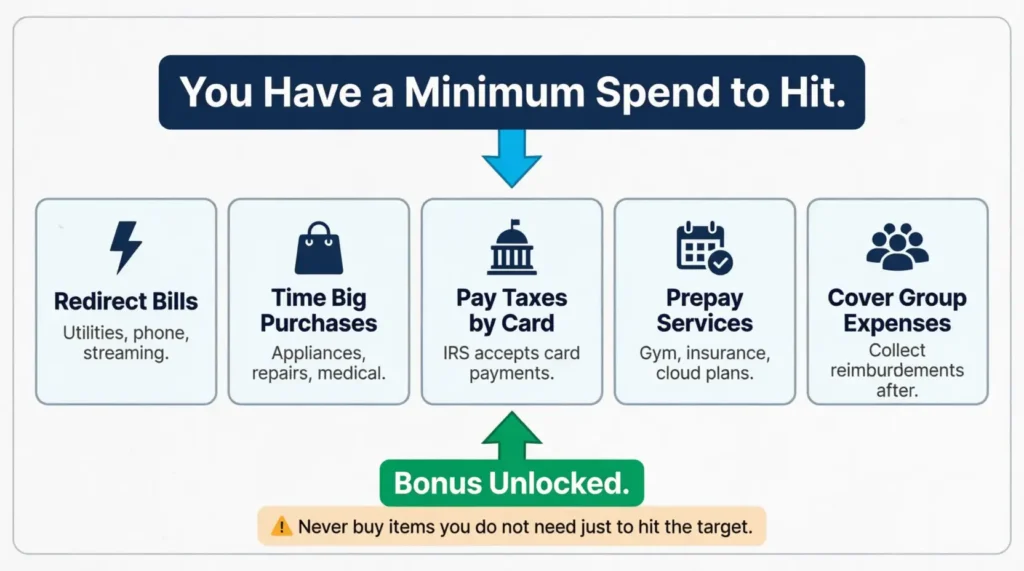
Practical ways to reach your spending target:
Redirect regular bills to the new card. Utilities, phone, internet, streaming services, insurance premiums, and grocery shopping all count. For the first three months, route as much of your normal spending to the new card as possible.
Time for a large planned purchase. If you know a repair bill, appliance purchase, or medical expense is coming, put it on the new card. You were going to spend that money anyway.
Pay estimated taxes or government fees by card. Many federal and state agencies accept credit card payments. The IRS processes card payments through authorized third-party processors listed on IRS.gov/payments. There’s a small processing fee, but it’s often worth it when the bonus is worth several hundred dollars.
Prepay recurring services. Some providers let you pay several months of service in advance. Gym memberships, cloud storage plans, and insurance premiums are common options. Prepaying for a few months can close a gap quickly.
Use the card for group expenses. When a team goes out for lunch or a group trip needs booking, use the new card. Then, collect reimbursements from everyone else. You get the spending credit without paying more than your share.
⚠️ Mistake to Avoid: Never buy things you don’t need just to hit the spending requirement. If you spend $300 on items you wouldn’t have purchased otherwise, you’ve reduced the bonus value by $300. Stick to planned, necessary purchases only.
One thing to avoid at all costs: carrying a balance. Federal Reserve consumer credit data shows the average credit card interest rate has been running above 21%. On a $3,000 balance, one month of interest costs more than $50. That erodes your bonus value fast and turns a reward into a liability.
When Does a Welcome Bonus Actually Post to Your Account?
Hitting the spending target is the hard part. But the bonus doesn’t land the same day you cross the finish line. There’s always a delay, and knowing what to expect prevents unnecessary worry.
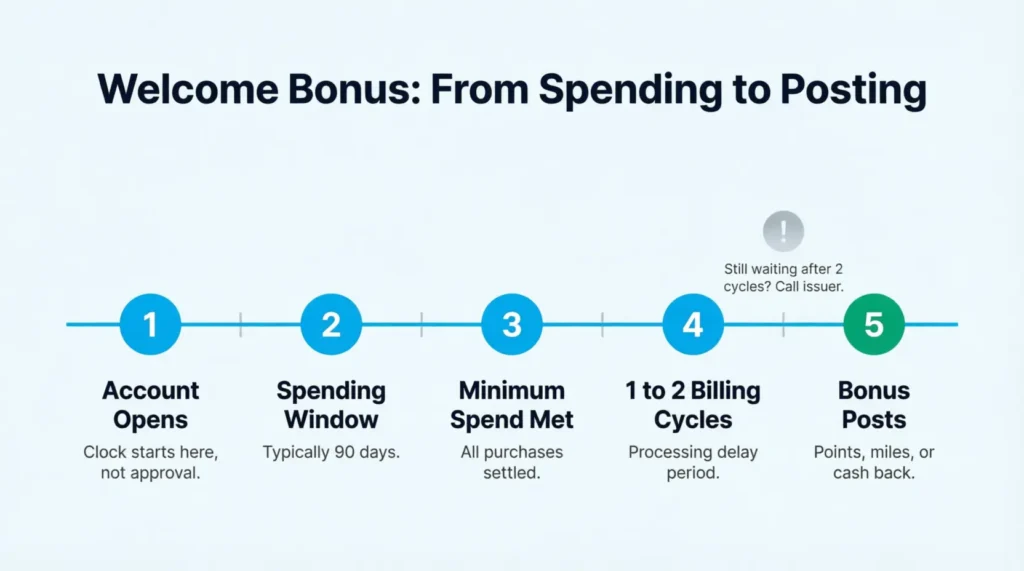
Typical timeline:
Most issuers process welcome bonuses within one to two billing cycles after the spending requirement is met. If your card bills are monthly, you should wait 30 to 60 days. The bonus will show up in your account after you hit the minimum.
Some issuers move faster. American Express, for example, often posts bonuses within a few days of the spending requirement being met. Chase typically takes one to two full billing cycles. Timelines vary, so check your specific card’s terms for guidance.
What can slow the posting down:
- A large purchase that’s still pending and hasn’t yet been settled when you cross the spending threshold
- A return or credit that temporarily pulls your running total below the minimum
- Spending in an excluded category, such as cash advances or balance transfers, which typically don’t count toward the requirement
- A temporary account hold or fraud alert that paused transactions
What to do if the bonus is late:
Wait until two full billing cycles have passed after meeting the spending target. If nothing has posted, call the customer service number on the back of your card. Keep your account open date, a summary of your spending, and the original bonus offer handy. Most representatives can verify whether you met the requirement and escalate the issue if needed.
A secure message through the card’s online portal also works and creates a written record of your request in case follow-up is needed.
Managing Multiple Welcome Bonuses at the Same Time
Tracking one bonus is straightforward. Running three or four at once takes more structure. These habits keep things from getting chaotic.
Stagger your applications.
Avoid opening two or three cards in the same week. Overlapping 90-day windows create competing deadlines that all hit at once. Space applications 30 to 45 days apart when possible to spread out the pressure.
Prioritize by deadline, not bonus size.
The card with the smallest bonus but the nearest deadline still comes first. The tracker makes this easy to see at a glance without any mental juggling.
Keep each card on its own row.
Don’t combine cards or stack details on a single row. Mixed data creates errors. One card, one row, every time.
Set a consistent weekly check-in.
A five-minute review once a week is enough to stay on top of two or three open bonuses. More than four or five active bonuses at once usually requires spreadsheet-level organization to manage without mistakes.
💡 Pro Tip: Color-code your rows in the Word or Google Sheets version by urgency. Red for deadlines within 30 days, yellow for 30 to 60 days, and green for over 60 days remaining. It turns the tracker into a visual priority list you can read in seconds.
Frequently Asked Questions
How long do I typically have to meet the minimum spending requirement for a welcome bonus?
Most credit card welcome bonuses give you three months (90 days) from account opening to meet the minimum spend. Some premium cards extend this to four to six months. Always check your specific card’s offer terms to confirm the exact window before you start spending.
Does the annual fee count toward the minimum spending requirement?
In most cases, yes. Annual fees posted to the account typically count toward the minimum spend. However, some issuers exclude them. Check your card’s terms before assuming the annual fee contributes to your running total.
What purchases count toward the minimum spend?
Most everyday purchases count, including groceries, gas, dining, and online shopping. Cash advances, balance transfers, interest charges, and account fees generally do not count. Review your specific card’s terms to confirm which purchase types are eligible.
Can I earn the same card’s welcome bonus more than once?
Usually not. Most issuers let you earn the welcome bonus once per card. Usually, there’s a waiting period of 24 to 48 months after you earn or close that card. Rules vary by issuer, so always read the offer terms before applying.
What happens if I return a purchase that drops my total below the minimum spend?
If a return brings your running total below the required amount, you’ll need additional purchases to close the gap before the deadline. Tracking your net spending (purchases minus returns) in real time helps you catch this situation before it becomes a problem.
Do authorized user purchases count toward the primary cardholder’s minimum spend?
Yes, in most cases. Purchases made by authorized users on the same account count toward the primary cardholder’s spending requirement. Adding a trusted family member as an authorized user can be a practical way to reach a higher spending target faster.
How will I know when my welcome bonus has posted?
Log in to your card account and check your rewards balance or points summary. Most issuers also send a notification email or app alert when the bonus posts. If nothing appears within two billing cycles of meeting the requirement, contact customer service directly.
My card arrived late in the mail. Does the spending window start when the card arrives?
No. The spending window typically starts from the account open date or the card issue date, not the date the physical card arrives. If your card is delayed, contact your issuer. They can confirm when the clock started and how much time you have left.
Is it a bad idea to cancel a card right after earning the welcome bonus?
Canceling too soon can lower your credit score by reducing your total available credit and shortening your account history. Keeping the card for at least 12 months is the approach most financial experts recommend. Check whether a no-fee downgrade option is available if the annual fee is the only concern.
Is a credit card welcome bonus considered taxable income?
In most cases, no. The IRS generally treats welcome bonuses earned through spending as a rebate on purchases rather than taxable income. Bonuses received without any spending requirement may be treated differently. Consult a tax professional if you’re unsure about your specific situation.
Bottom Line
Signup bonuses are among the best perks in the rewards world. They only pay off when you hit the spending target on time and the bonus actually posts to your account.
The templates on this page cover every key detail: approval dates, spending goals, deadlines, posting status, and annual fees. Fill one in on the day your new card arrives. The sooner you log the details, the easier it is to stay ahead of every deadline and avoid a costly miss.
For most cardholders, a quick weekly check-in makes the biggest difference. If this page saves you from losing a bonus worth $300 or more, share it with a friend chasing their first travel card. It could save them from the same expensive mistake.