
Nearly every credit card swipe in America now earns some kind of reward. The CFPB’s 2025 Credit CARD Act Report found that 92% of all general-purpose card spending in 2024 went on rewards cards.
But earning rewards and actually capturing their full value are two very different things. If you’ve been searching for a credit card rewards tracker template, this guide was built for exactly that gap.
A rewards tracker gathers all your card info in one spot. This way, you can see your earnings, what’s about to expire, and which card is working best for you.
Here are free templates to download, a simple setup guide, and helpful tips to maximize your spending.
Download Your Free Credit Card Rewards Tracker Templates
Three ready-to-use formats are available below. Each one includes everything you need to track points, miles, and cash back across all your cards.
Pick the format and paper size that works best for you:
Disclaimer: The Templates & Printables on this site are provided for informational and personal tracking purposes only. This is not financial, legal, tax, or credit advice. While reasonable efforts are made to ensure accuracy, Credit Card Wind makes no warranties as to the completeness, reliability, or accuracy of the calculations generated by these Templates & Printables. Users are responsible for independently verifying all data and calculations. Terms, conditions, rates, regulations, and legal requirements vary by institution, jurisdiction, and individual circumstances.
Always refer to your official statements, account agreements, and applicable laws, and consult a qualified professional before making any financial, legal, or other important decisions. By using these Templates & Printables, you acknowledge that Credit Card Wind and its owner shall not be liable for any damages, losses, or financial consequences arising from the use or misuse of these Templates & Printables.
This universal disclaimer applies to all templates and printables provided by Credit Card Wind (https://creditcardwind.com), created by Robert Williams (Owner at Credit Card Wind).
© Credit Card Wind. All rights reserved.
These templates and printables may be downloaded and used for personal, non-commercial purposes only. Redistribution, resale, or modification for commercial use without permission is strictly prohibited.
What Is a Credit Card Rewards Tracker?
A credit card rewards tracker is a tool that records every reward you earn across your cards. It logs the key details: how many points or miles you’ve collected, the dollar value of those rewards, each card’s annual fee, and when your rewards are set to expire.
The goal is simple. Instead of guessing if your rewards card is worth keeping, use a tracker to see the real numbers.
The CFPB’s 2025 Credit CARD Act Report confirms that rewards cards now dominate the market, accounting for 92% of all general-purpose card purchase volume in 2024. That means the vast majority of American cardholders are sitting on points, miles, or cash back right now. The question isn’t whether you’re earning rewards. It’s whether you’re actually capturing all the value you’ve already earned.
The Three Main Types of Credit Card Rewards
Most credit card rewards fall into one of three categories.
Points are a general-purpose currency you can redeem for travel, merchandise, or statement credits. Cards like the Chase Sapphire Preferred and the American Express Gold earn points.
Miles are airline-specific currency tied to a frequent flyer program. United MileagePlus, Delta SkyMiles, and Southwest Rapid Rewards are common examples.
Cash back is a direct percentage returned on your spending. It’s the simplest type and the easiest to value, because one dollar is always worth one dollar.
A rewards log works for all three types. It converts each into a USD value so you can compare cards on equal footing.
Tip: → Wondering what your tracked points are actually worth in dollars? Find out with the credit card points value calculator.
Why Tracking Your Credit Card Rewards Actually Matters
Most people know they earn rewards. Fewer people know how much they earn. They’re unsure which card is the best or which rewards are close to expiring.
That gap is costly.
The Real Cost of Not Tracking
Think about Marcus, a software developer juggling four credit cards. For two years, he assumed his travel miles card was his best performer. When he logged everything into a tracking spreadsheet, he found that his flat-rate cash back card earned $340 more in net value each year. The airline card’s $250 annual fee had been quietly eating into its actual return.
Without a system, Marcus was paying more than he needed to. This kind of blind spot is more common than most people realize.
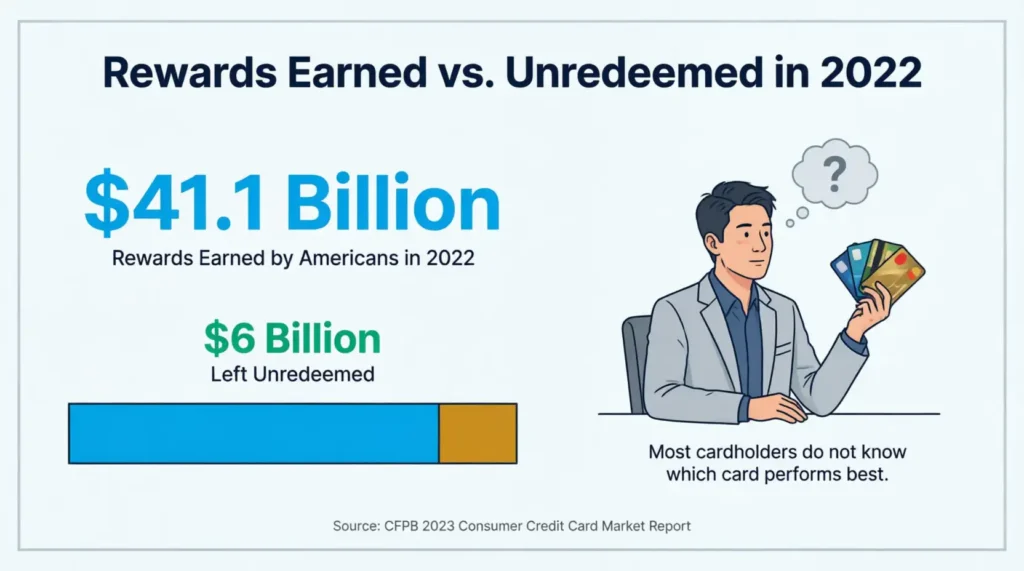
The numbers confirm it. The CFPB’s 2023 Consumer Credit Card Market Report — the most recently available primary-source figure for this specific metric — found that Americans earned $41.1 billion in rewards in 2022 but left $6 billion unredeemed. Rewards balances have only grown since then, which means the true unclaimed total today is very likely higher.
A card performance log also protects you from expiration losses. Some rewards programs set points to expire after 12 to 24 months of inactivity. If you’re not watching, those points simply vanish.
📌 Did You Know: Cardholders with the highest credit scores (superprime) account for 82% of all credit card reward redemptions, according to CFPB data. That means most unclaimed rewards are in the accounts of regular cardholders, not low spenders.
What’s Inside the Tracker Template?
This section walks through every part of the tracker so you know what each section does before you start filling it in. The templates contain four main parts.
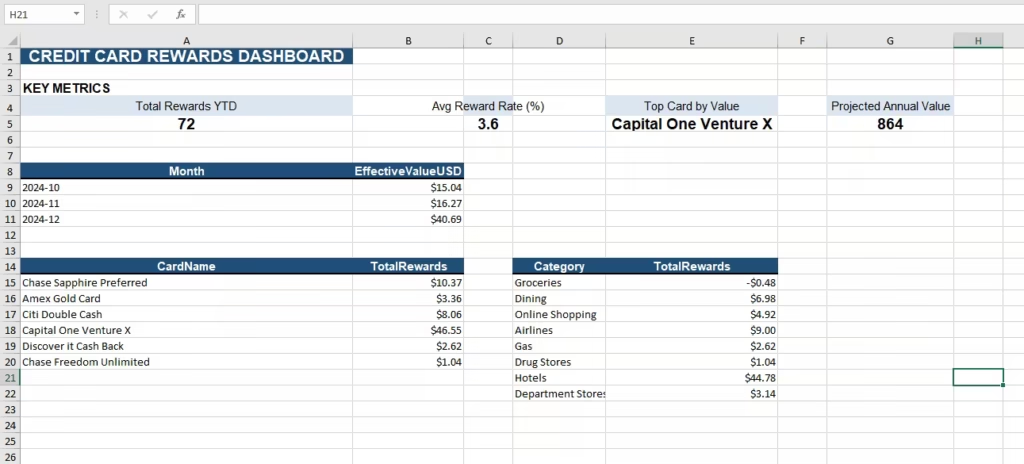
Section 1: The KPI Summary Row
At the very top, you’ll see four key performance indicators displayed side by side. These give you an instant snapshot of your rewards portfolio without digging into any details.
Total Rewards YTD (USD): The total dollar value of all rewards you’ve earned so far this year, across every card you’re tracking.
Top Card by Value / Best Performing Card: The single card generating the most reward value. This is the card that deserves your biggest spending categories.
Average Reward Rate / Avg Reward per $1,000: How many dollars in rewards you earn for every $1,000 you spend. The higher this number, the more efficient your spending overall.
Fees vs. Rewards (Net) / Projected Annual Value: This is the most important figure on the entire sheet. It’s your total rewards earned minus the total annual fees paid. A positive number means your cards are working for you. A negative number means the opposite.
Section 2: The Monthly Performance Chart
The chart tracks your reward value month by month. You’ll see either a bar chart (A4 version) or a line graph (US Letter version) that shows how your earnings move over time.
This section helps you spot patterns. Did your rewards drop in a quiet spending month? Did you earn significantly more in November and December? Trend data like this tells you when to plan bigger purchases to maximize your returns.
Section 3: The Card Performance Table
This is the heart of the tracker. Each row represents one credit card you own. The columns include:
- Card Name – The card you’re tracking
- Reward Type / Currency – Points, miles, cash back, or dining credits
- YTD Units / Units Earned – The raw number of points, miles, or dollars earned
- USD Value – The cash equivalent of those units
- Annual Fee – What you pay to hold the card each year
- Net Value – USD Value minus Annual Fee (the number that really matters)
- Expiry Risk (Yes/No) – A flag showing whether your rewards are at risk of expiring
- Notes – Space for transfer partners, bonus categories, or key deadlines
Section 4: The Recent Transactions Log
The bottom section is a running log of your most recent transactions. Each entry shows the date, card used, merchant, spending category, amount spent, rewards earned, and their dollar value.
This log is great for spotting which categories generate your rewards. It also helps you check if you’re using the right card for each type of purchase.
How to Fill Out the Tracker Step by Step
Follow these steps to set up your tracker from scratch.
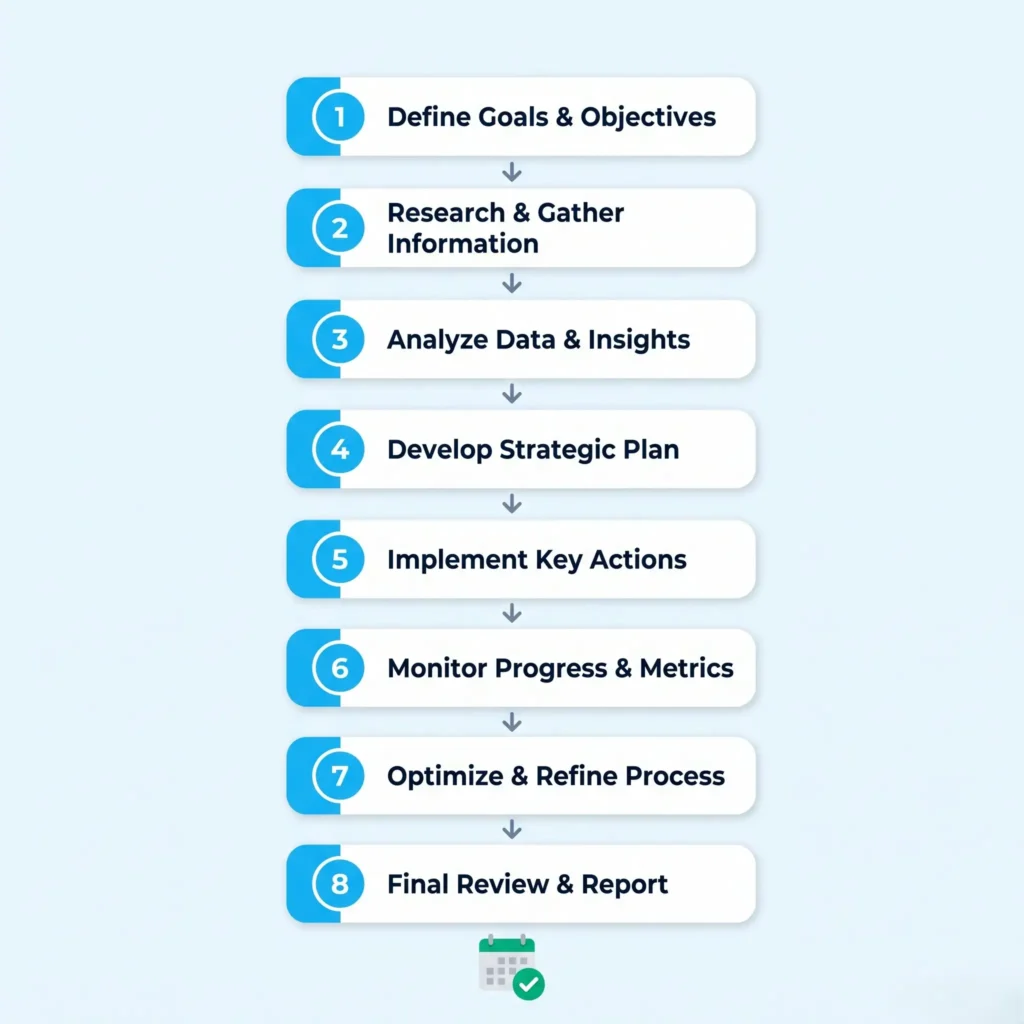
Step 1: List every card you actively use.
Write down each card’s name in the Card Name column. Include cards you use occasionally, but skip cards you’ve completely stopped using.
Step 2: Enter each card’s reward type.
Check your card’s rewards page or your issuer’s app. This will confirm if you earn points, miles, cash back, or credits, such as dining credits.
Step 3: Look up your current points or miles balance.
Log in to each card’s account and copy your current balance into the YTD Units column. Your issuer’s app usually displays this on the home screen.
Step 4: Convert your rewards to a USD value.
For cash back cards, this is simple. One dollar equals one dollar. For points and miles, use a standard valuation guide. The Points Guy publishes monthly valuations for most major loyalty programs. As a rough starting point, most hotel points are worth 0.5 to 1 cent each, and most airline miles range from 1 to 2 cents.
Step 5: Enter each card’s annual fee.
Find this in your original card agreement or under “Card Details” in your issuer’s app. Some cards waive the fee in the first year, so double-check before you enter a number.
Step 6: Fill in the Net Value column.
Subtract the annual fee from the USD value for each card. This tells you whether the card is actually paying for itself.
Step 7: Check the Expiry Risk flag.
Review each card’s rewards program terms. Mark “Yes” for any card whose rewards expire after a period of inactivity, and note the inactivity window in the Notes column.
Step 8: Log your most recent transactions.
Pull up your card statements and enter your recent activity into the transactions log. Focus on your largest purchases and any that earned bonus rewards.
Pro Tip: → Planning future rewards? Project your earnings with the credit card rewards calculator before logging them.
How to Read Your Tracker Data and Actually Use It
Filling out the tracker is step one. Reading it correctly is step two.
Net Value vs. USD Value: Why the Difference Matters
A card with a $1,062.50 USD value and a $250 annual fee has a net value of $812.50. That’s still strong. But a card with $441 in rewards and a $0 annual fee has a net value of $441.
On paper, the first card “earns more.” In practice, both can be worthwhile depending on the perks attached to the annual fee, such as travel credits, lounge access, or trip delay insurance. The net value column lets you compare them fairly.
If a card’s net value is consistently negative for two years in a row, it’s worth calling the issuer to request a product change to a no-fee version.
Using the Expiry Risk Flag
The Expiry Risk column is your early warning system. Any card marked “Yes” means you should check the program’s inactivity policy right away.
Most airline and hotel programs reset the inactivity clock with any earning or redemption activity. So if your miles are at risk, making even a small purchase on that card will typically extend your rewards window by another 12 to 24 months.
⚠️ Mistake to Avoid: Don’t confuse rewards expiration with credit card expiration. Your rewards don’t disappear when your physical card expires and gets replaced. However, if you close an account, many issuers will forfeit unredeemed rewards immediately. Always redeem what you have before you close any card.
How to Maximize Rewards Across Multiple Cards
Most people use one or two cards for everything. The cardholders who get the most out of their rewards use a smarter system: each card has a job.
The dining card earns extra points or cash back at restaurants. Cards like the American Express Gold offer 4x points on dining.
The travel card maximizes airline and hotel purchases. Points from travel cards often convert to airline miles at strong ratios, making them the best choice for flights and hotels.
The everyday card is a flat-rate cash back card that handles every purchase that doesn’t fit a bonus category. A 2% flat-rate card is a reliable baseline for miscellaneous spending.
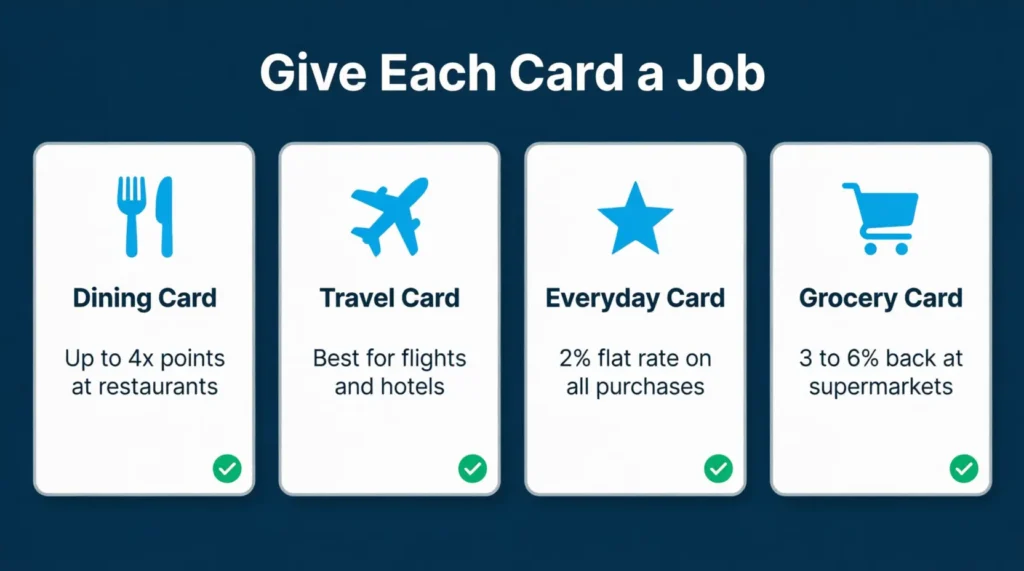
The grocery card targets supermarket spending. Some cards offer 3% to 6% back at grocery stores, which adds up fast for households spending $600 or more per month on food.
Experian’s State of Credit report puts the average number of credit cards held by an American at 3.9. A card performance tracker helps you turn your tendency to use multiple cards into a clear rewards strategy. This way, you avoid a confusing pile of accounts.
💡 Pro Tip: Keep your tracker in a shared cloud folder like Google Drive or Dropbox. If something happens to your device, your data stays safe. The Excel version is especially easy to back up this way.
Cash Back vs. Points vs. Miles: Which Reward Type Is Worth More?
This is one of the most common questions in personal finance, and the honest answer is: it depends on how you spend and how you redeem.
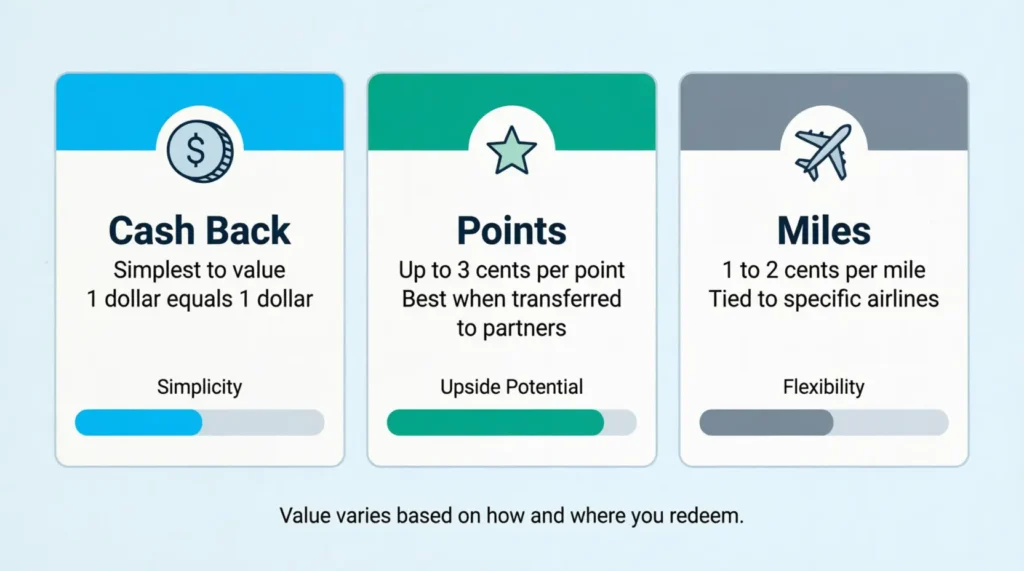
Cash back wins on simplicity. There’s no guesswork about value. You earn a percentage back, it posts to your statement, and you use it. For someone who doesn’t travel frequently, a 2% flat cash back card is often the best performer over a full year.
Points win on potential. Points can be worth 2 to 3 cents each when you redeem them through travel portals or transfer them to airline and hotel partners. This is better than the usual 1 cent. That gap can be worth hundreds of dollars on a single trip.
Miles win on travel redemptions but lose on flexibility. Miles locked inside one airline’s program are only as valuable as the flights you actually want to take. If your home airport has limited options for that carrier, the miles may be harder to put to use.
The card performance table in your rewards tracker makes this comparison concrete. Once you see each card’s USD value and net value side by side, the right choice for your situation becomes much clearer.
How Often Should You Update Your Rewards Tracker?
The answer depends on how many cards you have and how actively you earn rewards. Three update schedules work well for different types of users.
Monthly updates work for most people. Once a month, log your total points or miles balance for each card, record your top transactions, and check the Expiry Risk column.
Quarterly reviews are best for bigger-picture analysis. Every three months, look at the net value column for each card and ask these two questions. Is this card still earning more than it costs? Are there any cards I should be using more or less?
Annual fee reviews happen once a year. Before each annual fee post, compare the card’s total net value against what a no-fee alternative would deliver. If the numbers don’t justify the fee, call the issuer and ask for a retention offer or a product change.
Frequently Asked Questions
What is a credit card rewards tracker?
A credit card rewards tracker is a spreadsheet or printable that records your points, miles, and cash back across all your cards. It helps you see your total reward value, compare card performance, and avoid losing rewards to expiration.
Can I track rewards from multiple credit cards in one template?
Yes. The card performance table includes one row per card, so you can monitor every card you own side by side. Most users track between two and five cards in a single sheet.
How do I convert credit card points to a dollar value?
For cash back, the conversion is straightforward: 100 points equals $1.00. For travel points and miles, most airline miles are worth 1 to 2 cents each, and most hotel points range from 0.5 to 1 cent. Valuation guides like The Points Guy publish updated figures monthly.
Do credit card rewards expire?
Some do and some don’t. Cash back rarely expires as long as your account stays open. Airline miles and hotel points often expire after 12 to 24 months of inactivity. Check your card’s program terms and use the Expiry Risk column in the tracker to flag any at-risk accounts.
Is the Excel version better than the PDF version?
It depends on your preference. The Excel template is fully editable and lets you customize every row and column. The PDF versions are better for printing and reference, or for anyone who prefers to fill out a form by hand.
How do I know if my annual fee credit card is worth keeping?
Look at the Net Value column in your tracker. Subtract the card’s annual fee from the total rewards earned over a year. If the result is positive and higher than what a no-fee card would generate, the card is earning its keep. If it’s negative, it’s time to call the issuer.
What spending categories earn the most credit card rewards?
Travel, dining, and groceries typically earn the highest reward rates. Many cards offer 3x to 5x points on these categories. Putting the right card on each purchase type is the easiest way to increase your total reward value without changing how much you spend.
Can I use a rewards tracker if I only have one credit card?
Absolutely. The tracker lets you watch your earning rate with just one card. It helps you estimate your yearly reward value. Plus, it ensures your rewards don’t expire before you can use them.
How long does it take to set up the tracker for the first time?
Most people finish the initial setup in 15 to 30 minutes. You’ll need to log in to each card account to pull your current rewards balance and annual fee. After the first setup, monthly updates typically take 5 to 10 minutes.
Bottom Line
Tracking your credit card rewards doesn’t have to be complicated. The templates above put all your key data in one place: total reward value, top-performing card, annual fees, and expiration risks. Once you can see the full picture, even small adjustments add up fast.
The most effective approach is to start with the Net Value column. That single figure tells you whether each card is actually earning its keep.
From there, shift more spending to your best performers, redeem before expiration, and drop cards that cost more than they return.
If you know someone juggling many rewards cards without a plan, share this guide. It could help them avoid losing hundreds of points they’ve already earned.