
Running a business that accepts card payments without a signed authorization document is a real risk. Every disputed charge can cost far more than the original sale. The Federal Trade Commission logged more than 458,000 credit card fraud reports in 2024 alone, and a missing authorization record is one of the fastest ways to lose a chargeback dispute. A proper credit card authorization form gives your business a clear, signed paper trail.
The solution is simple: a signed payment authorization document puts both the cardholder and the merchant on the same page before any charge is processed.
This guide covers everything you need to know, from what goes on the form, to how to fill it out correctly to how to store it safely under PCI-DSS rules. Scroll down for step-by-step instructions, helpful tips from real-world experiences, and two free templates you can download right now!
Download Your Free Credit Card Authorization Form Templates
Two ready-to-use templates are available below. Each form includes all the sections needed for compliance. This covers cardholder details, card type, payment frequency, and a full authorization statement.
Pick the format that works best for your workflow:
Disclaimer: The Templates & Printables on this site are provided for informational and personal tracking purposes only. This is not financial, legal, tax, or credit advice. While reasonable efforts are made to ensure accuracy, Credit Card Wind makes no warranties as to the completeness, reliability, or accuracy of the calculations generated by these Templates & Printables. Users are responsible for independently verifying all data and calculations. Terms, conditions, rates, regulations, and legal requirements vary by institution, jurisdiction, and individual circumstances.
Always refer to your official statements, account agreements, and applicable laws, and consult a qualified professional before making any financial, legal, or other important decisions. By using these Templates & Printables, you acknowledge that Credit Card Wind and its owner shall not be liable for any damages, losses, or financial consequences arising from the use or misuse of these Templates & Printables.
This universal disclaimer applies to all templates and printables provided by Credit Card Wind (https://creditcardwind.com), created by Robert Williams (Owner at Credit Card Wind).
© Credit Card Wind. All rights reserved.
These templates and printables may be downloaded and used for personal, non-commercial purposes only. Redistribution, resale, or modification for commercial use without permission is strictly prohibited.
What Is a Credit Card Authorization Form?
A credit card authorization form is a signed document in which a cardholder gives a merchant permission to charge their card. That permission can cover a single transaction or a series of recurring payments over time.
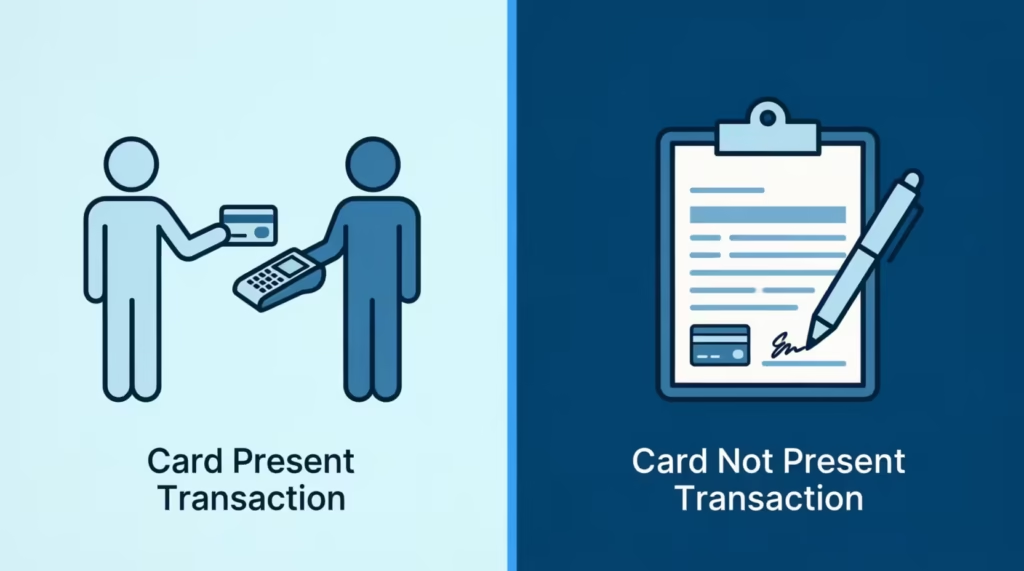
Think of it this way: when a customer hands over their card at a hotel check-in desk, the front desk agent runs the card. But in phone orders, mail orders, or recurring billing arrangements, the card is not physically present. That is exactly where this form steps in. It gets the customer’s consent and card details. This lets the merchant charge them later, so the customer doesn’t need to call again.
The form is not just a formality. FTC Consumer Sentinel data shows that credit card fraud remained the top category of identity theft reports in 2024, with over 458,000 cases filed. A signed authorization form provides businesses with strong evidence in chargeback disputes. It proves that the cardholder approved the charge before it was processed.
Merchants in many industries use these forms. Hotels, property managers, subscription services, contractors, medical offices, and airlines all rely on them. These tools help make operations smoother and improve customer service.
📌 Did You Know: Merchants who win chargeback disputes almost always have one thing in common: a signed authorization document that directly matches the disputed charge amount and date. Without it, the card network typically sides with the cardholder.
Why Businesses Use a Payment Authorization Form
A payment authorization form does three important things at once. It protects the business, it protects the customer, and it creates an auditable record of consent.
Here is where things get expensive without one. The CFPB’s 2024 Consumer Credit Card Market Report found that cardholders disputed $9.8 billion in credit card charges in 2024, resulting in $5.9 billion in chargebacks.
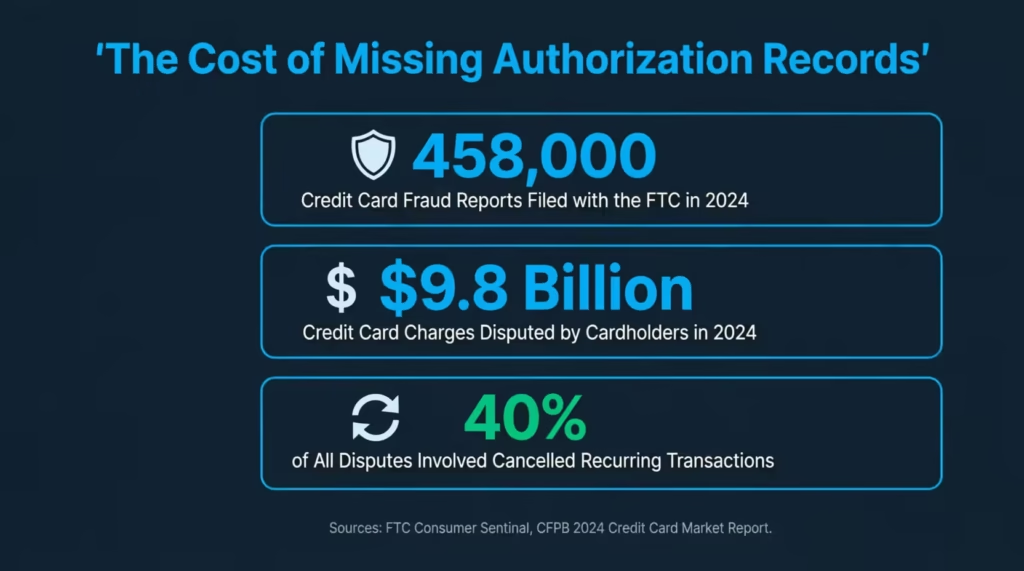
Cancelled recurring transactions were the single most common dispute reason, making up 40% of all disputes on general-purpose cards. That is a massive problem for any subscription or recurring-billing business without signed authorization records on file.
Beyond chargebacks, signed forms help businesses:
- Set clear expectations about billing frequency, amounts, and end dates
- Satisfy payment processor requirements for card-on-file transactions
- Reduce friendly fraud, where a cardholder disputes a charge they actually authorized
- Meet PCI-DSS record-keeping guidelines for cardholder data
- Handle hotel pre-authorizations and airline ticket purchases smoothly
Take the case of David Park, a property manager in Chicago who handles rent payments for 22 short-term rental units. Before he started using a signed card authorization form for each tenant’s security deposit hold, he faced three chargeback disputes in a single quarter. After switching to a signed form with clear pre-authorization language, he has not lost a single dispute in over a year.
What to Include in a Credit Card Authorization Form
A strong cardholder authorization document needs specific information to be useful in a dispute. Leaving out even one section can weaken the form’s legal weight. The templates on this page cover all of the following areas.
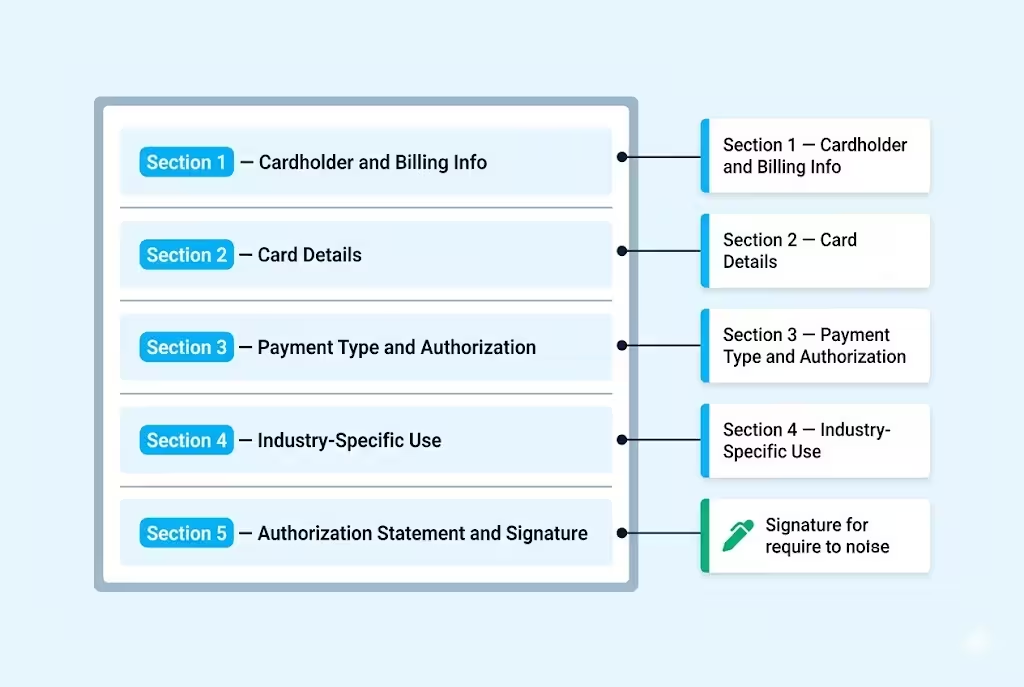
Section 1: Cardholder and Billing Information
This section captures the basic identity of the person authorizing the charge. It includes the cardholder’s full legal name, billing address, city, state, ZIP code, phone number, and email address.
The billing address is especially important. It must match the address linked to the card account. A mismatch can trigger a failed AVS (Address Verification System) check during processing.
Section 2: Card Details
This section gathers the card type (Visa, Mastercard, American Express, Discover), the card number, and the expiration date.
One critical rule: never record the CVV on the form. Under PCI-DSS requirements, the Card Verification Value must never be stored after a transaction is authorized. The templates on this page follow this rule by design. The Word template has a clear security notice saying the CVV won’t be stored. The PDF template shows the CVV field as “if required” for initial verification only.
⚠️ Mistake to Avoid: Some businesses add a “CVV” field to their custom forms and store those records in filing cabinets. This is a direct PCI-DSS violation. If your form includes a stored CVV, you need to remove it immediately and destroy any existing copies that contain one.
Section 3: Payment Type and Authorization Details
This is where you specify whether the charge is a one-time payment or a recurring one.
For recurring charges, include the following details:
- Billing frequency (weekly, monthly, quarterly)
- Start date
- End date or “until cancelled.”
- Maximum charge amount per cycle
The authorized dollar amount goes here too, along with the currency and a brief description of the goods or services being paid for.
Section 4: Industry-Specific Use (Optional)
Hotels, airlines, and businesses in specialized industries often need to flag why the form is being used.
The fillable PDF template has checkboxes for:
- Hotel reservations
- Airline tickets
- General business services
This context helps the merchant’s records stay organized, and it clarifies the charge purpose if a dispute arises later.
Section 5: Authorization Statement and Signature
The authorization statement is the legal core of the form. The cardholder is the legal owner of the card. They authorize the merchant to process the specified charges. They also understand the terms for refunds and cancellations.
The form must include a cardholder’s signature, printed name, and the date signed. Without all three, the form is incomplete and may not hold up in a chargeback dispute.
One-Time vs. Recurring Credit Card Authorizations
The type of authorization you need depends on your billing model. Choosing the wrong one can create confusion for cardholders and complicate disputes down the line.
| Feature | One-Time Authorization | Recurring Authorization |
|---|---|---|
| Charge Frequency | Single transaction only | Ongoing (weekly, monthly, quarterly) |
| Amount Flexibility | Fixed, agreed amount | Maximum per cycle must be stated |
| New Form Required? | Yes, for each transaction | No, one form covers the full billing period |
| End Date Required? | N/A — single charge | Yes — state end date or “until cancelled” |
| Common Use Cases | Hotel deposits, contractor invoices, one-off orders | Subscriptions, retainers, rent, membership billing |
| Dispute Risk if Vague | Low — single charge is clear | High — vague terms are the #1 dispute cause |
One-time charge authorization forms are straightforward. The cardholder signs off on a specific dollar amount for a specific purchase. Once that charge clears, the authorization is complete.
A recurring credit card authorization form works differently. The cardholder is giving ongoing permission for future charges. That means the form needs to spell out exactly how often charges will occur, the maximum amount, and what happens if they want to cancel. Vague recurring terms are the number-one reason recurring billing disputes are difficult to win.
💡 Pro Tip: For recurring billing arrangements, always send the cardholder a copy of the signed form by email immediately after they sign. This sets expectations upfront and significantly reduces the chance of a “I don’t remember authorizing this” dispute months later.
Credit Card Authorization Forms for Hotels and Airlines
Hotels and airlines have some of the highest authorization form usage of any industry. Both require payment card details in advance. This often happens when the customer isn’t there to swipe or tap their card.
A hotel credit card authorization form allows guests to pre-authorize their card. This covers room charges, incidentals, and security holds. This is common when a third party, such as a company or family member, is paying for another person’s stay. The form confirms who the cardholder is, what the hotel is allowed to charge, and the maximum amount for that authorization.
An airline credit card authorization form functions the same way for group bookings, corporate travel accounts, and for ticket purchases made over the phone or by mail. When a travel manager books multiple tickets on a company card without each traveler being present at the terminal, a signed authorization form protects both the airline and the business.
The fillable PDF template here has a section just for the industry. It includes checkboxes for hotel reservations, airline tickets, and other business services. This allows you to use the same template for different cases. You won’t need to make separate documents for each department.
Jennifer Castillo is a travel coordinator at a regional construction firm in Phoenix. She handles an average of 14 flights each month for her team. Her company emailed scanned card images to the airline’s group desk. This was a big security risk.
After switching to a signed authorization form for each booking, her finance team created a clear paper trail. The company hasn’t had a fraudulent charge in over 18 months.
How to Fill Out a Credit Card Authorization Form
Filling out the form correctly the first time saves everyone from headaches later. Follow these steps to complete it without errors.
- Add the merchant’s information at the top. Fill in your business name, address, phone number, and email. If you are using the Word template, drop your company logo into the placeholder at the top of the page.
- Have the cardholder fill in their personal details. Full legal name (exactly as it appears on the card), billing address, phone, and email. Double-check that the billing address matches what the card issuer has on file.
- Collect card details carefully. Card type, full card number, and expiration date. Do not ask for or record the CVV on the form itself.
- Select the payment type. Check the box for one-time or recurring. If recurring, fill in the frequency, start date, end date or “until cancelled,” and the maximum charge per cycle.
- Enter the authorized amount and a description. Be specific. “Monthly retainer for accounting services, $1,200/month” is far stronger than “monthly payment” in a dispute hearing.
- Select the industry-specific use case if applicable. Hotel, airline, business services, or other.
- Have the cardholder sign, print their name, and date the form. All three fields are required. An undated or unsigned form offers very little legal protection.
- Give the cardholder a copy. Either a physical copy or a scanned digital copy sent to their email on file.
- Store the form securely. Physical copies go in a locked cabinet. Digital copies go on an encrypted drive or in a secure cloud system. See the storage rules below.
How to Use These Templates
The two templates on this page are designed to cover different workflows. Choose based on how your business collects and stores records.
Using the Fillable PDF Template:
- Open the file in Adobe Acrobat Reader (free) or any browser-based PDF viewer.
- Click on each field and type directly into it. The form has pre-built input fields for every section, including checkboxes you can click to check.
- For the cardholder signature field, add a photo of a handwritten signature. You can also use a PDF signing tool like Adobe Sign or DocuSign.
- Save a completed copy to your encrypted records system before printing.
- Print on standard 8.5″ x 11″ paper for in-person signing, or send the completed PDF securely for remote customers.
Using the Word Template (.docx):
- Open the file in Microsoft Word or upload it to Google Docs.
- Replace the “Insert Logo Here” placeholder with your company logo image.
- Fill in the merchant name, address, phone, and email in the header section.
- Customize any field labels to match your industry. For example, a medical practice might rename “Description of Goods/Services” to “Treatment Plan Reference.”
- Save your customized version as a master template so you do not have to re-enter merchant details every time.
- For recurring billing clients, print or email the form before the first charge is processed. Keep the signed version on file for the entire billing period and for any required state record retention.
💡 Pro Tip: Save a blank branded version of the Word template as a protected document. This allows staff to fill in client fields without accidentally editing your logo, legal language, or header layout.
How to Store and Handle Authorization Forms Safely
Collecting a signed form is only half the job. Storing it correctly is the other half. Payment card data is governed by the Payment Card Industry Data Security Standard, known as PCI-DSS. This is a worldwide set of security rules made by major card networks such as Visa, Mastercard, American Express, Discover, and JCB.
The PCI Security Standards Council requires that any business storing, processing, or transmitting cardholder data maintain a secure environment. This applies to paper authorization forms too, not just digital records.
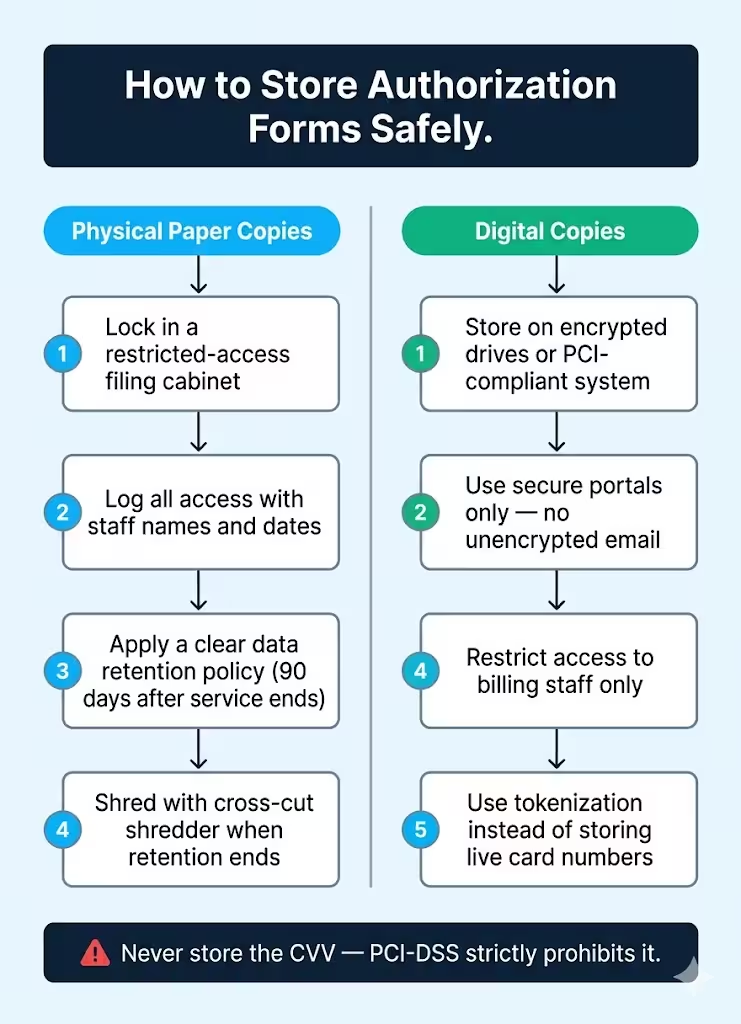
For physical (paper) copies:
- Store in a locked filing cabinet in a restricted-access area.
- Keep a log of who accesses the cabinet and when.
- Set a clear data retention policy. The Word template suggests 90 days after service ends. If local rules say otherwise, extend this period.
- Destroy forms using a cross-cut shredder once the retention period ends. Do not throw card data in a recycling bin.
For digital copies:
- Store on encrypted drives or in a PCI-compliant document management system.
- Never transmit forms through unencrypted email. Use a secure file upload portal or an encrypted document-sharing service.
- Limit access to only the staff members who need it for billing purposes.
- Do not store the full card number in any digital system that is not specifically designed for PCI-compliant cardholder data storage. If you need recurring billing capability, use a payment processor’s tokenization service instead.
Tokenization replaces the actual card number with a secure token that is useless to a thief. Many payment gateways, including Stripe, Square, and Braintree, offer tokenization as part of their standard merchant accounts. Using tokens means your stored forms only need to reference a token ID instead of a live card number. This change dramatically reduces your PCI-DSS compliance burden.
Business Best Practices for Credit Card Payment Forms
A well-designed business credit card authorization form is only as effective as the process around it. These practices help businesses of all sizes use authorization forms without creating more risk.
- Use a form every time, without exceptions. Michael Torres, a freelance web developer in Austin, once skipped the form for a long-time client. The client called with a quick payment request. That client later disputed the $3,200 charge, claiming they did not authorize it. Without a signed form, Michael had no recourse and lost the dispute. Now he sends a digital form before processing any charge, regardless of the relationship.
- Match the authorized amount exactly. If the form says $500 and you charge $525, even by accident, the cardholder can dispute the difference. Always update the form if the amount changes before running the card.
- Collect a new form for every new billing arrangement. A form signed for a one-time charge does not cover a later recurring agreement. Each distinct billing relationship needs its own signed document.
- Train your staff on what they can and cannot ask for. Front-line staff should never ask a cardholder to read their CVV aloud and then write it on the form. That violates PCI rules the moment the pen hits paper.
- Keep your authorization statement language current. Review the legal language on your form every year. This ensures it matches your current refund and cancellation policies.
- Use a secure delivery method for remote forms. Email alone is not secure enough. Use a service with encryption and access logging if you need to send forms to remote clients for signature.
⚠️ Mistake to Avoid: Never ask customers to send a completed authorization form back via regular email attachment. Standard email is not encrypted, which means card data travels in plain text across servers you do not control. Use a secure upload portal, encrypted messaging, or an e-signature platform instead.
Frequently Asked Questions
Is a credit card authorization form legally binding?
Yes. A signed authorization form is a written agreement between the cardholder and the merchant. The cardholder gave explicit consent for the charge. This makes it one of the strongest pieces of evidence in a chargeback dispute.
Can I store the CVV on the authorization form?
No. PCI-DSS rules prohibit storing the CVV after a transaction is authorized. Your form should never have a field that permanently records the CVV. Businesses that store CVV data risk heavy fines and loss of their ability to accept card payments.
How long should I keep a signed credit card authorization form on file?
Most payment processors recommend keeping authorization records for at least 18 months after the last transaction. Some industries and states require longer retention periods. Check with your acquiring bank and local regulations to confirm the minimum for your business.
Do I need a new form for each transaction or just once per customer?
For recurring billing, one signed form covers the entire billing relationship as long as the terms do not change. If the amount, frequency, or card changes, collect a new form. For one-time charges, a new form is needed for each separate transaction.
Can a credit card authorization form be signed electronically?
Yes. Electronic signatures are legally valid in the United States under the E-SIGN Act. Tools like DocuSign, Adobe Sign, and HelloSign support legally compliant e-signatures. Make sure the platform you use logs the signer’s IP address, timestamp, and consent record.
What is the difference between a credit card authorization form and a payment receipt?
An authorization form is collected before a charge to get the cardholder’s permission. A receipt is issued after the charge as proof that it was processed. Both serve different purposes and should both be kept on file for each transaction.
Do hotels always require a credit card authorization form?
Not always for guests who are present and swiping their own card. Hotels use authorization forms primarily when a third party is paying, when booking is done by phone or mail, or when setting up a company billing account for corporate guests.
Is a free credit card authorization form template safe to use?
Yes, as long as the template has the right fields. Also, your business must follow proper storage and handling steps. A template is just a starting point. The form’s security relies on how your team collects, stores, and destroys it. It doesn’t matter where you downloaded it.
Bottom Line
A filled-out credit card authorization form helps businesses avoid chargeback losses. It also gives cardholders clear proof of their agreement. Plus, it keeps payment records in line with PCI-DSS guidelines.
This guide covers:
- What to include on the form
- How to fill it out correctly
- Key differences between one-time and recurring authorizations
- How hotels, airlines, and other businesses use them for card-not-present transactions.
Based on the risks outlined here, the most effective approach is to use a signed authorization form for every card-on-file arrangement, without exception. A single missed form can cost far more in dispute losses than the time it takes to collect one upfront. The fillable PDF is great for fast in-person or online collection. The Word template offers a customizable, brandable starting point for businesses in any industry.
If you know a business owner or office manager who handles recurring billing or card-not-present payments, please share this page with them. It could really help them out! A solid authorization process could save them from a costly dispute they would have no way to win without it.