
Pulling funds directly from a customer’s bank account is one of the fastest ways to collect payments. Without proper written consent, you’re just one dispute away from a chargeback, a NACHA violation, or even worse.
Every business that collects bank payments needs a strong ACH debit authorization form template. This is crucial before processing any transaction. NACHA states that in 2023, the ACH Network processed over 31.5 billion payments. This figure presents the most recent annual data. It highlights that the ACH Network is among the largest payment systems in the US.
A completed, signed authorization form is the legal record that gives your business the green light to debit a customer’s account.
Below, you’ll find free templates ready for use in three formats. You’ll also get a complete walkthrough of every section, NACHA compliance rules, and best practices for safely storing and revoking authorizations.
Download Your Free ACH Debit Authorization Form Templates
Three ready-to-use templates are available to make your life easier. Each one has all the sections needed for a compliant bank payment authorization. This includes originator details, payer information, bank account fields, payment terms, the authorization statement, and a signature block.
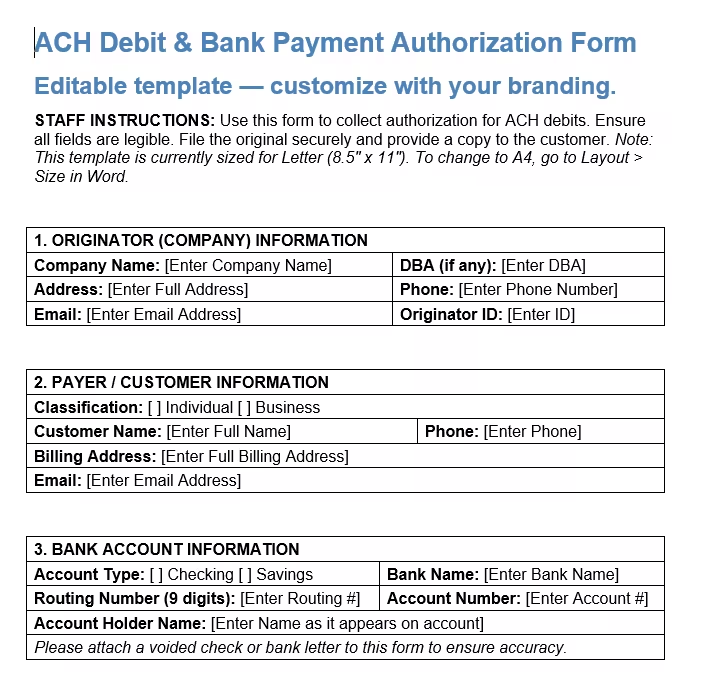
Pick the format and paper size that works best for you:
ACH Debit & Bank Payment Authorization Form
3 formats available. Use fillable PDFs to complete digitally, or the Word file to add your own branding and custom fields.
Disclaimer: The Templates & Printables on this site are provided for informational and personal tracking purposes only. This is not financial, legal, tax, or credit advice. While reasonable efforts are made to ensure accuracy, Credit Card Wind makes no warranties as to the completeness, reliability, or accuracy of the calculations generated by these Templates & Printables. Users are responsible for independently verifying all data and calculations. Terms, conditions, rates, regulations, and legal requirements vary by institution, jurisdiction, and individual circumstances.
Always refer to your official statements, account agreements, and applicable laws, and consult a qualified professional before making any financial, legal, or other important decisions. By using these Templates & Printables, you acknowledge that Credit Card Wind and its owner shall not be liable for any damages, losses, or financial consequences arising from the use or misuse of these Templates & Printables.
This universal disclaimer applies to all templates and printables provided by Credit Card Wind (https://creditcardwind.com), created by Robert Williams (Owner at Credit Card Wind).
© Credit Card Wind. All rights reserved.
These templates and printables may be downloaded and used for personal, non-commercial purposes only. Redistribution, resale, or modification for commercial use without permission is strictly prohibited.
What Is an ACH Debit Authorization Form?
An ACH debit authorization form is a written agreement. Your customer signs it to let a business take money from their bank account using the Automated Clearing House network. Without it, any debit you start is considered unauthorized under NACHA’s Operating Rules and under federal consumer protection law.
Think of it as the handshake before the money moves. It documents the who, what, when, and how much of every bank-to-bank transfer your business initiates. That paper trail protects you if a customer later claims they never agreed to the charge.
The form captures:
- The originator (your business) and payer (your customer) details
- The customer’s bank account and routing numbers
- Whether the debit is one-time or recurring
- The dollar amount, frequency, and start/end dates
- A signed authorization statement and revocation terms
Did you know: The ACH network covers far more than direct debits. Payroll deposits, government benefits, and business transfers all use the same system. Your authorization form taps into that same infrastructure.
Why This Form Is Legally Required
Collecting a bank account number is not enough. Under Regulation E (the Electronic Fund Transfer Act), any preauthorized electronic transfer from a consumer’s account must be authorized in writing and kept on record by the originating company. Failing to collect a signed authorization before initiating a debit exposes your business to serious consequences.
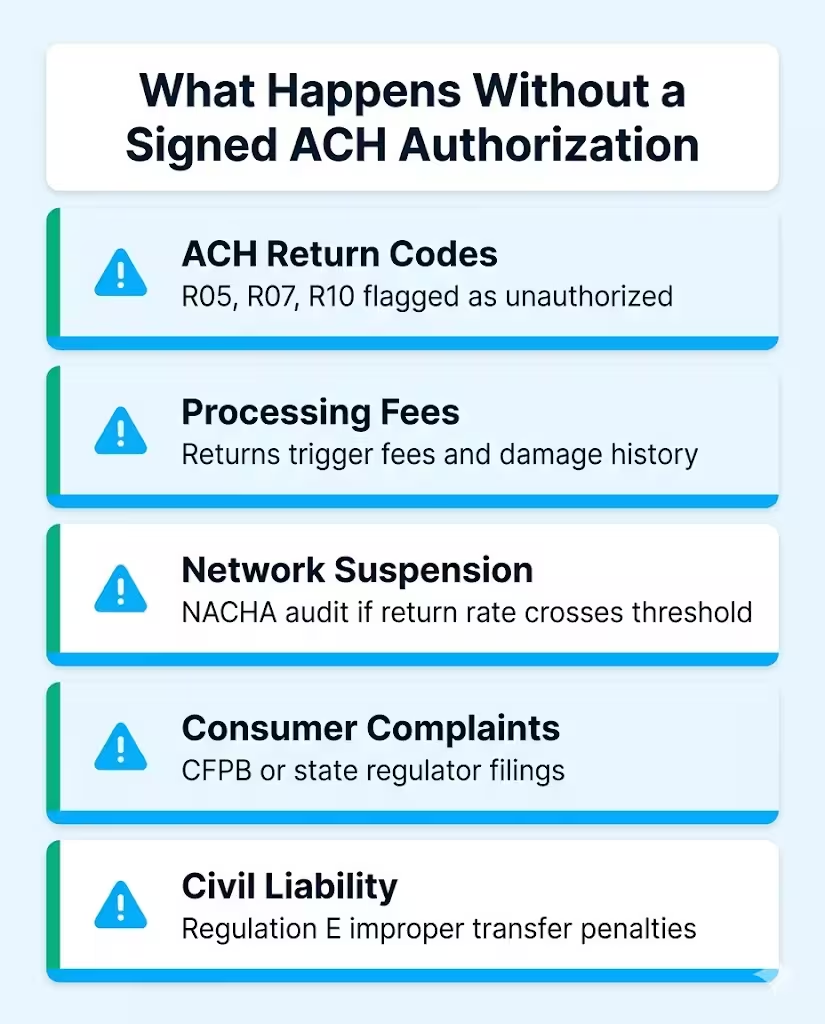
The risks of skipping this step include:
- Return codes from the receiving bank (R05, R07, R10) that flag unauthorized debits
- ACH returns, which trigger fees and damage your processing history
- Potential removal from the ACH Network if your return rate crosses NACHA thresholds
- Consumer complaints filed with the CFPB or state regulators
- Civil liability under Regulation E for improper electronic fund transfers
For business-to-business (B2B) ACH, Regulation E does not apply in the same way. But NACHA’s own Operating Rules still require written authorization for WEB, TEL, PPD, and CCD entries. No authorization, no protection.
⚠️ Mistake to avoid: Never use a verbal agreement or an email thread as a substitute for a signed ACH authorization. Courts and NACHA dispute reviewers require written proof. A voided check alone is not authorization.
What Must an ACH Authorization Form Include?
NACHA specifies what a valid authorization must contain. The templates above are built to meet these requirements. Any bank payment authorization form you use should have all of the following:
Originator (company) information
Your legal business name, DBA (if any), mailing address, phone, email, and your assigned Originator ID or ACH Company ID. This is how the receiving bank identifies who is initiating the debit.
Payer/customer information
The customer’s full name or business name, billing address, phone, and email. State whether the account holder is an individual or a business entity.
Bank account details
You’ll need the following:
- The 9-digit routing (ABA) number
- The full account number
- The account type (checking or savings)
- The account holder’s name as it appears on the account
Attaching a voided check is essential for ensuring accuracy.
Payment authorization details
Specify if the debit is a one-time ACH payment or a recurring ACH authorization.
- Include the exact dollar amount.
- Specify the frequency: weekly, bi-weekly, monthly, etc.
- State the start date.
- Provide the end date or check the “until cancelled” box.
Authorization statement
The form should clearly state in plain English that the signer allows the company to start debits. This authorization stays active until the signer revokes it in writing. NACHA requires this exact language for consumer entries.
Signature block
Printed name, signature, date, and (for business accounts) job title. A unique authorization ID for internal tracking is also best practice. Digital signatures are accepted as long as they accurately reflect the paper record.
Revocation and privacy notice
Let the customer know how to cancel the authorization and how their data will be handled. This provides legal protection and fosters customer trust.
One-Time vs. Recurring ACH Authorization: What’s the Difference?
This is one of the most common questions businesses ask before setting up bank payment processing. The authorization type determines the NACHA Standard Entry Class (SEC) code for the transaction. Each code has different rules.
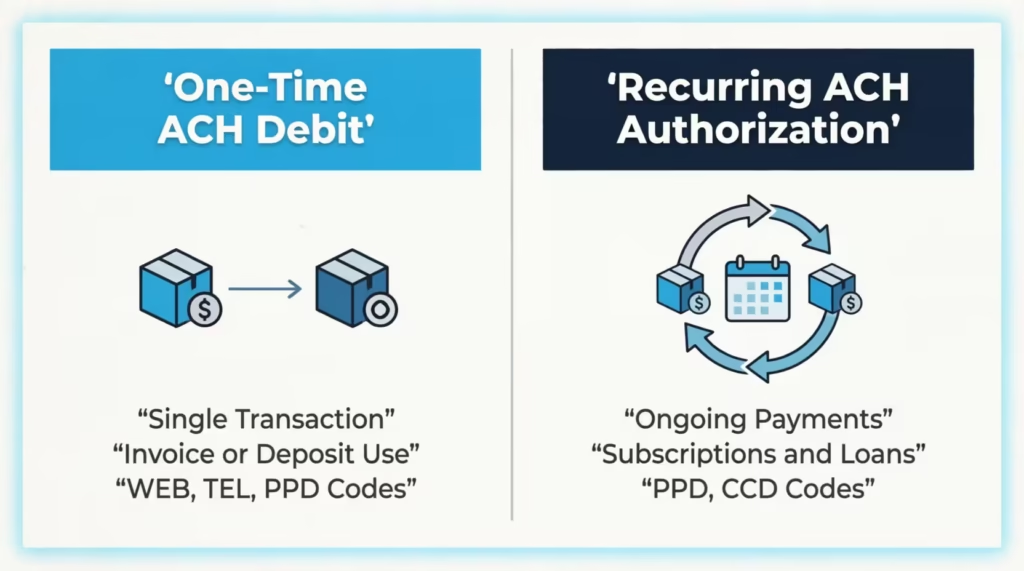
| Feature | One-Time ACH Debit | Recurring ACH Authorization |
|---|---|---|
| Frequency | Single transaction | Ongoing (weekly, monthly, etc.) |
| Common use | Invoice payment, deposit | Subscriptions, loan repayments, utilities |
| NACHA SEC codes | WEB, TEL, PPD | PPD, CCD (B2B), RCK |
| Authorization required | Yes, written or verifiable | Yes, written and retained |
| Cancellation | N/A (single pull) | Must be revokable in writing |
| Verification method | Micro-deposit or instant | Micro-deposit recommended |
Both options are included in the templates above. Check the appropriate box in the Payment Authorization Details section before the customer signs.
💡 Pro tip: For recurring billing, get a separate authorization for each amount. This applies unless the form clearly says that amounts can vary. Charging a different amount than what was authorized is a common cause of R10 (Customer Advises Unauthorized) return codes.
How to Fill Out an ACH Debit Authorization Form: Step by Step
Filling out the form accurately on the first attempt prevents extensive revisions later. Walk through each section in order.
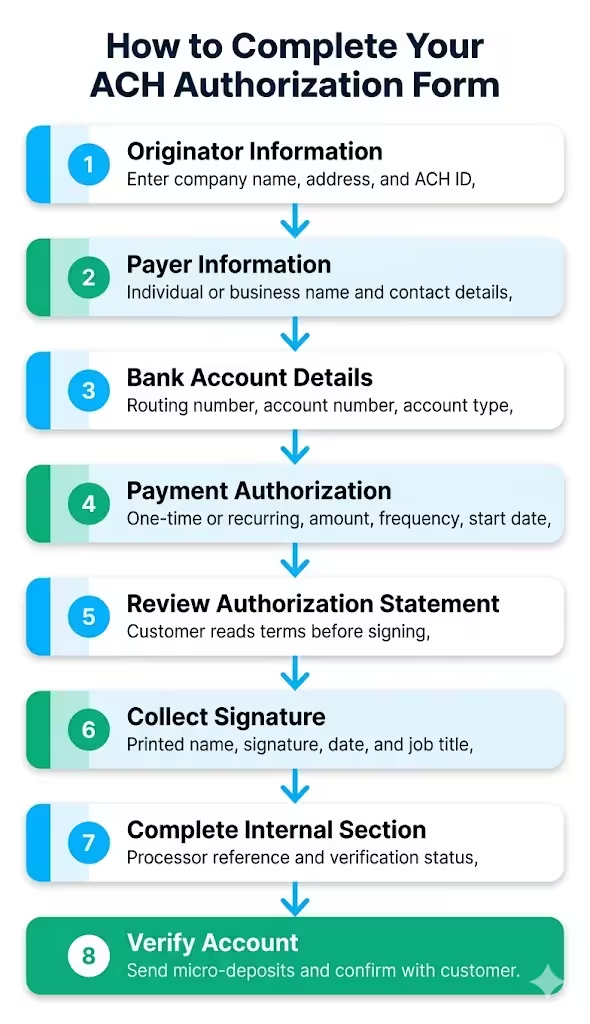
Complete Section A (Originator Information).
Enter your company name, DBA, address, phone, email, and your ACH Originator ID. If you don’t have an Originator ID yet, your payment processor or bank will assign one after account setup.
Fill in Section B (Payer Information).
Check “Individual” or “Business.” Enter the customer’s full legal name, billing address, phone, and email. For business accounts, the authorized signer’s name goes here, not just the company name.
Complete Section C (Bank Account Details).
Select checking or savings. Enter the bank name, 9-digit routing number, and full account number. Ask the customer to attach a voided check to prevent data entry errors.
Fill in Section D (Payment Authorization).
Select one-time or recurring. Enter the exact dollar amount. For recurring debits, choose the frequency and set the start date. Leave the end date blank if the authorization runs until cancelled.
Review Section E (Authorization Statement) with the customer.
The customer should read this section before signing. It explains what they are authorizing and how to cancel.
Collect the signature in Section G.
The customer prints their name, signs, and dates the form. For digital submissions, a typed signature with a timestamp and IP address is typically enough for WEB entries.
Complete Section H (For Company Use Only) internally.
- Note who got the form.
- Write down the date.
- Include your processor reference number.
- Check the micro-deposit verification status.
This section is for your records only, not customer-facing.
How to Use the ACH Debit Authorization Form Templates
The three templates are built to cover different workflows. Choose based on how you plan to collect and store the form.
Using the US Letter PDF (fillable)
This format works best for businesses based in the US collecting forms digitally. Open it in Adobe Acrobat Reader or any PDF viewer that supports form fields. Customers can type directly into each field on their device. To print, use “Actual Size” print settings to preserve field alignment on standard 8.5″ x 11″ paper. Once completed, save a copy as a flat (non-editable) PDF before filing.
Using the A4 PDF (fillable)
The A4 edition is the right choice if you serve international customers or operate outside the US. The layout is optimized for A4-sized paper (210mm x 297mm). All fields, fonts, and margins are adjusted for A4 print output. The form fields match the US Letter version. This keeps your internal process consistent for both.
Using the A4 Word Template (.docx)
The Word file gives you full editing control. Use it to:
- Add your company logo in place of the “Company Logo” placeholder at the top
- Replace all instances of [Company Name] quickly using Find and Replace (Ctrl+H)
- Add or remove fields to match your internal process
- Switch to US Letter size by going to Layout > Size > Letter in Word
- Save a master copy with your branding locked in, then generate fresh copies for each customer
💡Pro tip: Use the Word template to create your branded master, then export it as a PDF for distribution. Sending a PDF instead of a live Word file stops accidental edits to the authorization statement.
Verification best practices across all formats
Regardless of which format you use, verify the bank account before initiating the first debit. The templates include a micro-deposit verification section (Section H). Send two small test deposits, usually under $1.00, to the customer’s account.
Then, ask them to confirm the exact amounts. Record these in the originator-use section. This step is highly recommended for recurring ACH payments. Some processors even need it for high-value transactions.
NACHA Compliance Rules Every Originator Must Know
NACHA governs the ACH network through its Operating Rules and Guidelines, updated annually. When starting ACH debits, focus on these key compliance points for authorization.
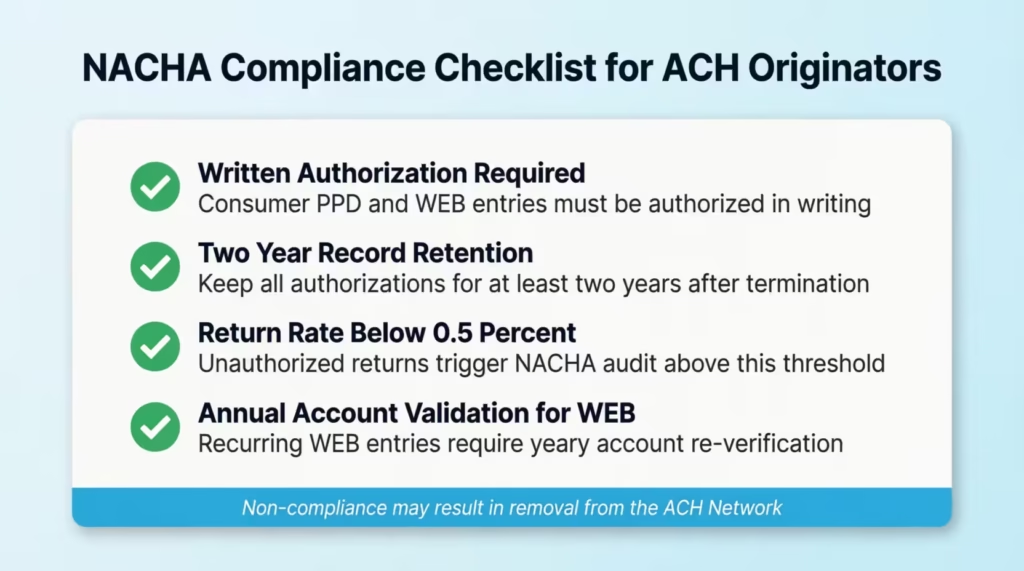
Written authorization is mandatory
For consumer (PPD) and WEB entries, NACHA says the authorization must be in writing. It should clearly state the terms of the debit. The authorization must also explain how the customer can revoke it. The authorization statement in the template meets this requirement out of the box.
Records must be kept for at least two years
Under NACHA rules, originators must keep a copy of each authorization for at least two years. This period starts from the date the authorization is revoked or terminated. Digital copies are acceptable as long as they accurately reproduce the original. Store completed forms in a locked filing cabinet. You can also save them in a password-protected, encrypted digital space.
Return rate thresholds
NACHA monitors return rates by entry type. For unauthorized returns (R05, R07, R08, R10, R29), the threshold is 0.5% of initiated entries. Crossing that threshold triggers a NACHA audit and can result in your company’s suspension from the ACH network. Keeping signed authorizations is the best way to protect against unauthorized return codes.
WEB entry requirements
Customers who allow online debits (WEB entries) must validate their account info every year for recurring transactions. NACHA also requires a reasonable method to detect fraud. Micro-deposit verification satisfies the account validation requirement.
⚠️ Mistake to avoid: The templates are designed as a general starting point. ACH regulations and state consumer protection laws vary by jurisdiction. Consult with a legal counsel before processing your first batch. This ensures your authorization language is compliant.
How to Store and Protect ACH Authorization Records
An authorization form is only useful if you can produce it when challenged. Good recordkeeping is also a NACHA compliance requirement, not just an internal best practice.
Physical storage
Print completed forms on paper and store originals in a locked filing cabinet with restricted access. Label folders by customer name and authorization date. Keep a logbook of who accessed the file and when.
Digital storage
Scan completed forms right away. Save them in a secure, password-protected folder or a safe document management system. Don’t store ACH forms in a shared drive that everyone can access. Also, don’t send them through an unencrypted email. Completed forms have routing numbers, account numbers, and signatures. Treat them like you would a Social Security number.
Retention schedule
- Keep every authorization on file for at least two years after the authorization is terminated or revoked
- For recurring authorizations without an end date, the two-year period begins when you get the written revocation notice.
- Some processors and states require longer retention periods — check your agreement and local law
Jennifer, a billing manager at a mid-sized SaaS company, set up a simple naming convention: “CustomerName_AuthDate_AuthID.pdf.” When an R10 return came in six months after signup, she quickly found the signed form. She resolved the dispute that same day. That kind of access can mean the difference between a resolved chargeback and a penalty.
How to Cancel or Revoke an ACH Authorization
Customers have the right to cancel an ACH authorization at any time. Under Regulation E, they must notify you at least three business days before a scheduled debit if they want to stop a specific payment. To cancel a recurring authorization, you need to give written notice. However, NACHA rules don’t demand a specific advance notice, aside from what your authorization agreement states.
When a revocation request comes in:
- Accept the request in writing (email is sufficient)
- Note the revocation date on the original authorization form and in your records
- Cancel all pending debits in your payment processor before the next scheduled run
- Send written confirmation to the customer that the authorization has been cancelled
- Keep the original form and the revocation request for two years from the cancellation date.
If a debit occurs after a valid revocation notice, it’s unauthorized under Regulation E. You must refund the customer within one business day of finding the error.
Frequently Asked Questions (FAQs)
Is a verbal agreement enough to authorize an ACH debit?
No. NACHA requires written authorization for consumer ACH debits (PPD and WEB entries). A verbal agreement can work for TEL entries in some cases. However, a written authorization is always safer and easier to defend.
Can I use a digital or electronic signature on an ACH authorization form?
Yes. Electronic signatures are acceptable for ACH authorizations, including WEB entries. The signature method must create a record that shows the information in the authorization. This record should be easy to reproduce for review.
How long do I need to keep a completed ACH authorization form?
NACHA rules say you must keep authorization records for at least two years after the authorization is revoked or ended. Some states or processors may require a longer retention period.
What is a routing number and where does a customer find it?
A routing number is the 9-digit code that identifies a bank in the US payment system. Customers can find it on the bottom left of a personal check, in their online banking portal, or by calling their bank directly.
What happens if a customer disputes an ACH debit?
If a customer makes an unauthorized return, like an R10, you must provide the signed authorization. Do this within the time limit set by your payment processor. A complete, signed form is your primary defense against the chargeback.
Do ACH authorization forms expire?
There is no automatic expiration date under NACHA rules. A recurring authorization remains valid until the customer cancels it in writing or the end date on the form arrives.
Is a separate authorization needed for each payment amount?
For recurring debits with a fixed amount, one authorization covers all future payments. If the amount changes each cycle, the authorization language must say that amounts can differ. Otherwise, you need a new authorization for each change.
Can a business use one ACH authorization form for both checking and savings accounts?
Yes. The same form covers both account types. The customer simply checks the appropriate box in the Bank Account Details section. A new form is needed if the customer later switches to a different account.
What is micro-deposit verification and do I need it?
Micro-deposit verification means sending two tiny test deposits, usually under $1.00. This checks if the customer’s account is real and active. It’s not required for all ACH entries. However, it’s strongly recommended for recurring transactions. Many processors also require it for new accounts.
Bottom Line
Collecting bank payments without a signed authorization puts your business at legal and financial risk. An ACH debit authorization form shows the customer’s consent. It meets NACHA’s requirement for written authorization. Plus, it provides a clear paper trail for any disputes.
The templates above include one-time and recurring debits in three formats. Each format has all the necessary sections already included.
Based on NACHA’s compliance framework, the most effective approach is to collect authorization before processing, verify the account through micro-deposits, and store every completed form in a secure, accessible location for at least two years.
If you work with a team that handles billing or client payments, sharing this guide could save them from a costly authorization mistake.