
Tracking your credit card activity each month isn’t always easy, especially when unexpected charges slip through unnoticed. The Consumer Financial Protection Bureau reports that billing disputes rank among the top credit card complaints filed each year. Without your own clear record to cross-check, catching those errors is nearly impossible. That’s exactly where a credit card statement template comes in.
The fix is simple: use a pre-formatted form to organize all charges, payments, and fees in one place.
Below are three free templates you can use right away. You’ll also find a complete guide to help you fill them out, understand each section, and keep your finances safe every month.
Download Your Free Credit Card Statement Templates
Three ready-to-use templates are available right here. Each one includes all the sections you need to clearly track your account activity. This ranges from your account summary to details of individual transactions.
Pick the format and paper size that works best for you:
Disclaimer: The Templates & Printables on this site are provided for informational and personal tracking purposes only. This is not financial, legal, tax, or credit advice. While reasonable efforts are made to ensure accuracy, Credit Card Wind makes no warranties as to the completeness, reliability, or accuracy of the calculations generated by these Templates & Printables. Users are responsible for independently verifying all data and calculations. Terms, conditions, rates, regulations, and legal requirements vary by institution, jurisdiction, and individual circumstances.
Always refer to your official statements, account agreements, and applicable laws, and consult a qualified professional before making any financial, legal, or other important decisions. By using these Templates & Printables, you acknowledge that Credit Card Wind and its owner shall not be liable for any damages, losses, or financial consequences arising from the use or misuse of these Templates & Printables.
This universal disclaimer applies to all templates and printables provided by Credit Card Wind (https://creditcardwind.com), created by Robert Williams (Owner at Credit Card Wind).
© Credit Card Wind. All rights reserved.
These templates and printables may be downloaded and used for personal, non-commercial purposes only. Redistribution, resale, or modification for commercial use without permission is strictly prohibited.
What Is a Credit Card Statement Template?
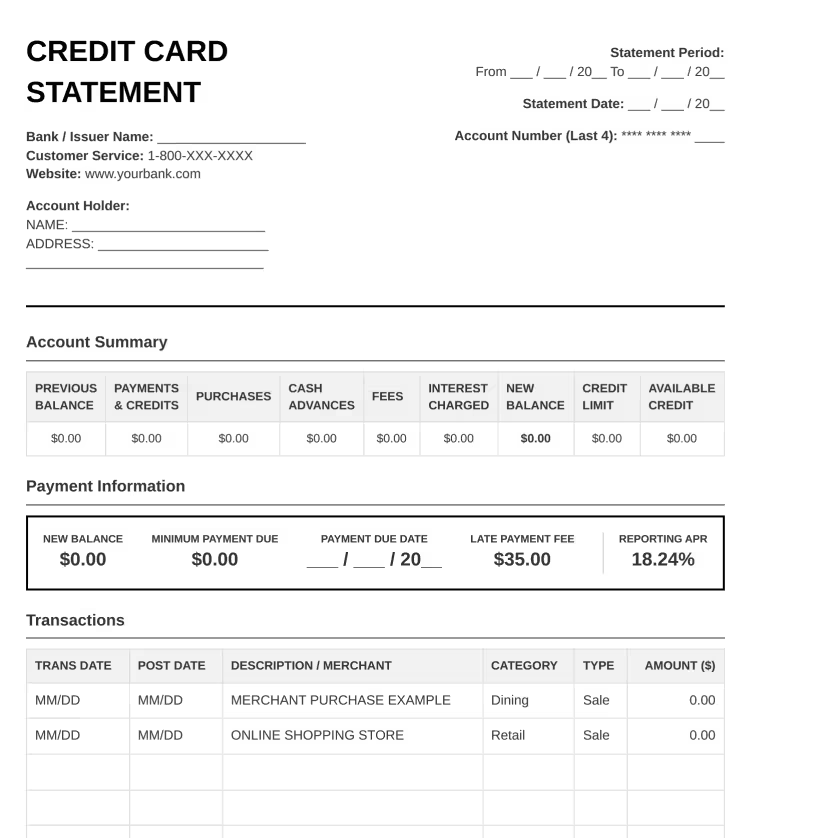
A credit card statement template is a pre-formatted document that mirrors the layout of an official billing statement from a bank or card issuer. It covers all the key sections found on a real statement: your account summary, transaction history, payment details, and a space for notes.
Unlike the statement your bank sends you, this one is yours to control. You fill it in yourself, keep your own copy, and review it on your own schedule.
Think of it as your personal version of a monthly billing record. You can print it, file it, or save it digitally, with everything in one organized place.
The CFPB’s consumer complaint database consistently shows that billing and statement issues rank among the most frequently reported credit card problems each year. Keeping your own account records is a smart way to spot issues early. This can save you money in the long run.
📌 Did You Know: The Credit CARD Act of 2009 requires card issuers to deliver your billing statement at least 21 days before the payment due date. That window exists specifically so you have time to review your charges and file a dispute if needed.
Why Do You Need a Credit Card Statement Template?
Your card issuer sends you a statement every billing cycle. So why keep your own record? A few strong reasons:
You catch errors faster.
When you log your transactions and check them against your official statement, any charge that doesn’t match will stand out.
You budget more effectively.
Seeing all your purchases, fees, and interest in one organized layout makes it far easier to spot spending patterns and plan ahead.
You build a paper trail.
If a billing dispute comes up, having your own detailed record gives you solid supporting evidence. It shows exactly what happened, on what date, and in what order.
You understand your account better.
Most cardholders check their balance and move on. Filling out a monthly billing record helps you see the whole picture. You’ll notice the APR, fees, available credit, and how they all work together.
You reduce financial surprises.
Unexpected charges on a billing statement are rarely good news. A simple monthly form helps you stay one step ahead before the dispute window closes.
What’s Included in My Credit Card Statement Templates?
Each template covers every major section of a standard billing statement; nothing is left out.
Header Information
This section covers the basics:
- Statement period (start and end dates)
- Statement date
- Cardholder’s name
- Issuing bank or institution.
The account number only shows the last four digits to keep sensitive data protected.
Account Summary
The account summary is the financial snapshot of the entire billing cycle. It includes:
- Previous Balance
- Payments and Credits
- Purchases and Adjustments
- Cash Advances (included in both PDF versions)
- Fees Charged
- Interest Charged
- New Balance
- Credit Limit
- Available Credit
Together, these fields show exactly how your balance moved from the start of the cycle to the end.
Transaction Details
This is where every purchase, credit, and payment gets recorded.
Each row in the transaction table shows:
- Transaction date
- Post date (in both PDF versions)
- Merchant name or description
- Spending category
- Transaction type
- Dollar amount
Payment Information
This section shows the key numbers you need before the due date:
- Minimum payment due
- Payment due date
- Annual percentage rate (APR)
- Late payment fee
Notes and Remarks
A free-text area for any personal memos, disputes in progress, expected refunds, or anything else worth flagging for that billing period.
💡 Pro Tip: Pay close attention to the post date column in the PDF templates. Charges can take one to three business days to post after the actual transaction date. If a charge looks unfamiliar, check the merchant name against the post date, not just when you think you made the purchase.
How to Use Your Credit Card Statement Template (Step-by-Step Guide)
Follow these steps to fill out your monthly billing record accurately.
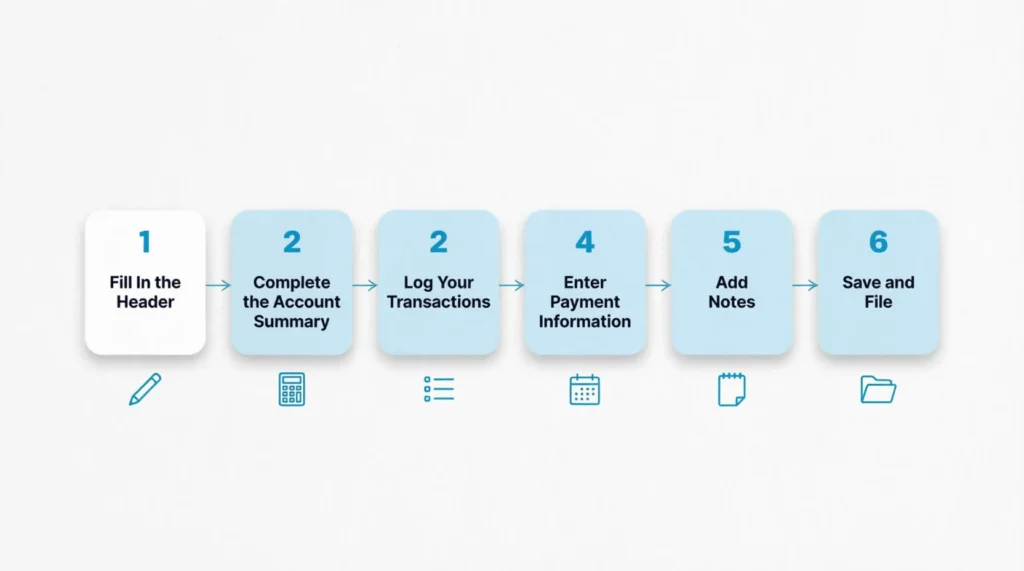
Step 1: Fill In the Header
Start with the basics. Enter the statement period (the start and end dates of your billing cycle), the statement date, your full name, and your card issuer’s name. Use only the last four digits of your account number.
Step 2: Complete the Account Summary
Pull up your bank’s official statement or online account dashboard. Transfer each figure into the matching row:
- Enter the Previous Balance from last month
- Record all Payments and Credits made during the cycle
- Add up Purchases and Adjustments
- Include Cash Advances if any were taken
- Enter Fees Charged and Interest Charged as separate line items
- Copy in the New Balance
- Fill in the Credit Limit and Available Credit
Step 3: Log Your Transactions
Go through each charge from the billing cycle. For every transaction, enter the date, the merchant name, the spending category, the transaction type (purchase, credit, or cash advance), and the amount. Grouping similar purchases under the same category, such as dining, retail, or travel, makes it easy to review spending patterns later.
Step 4: Enter Payment Information
Fill in the Minimum Payment Due, the Payment Due Date, the card’s APR, and the Late Payment Fee listed in your cardholder agreement. This section functions as a built-in payment reminder every month.
Step 5: Add Notes
Use the Notes section to mark anything needing follow-up. This includes:
- A disputed charge
- A refund you’re waiting for
- An upcoming annual fee
- A monthly spending limit you’ve set
Step 6: Save and File
For the Word template, save the file with a name that includes the month and year, such as “Statement_April_2026.” For the PDF versions, print a copy or save the completed file to a dedicated folder.
⚠️ Mistake to Avoid: Don’t skip the APR field because it feels like a minor detail. Your APR is the single most important factor in how fast an unpaid balance grows. Writing it down keeps it visible every time you open that month’s record.
Tips for Getting the Most from Your Template
A printable billing form is only as useful as the habits you build around it.
Review it right after your billing cycle closes.
Most billing cycles end on the same date each month. Set a quick calendar reminder for the day after. That’s the best time to fill out your record while the details are still fresh.
Compare every transaction to your bank records.
Don’t rely on memory. Pull up your actual account activity and match each entry line by line. Any charge you don’t recognize is worth investigating before the dispute window closes.
Track your credit utilization every month.
Your available credit field is more valuable than most people realize. Keep your balance below 30% of your credit limit. This widely cited guideline helps maintain healthy credit. Your template puts that number in front of you every single billing cycle.
Use categories consistently.
If you label restaurant charges as “Dining” in January, use the same label in February. Consistent categories make it straightforward to compare spending across months without re-sorting everything.
Keep a simple filing system.
Keep your finished monthly records in one spot. Use either a folder on your computer or a physical binder. Twelve months of records give you a clear picture of your full-year spending behavior.
Tip: → Want to check if the interest charge looks right? Run it through the daily credit card interest calculator.
Common Mistakes to Avoid
Even with a well-structured template, a few common errors can reduce its usefulness.
Waiting too long to fill it out.
The longer you wait after a cycle closes, the harder it becomes to remember the context behind each charge. Filling it out within a couple of days keeps the information accurate.
Ignoring small charges.
Jennifer, a marketing coordinator, noticed a $1.99 charge she didn’t recognize and almost dismissed it as a rounding error. After a quick call to her issuer, she learned it was an unauthorized test charge. Two weeks later, her card number had been used for $287 in fraudulent purchases. Small unauthorized charges are sometimes used to verify that a card is active before larger fraud follows.
Skipping the fees section.
Annual fees, foreign transaction fees, and returned payment fees can add up quickly. Recording each one separately keeps you fully aware of the true cost of using the card, beyond just your purchases.
Not updating the credit limit field.
Some card issuers quietly adjust credit limits without much notice. Recording the credit limit each month means any change shows up right away in your own records.
Using the wrong APR.
Cards with multiple APRs need careful attention. This includes different rates for purchases, cash advances, and penalty balances. Make sure the APR you record matches the balance type to which it applies.
⚠️ Mistake to Avoid: Missing the dispute window is one of the costliest errors a cardholder can make. Most issuers allow 60 days from the statement date to dispute a billing error. Once that window closes, your options shrink considerably.
Different Ways to Use These Templates
Most people think of a monthly billing record as something you fill out once and file. But the applications go further than that.
Personal budgeting
The category column in the transaction table turns your billing record into a spending audit. Sort by category at the end of each month to see exactly where your money went without using a separate app.
Dispute documentation
A completed monthly record with itemized transaction details gives you clear, organized evidence when filing a formal billing dispute with your card issuer.
Financial planning
Reviewing three to six months of records helps you see trends. You can find seasonal spending spikes, forgotten subscriptions, or fee patterns linked to your habits.
Teaching financial literacy
A printed statement form is a useful tool. It shows teens and young adults what a real credit card bill looks like. They can learn how each section works, all without using an actual account.
Small business and freelance expense tracking
Freelancers and small business owners can use a monthly template. This helps them quickly separate business purchases from personal charges on their card. It also makes tax season considerably less stressful.
Understanding Your Credit Card Statement Better
Filling out the template is just the start. Understanding what each number means brings real financial benefits.
Previous Balance vs. New Balance
The Previous Balance is what you owed at the end of the last billing cycle. The New Balance is what you owe now. The difference between the two shows whether your total debt is growing, shrinking, or holding steady month over month.
Payments and Credits
This row includes any payments made during the billing cycle, along with refunds or credits posted from merchants. A refund from a retailer appears in this row the same way a payment does.
Purchases and Adjustments
This covers all new charges posted during the cycle. Adjustments can include price-match credits, billing corrections, or other changes your issuer applied to the account.
Cash Advances
Cash advances have a higher APR than regular purchases. They usually start accruing interest right away, with no grace period. They also usually come with a separate transaction fee. Most personal finance experts see cash advances as a last option for these reasons.
Fees Charged
This row shows annual fees, late fees, returned payment fees, and other charges from your issuer during the cycle. Listing them separately from purchases makes it easy to see the true cost of holding the card each month.
Interest Charged
Interest is calculated based on the average daily balance and your APR. If you paid the full statement balance before last month’s due date, this row should show $0.00. If not, this figure is the direct dollar cost of carrying a balance.
Credit Limit and Available Credit
Your credit limit is the maximum you can borrow on the card. Your available credit is what’s left after your current balance. Lenders and credit-scoring models both factor this relationship into how they evaluate your account.
Tip: → Curious what rate is actually being applied to your balance each day? The daily periodic rate calculator shows you.
How These Templates Help Your Credit Score
A monthly billing record isn’t just an organizational tool. It connects directly to the factors that shape your credit score.
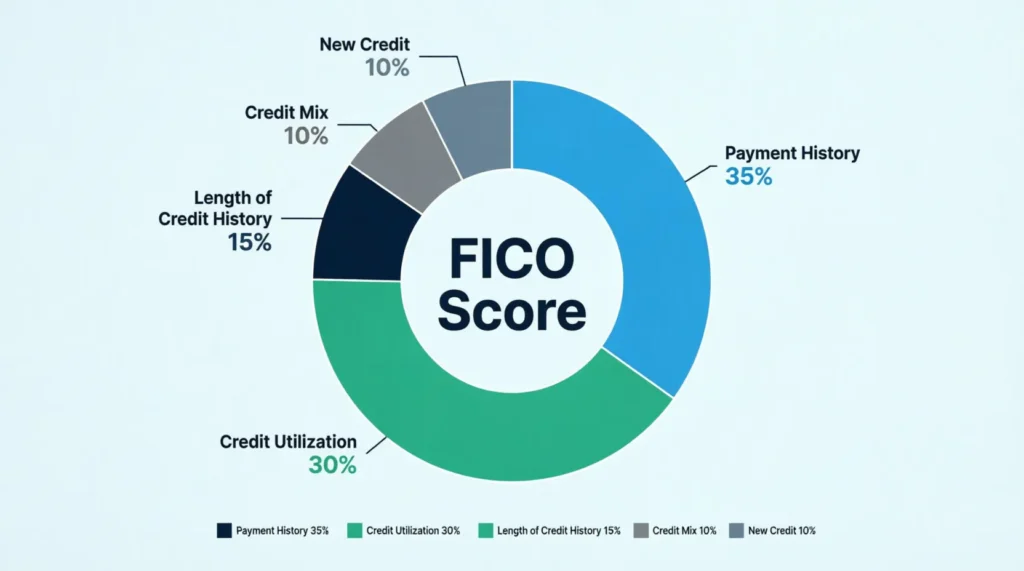
Payment History (35% of Your FICO Score)
myFICO’s credit education resource shows that payment history is the single largest factor in your FICO score, making up 35% of the total calculation. Filling in the Payment Due Date and Minimum Payment Due fields every month creates a built-in visual reminder. It’s harder to miss a due date when you’ve just written it into your own record.
Credit Utilization (30% of Your FICO Score)
Credit utilization is the second biggest factor. It’s your current balance divided by your credit limit, expressed as a percentage. Tracking both numbers in your monthly billing record gives you a clear, ongoing view of where your ratio stands. Most credit experts suggest keeping your usage under 30%. Staying below 10% gives the best scores.
Catching Errors That Affect Your Reported Balance
Spotting a fraudulent or incorrect charge early and having it removed protects your reported balance. An accurate, lower balance means your utilization ratio reflects your actual financial behavior, not an error or someone else’s unauthorized purchases.
Digital vs. Paper: Which Template Format Should You Choose?
Two of the three templates are PDFs, and one is an editable Word document. The right choice depends on how you prefer to manage your financial records.
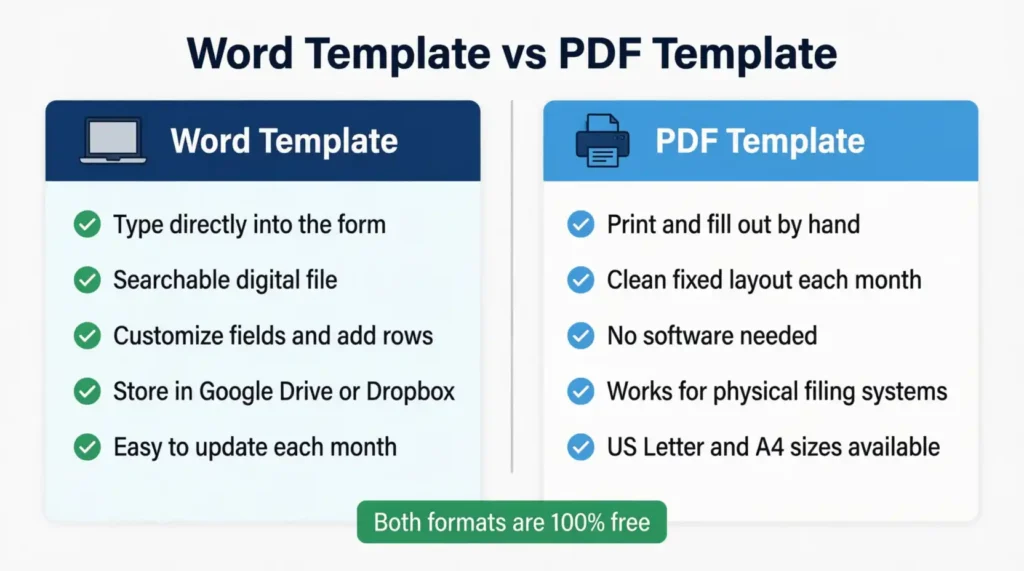
Choose the Word Template if:
- You want to type directly into the form
- You prefer searchable digital files
- You need to customize fields, add rows, or rename categories
- You store your financial documents in a cloud folder like Google Drive or Dropbox
Choose a PDF Template if:
- You prefer to print and fill out by hand
- You want a clean, fixed layout to print each month
- You manage a physical filing system for your financial documents
US Letter vs. A4
The US Letter PDF is sized at 8.5″ x 11″, the standard paper size for home printers in the United States. The A4 PDF is 8.27″ x 11.69″, the international standard used in most other countries. If you print at home in the US, the US Letter version works well. You do not need to make any page scaling adjustments.
The Word template is set for A4 paper. You can easily resize it in Microsoft Word. Just go to the Page Layout tab and make a few clicks.
Advanced Features You Can Add
The templates are designed to be clean and straightforward right out of the download. If you’re comfortable working in Word, Excel, or Google Docs, a few additions can make them even more useful.
Running Balance Column. Add a new column to the transaction table. This column will display your running balance after each transaction. This tells you exactly where you stand at any point in the month, not just after the cycle closes.
Color-Coded Categories. Use cell fill colors to group transaction types visually. Dining in yellow, travel in blue, and recurring subscriptions in green. You can quickly see where spending is focused just by scanning the table.
Monthly Comparison Table. Add a second page to the Word template. Create a simple table with 12 rows, one for each month.
In this table, include these details:
- New Balance
- Total Fees
- Interest Charged
- Available Credit
At year’s end, spending trends become easy to identify at a glance.
Utilization Percentage Formula.
In a Word table or Excel, use this formula:
- Divide your New Balance by your credit limit
- Multiply the result by 100.
Your utilization percentage updates automatically whenever you enter the monthly figures.
Dispute Log. Add a secondary table in the Notes section for billing disputes.
- Original Charge: [Insert charge here]
- Date Filed: [Insert date here]
- Amount in Question: [Insert amount here]
- Resolution: [Insert resolution here]
This ties a permanent dispute record directly to the statement where the charge first appeared.
Frequently Asked Questions
Can I use this template to track multiple credit cards?
Yes. Keep one completed form per card, per month. Label each file or printout with the card name or last four digits of the account number. This helps keep things organized when using multiple cards.
Is a credit card statement template the same as a credit card tracker?
Not exactly. A statement template mirrors your official billing document and records all account activity for a single billing period. A credit card tracker is a broader tool that monitors balances, due dates, and payment history across multiple cards over time.
How often should I fill out my statement template?
Once per billing cycle works well for most people. Most billing cycles last 28 to 31 days. So, fill out your record right after the cycle ends. This keeps your information current and accurate.
Do I need to use the same template format every month?
No. You can switch between the PDF and Word versions at any time. The key is to record the same fields consistently each month so your records stay comparable over time.
What should I do if a transaction on my template doesn’t match my bank’s records?
Start by checking the post date. Some transactions take one to two business days to settle. If the discrepancy is still there after checking the post date, contact your card issuer’s customer service. This will help you report a possible billing error.
Can I use this template to support a billing dispute?
The template isn’t a formal dispute letter. However, a completed monthly record showing the charge is strong evidence when you dispute with your card issuer.
Is the Word template compatible with Google Docs?
Yes. Upload the .docx file to Google Drive and open it in Google Docs. Minor formatting differences may appear, but all fields and table structures transfer correctly.
What is the difference between a transaction date and a post date?
The transaction date is when a purchase was made. The post date is when the charge officially cleared and was recorded on the account. These are usually the same date or one to two days apart.
Bottom Line
A well-kept monthly billing record does more than keep you organized. It puts you in direct control of your credit utilization, your payment history, and your account accuracy. All three factors feed directly into your credit score.
This page has three free credit card statement templates. They cover all the important sections, like the account summary and payment due date.
For most readers, the Word template delivers the best flexibility since it’s fully editable and easy to store digitally. PDF versions are the better option for those who like a printed filing system.
If you know someone trying to get a grip on their monthly card spending, share this page with them. A clear, organized billing form might be exactly the financial tool they’ve been looking for.