
Shared company credit cards are convenient. But when a charge shows up on the monthly statement that nobody can explain, that convenience turns into a real headache fast. Tracking shared card activity without any system is one of the most overlooked financial control gaps in small businesses.
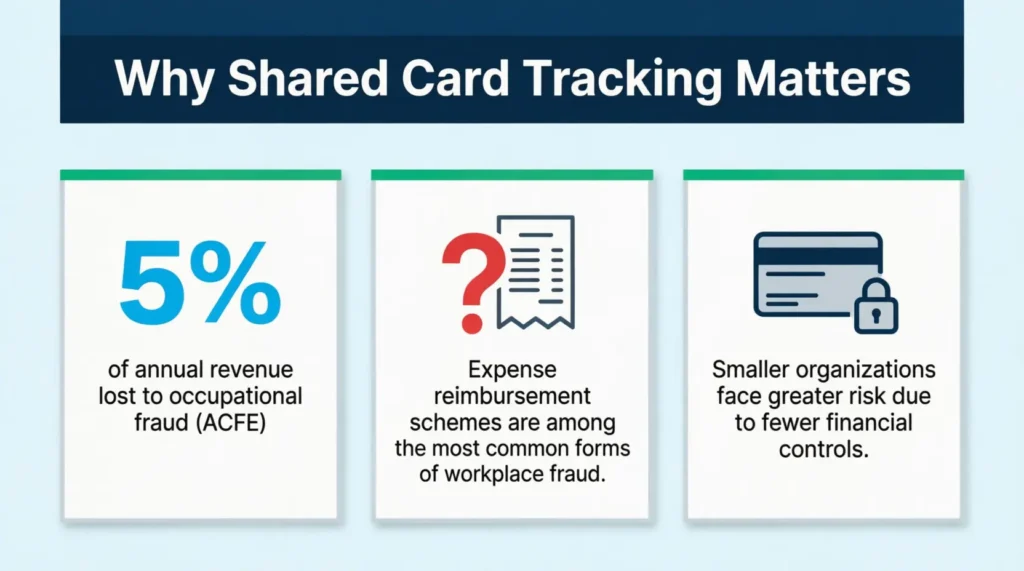
The Association of Certified Fraud Examiners estimates that organizations lose roughly 5% of their annual revenue to occupational fraud. A credit card sign-out sheet template gives any business a simple, printable way to close that gap before it costs real money.
A dedicated checkout log creates a clear paper trail: who took the card, when, and exactly what it was used for.
Get your free templates! Then, walk through each field on the form. Finally, set up a card tracking system your team can use today.
Download Your Free Credit Card Sign-Out Sheet Templates
Two PDF formats and one editable Word version are available below. Each one includes all the fields your team needs to track shared card activity clearly and consistently.
Pick the format that works best for you:
Disclaimer: The Templates & Printables on this site are provided for informational and personal tracking purposes only. This is not financial, legal, tax, or credit advice. While reasonable efforts are made to ensure accuracy, Credit Card Wind makes no warranties as to the completeness, reliability, or accuracy of the calculations generated by these Templates & Printables. Users are responsible for independently verifying all data and calculations. Terms, conditions, rates, regulations, and legal requirements vary by institution, jurisdiction, and individual circumstances.
Always refer to your official statements, account agreements, and applicable laws, and consult a qualified professional before making any financial, legal, or other important decisions. By using these Templates & Printables, you acknowledge that Credit Card Wind and its owner shall not be liable for any damages, losses, or financial consequences arising from the use or misuse of these Templates & Printables.
This universal disclaimer applies to all templates and printables provided by Credit Card Wind (https://creditcardwind.com), created by Robert Williams (Owner at Credit Card Wind).
© Credit Card Wind. All rights reserved.
These templates and printables may be downloaded and used for personal, non-commercial purposes only. Redistribution, resale, or modification for commercial use without permission is strictly prohibited.
What Is a Credit Card Sign Out Sheet?
A credit card sign-out sheet template is a structured log that records every use of a shared company credit card. Each time an employee takes the card, they fill in their name, the intended purchase, and the date and time. When they return it, they sign it back in.
Think of it like a library checkout system applied to your company’s finances. The card goes out with a written record attached. It comes back with a written record attached. No guesswork, no gaps.
ACFE’s 2024 Report to the Nations identifies expense reimbursement schemes as among the most common forms of occupational fraud, with smaller organizations being especially vulnerable due to fewer financial controls in place. A card sign out log is one of the simplest proactive controls any business can adopt.
This tool has different names based on the workplace:
- Company card checkout log
- Shared card usage form
- Corporate card sign-out record
The name varies, but the purpose is the same — a written record that ties every card transaction to a specific person and business purpose.
Tip: → Sharing one card across your team? The business credit card limit calculator helps you set a limit that works for everyone.
Why Every Business Needs a Shared Card Checkout Log
Many small businesses run on one or two company cards shared across a team. Those cards move between employees for supplies, vendor payments, travel, and client meals. Without a log, there’s no real-time link between a charge on the statement and the person who made it.
Have you ever tried to explain a $400 charge to your accountant? It’s tricky when you don’t know who made the order. Without a checkout system, that scenario plays out more often than most business owners expect.
A real example of what that looks like: Maria, the office manager at a mid-sized event planning company in Austin, found three unexplained charges on the company’s Visa in a single month.
The total came to $1,247. She couldn’t trace any charges to a specific employee or business purpose because there was no sign-out process. The dispute took three weeks to resolve, and two of the charges were ultimately unrecoverable.
A card checkout log prevents exactly that kind of situation. It ensures accountability right when the card changes hands, not after a problem arises.
Beyond fraud prevention, a card usage log supports three other business needs:
Expense audits. When an accountant or auditor reviews company spending, they use a checkout log. This log helps them quickly match card transactions to named employees. No piecing together details from memory.
Tax recordkeeping. IRS Publication 463 requires businesses to document the business purpose, date, and amount for any deductible expense. A completed sign-out sheet, paired with receipts, directly supports that documentation.
Policy enforcement. If the company policy forbids personal purchases or cash advances on a business card, signing out the card shows those rules. This visibility reminds everyone each time the card is passed around.
📌 Did You Know: Most workplace expense fraud isn’t committed by strangers. It’s carried out by employees in trusted roles who had consistent, unsupervised access to payment methods over an extended period of time.
What to Include on a Credit Card Sign Out Sheet
A well-designed log captures everything needed to identify who used the card and why, without being so complex that employees start skipping steps.
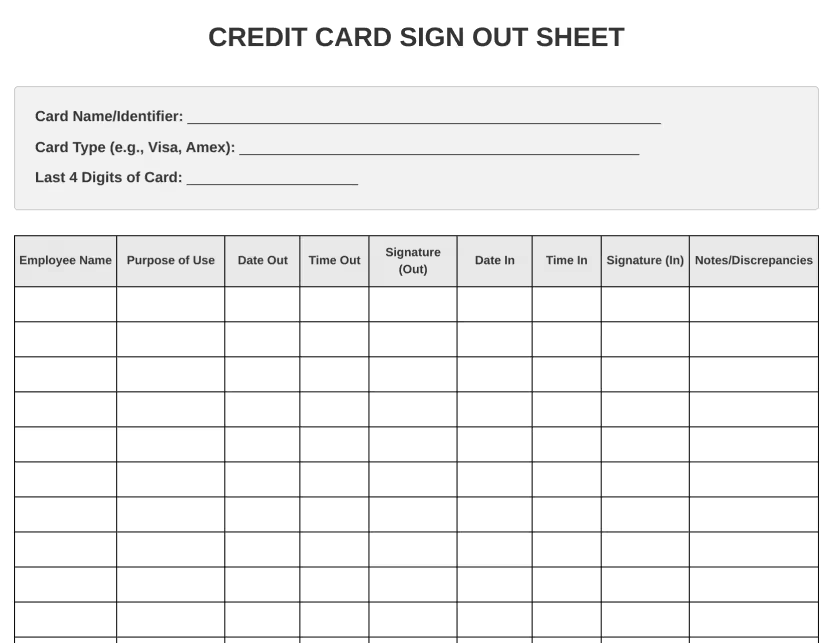
The template here has a three-field card ID header. It also includes nine columns for tracking usage. Here’s what each one does:
Card identification header (completed once, before the first use):
- Card Name/Identifier – An internal label for the card, such as “Operations Visa” or “Travel Amex”
- Card Type – The card network: Visa, Mastercard, Amex, or Discover
- Last 4 Digits – Enough to identify the exact card without exposing the full account number
Per-use log columns (completed at every checkout):
- Employee Name – Full name of the person checking out the card
- Purpose of Use – A short description of the intended transaction or expense category
- Date Out / Time Out – The exact date and time the card was taken
- Signature (Out) – Employee signature confirming they received the card
- Date In / Time In – The date and time the card was returned
- Signature (In) – Signature confirming the card was handed back
- Notes/Discrepancies – Space for flagging missing receipts, unexpected charges, or unauthorized use
Together, these fields form a full audit trail for each card transaction. No software or technical setup is needed.
💡 Pro Tip: Assign each card a clear internal name before printing the first log sheet. “Company Visa” is workable for now, but “Ops Visa – 4892” is far more useful once your business manages two or more cards simultaneously.
How to Fill Out the Credit Card Sign Out Sheet Step by Step
To use the downloaded template properly and create a clear, reliable record from the start, follow these steps:
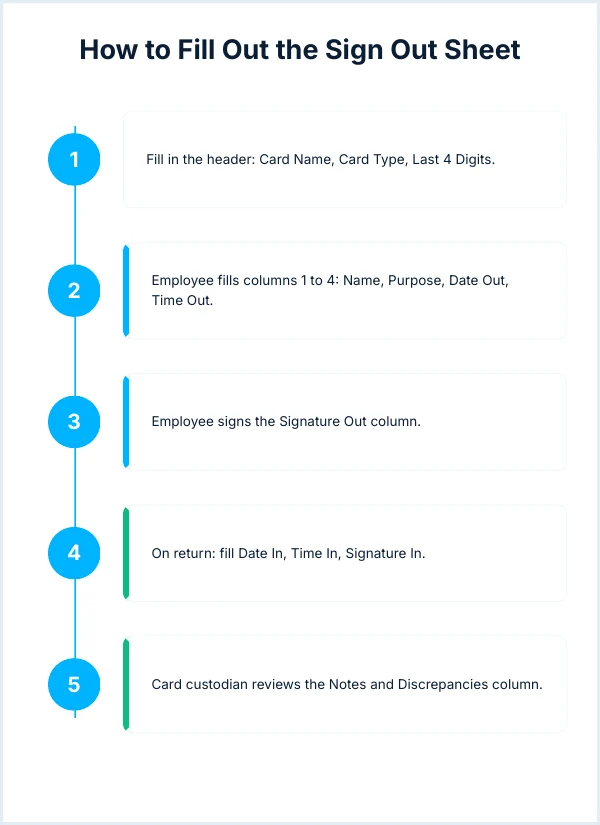
Step 1: Fill in the header section before the first use.
At the top of the sheet, enter the card name or identifier, the card type, and the last four digits. This information stays the same for every row below. It identifies which card this particular log belongs to.
Step 2: The employee completes columns 1 through 4 before taking the card.
- Employee Name: Full name, printed clearly
- Purpose of Use: One clear sentence describing the intended expense (e.g., “Office supplies – Staples run” or “Client lunch – Tuesday sales meeting”)
- Date Out: The current date
- Time Out: The current time
Step 3: The employee signs the Signature (Out) column.
This signature confirms they received the card and agree to return it with matching receipts.
Step 4: On return, the employee completes columns 6 through 8.
- Date In: The return date
- Time In: The return time
- Signature (In): Confirmation that the card was physically handed back
Step 5: The card custodian reviews the Notes/Discrepancies column
If a charge on the statement doesn’t match its purpose, or if a receipt is missing, the custodian will note it here. This is also where unauthorized use gets formally documented.
Step 6: File the completed sheet with matching receipts at the end of each billing cycle.
The log and its receipts form a matched pair. Together, they satisfy both internal recordkeeping standards and standard tax documentation requirements.
⚠️ Mistake to Avoid: Don’t allow employees to pre-fill the return columns (Date In, Time In, Signature In) when they first check the card out. Those fields must be completed at the actual time of return. Pre-filling them destroys the log’s integrity as a real-time record.
Who Should Use a Card Sign Out Log?
Any organization where more than one person can access a shared payment method benefits from a card checkout system. Common use cases include:
Small businesses with one or two company cards shared across a team. Many small businesses lack the expense management software that big companies use. So, a printed log becomes the easiest and cheapest choice.
Nonprofits and associations allow board members or volunteers to use an organizational card. This card is for events or buying supplies. A sign out record protects both the organization and the individual.
Medical offices and clinics where front desk staff and office managers share a card for supply orders or equipment rentals. A log keeps those purchases organized and auditable for billing purposes.
Schools and educational institutions use a department card for:
- Supply purchases
- Field trips
- Software subscriptions
A checkout sheet keeps budget stewards accountable to their administrators.
Property management companies have maintenance staff and property managers who share a card. This card is used for vendor payments and emergency repairs. A sign out record supports property-level expense tracking across multiple locations.
Credit Card Sign Out Sheet vs. Expense Report: Key Differences
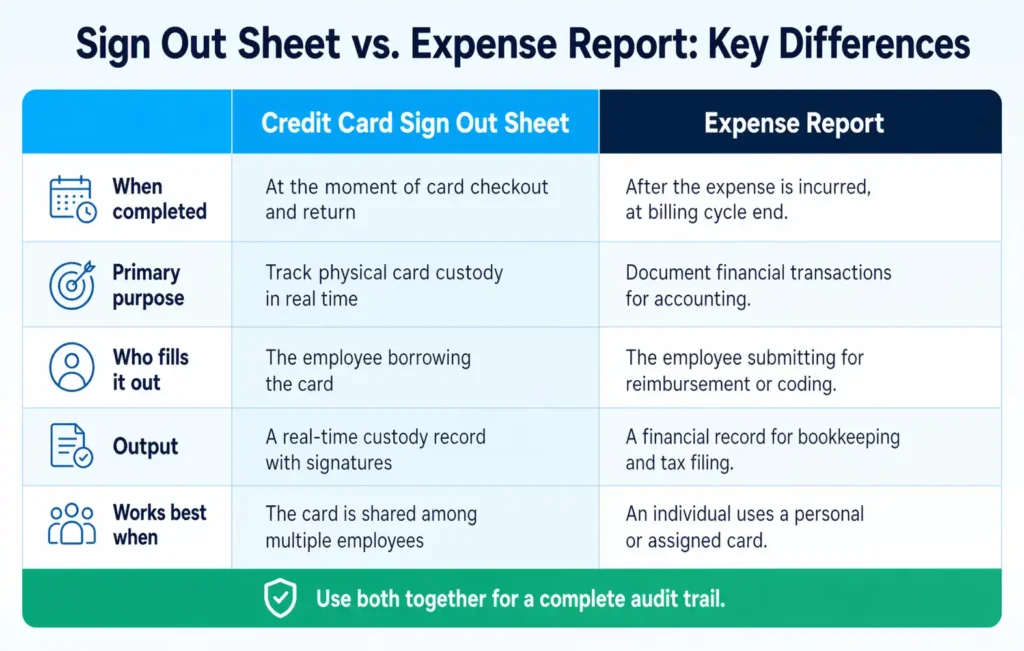
These two tools solve different problems. Both belong in a complete expense management system.
| Feature | Credit Card Sign Out Sheet | Expense Report |
|---|---|---|
| When it’s completed | Before and after each card use | After expenses are incurred |
| Primary purpose | Physical card accountability | Reimbursement or budget review |
| Tracks card location | Yes | No |
| Requires receipts | Recommended alongside | Always required |
| Fraud prevention | Proactive (before fraud occurs) | Reactive (detected after the fact) |
| Best for | Shared physical cards | Personal cards used for work |
A sign out sheet and an expense report work best as a pair. The log tracks the card itself. The expense report handles the financial documentation for accounting. Using one without the other leaves gaps in the audit trail.
Best Practices for Managing Shared Business Credit Cards
A card sign out log works best when it’s backed by a clear, consistent policy. These practices help the system hold up over time:
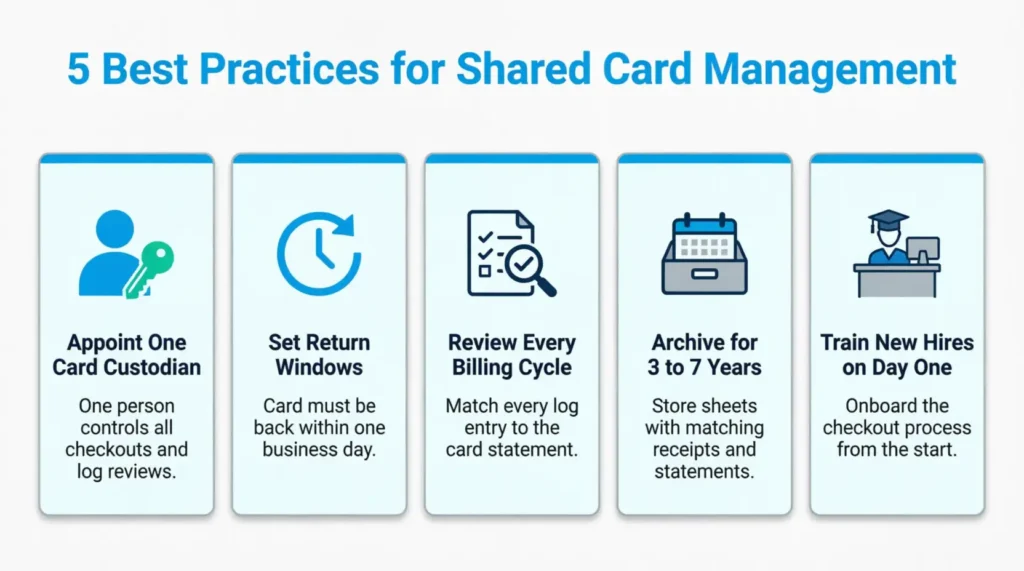
Appoint a single card custodian.
One person should be responsible for the card and the log. This person controls checkouts, collects the card on return, and flags discrepancies. When ownership is spread across a team with no clear point of contact, accountability gets diluted fast.
Set firm return windows.
Establish a rule that the card must be returned within a set time after use, such as within one business day. Employees needing the card for multi-day travel must fill out a separate written authorization.
Review the log every billing cycle.
At the end of each statement period, compare every line on the sign out sheet against the card statement. Each charge should trace back to a specific log entry. Gaps are a warning sign that needs follow-up.
Archive completed sheets for at least three years.
Tax professionals generally recommend keeping business expense records for three to seven years. Store completed log sheets with matching receipts and card statements in a safe, organized place.
Train new hires on the checkout process from day one.
Add card sign out procedures to your onboarding checklist. Employees who learn the process on their first day follow it consistently. Employees who learn it later often treat it as optional.
⚠️ Mistake to Avoid: Never allow verbal card requests. If an employee borrows the card without filling out the log, the system breaks down immediately. Every card use, without exception, should go through the formal sign out process.
Common Mistakes to Avoid
Even businesses that set up a sign out system run into the same recurring problems. Spotting them early saves time and prevents the system from slowly falling apart.
Allowing blank entries.
If an employee skips their name or leaves the purpose field empty, don’t let it slide. Hand the card back and ask them to complete the form before they leave. Being firm at the start builds lasting habits. A log with missing fields provides no more protection than no log at all.
Storing the sheet in the wrong location.
The sign out log and the card need to live in the same spot. If the sheet is locked in a manager’s office but the card sits in a front desk drawer, employees will take the card without logging it. Keep them together so the checkout step can’t be skipped accidentally.
Setting no consequences for non-compliance.
If employees ignore the sign out process and nothing happens, the system breaks down within weeks. A simple, clearly stated rule — such as “no card access without a completed log entry” — is enough to enforce the habit. The consequence doesn’t have to be severe. It just has to exist.
Discarding completed sheets.
Finished sign out logs are financial records, not scrap paper. A manager may need to identify who used a card six months ago, and that sheet is the only documented proof. File all completed logs in a labeled binder or folder. Keep them for three to seven years. Store matching receipts and card statements with them.
Digital Alternatives and When to Use Them
A paper sign out sheet works well for most businesses. But some teams are better served by a digital version of the same system.
When a digital log makes more sense:
Digital alternatives are great for remote teams or those in different locations. They work well when automatic return reminders are needed. They also help when several people need to access the log at the same time. Plus, they’re useful for generating monthly usage reports for management review.
How to set one up:
Google Sheets or Excel can recreate the template exactly. Share the sheet with the team. Lock the header row. Also, add data validation to required fields. This way, entries can’t be skipped. With Google Sheets, email notifications can be set to trigger automatically when a new entry is made.
Some dedicated card management tools include built-in checkout features. These cost money and work well for larger teams. However, a good spreadsheet can do the job for most small businesses without the extra cost.
The hybrid approach:
Some businesses use a sign-out sheet. They take a photo of it each week. Then, they store these images in a shared drive. The folder is organized by month. This delivers the simplicity of paper with a digital backup accessible from any device.
Legal and Compliance Considerations
A card checkout log does more than prevent fraud. It supports several compliance areas that matter during audits, disputes, and financing conversations.
Internal controls.
Documented rules on who can use company cards show financial discipline to auditors and lenders. Internal controls boost credibility during tax audits or financing applications. They show the business handles money wisely.
Fraud investigation.
If unauthorized charges show up on a statement, a sign-out sheet can help. It shows whether the card was used during checkout or accessed without permission. A clean paper trail is typically the first thing a card issuer or investigator requests.
Tax documentation.
A sign-out log with a clear business purpose for each transaction helps support deductions if the IRS questions certain charges. Paired with receipts, it builds a strong documentary record.
Employee disputes.
A signed log entry clearly proves whether there’s a dispute about whether an employee made a purchase or returned the card on a certain date. Without it, the dispute becomes a matter of conflicting accounts with no record to reference.
Insurance claims.
If company cards are stolen, an insurer may ask what security procedures were in place at the time. A checkout system with signed and dated records shows that good controls were in place. This helps strengthen the claim.
Scaling This System as Your Business Grows
A process that works for a five-person office needs adjustment as the team expands. These guidelines help the log stay functional at each stage of growth.
For growing teams (10 to 20 people):
- Assign one dedicated card manager who controls all checkouts and log reviews
- Create a single central location where all cards and their matching sheets are stored
- Add a manager approval step for purchases above a defined dollar threshold
- Scan completed sheets at the end of each billing cycle to create a digital backup
For larger organizations (20 or more employees):
- Create department-specific cards, each with its own dedicated tracking log
- Move to a digital system that can handle volume and generate usage reports
- Establish tiered spending limits that require escalating approval at higher amounts
- Integrate card activity with accounting software for streamlined monthly reconciliation
For businesses with multiple locations:
- Each location maintains its own set of cards and sign out logs
- Standardize the checkout process across all sites so records stay consistent
- Have each location manager review their log on a weekly basis
- Send scanned copies to the main accounting office every month for central filing
Troubleshooting Common Issues
Even well-run systems hit snags. These practical fixes address the most common problems that come up after the log is in place.
Problem: Employees keep forgetting to fill out the log.
Move the sheet to the exact spot where the card is stored. Attach the log to the same clipboard as the card if possible. The goal is to make it physically impossible to grab the card without seeing the form first.
Problem: Signatures on the log are illegible.
Add a “Printed Name” column next to each signature column. Printed names make sure that messy handwriting won’t stop someone from being identified later.
Problem: The sign out sheet keeps getting misplaced.
Use a bright-colored clipboard or a labeled folder stored in a fixed, dedicated location. The log should never live in a general stack of office papers where it can be buried or lost.
Problem: Receipts are missing at return time.
Add a checkbox column labeled “Receipt Attached.” The card custodian should decline to log the card’s return until the box is checked. This turns receipt submission into a required step in the return process rather than an optional follow-up.
Problem: Too many completed sheets to manage.
Scan the finished sheets at the end of each billing cycle. Then, save them in a digital folder. Make sure to label it clearly by month and year. After the scan is confirmed, you can file or archive physical copies. This keeps active storage space clear.
Frequently Asked Questions
What is a credit card sign out sheet used for in a business?
It’s a paper log that records who used a shared company credit card, when, and for what purpose. It creates a real-time accountability record before charges appear on the monthly statement.
Who should be responsible for maintaining the sign out log?
One person, like an office manager or finance lead, should be the card custodian and manage the log. Shared responsibility with no clear point of contact leads to incomplete or inconsistent records.
Can the same sign out sheet be used for multiple credit cards?
No. Each card should have its own dedicated log sheet. The header shows the card’s internal name and last four digits. Mixing two cards on one sheet can confuse things and weaken the audit trail.
How many entries fit on a single sign out sheet?
Most printed templates have 15 to 20 rows per page. This covers one or two billing cycles for a team that uses cards moderately. Print a fresh sheet at the start of each new billing period.
Is a credit card sign out sheet required by law?
No specific law mandates this exact form. However, the IRS requires businesses to document the business purpose, date, and amount for any deductible expense. A completed sign out sheet directly supports that documentation requirement.
How long should a business keep completed sign out sheets?
Tax pros usually suggest keeping business expense records for three to seven years. Store completed sheets alongside the matching receipts and monthly card statements.
What should a manager do when a discrepancy shows up on the log?
Flag it in the Notes/Discrepancies column and follow up directly with the employee listed for that row. For unauthorized charges, contact the card issuer promptly and document the incident in writing.
Can a sign out sheet replace an expense report?
No. They serve different functions. A sign out sheet tracks the physical card and creates a real-time record at each use. An expense report handles the financial documentation for accounting and reimbursement. Both should be used together for a complete audit trail.
Bottom Line
Managing a shared company credit card doesn’t require expensive software or a complex approval chain. A clear, consistent log keeps every transaction tied to a name, a purpose, and a timestamp. The templates here guide you through the whole process. They start with the card identification header and end with the Notes column. Use the Notes column to spot any issues before they grow.
For most businesses, the best starting point is the editable Word version. Add your card name and last four digits, print a stack of sheets, and store them next to wherever the card is kept. The process works best when it becomes a routine reflex, not a policy that employees have to be reminded about.
If you know someone who handles shared cards for a small business or nonprofit, share this page with them. It could save them hours of dealing with statement disputes and help protect their organization from costly losses.